前言
本文为8月10日TensorFlow学习笔记,分为九个章节:
- 合并与分割;
- 数据统计;
- 排序;
- 填充与复制;
- 张量限幅;
- 高阶操作;
- 数据加载;
- 全连接层;
- 误差计算。
一、合并与分割
1、tf.concat
两组数据:
[ c l a s s 1 − 4 , s t u d e n t s , s c o r e s ] [ c l a s s 5 − 6 , s t u d e n t s , s c o r e s ] [class\ 1-4, students, scores]\\\ [class\ 5-6, students, scores][class 1−4,students,scores] [class 5−6,students,scores]
a = tf.ones([4, 35, 8])
b = tf.ones([2, 35, 8])
c = tf.concat([a, b], axis=0)

c.shape
>>> TensorShape([6, 35, 8])
2、tf.stack: 创建新的维度
注意:a 和 b 维度必须完全一致。
a.shape
b.shape
>>> TensorShape([4, 35, 8])

tf.stack([a, b], axis=0).shape
>>> TensorShape([2, 4, 35, 8])
3、tf.unstack
c.shape
TensorShape([2, 4, 35, 8])
aa, bb = tf.unstack(c, axis=0)

aa.shape, bb.shape
>>> (TensorShape([4, 35, 8]), TensorShape([4, 35, 8]))
4、tf.split
res = tf.split(c, axis = 3, num_or_size_splits=[2, 2, 4])

res[0].shape, res[1].shape, res[2].shape
>>> (TensorShape([2, 4, 35, 2]), TensorShape([2, 4, 35, 2]), TensorShape([2, 4, 35, 4]))
二、数据统计
1、tf.norm
- L1 Norm:
∣ ∣ x ∣ ∣ 1 = ∑ k ∣ x k ∣ ||x||_1 = {\textstyle \sum_{k}}|x_k|∣∣x∣∣1=∑k∣xk∣
b = tf.ones([2, 2])

tf.norm(b, ord=1)
>>> <tf.Tensor: shape=(), dtype=float32, numpy=4.0>

tf.norm(b, ord=1, axis=0)
>>> <tf.Tensor: shape=(2,), dtype=float32, numpy=array([2., 2.], dtype=float32)>

tf.norm(b, ord=1, axis=1)
>>> <tf.Tensor: shape=(2,), dtype=float32, numpy=array([2., 2.], dtype=float32)>
- L2 Norm:
b = tf.ones([2, 2])

tf.norm(b)
>>> <tf.Tensor: shape=(), dtype=float32, numpy=2.0>
2、reduce_min / max / mean
a = tf.random.normal([4, 10])
tf.reduce_min(a), tf.reduce_max(a), tf.reduce_mean(a)

>>> (<tf.Tensor: shape=(), dtype=float32, numpy=-2.0422432>,
     <tf.Tensor: shape=(), dtype=float32, numpy=2.3004503>,
     <tf.Tensor: shape=(), dtype=float32, numpy=-0.08308693>)
3、argmax / argmin
a = tf.random.normal([4, 10])

tf.argmax(a).shape
>>> TensorShape([10])

tf.argmax(a)
>>> <tf.Tensor: shape=(10,), dtype=int64, numpy=array([2, 1, 2, 1, 3, 2, 3, 0, 2, 0], dtype=int64)>

tf.argmin(a)
>>> <tf.Tensor: shape=(10,), dtype=int64, numpy=array([0, 2, 1, 2, 2, 3, 0, 1, 0, 1], dtype=int64)>
4、tf.equal
a = tf.constant([1, 2, 3, 4, 5])
b = tf.range(5)

tf.equal(a, b)
>>> <tf.Tensor: shape=(5,), dtype=bool, numpy=array([False, False, False, False, False])>

res = tf.equal(a, b)
tf.reduce_sum(tf.cast(res, dtype=tf.int32))
>>> <tf.Tensor: shape=(), dtype=int32, numpy=0>
5、tf.unique
在一维张量中找到唯一的元素。
a = tf.range(5)

tf.unique(a)
>>> Unique(y=<tf.Tensor: shape=(5,), dtype=int32, numpy=array([0, 1, 2, 3, 4])>, idx=<tf.Tensor: shape=(5,), dtype=int32, numpy=array([0, 1, 2, 3, 4])>)

a = tf.constant([4, 2, 2, 4, 3])
tf.unique(a)
>>> Unique(y=<tf.Tensor: shape=(3,), dtype=int32, numpy=array([4, 2, 3])>, idx=<tf.Tensor: shape=(5,), dtype=int32, numpy=array([0, 1, 1, 0, 2])>)
三、排序
1、tf.sort / tf.argsort
a
<tf.Tensor: shape=(5,), dtype=int32, numpy=array([1, 4, 0, 2, 3])>

tf.sort(a)
>>> <tf.Tensor: shape=(5,), dtype=int32, numpy=array([0, 1, 2, 3, 4])>

tf.sort(a, direction='DESCENDING')
>>> <tf.Tensor: shape=(5,), dtype=int32, numpy=array([4, 3, 2, 1, 0])>

a
>>> <tf.Tensor: shape=(3, 3), dtype=int32, numpy=
	array([[8, 0, 4],
	       [0, 7, 8],
	       [7, 6, 2]])>

tf.sort(a)
>>> <tf.Tensor: shape=(3, 3), dtype=int32, numpy=
	array([[0, 4, 8],
	       [0, 7, 8],
	       [2, 6, 7]])>
- tf.argsort: 返回对应值的排名:
a
<tf.Tensor: shape=(5,), dtype=int32, numpy=array([1, 4, 0, 2, 3])>

tf.argsort(a)
>>> <tf.Tensor: shape=(5,), dtype=int32, numpy=array([2, 0, 3, 4, 1])>

tf.argsort(a)
>>> <tf.Tensor: shape=(3, 3), dtype=int32, numpy=
	array([[1, 2, 0],
	       [0, 1, 2],
	       [2, 1, 0]])>
2、tf.math.top_k
a
>>> <tf.Tensor: shape=(3, 3), dtype=int32, numpy=
	array([[8, 0, 4],
	       [0, 7, 8],
	       [7, 6, 2]])>

res = tf.math.top_k(a, 2)

res.indices
>>> <tf.Tensor: shape=(3, 2), dtype=int32, numpy=
	array([[0, 2],
	       [2, 1],
	       [0, 1]])>

res.values
>>> <tf.Tensor: shape=(3, 2), dtype=int32, numpy=
	array([[8, 4],
	       [8, 7],
	       [7, 6]])>
四、填充与复制
1、tf.pad
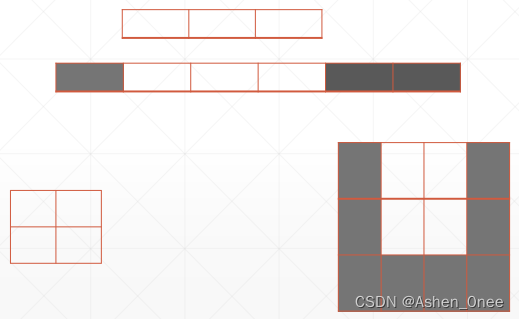
a
>>> <tf.Tensor: shape=(3, 3), dtype=int32, numpy=
	array([[0, 1, 2],
	       [3, 4, 5],
	       [6, 7, 8]])>

tf.pad(a, [[1, 0], [0, 1]])
>>> <tf.Tensor: shape=(4, 4), dtype=int32, numpy=
	array([[0, 0, 0, 0],
	       [0, 1, 2, 0],
	       [3, 4, 5, 0],
	       [6, 7, 8, 0]])>
- Image padding:
a = tf.random.normal([4, 28, 28, 3])
b = tf.pad(a, [[0, 0], [2, 2], [2, 2], [0, 0]])

b.shape
>>> TensorShape([4, 32, 32, 3])
2、tf.tile
在同一维度上复制。
a = tf.reshape(tf.range(9), [3, 3])
a
>>> <tf.Tensor: shape=(3, 3), dtype=int32, numpy=
	array([[0, 1, 2],
	       [3, 4, 5],
	       [6, 7, 8]])>
tf.tile(a, [1, 2])
>>> <tf.Tensor: shape=(3, 6), dtype=int32, numpy=
	array([[0, 1, 2, 0, 1, 2],
	       [3, 4, 5, 3, 4, 5],
	       [6, 7, 8, 6, 7, 8]])>
五、张量限幅
1、clip_by_value
- tf.maximum / tf.minimu() / tf.clip_by_value():
a = tf.range(10)

a
>>> <tf.Tensor: shape=(10,), dtype=int32, numpy=array([0, 1, 2, 3, 4, 5, 6, 7, 8, 9])>

tf.maximum(a, 2)
>>> <tf.Tensor: shape=(10,), dtype=int32, numpy=array([2, 2, 2, 3, 4, 5, 6, 7, 8, 9])>

tf.minimum(a, 8)
>>> <tf.Tensor: shape=(10,), dtype=int32, numpy=array([0, 1, 2, 3, 4, 5, 6, 7, 8, 8])>

tf.clip_by_value(a, 2, 8)
>>> <tf.Tensor: shape=(10,), dtype=int32, numpy=array([2, 2, 2, 3, 4, 5, 6, 7, 8, 8])>
2、clip_by_norm: 按范数放缩
a = tf.random.normal([2, 2], mean=10)

a
>>> <tf.Tensor: shape=(2, 2), dtype=float32, numpy=
	array([[9.9873085, 9.921564 ],
	       [8.984995 , 8.998684 ]], dtype=float32)>

tf.norm(a)
>>> <tf.Tensor: shape=(), dtype=float32, numpy=18.970772>

aa = tf.clip_by_norm(a, 10)
tf.norm(aa)
>>> <tf.Tensor: shape=(), dtype=float32, numpy=10.0>
六、高阶操作
1、.where()
返回一个布尔张量中真值的位置。对于非布尔型张量,非0的元素都判为True。
a = tf.random.normal([3, 3])

a
>>> <tf.Tensor: shape=(3, 3), dtype=float32, numpy=
	array([[-1.560072 ,  0.5151809, -1.4624902],
	       [ 2.0856383,  1.3947535, -1.6492294],
	       [-2.4880304, -1.8168672,  1.519111 ]], dtype=float32)>

mask = a>0
mask
>>> <tf.Tensor: shape=(3, 3), dtype=bool, numpy=
	array([[False,  True, False],
	       [ True,  True, False],
	       [False, False,  True]])>

tf.boolean_mask(a, mask)
>>> <tf.Tensor: shape=(4,), dtype=float32, numpy=array([0.5151809, 2.0856383, 1.3947535, 1.519111 ], dtype=float32)>

indices = tf.where(mask)
indices
>>> <tf.Tensor: shape=(4, 2), dtype=int64, numpy=
	array([[0, 1],
	       [1, 0],
	       [1, 1],
	       [2, 2]], dtype=int64)>
- .where(cond, A, B)
mask
>>> <tf.Tensor: shape=(3, 3), dtype=bool, numpy=
	array([[False,  True, False],
	       [ True,  True, False],
	       [False, False,  True]])>

A = tf.ones([3, 3])
B = tf.zeros([3, 3])

tf.where(mask, A, B)
>>> <tf.Tensor: shape=(3, 3), dtype=float32, numpy=
	array([[0., 1., 0.],
	       [1., 1., 0.],
	       [0., 0., 1.]], dtype=float32)>
2、tf.scatter_nd()
将 updates 中的值按照 indices 插到指定的shape的位置上。
tf.scatter_nd(indices, updates, shape)
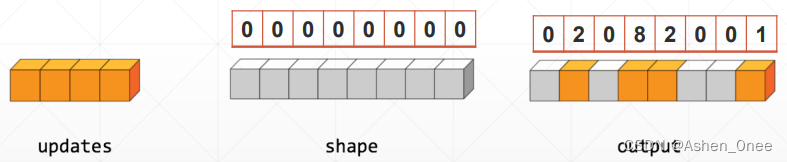
indices = tf.constant([[4], [3], [1], [7]])
updates = tf.constant([9, 10, 11, 12])
shape = tf.constant([8])

tf.scatter_nd(indices, updates, shape)
>>> <tf.Tensor: shape=(8,), dtype=int32, numpy=array([ 0, 11,  0, 10,  9,  0,  0, 12])>
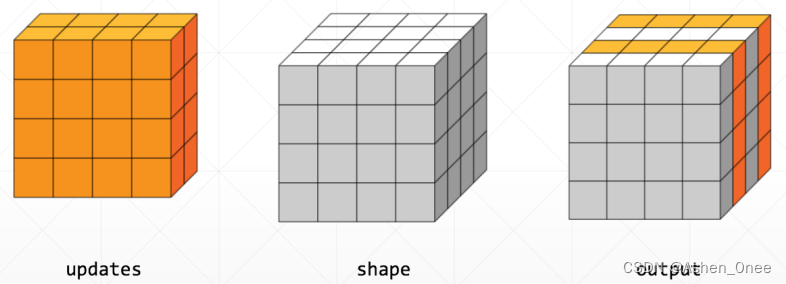
3、meshgrid
y = tf.linspace(-2., 2, 5)

y
>>> <tf.Tensor: shape=(5,), dtype=float32,

numpy=array([-2., -1.,  0.,  1.,  2.], dtype=float32)>
x = tf.linspace(-2., 2, 5)

points_x, points_y = tf.meshgrid(x, y)

points_x.shape
>>> TensorShape([5, 5])

points = tf.stack([points_x, points_y], axis=2)
points
>>> <tf.Tensor: shape=(5, 5, 2), dtype=float32, numpy=
	array([[[-2., -2.],
	        [-1., -2.],
	        [ 0., -2.],
	        [ 1., -2.],
	        [ 2., -2.]],
	       [[-2., -1.],
	        [-1., -1.],
	        [ 0., -1.],
	        [ 1., -1.],
	        [ 2., -1.]],
	       [[-2.,  0.],
	        [-1.,  0.],
	        [ 0.,  0.],
	        [ 1.,  0.],
	        [ 2.,  0.]],
	       [[-2.,  1.],
	        [-1.,  1.],
	        [ 0.,  1.],
	        [ 1.,  1.],
	        [ 2.,  1.]],
	       [[-2.,  2.],
	        [-1.,  2.],
	        [ 0.,  2.],
	        [ 1.,  2.],
	        [ 2.,  2.]]], dtype=float32)>
七、数据加载
1、keras.datasets
得到的是 Numpy 格式。
(1)、MNIST
(x, y), (x_test, y_test) = keras.datasets.mnist.load_data()

x.shape
>>> (60000, 28, 28)

y.shape
>>> (60000,)

x.min(), x.max(), x.mean()
>>> (0, 255, 33.318421449829934)

x_test.shape, y_test.shape
>>> ((10000, 28, 28), (10000,))

y_onehot = tf.one_hot(y, depth=10)
y_onehot[:2]
>>> <tf.Tensor: shape=(2, 10), dtype=float32, numpy=
	array([[0., 0., 0., 0., 0., 1., 0., 0., 0., 0.],
	       [1., 0., 0., 0., 0., 0., 0., 0., 0., 0.]], dtype=float32)>
(2)、CIFAR
(x, y), (x_test, y_test) = keras.datasets.cifar10.load_data()

x.shape, y.shape, x_test.shape, y_test.shape
>>> ((50000, 32, 32, 3), (50000, 1), (10000, 32, 32, 3), (10000, 1))

x.min(), x.max()
>>> (0, 255)
2、tf.data.Dataset.from_tensor_slices
作用:把给定的元组、列表和张量等数据进行特征切片。
切片的范围从最外层维度开始,如果有多个特征组合,那么一次切片是把最外层维度的数据切开。
(x, y), (x_test, y_test) = keras.datasets.cifar10.load_data()

db = tf.data.Dataset.from_tensor_slices(x_test)

next(iter(db)).shape
>>> TensorShape([32, 32, 3])

db = tf.data.Dataset.from_tensor_slices((x_test, y_test))

next(iter(db))[0].shape
>>> TensorShape([32, 32, 3])
八、全连接层
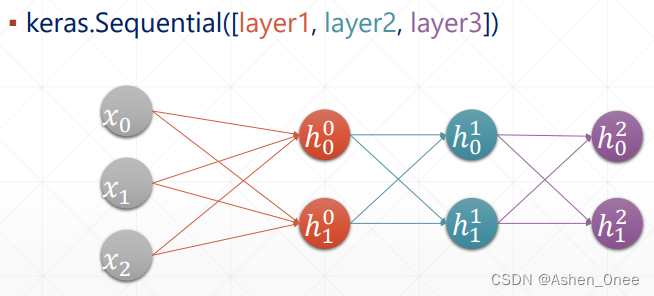
x = tf.random.normal([2, 3])

model = keras.Sequential([
    keras.layers.Dense(2, activation='relu'),
    keras.layers.Dense(2, activation='relu'),
    keras.layers.Dense(2)
])
model.build(input_shape=[None, 4])
model.summary()

for p in model.trainable_variables:
    print(p.name, p.shape)
九、误差计算
1、MSE
y = tf.constant([1, 2, 3, 0, 2])
y = tf.one_hot(y, depth=4)
y = tf.cast(y, dtype=tf.float32)

out = random.normal([5, 4])

out = tf.random.normal([5, 4])
loss1 = tf.reduce_mean(tf.square(y - out))
loss2 = tf.reduce_mean(tf.losses.MSE(y, out))

loss1
>>> <tf.Tensor: shape=(), dtype=float32, numpy=1.2998294>

loss2
>>> <tf.Tensor: shape=(), dtype=float32, numpy=1.2998294>
2、Cross Entropy
x = tf.random.normal([1, 784])
w = tf.random.normal([784, 2])
b = tf.zeros([2])
logits = x @ w + b
prob = tf.math.softmax(logits, axis=1)

tf.losses.categorical_crossentropy(prob, logits, from_logits=True)
>>> <tf.Tensor: shape=(1,), dtype=float32, numpy=array([1.6746448e-11], dtype=float32)>
版权声明:本文为Ashen_0nee原创文章,遵循CC 4.0 BY-SA版权协议,转载请附上原文出处链接和本声明。