Angular介绍
0.前言
创建新的项目 :ng new 项目名
在使用npm安装的时候可以使用ctrl+c阻止安装。
然后使用cnpm install安装
使用ng serve启动,可返回一个连接去访问项目
1.项目结构介绍
目录结构
| 名字 | 说明 |
|---|---|
| e2e | 端到端测试 |
| node_modules | npm 安装第三方包 |
| src | 存放业务源码 |
| .angular-cli.json | AngularCLI脚手架工具配置文件 |
| .editorconfig | 针对编译器的代码风格约束 |
| .gitignore | git仓库忽略配置项 |
| karma.conf.js | 测试配置文件(给kerma用的,暂且不用关心) |
| package.json | 项目包说明文件 |
| protractor.conf.js | 端到端测试配置文件 |
| README.md | 项目说明文件 |
| tsconfig.json | TypeScript配置文件 |
| tslint.json | TypeScript代码风格校验工具配置文件 |
| mian.ts | 项目启动文件 |
npm scripts介绍

 "scripts": {
    "ng": "ng",    运行查看Angular CLI脚手架工具使用帮助
    "start": "ng serve",  运行开发模式
    "build": "ng build", 运行项目打包构建(用于发布到生成环境)
    "test": "ng test",运行karma单元测试
    "lint": "ng lint",运行TypeScript代码校验
    "e2e": "ng e2e" 运行protractor端到端测试

Angular的特性

组件
组件是整个框架的核心,也是终极目标。组件化的意义有2个:
- 第一个分治:把各种逻辑封装在组件内部,避免混淆在一起
- 第二个复用:封装成组件之后不仅可以在项目内部复用,而且可以沉淀下来跨项目复用
组件就是一个类(构造函数的另一种写法)
@Component组件的装饰器({
selector :用来定义组件渲染的标签名称(组件的名字)
templateUrl:用来指定组件的模板文件
styleUrls :一个数组,用来存放组件相关的样式文件
}
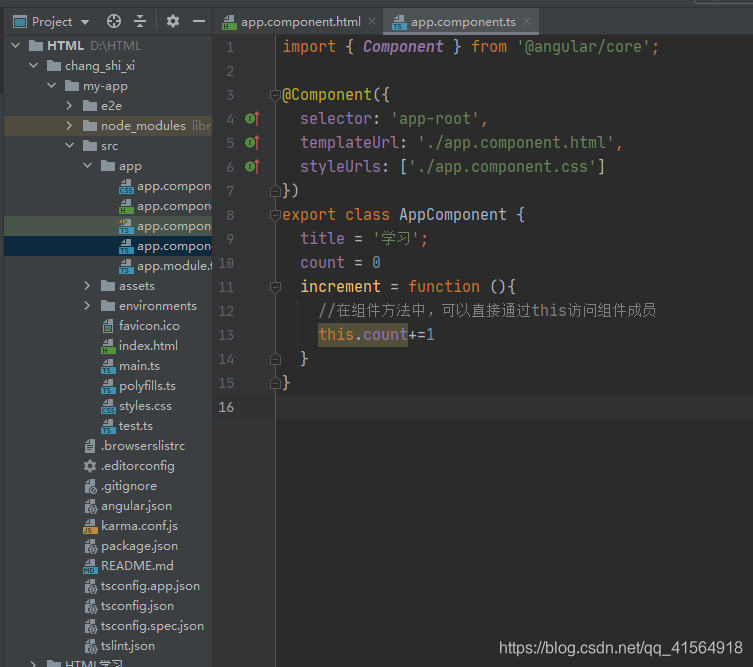
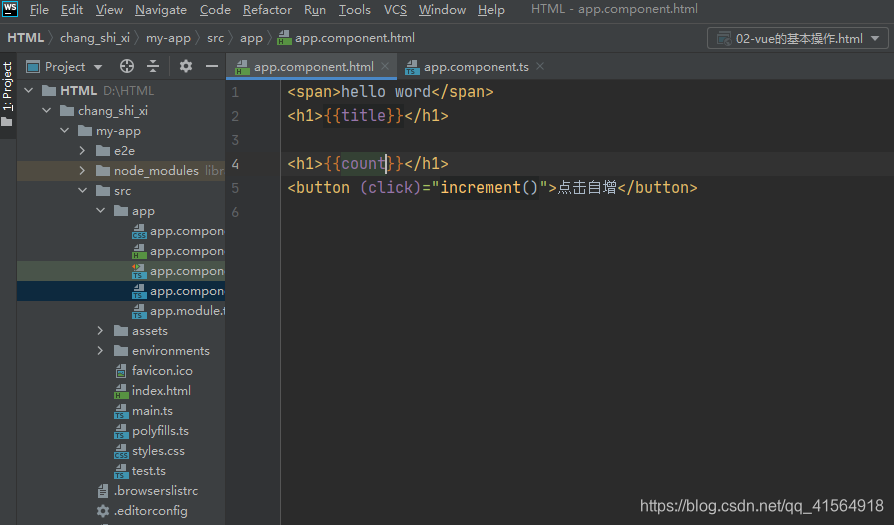
创建组件
ng generate component foo
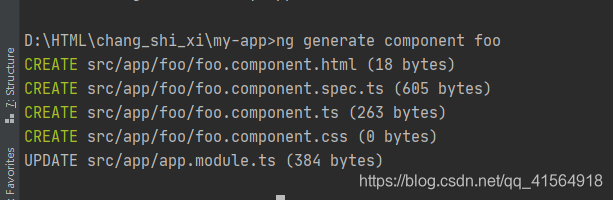
在app目录下创建了一个名叫foo的组件
同时更新app.module.ts下的 declarations
模块(NgModule)
是组织业务代码的利器,按照自己的业务场景,把组件,服务,路由打包到模块中,形成了一个积木块,然后在用这些积木块来搭建,
app.module
import { BrowserModule } from '@angular/platform-browser';
import { NgModule } from '@angular/core';

import { AppComponent } from './app.component';
import { FooComponent } from './foo/foo.component';

@NgModule({
// 组装模块资源,组件,指令,服务
  declarations: [
    AppComponent,
    FooComponent
  ],
  imports: [   //模块依赖
    BrowserModule
  ],
  providers: [],    //提供
  bootstrap: [AppComponent]  //指定启动的根组件
})
export class AppModule { }
模板(Templates)
组件是用来封装对试图的操作,而我们的所谓的试图其实也就是常规的HTML模板
元数据 (Metadata)
用来描述组件的信息,告诉Angular如何处理组件类
import { Component } from '@angular/core';

@Component({
  selector: 'app-root',
  templateUrl: './app.component.html',
  styleUrls: ['./app.component.css']
})
export class AppComponent {
  title = '学习';
  count = 0
  increment = function (){
    //在组件方法中,可以直接通过this访问组件成员
    this.count+=1
  }
}
数据绑定(Data binding)
MVVM思想(数据驱动试图),通过{{}}语法绑定到DOM元素,当数据改变时会影响试图的更新
指令(Directives)
- ngFor 循环指令
- *ngIf 条件判定指令
- [(ngModel)] 表单控件双向绑定指令
版权声明:本文为qq_41564918原创文章,遵循CC 4.0 BY-SA版权协议,转载请附上原文出处链接和本声明。