1,文档
Name: 'STREAM LOAD'
Description:
NAME:
stream-load: load data to table in streaming
SYNOPSIS
curl --location-trusted -u user:passwd [-H ""...] -T data.file -XPUT http://fe_host:http_port/api/{db}/{table}/_stream_load
DESCRIPTION
该语句用于向指定的 table 导入数据,与普通Load区别是,这种导入方式是同步导入。
这种导入方式仍然能够保证一批导入任务的原子性,要么全部数据导入成功,要么全部失败。
该操作会同时更新和此 base table 相关的 rollup table 的数据。
这是一个同步操作,整个数据导入工作完成后返回给用户导入结果。
当前支持HTTP chunked与非chunked上传两种方式,对于非chunked方式,必须要有Content-Length来标示上传内容长度,这样能够保证数据的完整性。
另外,用户最好设置Expect Header字段内容100-continue,这样可以在某些出错场景下避免不必要的数据传输。
OPTIONS
用户可以通过HTTP的Header部分来传入导入参数
label: 一次导入的标签,相同标签的数据无法多次导入。用户可以通过指定Label的方式来避免一份数据重复导入的问题。
当前Palo内部保留30分钟内最近成功的label。
column_separator:用于指定导入文件中的列分隔符,默认为\t。如果是不可见字符,则需要加\x作为前缀,使用十六进制来表示分隔符。
如hive文件的分隔符\x01,需要指定为-H "column_separator:\x01"
columns:用于指定导入文件中的列和 table 中的列的对应关系。如果源文件中的列正好对应表中的内容,那么是不需要指定这个字段的内容的。
如果源文件与表schema不对应,那么需要这个字段进行一些数据转换。这里有两种形式column,一种是直接对应导入文件中的字段,直接使用字段名表示;
一种是衍生列,语法为 `column_name` = expression。举几个例子帮助理解。
例1: 表中有3个列“c1, c2, c3”,源文件中的三个列一次对应的是"c3,c2,c1"; 那么需要指定-H "columns: c3, c2, c1"
例2: 表中有3个列“c1, c2, c3", 源文件中前三列依次对应,但是有多余1列;那么需要指定-H "columns: c1, c2, c3, xxx";
最后一个列随意指定个名称占位即可
例3: 表中有3个列“year, month, day"三个列,源文件中只有一个时间列,为”2018-06-01 01:02:03“格式;
那么可以指定-H "columns: col, year = year(col), month=month(col), day=day(col)"完成导入
where: 用于抽取部分数据。用户如果有需要将不需要的数据过滤掉,那么可以通过设定这个选项来达到。
例1: 只导入大于k1列等于20180601的数据,那么可以在导入时候指定-H "where: k1 = 20180601"
max_filter_ratio:最大容忍可过滤(数据不规范等原因)的数据比例。默认零容忍。数据不规范不包括通过 where 条件过滤掉的行。
partitions: 用于指定这次导入所设计的partition。如果用户能够确定数据对应的partition,推荐指定该项。不满足这些分区的数据将被过滤掉。
比如指定导入到p1, p2分区,-H "partitions: p1, p2"
timeout: 指定导入的超时时间。单位秒。默认是 600 秒。可设置范围为 1 秒 ~ 259200 秒。
strict_mode: 用户指定此次导入是否开启严格模式,默认为关闭。开启方式为 -H "strict_mode: true"。
timezone: 指定本次导入所使用的时区。默认为东八区。该参数会影响所有导入涉及的和时区有关的函数结果。
exec_mem_limit: 导入内存限制。默认为 2GB。单位为字节。
format: 指定导入数据格式,默认是csv,支持json格式。
jsonpaths: 导入json方式分为:简单模式和精准模式。
简单模式:没有设置jsonpaths参数即为简单模式,这种模式下要求json数据是对象类型,例如:
{"k1":1, "k2":2, "k3":"hello"},其中k1,k2,k3是列名字。
匹配模式:用于json数据相对复杂,需要通过jsonpaths参数匹配对应的value。
strip_outer_array: 布尔类型,为true表示json数据以数组对象开始且将数组对象中进行展平,默认值是false。例如:
[
{"k1" : 1, "v1" : 2},
{"k1" : 3, "v1" : 4}
]
当strip_outer_array为true,最后导入到doris中会生成两行数据。
json_root: json_root为合法的jsonpath字符串,用于指定json document的根节点,默认值为""。
merge_type: 数据的合并类型,一共支持三种类型APPEND、DELETE、MERGE 其中,APPEND是默认值,表示这批数据全部需要追加到现有数据中,DELETE 表示删除与这批数据key相同的所有行,MERGE 语义 需要与delete 条件联合使用,表示满足delete 条件的数据按照DELETE 语义处理其余的按照APPEND 语义处理, 示例:`-H "merge_type: MERGE" -H "delete: flag=1"`
delete: 仅在 MERGE下有意义, 表示数据的删除条件
RETURN VALUES
导入完成后,会以Json格式返回这次导入的相关内容。当前包括一下字段
Status: 导入最后的状态。
Success:表示导入成功,数据已经可见;
Publish Timeout:表述导入作业已经成功Commit,但是由于某种原因并不能立即可见。用户可以视作已经成功不必重试导入
Label Already Exists: 表明该Label已经被其他作业占用,可能是导入成功,也可能是正在导入。
用户需要通过get label state命令来确定后续的操作
其他:此次导入失败,用户可以指定Label重试此次作业
Message: 导入状态详细的说明。失败时会返回具体的失败原因。
NumberTotalRows: 从数据流中读取到的总行数
NumberLoadedRows: 此次导入的数据行数,只有在Success时有效
NumberFilteredRows: 此次导入过滤掉的行数,即数据质量不合格的行数
NumberUnselectedRows: 此次导入,通过 where 条件被过滤掉的行数
LoadBytes: 此次导入的源文件数据量大小
LoadTimeMs: 此次导入所用的时间
ErrorURL: 被过滤数据的具体内容,仅保留前1000条
ERRORS
可以通过以下语句查看导入错误详细信息:
SHOW LOAD WARNINGS ON 'url'
其中 url 为 ErrorURL 给出的 url。
Examples:
1. 将本地文件'testData'中的数据导入到数据库'testDb'中'testTbl'的表,使用Label用于去重。指定超时时间为 100 秒
curl --location-trusted -u root -H "label:123" -H "timeout:100" -T testData http://host:port/api/testDb/testTbl/_stream_load
2. 将本地文件'testData'中的数据导入到数据库'testDb'中'testTbl'的表,使用Label用于去重, 并且只导入k1等于20180601的数据
curl --location-trusted -u root -H "label:123" -H "where: k1=20180601" -T testData http://host:port/api/testDb/testTbl/_stream_load
3. 将本地文件'testData'中的数据导入到数据库'testDb'中'testTbl'的表, 允许20%的错误率(用户是defalut_cluster中的)
curl --location-trusted -u root -H "label:123" -H "max_filter_ratio:0.2" -T testData http://host:port/api/testDb/testTbl/_stream_load
4. 将本地文件'testData'中的数据导入到数据库'testDb'中'testTbl'的表, 允许20%的错误率,并且指定文件的列名(用户是defalut_cluster中的)
curl --location-trusted -u root -H "label:123" -H "max_filter_ratio:0.2" -H "columns: k2, k1, v1" -T testData http://host:port/api/testDb/testTbl/_stream_load
5. 将本地文件'testData'中的数据导入到数据库'testDb'中'testTbl'的表中的p1, p2分区, 允许20%的错误率。
curl --location-trusted -u root -H "label:123" -H "max_filter_ratio:0.2" -H "partitions: p1, p2" -T testData http://host:port/api/testDb/testTbl/_stream_load
6. 使用streaming方式导入(用户是defalut_cluster中的)
seq 1 10 | awk '{OFS="\t"}{print $1, $1 * 10}' | curl --location-trusted -u root -T - http://host:port/api/testDb/testTbl/_stream_load
7. 导入含有HLL列的表,可以是表中的列或者数据中的列用于生成HLL列,也可使用hll_empty补充数据中没有的列
curl --location-trusted -u root -H "columns: k1, k2, v1=hll_hash(k1), v2=hll_empty()" -T testData http://host:port/api/testDb/testTbl/_stream_load
8. 导入数据进行严格模式过滤,并设置时区为 Africa/Abidjan
curl --location-trusted -u root -H "strict_mode: true" -H "timezone: Africa/Abidjan" -T testData http://host:port/api/testDb/testTbl/_stream_load
9. 导入含有BITMAP列的表,可以是表中的列或者数据中的列用于生成BITMAP列,也可以使用bitmap_empty填充空的Bitmap
curl --location-trusted -u root -H "columns: k1, k2, v1=to_bitmap(k1), v2=bitmap_empty()" -T testData http://host:port/api/testDb/testTbl/_stream_load
10. 简单模式,导入json数据
表结构:
`category` varchar(512) NULL COMMENT "",
`author` varchar(512) NULL COMMENT "",
`title` varchar(512) NULL COMMENT "",
`price` double NULL COMMENT ""
json数据格式:
{"category":"C++","author":"avc","title":"C++ primer","price":895}
导入命令:
curl --location-trusted -u root -H "label:123" -H "format: json" -T testData http://host:port/api/testDb/testTbl/_stream_load
为了提升吞吐量,支持一次性导入条数据,json数据格式如下:
[
{"category":"C++","author":"avc","title":"C++ primer","price":89.5},
{"category":"Java","author":"avc","title":"Effective Java","price":95},
{"category":"Linux","author":"avc","title":"Linux kernel","price":195}
]
11. 匹配模式,导入json数据
json数据格式:
[
{"category":"xuxb111","author":"1avc","title":"SayingsoftheCentury","price":895},
{"category":"xuxb222","author":"2avc","title":"SayingsoftheCentury","price":895},
{"category":"xuxb333","author":"3avc","title":"SayingsoftheCentury","price":895}
]
通过指定jsonpath进行精准导入,例如只导入category、author、price三个属性
curl --location-trusted -u root -H "columns: category, price, author" -H "label:123" -H "format: json" -H "jsonpaths: [\"$.category\",\"$.price\",\"$.author\"]" -H "strip_outer_array: true" -T testData http://host:port/api/testDb/testTbl/_stream_load
说明:
1)如果json数据是以数组开始,并且数组中每个对象是一条记录,则需要将strip_outer_array设置成true,表示展平数组。
2)如果json数据是以数组开始,并且数组中每个对象是一条记录,在设置jsonpath时,我们的ROOT节点实际上是数组中对象。
12. 用户指定json根节点
json数据格式:
{
"RECORDS":[
{"category":"11","title":"SayingsoftheCentury","price":895,"timestamp":1589191587},
{"category":"22","author":"2avc","price":895,"timestamp":1589191487},
{"category":"33","author":"3avc","title":"SayingsoftheCentury","timestamp":1589191387}
]
}
通过指定jsonpath进行精准导入,例如只导入category、author、price三个属性
curl --location-trusted -u root -H "columns: category, price, author" -H "label:123" -H "format: json" -H "jsonpaths: [\"$.category\",\"$.price\",\"$.author\"]" -H "strip_outer_array: true" -H "json_root: $.RECORDS" -T testData http://host:port/api/testDb/testTbl/_stream_load
13. 删除与这批导入key 相同的数据
curl --location-trusted -u root -H "merge_type: DELETE" -T testData http://host:port/api/testDb/testTbl/_stream_load
14. 将这批数据中与flag 列为ture 的数据相匹配的列删除,其他行正常追加
curl --location-trusted -u root: -H "column_separator:," -H "columns: siteid, citycode, username, pv, flag" -H "merge_type: MERGE" -H "delete: flag=1" -T testData http://host:port/api/testDb/testTbl/_stream_load
2,Flink 写入doris文档代码实践(有时间pull上来)
Flink简单demo:
1,创建表 2个字段
CREATE TABLE `stream_load_test` (
`order_number` varchar(160) NOT NULL COMMENT '订单号',
`canal_type` varchar(96) DEFAULT NULL
)
UNIQUE KEY(`order_number`)
DISTRIBUTED BY HASH(`order_number`) BUCKETS 6
PROPERTIES("replication_num" = "1");
2,Flink简易代码:
public class StreamLoadKafka2DorisTest {

    public static Logger logger = LoggerFactory.getLogger(StreamLoadKafka2DorisTest.class);

    public static void main(String[] args) throws Exception {
        if (args.length == 0) {
            StreamExecutionEnvironment env = StreamExecutionEnvironment.getExecutionEnvironment();
            env.setParallelism(1);
            env.setStreamTimeCharacteristic(TimeCharacteristic.ProcessingTime);

            DataStreamSource<JSONObject> dataStream = env.addSource(new SourceFunction<JSONObject>() {
            private  int order_number = 0 ;
                @Override
                public void run(SourceContext<JSONObject> out) throws Exception {

                        while (true){
                            Thread.sleep(10000);
                            JSONObject json =  new JSONObject();
                            json.put("order_number",order_number);
                            json.put("canal_type","INSERT");
                            order_number++ ;
                            if (order_number >= 5 ){
                                order_number=0;
                                json.put("order_number",order_number);
                                json.put("canal_type","DELETE");
                                out.collect(json);
                                Thread.sleep(20000);
                                logger.error("========================================");
                            }else {
                                out.collect(json);
                            }

                        }

                }

                @Override
                public void cancel() {

                }
            });
            dataStream.print("==>");

            dataStream.keyBy(new KeySelector<JSONObject, String>() {
                @Override
                public String getKey(JSONObject json) throws Exception {
                    return "aa";
                }
            })
                    .timeWindow(Time.seconds(1))
                    .process(new ProcessWindowFunction<JSONObject, String, String, TimeWindow>() {
                        private DorisStreamLoadProd dorisStreamLoad;
//                        private DorisStreamLoadNewTest dorisStreamLoad;

                        @Override
                        public void open(Configuration parameters) throws Exception {
                            super.open(parameters);
                            dorisStreamLoad = new DorisStreamLoadProd();
//                            dorisStreamLoad = new DorisStreamLoadNewTest();
                        }

                        @Override
                        public void process(String key, Context context, Iterable<JSONObject> iterable, Collector<String> out) {
                            JSONArray jsonArray = new JSONArray();
                            Iterator<JSONObject> iterator = iterable.iterator();
                            while (iterator.hasNext()) {
                                JSONObject next = iterator.next();
                                jsonArray.add(next);
                            }
                            if (jsonArray.size() > 0) {
                                String loadData = jsonArray.toJSONString();
                                try {
//                                dorisStreamLoad.sendData(loadData, db, table);
                                    dorisStreamLoad.sendData(loadData, "test", "stream_load_test");
                                } catch (Exception ex) {
                                    ex.printStackTrace();


                                }
                            }
                        }
                    }).name("process_1").uid("process_1");


            env.execute("执行streamLoad任务,topic -> ");

        } else {
            logger.error("缺乏输入参数........");
        }
    }
3,stream load写入代码
public class DorisStreamLoadNewTest {
    private final static String DORIS_HOST_DEV = "dev-hadoop-01";

    public static Logger logger = LoggerFactory.getLogger(DorisStreamLoadNewTest.class);

    //    private final static String DORIS_TABLE = "join_test";
    private final static String DORIS_USER = "root";
    private final static String DORIS_PASSWORD = "root";
    private final static int DORIS_HTTP_PORT = 8030;

    public void sendData(String content, String db, String table) throws Exception {

        final String loadUrl = String.format("http://%s:%s/api/%s/%s/_stream_load",
                DORIS_HOST_DEV,
                DORIS_HTTP_PORT,
                db,
                table);
        final HttpClientBuilder httpClientBuilder = HttpClients
                .custom()
                .setRedirectStrategy(new DefaultRedirectStrategy() {
                    @Override
                    protected boolean isRedirectable(String method) {
                        return true;
                    }
                });
        CloseableHttpClient client = httpClientBuilder.build();

        HttpPut put = new HttpPut(loadUrl);
        StringEntity entity = new StringEntity(content, "UTF-8");
        put.setHeader(HttpHeaders.EXPECT, "100-continue");
        put.setHeader(HttpHeaders.AUTHORIZATION, basicAuthHeader(DORIS_USER, DORIS_PASSWORD));

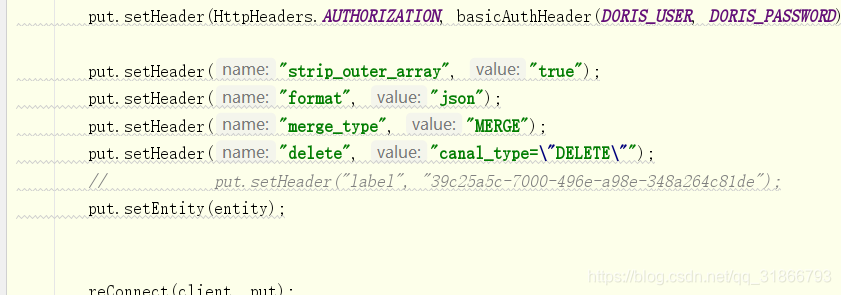
        put.setHeader("strip_outer_array", "true");
        put.setHeader("format", "json");
        put.setHeader("merge_type", "MERGE");
        put.setHeader("delete", "canal_type=\"DELETE\"");
        //            put.setHeader("label", "39c25a5c-7000-496e-a98e-348a264c81de");
        put.setEntity(entity);


        reConnect(client, put);

    }

    private void reConnect(CloseableHttpClient client, HttpPut put) throws Exception {


        String loadResult = "";
        CloseableHttpResponse response = client.execute(put);
        //todo 调用方法
        if (response.getEntity() != null) {

            loadResult = EntityUtils.toString(response.getEntity());
        }
        final int statusCode = response.getStatusLine().getStatusCode();
        if (statusCode != 200) {
            System.out.println("写入失败");
        } else {
            if (loadResult.contains("OK") && loadResult.contains("Success")) {
                System.out.println(loadResult);
            } else if (loadResult.contains("Fail")) {
                throw new Exception(loadResult + ",抛出异常,任务失败,当前时间: " + System.currentTimeMillis());
            } else {
                throw new Exception(loadResult + ",抛出异常,任务失败,当前时间: " + System.currentTimeMillis());
            }

        }


    }


    private String basicAuthHeader(String username, String password) {
        final String tobeEncode = username + ":" + password;
        byte[] encoded = Base64.encodeBase64(tobeEncode.getBytes(StandardCharsets.UTF_8));
        return "Basic " + new String(encoded);
    }
就按照API加了点东西:
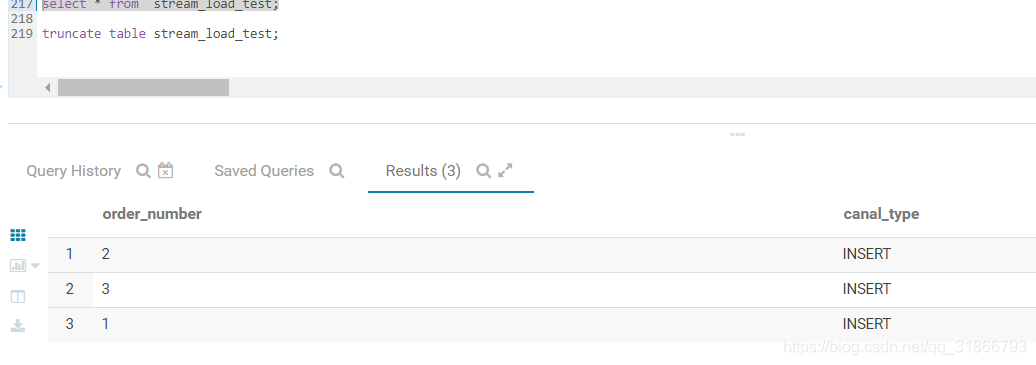
4,运行结果:
5,总结:
这个功能相当于用一次导入实现了多行数据的删除, 和导入语句里的where 含义是不同的,where 是过滤掉了一部分数据, delete 是 把表中符合这个条件的数据删除。
然后还有就是一个版本问题,我使用的是 0.13.11 和 013.15
之前的旧版本不支持删除