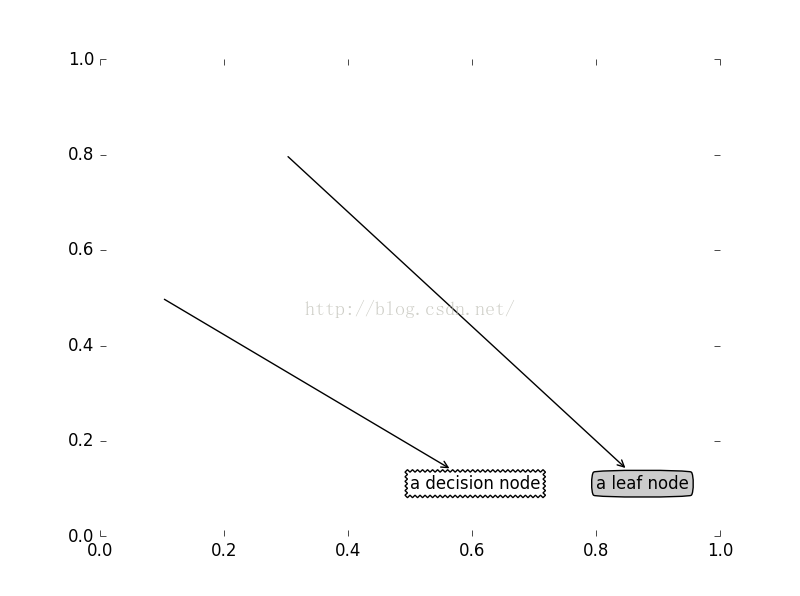
pyplot.annatate(s,xy, xytext=None, xycoords=’data’,textcoords=’data’, arrowprops=None, **kwargs)是matplotlib.pyplot模块提供的一个注解函数,可以用来对坐标中的数据进行注解,让人更清晰的得知坐标点得意义,现在对其参数作用进行分析:
# xy -- 为点的坐标
# xytext -- 为注解内容位置坐标,当该值为None时,注解内容放置在xy处
# xycoords and textcoords 是坐标xy与xytext的说明,若textcoords=None,则默认textNone与xycoords相同,若都未设置,默认为data,
# arrowprops -- 用于设置箭头的形状,类型为字典类型
# **kwargs -- 用于接收其他设置参数,比如bbox用于设置文本的边框形状
其中,arrowprops用与设置箭头形状,类型为字典类型,matplotlib提供的箭头有一下几种
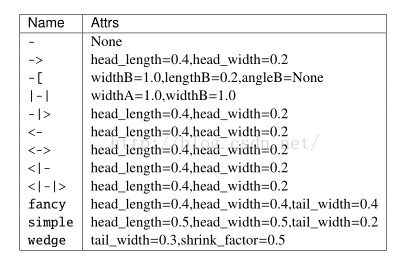
其中name为箭头形状,attrs为可设置的属性,创建一个箭头的方式为
arrowName = dict(arrowstyle="箭头的形状",connectionstyle="例如arc3")
connectionstyle的属性值有
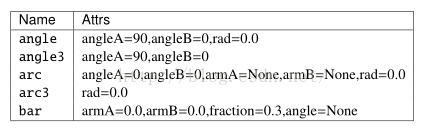
其效果分别为
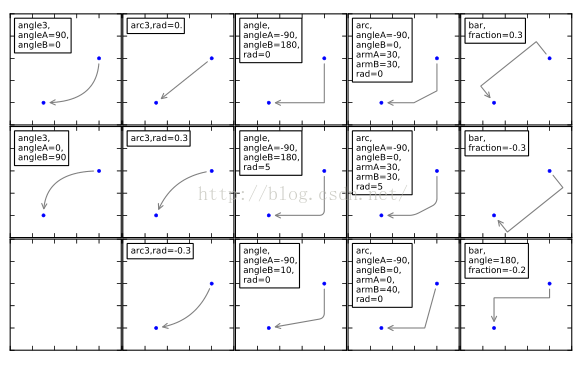
connectionstyle属性可以不设置,默认为直线,例如我们创建一个直线箭头,可以这样创建
directArrow = dict(arrowstyle='->')
**kwargs -- 用于接收其他设置参数,比如bbox用于设置文本的边框形状,文本边框类型有
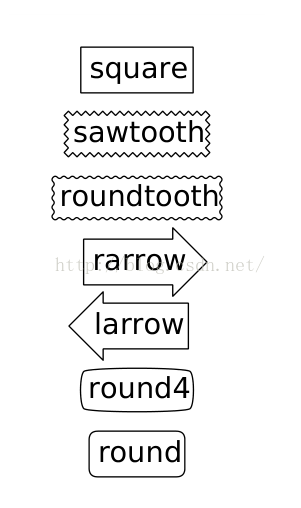
例如这样创建一个边框的格式,其中boxstyle用于指定边框类型,fc用于设定边框背景灰度,范围在0-1之间,1.0位白,0.0为黑,不设置该属性的时候背景色为蓝色
decisionNode = dict(boxstyle="sawtooth",fc="0.8")
一下是一个完整例子:
import matplotlib.pyplot as plt

def plotNode(nodeTxt,centerPt,parentPt,nodeType,ax1):
    ax1.annotate(nodeTxt, xy=parentPt,  xycoords='axes fraction',
             xytext=centerPt, textcoords='axes fraction',arrowprops=arrow_args,
              bbox=nodeType  )
#两个文本标签
decisionNode = dict(boxstyle="sawtooth",fc="1.0")
leafNode = dict(boxstyle="round4",fc="0.8")
#箭头
arrow_args = dict(arrowstyle="<-")

fig = plt.figure(1,facecolor = 'white')
fig.clf()
ax1 = plt.subplot(111,frameon = False)
#画出两个例子
plotNode('a decision node',(0.5,0.1),(0.1,0.5),decisionNode,ax1)
plotNode('a leaf node',(0.8,0.1),(0.3,0.8),leafNode,ax1)
plt.show()