虽然vue3.0都已经出来了吗,奈何现在element-ui还不兼容3.0,观望一阵。
为了给更多想要使用vue+element构建项目,也给自己也插个眼,写了这篇文章,希望能帮到你。
创建vue项目这个网上已经有很多教程了,我就不过多描述了,这里推荐一篇我觉得写的比较好的,照着步骤来,一分钟就好
https://www.cnblogs.com/hellman/p/10985377.html在vue项目里使用element的步骤:
1、安装element
//1、CMD控制台进入到项目目录,输入以下安装命令

//element模块
npm install element-ui --save


//以下安装后可以用来制作其他主题来替换element的默认主题色,可以选择不安装
npm install element-theme -g
npm install element-theme-chalk -D

//webpack默认只能打包js,安装这个可以用于打包图片文件
npm install file-loader --save
2、引用,我这里使用全局引用,也可以在需要的组件中局部引用
在src/main.js文件中引入这个模块
// 引入模块
import ElementUI from '../node_modules/element-ui'
// 引入样式
import '../node_modules/element-ui/lib/theme-chalk/index.css'

Vue.use(ElementUI)
main.js的具体代码如下:
// The Vue build version to load with the `import` command
// (runtime-only or standalone) has been set in webpack.base.conf with an alias.
import Vue from 'vue'
import App from './App'
import router from './router'
import ElementUI from '../node_modules/element-ui'
import '../node_modules/element-ui/lib/theme-chalk/index.css'
Vue.config.productionTip = false
Vue.use(ElementUI)

new Vue({
  el: '#app',
  router,
  components: { App },
  template: '<App/>'
})
3.使用,创建一个组件,里面加入官方给出的多选框的组件例子,组件代码如下:
<template>
  <div id="home">
    <el-checkbox :indeterminate="isIndeterminate" v-model="checkAll" @change="handleCheckAllChange">全选</el-checkbox>
    <div style="margin: 15px 0;"></div>
    <el-checkbox-group v-model="checkedCities" @change="handleCheckedCitiesChange">
      <el-checkbox v-for="city in cities" :label="city" :key="city">{{city}}</el-checkbox>
    </el-checkbox-group>
  </div>
</template>

<script>
  const cityOptions = ['上海', '北京', '广州', '深圳'];
  export default {
    name: 'home',
    data() {
      return {
        checkAll: false,
        checkedCities: ['上海', '北京'],
        cities: cityOptions,
        isIndeterminate: true
      }
    },
    methods: {
      handleCheckAllChange(val) {
        this.checkedCities = val ? cityOptions : [];
        this.isIndeterminate = false;
      },
      handleCheckedCitiesChange(value) {
        let checkedCount = value.length;
        this.checkAll = checkedCount === this.cities.length;
        this.isIndeterminate = checkedCount > 0 && checkedCount < this.cities.length;
      }
    }
  }
</script>

<style scoped>

</style>
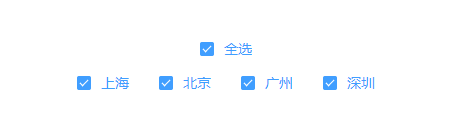
4、编译运行项目,效果成功实现
总结:vue中使用element和html里使用其实都差不多,只是引入方式的不同,掌握了引入方式,结合自己的操作,能够做出很多酷炫操作。
版权声明:本文为TJ1532635942原创文章,遵循CC 4.0 BY-SA版权协议,转载请附上原文出处链接和本声明。