一、先来展示下功能:
淘宝搜索提示功能
二、实现:
1、大体实现思路: 先从input框里获得输入的内容,再把得到的内容通过jQuery封装的ajax以jsonp的形式发送出去。接着把响应回来的数据渲染到页面上
2、其他内容:
1)、在input里通过定时器做了输入防抖
// 给input设个防抖  (定时器)
            let timer = null
            function settime(k) {
                timer = setTimeout(function () {
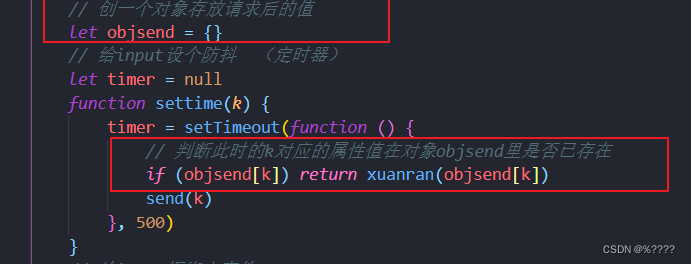
                    // 判断此时的k对应的属性值在对象objsend里是否已存在
                    if (objsend[k]) return xuanran(objsend[k])
                    send(k)
                }, 500)
            }
2)、通过对象来存储ajax请求回来的数据,避免多次重复发送请求

3)、鼠标点击input框外,提示内容隐藏,点击里面则显示
// 点击外面隐藏提示框
            $(document).on('click' , function (e) {
                    if (e.target.id !== "ip") {
                        return $('#suggest-list').hide()
                    }else {
                        // 如果提示里面没有,就不展示提示框
                        if (  $('.suggest-item').length <= 0) {
                            return
                        }
                         $('#suggest-list').show()
                    }
            })
三、代码展示:
1、html代码
<div class="container">
        <!-- Logo -->
        <img src="./images/taobao_logo.png" alt="" class="logo" />
        <div class="box">
            <!-- tab 栏 -->
            <div class="tabs">
                <div class="tab-active">宝贝</div>
                <div>店铺</div>
            </div>
            <!-- 搜索区域(搜索框和搜索按钮) -->
            <div class="search-box">
                <input type="text" id="ip" class="ipt" placeholder="请输入要搜索的内容" autofocus />
                <button class="btnSearch">
                    搜索
                </button>
            </div>
            <!-- 搜索建议 -->
            <div id="suggest-list"></div>
        </div>
    </div>
2、css代码
.container {
  display: flex;
  flex-direction: column;
  align-items: center;
  font-size: 12px;
}

.logo {
  width: 225px;
  height: 65px;
  margin: 50px 0;
}

.tabs {
  display: flex;
}
.tabs > div {
  width: 55px;
  height: 23px;
  line-height: 23px;
  text-align: center;
  cursor: pointer;
}

.tabs > div:hover {
  text-decoration: underline;
  color: #ff5700;
}

.tab-active {
  background-color: #ff5700;
  font-weight: bold;
  color: white;
}

.tabs > .tab-active:hover {
  color: white;
  text-decoration: none;
}

.search-box {
  display: flex;
  align-items: center;
}

.search-box .ipt {
  box-sizing: border-box;
  width: 500px;
  height: 34px;
  line-height: 30px;
  margin: 0;
  padding: 0;
  padding-left: 5px;
  outline: none;
  border: 2px solid #ff5700;
}

.btnSearch {
  margin: 0;
  height: 34px;
  border: none;
  background-color: #ff5700;
  color: white;
  letter-spacing: 1em;
  text-align: center;
  width: 90px;
  padding-bottom: 5px;
  outline: none;
  cursor: pointer;
}

.btnSearch:hover {
  opacity: 0.9;
}
#suggest-list {
  width: 498px;
  height: 200px;
  overflow-y: scroll;
  display: none;
  border: 0;
}
#suggest-list::-webkit-scrollbar {
  display: none;
}
.suggest-item {

  padding: 10px;
}
.suggest-item:hover {
  color: rgb(62, 149, 226);
  background-color: antiquewhite;
}
3、js代码
$(function () {
            // 创一个对象存放请求后的值
            let objsend = {}
            // 给input设个防抖  (定时器)
            let timer = null
            function settime(k) {
                timer = setTimeout(function () {
                    // 判断此时的k对应的属性值在对象objsend里是否已存在
                    if (objsend[k]) return xuanran(objsend[k])
                    send(k)
                }, 500)
            }
            // 给input框绑定事件
            $('.ipt').on('input', function () {
                clearTimeout(timer)
                // 获取值
                k = $(this).val().trim()
                if (k.length <= 0) return $('#suggest-list').empty().hide()
                // 调用定时器,500ms后发送请求
                settime(k)
            })
            //发送ajax的jsonp请求
            function send(k) {
                $.ajax({
                    url: 'https://suggest.taobao.com/sug?q=' + k,
                    dataType: 'JSONP',
                    success: function (res) {
                        xuanran(res)
                    }
                });
            }
            //发送请求后把响应回来的数据加载到页面上
            function xuanran(data) {
                clearTimeout(timer)
                //加之前先清空
                $('#suggest-list').empty()
                if (data.result.length <= 0) return $('#suggest-list').empty().hide()
                //用forEach遍历传过来的data里的result数组
                data.result.forEach(item => {
                    // 给搜索盒子里加
                    $('#suggest-list').append(`<div class="suggest-item">${item[0]}</div>`).show().css('border', '1px solid #ccc')
                })
                // 请求过得数据给对象objsend
                objsend[k] = data;
            }
            // 点击外面隐藏提示框
            $(document).on('click' , function (e) {
                    if (e.target.id !== "ip") {
                        return $('#suggest-list').hide()
                    }else {
                        // 如果提示里面没有,就不展示提示框
                        if (  $('.suggest-item').length <= 0) {
                            return
                        }
                         $('#suggest-list').show()
                    }
            })
        })
四、总结:
这里个案例大体实现不难,但在防抖和请求缓存这里会有点难度,多看多练习才能懂的多一点。
因为是初学阶段,里面的功能写法有些不够简单,有建议大家可以提提,互相学习。
版权声明:本文为weixin_45728088原创文章,遵循CC 4.0 BY-SA版权协议,转载请附上原文出处链接和本声明。