方法一
<script setup lang="ts">
import {onMounted,reactive } from 'vue'

const times = reactive({
    timer: ''
})
const formatTime = () => {
 const date = new Date();
 const y = date.getFullYear();
 let m: number | string = date.getMonth() + 1;
 m = m < 10 ? '0' + m : m;
 let d: number | string = date.getDate();
 d = d < 10 ? '0' + d : d;
 let h: number | string = date.getHours();
 h = h < 10 ? '0' + h : h;
 let minute: number | string = date.getMinutes();
 minute = minute < 10 ? '0' + minute : minute;
 let second: number | string = date.getSeconds();
 second = second < 10 ? '0' + second : second;
 times.timer = y + '/' + m + '/' + d + '\xa0'+'\xa0'+'\xa0' + '\xa0' + h + ':' + minute + ':' + second;
 }

onMounted(()=> {
 setInterval(()=> {
    formatTime()
 },1000)
})
</script>

<template>
     <li>
        <icon-clock-circle class="icon-clock" />
        <span>{{times.timer}}</span>
      </li>
</template>
方法二:使用date-fns
1.安装
# 使用npm
npm install --save date-fns

# 或使用yarn
yarn add date-fns
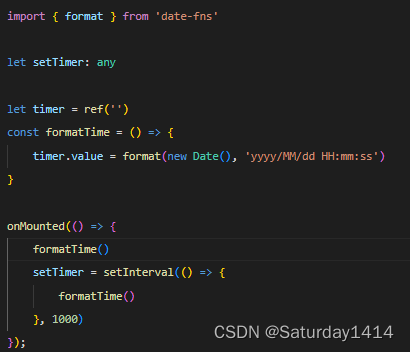
2.引入并使用
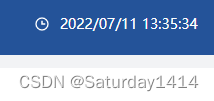
最终效果
版权声明:本文为Saturday1414原创文章,遵循CC 4.0 BY-SA版权协议,转载请附上原文出处链接和本声明。