运行testng.xml生成的测试报告index.html打开速度慢,不够直观,还有一些bug;所以琢磨着自己简单的设计一个html,然后利用java拼接html的方法,最后利用testng的listener监听器,生成报告。
一、预期效果:
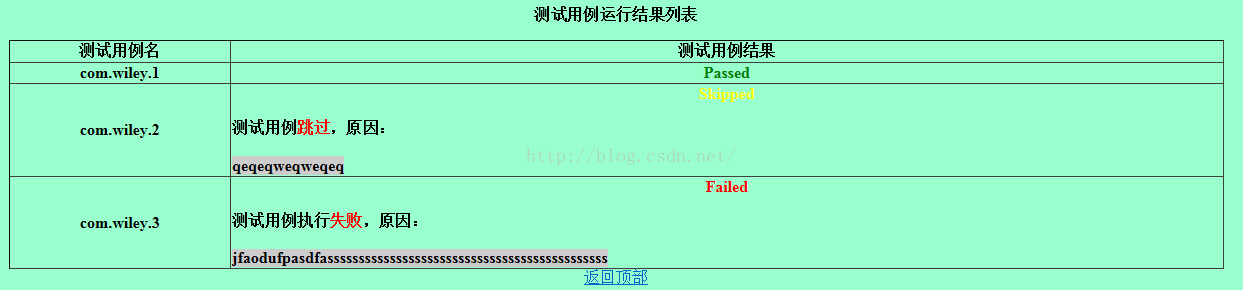
二、简单自定义html模板:
<html>
<head>
	<meta http-equiv="Content-Type" content="text/html; charset=utf-8" />
	<title >UI自动化测试报告</title>
</head>
<body style="background-color:#99FFCC;">
	<div id="top" align="center">
		<p style="font-weight:bold;">测试用例运行结果列表</p>
		<table width="90%" height="80" border="1" align="center" cellspacing="0" rules="all" style="table-layout:relative;">
			<thead>
				<tr>
					<th>测试用例名</th>
					<th>测试用例结果</th>
				</tr>
			</thead>
			<tbody style="word-wrap:break-word;font-weight:bold;" align="center">
				<tr>
					<td>com.wiley.1</td>
					<td><font color="green">Passed</font></td>
				</tr>
				<tr>
					<td>com.wiley.2</td>
					<td>
						<font color="yellow">Skipped</font>
						<p align="left">测试用例<font color="red">跳过</font>,原因:<br>
							<br><a style="background-color:#CCCCCC">qeqeqweqweqeq</a>
						</p>
					</td>
				</tr>
				<tr>
					<td>com.wiley.3</td>
					<td>
						<font color="red">Failed</font>
						<p align="left">测试用例执行<font color="red">失败</font>,原因:<br>
							<br><a style="background-color:#CCCCCC">jfaodufpasdfasssssssssssssssssssssssssssssssssssssssssssss</a>
						</p>
					</td>
				</tr>
			</tbody>
		</table>
		<a href="#top">返回顶部</a>
	</div>
</body>
</html>
三、java拼接:
package com.wiley.listener;

import java.io.File;
import java.io.IOException;
import java.nio.file.Files;
import java.nio.file.Paths;
import java.nio.file.StandardOpenOption;
import java.text.SimpleDateFormat;
import java.util.Calendar;
import java.util.Date;

import org.testng.ITestContext;
import org.testng.ITestResult;
import org.testng.TestListenerAdapter;

public class TestReport extends TestListenerAdapter{

	private String reportPath;

	@Override
	public void onStart(ITestContext context) {
		File htmlReportDir = new File("test-output/customizeHtml-report");
        if (!htmlReportDir.exists()) {
        	htmlReportDir.mkdirs();
        }
        String reportName = formateDate()+".html";
        reportPath = htmlReportDir+"/"+reportName;
        File report = new File(htmlReportDir,reportName);
        if(report.exists()){
            try {
                report.createNewFile();
            } catch (IOException e) {
                e.printStackTrace();
            }
        }
        StringBuilder sb = new StringBuilder("<html><head><meta http-equiv=\"Content-Type\" content=\"text/html; charset=utf-8\" />"
				+ "<title >UI自动化测试报告</title></head><body style=\"background-color:#99FFCC;\">"
				+ "<div id=\"top\" align=\"center\"><p style=\"font-weight:bold;\">测试用例运行结果列表</p>"
        		+ "<table width=\"90%\" height=\"80\" border=\"1\" align=\"center\" cellspacing=\"0\" rules=\"all\" style=\"table-layout:relative;\">"
        		+ "<thead>"
        		+ "<tr>"
        		+ "<th>测试用例名</th>"
        		+ "<th>测试用例结果</th>"
        		+ "</tr>"
        		+ "</thead>"
        		+ "<tbody style=\"word-wrap:break-word;font-weight:bold;\" align=\"center\">");
        String res = sb.toString();
        try {
            Files.write((Paths.get(reportPath)),res.getBytes("utf-8"));
        } catch (IOException e) {
            e.printStackTrace();
        }
	}

	@Override
	public void onTestSuccess(ITestResult result) {
		StringBuilder sb = new StringBuilder("<tr><td>");
		sb.append(result.getMethod().getRealClass()+"."+result.getMethod().getMethodName());
		sb.append("</td><td><font color=\"green\">Passed</font></td></tr>");
		String res = sb.toString();
		try {
			Files.write((Paths.get(reportPath)),res.getBytes("utf-8"),StandardOpenOption.APPEND);
		} catch (IOException e) {
			e.printStackTrace();
		}
	}

	@Override
	public void onTestSkipped(ITestResult result) {
		StringBuilder sb = new StringBuilder("<tr><td>");
		sb.append(result.getMethod().getRealClass()+"."+result.getMethod().getMethodName());
		sb.append("</td><td><font color=\"yellow\">Skipped</font>");
		sb.append("<p align=\"left\">测试用例<font color=\"red\">跳过</font>,原因:<br>");
		sb.append("<br><a style=\"background-color:#CCCCCC;\">");
		Throwable throwable = result.getThrowable();
                sb.append(throwable.getMessage());
                sb.append("</a></p></td></tr>");
		String res = sb.toString();
		try {
			Files.write((Paths.get(reportPath)),res.getBytes("utf-8"),StandardOpenOption.APPEND);
		} catch (IOException e) {
			e.printStackTrace();
		}
	}

	@Override
	public void onTestFailure(ITestResult result) {
		StringBuilder sb = new StringBuilder("<tr><td>");
        sb.append(result.getMethod().getRealClass()+"."+result.getMethod().getMethodName());
        sb.append("</td><td><font color=\"red\">Failed</font><br>");
        sb.append("<p align=\"left\">测试用例执行<font color=\"red\">失败</font>,原因:<br>");
        sb.append("<br><a style=\"background-color:#CCCCCC;\">");
        Throwable throwable = result.getThrowable();
        sb.append(throwable.getMessage());
        sb.append("</a></p></td></tr>");
        String res = sb.toString();
        try {
            Files.write((Paths.get(reportPath)),res.getBytes("utf-8"),StandardOpenOption.APPEND);
        } catch (IOException e) {
            e.printStackTrace();
        }
	}

	@Override
	public void onFinish(ITestContext testContext) {
		StringBuilder sb = new StringBuilder("</tbody></table><a href=\"#top\">返回顶部</a></div></body>");
		sb.append("</html>");
		String msg = sb.toString();
		try {
			Files.write((Paths.get(reportPath)),msg.getBytes("utf-8"),StandardOpenOption.APPEND);
		} catch (IOException e) {
			e.printStackTrace();
		}

	}

	public static String formateDate(){
		SimpleDateFormat sf = new SimpleDateFormat("yyyy-MM-dd-HH-mm-ss");
		Calendar cal = Calendar.getInstance();
		Date date = cal.getTime();
		return sf.format(date);
	}
}
四、testng.xml中添加监听器:
<listeners>
        <listener class-name="com.wiley.listener.TestReport"></listener>
</listeners>
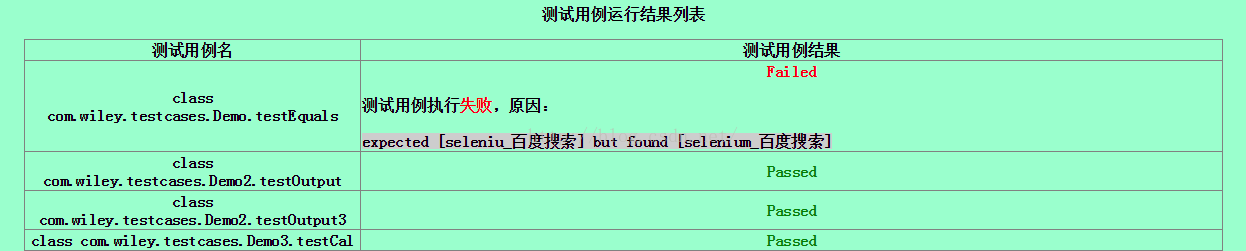
五、实际效果:
六、后记
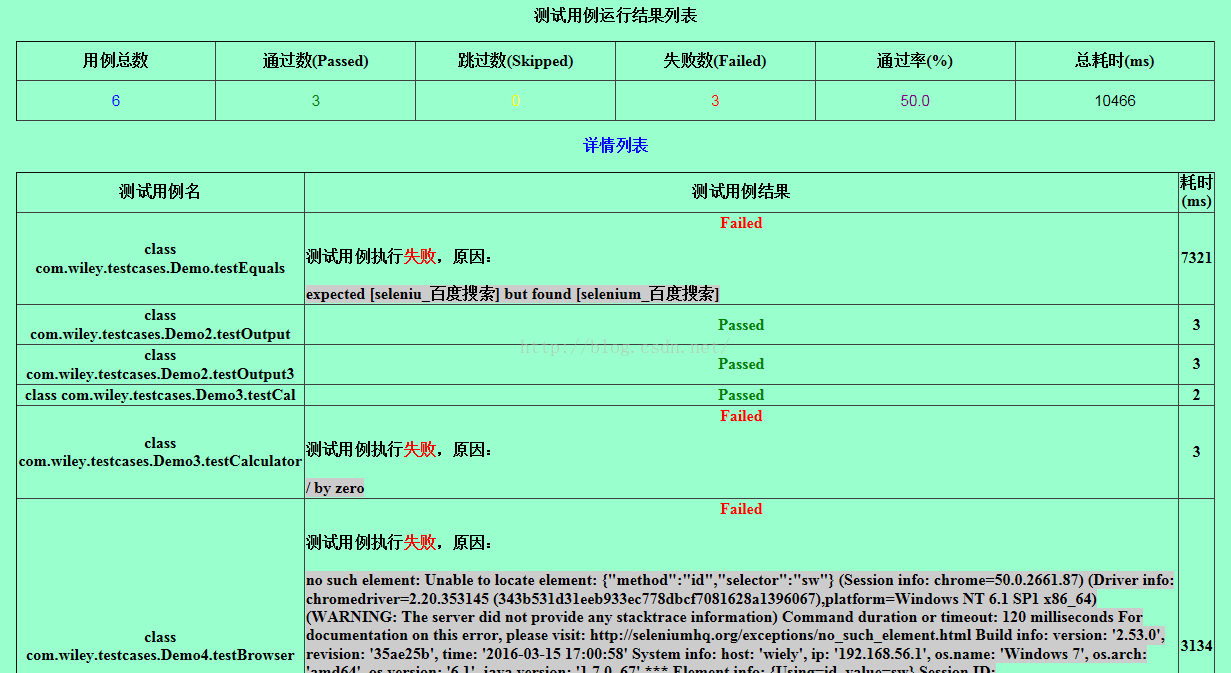
如果你懂得一些html和js的基本知识,自己设计html,然后套用上面的TestReport.class这个类,你就可以不断完善你自己的测试报告。下图就是我在上面的模板基础上完善的,感觉还不错吧,相信你会做得更好~~
版权声明:本文为fgwvip123原创文章,遵循CC 4.0 BY-SA版权协议,转载请附上原文出处链接和本声明。