
技术选型
平台:Windows开发工具:Intelij IDEA
JDK环境:Java 8
UI界面:基于Swing的桌面编程技术。
绘图技术:Graphics
集合框架
IO流
多线程等
地图配置
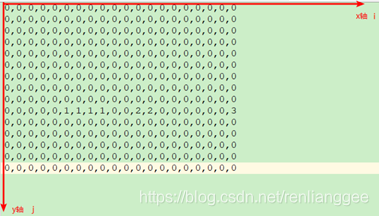
地图map.txt文件
0,0,0,0,0,0,0,0,0,0,0,0,0,0,0,0,0,0,0,0
0,0,0,0,0,0,0,0,0,0,0,0,0,0,0,0,0,0,0,0
0,0,0,0,0,0,0,0,0,0,0,0,0,0,0,0,0,0,0,0
0,0,0,0,0,0,0,0,0,0,0,0,0,0,0,0,0,0,0,0
0,0,0,0,0,0,0,0,0,0,0,0,0,0,0,0,0,0,0,0
0,0,0,0,0,0,0,0,0,0,0,0,0,0,0,0,0,0,0,0
0,0,0,0,0,0,0,0,0,0,0,0,0,0,0,0,0,0,0,0
0,0,0,0,0,0,0,0,0,0,0,0,0,0,0,0,0,0,0,0
0,0,0,0,0,0,0,0,0,0,0,0,0,0,0,0,0,0,0,0
0,1,0,0,0,1,1,1,1,0,0,2,2,0,0,0,0,0,0,3
0,0,0,0,0,0,0,0,0,0,0,0,0,0,0,0,0,0,0,0
0,0,0,0,0,0,0,0,0,0,0,0,0,0,0,0,0,0,0,0
0,0,0,0,0,0,0,0,0,0,0,0,0,0,0,0,0,0,0,0
0,0,0,0,0,0,0,0,0,0,0,0,0,0,0,0,0,0,0,0
0,0,0,0,0,0,0,0,0,0,0,0,0,0,0,0,0,0,0,0
读取地图
package cn.tx.util;

import org.junit.Test;

import java.io.BufferedReader;
import java.io.FileInputStream;
import java.io.InputStreamReader;
import java.util.ArrayList;
import java.util.List;

/**
 * 地图配置类
 * @author 任亮
 * @company 拓薪教育
 * @QQ:206229531
 */
public class GameMap {

    //数据容器
    public List<String> list = new ArrayList<>();

    // 二维数组元素又是一个一维数组:行列矩阵
    public int[][] map = null;

    // 单元测试:验证Map类的readMap()方法确实把地图配置文件map.txt
    // 加载成了二维数组
    @Test
    public void testResult() throws Exception {
        int[][] result = readMap();
        // 二维数组的内容输出,看一下是否是地图的配置信息
        for(int i = 0 ; i < result.length ; i++ ){
            for(int j = 0 ; j < result[i].length ; j++) {
                System.out.print(result[i][j]+" ");
            }
            System.out.println();
        }
    }

    public int[][] readMap() throws Exception {
        // 构造文件输入流
        FileInputStream fis = new FileInputStream("map.txt");
        InputStreamReader isr = new InputStreamReader(fis);
        BufferedReader br = new BufferedReader(isr);

        //直接读取一行数据
        String value = br.readLine();

        while (value != null) {
            //将读取到的一行数据加入到容器中
            list.add(value);
            value = br.readLine();
        }

        br.close();

        //得到多少行多少列
        int row = list.size();
        int cloum = 0;

        for (int i = 0; i < 1; i++) {
            String str = list.get(i);
            String[] values = str.split(",");
            cloum = values.length;
        }


        map = new int[row][cloum];

        //将读到的字符创转换成整数,并赋值给二位数组map
        for (int i = 0; i < list.size(); i++) {
            String str = list.get(i);
            String[] values = str.split(",");
            for (int j = 0; j < values.length; j++) {
                map[i][j] = Integer.parseInt(values[j]);
            }
        }
        return map;
    }


}
定义角色
超级玛丽中的角色包括了,水管,怪物,砖头等。并显示到主界面。
障碍物抽象父类Enemy
package cn.tx.role;

import java.awt.Image;
/**
  敌人抽象类
 * @author 任亮
 * @company 拓薪教育
 * @QQ:206229531
 */
public abstract class Enemy {
	//坐标位置
	public int x,y;
	//宽高
	public int width,height;
	//图片
	public Image img;

	public Enemy(int x, int y, int width, int height, Image img) {
		this.x = x;
		this.y = y;
		this.width = width;
		this.height = height;
		this.img=img;
	}
}
水管类
package cn.tx.role;
import java.awt.Image;

/**
 * 水管类
 * @author 任亮
 * @company 拓薪教育
 * @QQ:206229531
 */
public class Pipe extends Enemy {


	public Pipe(int x, int y, int width, int height, Image img) {
		super(x, y, width, height, img);
	}
}
砖头类
package cn.tx.role;

import java.awt.Image;

/**
 * 砖
 *
 * @author 任亮
 * @company 拓薪教育
 * @QQ:206229531
 */
public class Brick extends Enemy {


    public Brick(int x, int y, int width, int height, Image img) {
        super(x, y, width, height, img);
    }
}
金币类
package cn.tx.role;

import java.awt.Image;

/**
   金币类
 * @author 任亮
 * @company 拓薪教育
 * @QQ:206229531
 */
public class Coin extends Enemy {
	public Coin(int x, int y, int width, int height, Image img) {
		super(x, y, width, height, img);
	}
}
子弹类
package cn.tx.role;
/**
  子弹类
 * @author 任亮
 * @company 拓薪教育
 * @QQ:206229531
 */
public class Boom {
	//子弹的坐标,大小,速度
	public int x,y;
	public int width;
	public int speed=1;

	public Boom(int x, int y, int width) {
		super();
		this.x = x;
		this.y = y;
		this.width = width;
	}
}
马里奥类
package cn.tx.mario;

import java.awt.Image;
import java.awt.Rectangle;
import javax.swing.ImageIcon;

import cn.tx.ui.GameFrame;
import cn.tx.role.Enemy;

/**
 * 玛丽
 *
 * @author 任亮
 * @company 拓薪教育
 * @QQ:206229531
 */
public class Mario extends Thread {
    //窗体对象
    public GameFrame gf;
    //是否跳起
    public boolean jumpFlag = true;

    //马里奥的坐标,原点为左上角,所以y周越小玛丽越高
    public int x = 50, y = 358;
    //马里奥的速度
    public int xspeed = 5, yspeed = 1;
    //马里奥的宽高
    public int width = 30, height = 32;
    //马里奥的图片
    public Image img = new ImageIcon("image/mari1.png").getImage();
    //键盘上的上下左右是否被按下
    public boolean left = false, right = false, down = false, up = false;

    public String Dir_Up = "Up", Dir_Left = "Left", Dir_Right = "Right", Dir_Down = "Down";


    public Mario(GameFrame gf) {
        this.gf = gf;
        this.Gravity();
    }

    // 玛丽飞翔的逻辑 ;移动的逻辑都在这里。
    public void run() {
        while (true) {
            //向左走
            if (left) {
                //碰撞到了
                if (hit(Dir_Left)) {
                    this.xspeed = 0;
                }
                //没有撞击到障碍物
                if (this.x >= 0) {
                    //马里奥的位置的更新
                    this.x -= this.xspeed;
                    //改变马里奥的图片
                    this.img = new ImageIcon("image/mari_left.gif").getImage();
                }

                this.xspeed = 5;
            }

            //向右走
            if (right) {
                // 右边碰撞物检测应该是往右走的时候检测
                // 进行碰撞检测:至少主角(玛丽,碰撞物)
                if (hit(Dir_Right)) {
                    this.xspeed = 0;
                }
                //任人物向右移动
                if (this.x < 400) {
                    this.x += this.xspeed;
                    this.img = new ImageIcon("image/mari_right.gif").getImage();
                }
                //玛丽奥x轴的坐标大于400的时候发生什么
                if (this.x >= 400) {
                    //背景向左移动
                    gf.bg.x -= this.xspeed;
                    //障碍物项左移动
                    for (int i = 0; i < gf.eneryList.size(); i++) {
                        Enemy enery = gf.eneryList.get(i);
                        enery.x -= this.xspeed;
                    }
                    //图标的变化
                    this.img = new ImageIcon("image/mari_right.gif").getImage();
                }
                this.xspeed = 5;
            }

            //向上跳
            if (up) {

                if (jumpFlag && !isGravity) {
                    jumpFlag = false;
                    new Thread() {
                        public void run() {
                            jump();
                            jumpFlag = true;
                        }
                    }.start();
                }
            }

            try {
                this.sleep(20);
            } catch (InterruptedException e) {
                e.printStackTrace();
            }
        }
    }


    //向上跳的函数
    public void jump() {
        //定义高度值
        int jumpHeigh = 0;
        for (int i = 0; i < 150; i++) {
            //玛丽的y轴位置减去玛丽的y轴速度
            gf.mario.y -= this.yspeed;
            //玛丽的高度递增
            jumpHeigh++;
            //如果撞到障碍物跳出
            if (hit(Dir_Up)) {
                break;
            }
            try {
                Thread.sleep(5);
            } catch (InterruptedException e) {
                e.printStackTrace();
            }
        }
        //玛丽跳起来后下落
        for (int i = 0; i < jumpHeigh; i++) {
            //玛丽的y轴高度加上y轴速度
            gf.mario.y += this.yspeed;
            //如果撞到下面障碍则停止
            if (hit(Dir_Down)) {
                this.yspeed = 0;
            }
            try {
                Thread.sleep(5);
            } catch (InterruptedException e) {
                e.printStackTrace();
            }


        }
        this.yspeed = 1;//还原速度
    }

    //检测碰撞
    public boolean hit(String dir) {
        // Swing技术中,人家已经提供了!!
        Rectangle myrect = new Rectangle(this.x, this.y, this.width, this.height);

        Rectangle rect = null;

        for (int i = 0; i < gf.eneryList.size(); i++) {
            Enemy enery = gf.eneryList.get(i);

            if (dir.equals("Left")) {
                rect = new Rectangle(enery.x + 2, enery.y, enery.width, enery.height);
            } else if (dir.equals("Right")) {
                // 右侧碰撞物检测。
                rect = new Rectangle(enery.x - 2, enery.y, enery.width, enery.height);
            } else if (dir.equals("Up")) {
                rect = new Rectangle(enery.x, enery.y + 1, enery.width, enery.height);
            } else if (dir.equals("Down")) {
                rect = new Rectangle(enery.x, enery.y - 2, enery.width, enery.height);
            }
            //碰撞检测
            if (myrect.intersects(rect)) {

                return true;
            }
        }

        return false;
    }

    //检查是否贴地
    public boolean isGravity = false;

    // 重力线程!
    public void Gravity() {
        new Thread() {
            public void run() {

                while (true) {
                    try {
                        sleep(10);
                    } catch (InterruptedException e) {
                        e.printStackTrace();
                    }


                    while (true) {
                        //如果没有跳起退出
                        if (!jumpFlag) {
                            break;
                        }
                        //如果撞到下面障碍跳出
                        if (hit(Dir_Down)) {
                            break;
                        }

                        //大于385 在地面之下
                        if (y >= 358) {
                            isGravity = false;
                        } else {
                            //在地面上
                            isGravity = true;
                            //y是马里奥的纵向的位置
                            y += yspeed;
                        }

                        try {
                            sleep(10);
                        } catch (InterruptedException e) {
                            e.printStackTrace();
                        }
                    }
                }
            }
        }.start();
    }
}
窗体
package cn.tx.ui;

import java.awt.Color;
import java.awt.Graphics;
import java.awt.image.BufferedImage;
import java.util.ArrayList;
import javax.swing.ImageIcon;
import javax.swing.JFrame;

import cn.tx.mario.Mario;
import cn.tx.role.*;
import cn.tx.util.GameMap;
import cn.tx.util.MusicUtil;
/**
   主体窗口界面:展示角色。
 */
public class GameFrame extends JFrame{
	// 超级玛丽:界面需要一个超级玛丽的。
	public Mario mario;
	// 分别定义:水管,金币和砖块
	public Enemy pipe ,coin , brick;
	//背景图片
	public BackgroundImage bg ;
	//定义一个集合容器装敌人对象
	public ArrayList<Enemy> eneryList = new ArrayList<Enemy>();
	//定义一个集合容器装子弹
	public ArrayList<Boom> boomList = new ArrayList<Boom>();
	//子弹的速度
	public int bspeed=0;

	//地图数据,制定规则,是1画砖头,是2画金币,是3画水管
	public int[][] map = null;
	//对象代码块: 当前类的创建的时候执行
	{
		// 实例代码块中初始化地图资源的数据
		GameMap mp = new GameMap();
		map = mp.readMap();
	}

	//构造函数里面初始化背景图片和马里奥对象
	public GameFrame() throws Exception {
		// 创建背景图片
		bg = new BackgroundImage();
		//初始化窗体相关属性信息数据
		// this代表了当前主界面对象。
		this.setSize(800,450);
		this.setTitle("超级玛丽");
		this.setResizable(true);
		// 居中展示窗口
		this.setLocationRelativeTo(null);
		this.setDefaultCloseOperation(EXIT_ON_CLOSE);
		this.setVisible(true);

		// 创建玛丽对象
		mario = new Mario(this);


		// 读取地图,并配置地图
		for (int i = 0; i < map.length; i++) {
			for (int j = 0; j < map[0].length; j++) {
				//读取到的是1,画砖头
				if(map[i][j]==1){
					// x
					brick = new Brick(j*30,i*30,30,30,new ImageIcon("image/brick.png").getImage());
					eneryList.add(brick);
				}
				//读到2画金币
				if(map[i][j]==2){
					coin = new Coin(j*30,i*30,30,30,new ImageIcon("image/coin_brick.png").getImage());
					eneryList.add(coin);
				}
				//读到3画水管
				if(map[i][j]==3){
					pipe = new Pipe(j*30,i*30,60,120,new ImageIcon("image/pipe.png").getImage());
					eneryList.add(pipe);
				}
			}
		}

		mario.start();

		//开启一个线程负责界面的窗体重绘线程
		new Thread(){
			public void run(){
				while(true){
					//重绘窗体
					repaint(); // 自动触发当前窗口中的paint方法
					//检查子弹是否出界
					//checkBoom();
					try {
						Thread.sleep(10);
					} catch (InterruptedException e) {
						e.printStackTrace();
					}
				}
			}
		}.start();


		//设置背景音乐
		new Thread(new Runnable() {
			@Override
			public void run() {
				MusicUtil.playBackground();
			}
		}).start();
	}

	/**
	 * 画窗体
	 * @param g
	 */
	@Override
	public void paint(Graphics g) {
		//利用双缓冲画背景图片和马里奥
		BufferedImage bi =(BufferedImage)this.createImage(this.getSize().width,this.getSize().height);
		//创建画图对象
		Graphics big = bi.getGraphics();
		//画背景
		big.drawImage(bg.img, bg.x, bg.y, null);

		// 开始绘制界面上的敌人。
		for (int i = 0; i < eneryList.size(); i++) {
			Enemy e = eneryList.get(i);
			//绘制敌人
			big.drawImage(e.img, e.x, e.y, e.width, e.height,null);
		}

		//画子弹
		for (int i = 0; i < boomList.size(); i++) {
			Boom b =boomList.get(i);
			Color c =big.getColor();
			big.setColor(Color.red);
			big.fillOval(b.x+=b.speed, b.y, b.width, b.width);
			big.setColor(c);
		}

		//画人物 玛丽自己
		big.drawImage(mario.img, mario.x, mario.y, mario.width, mario.height,null);
		g.drawImage(bi,0,0,null);

	}

	//检查子弹是否出界,出界则从容器中移除,不移除的话,内存会泄漏
	public void checkBoom(){
		for (int i = 0; i < boomList.size(); i++) {
			Boom b = boomList.get(i);
			if(b.x<0 || b.x>800){
				boomList.remove(i);
			}
		}
	}
}
键盘事件监听
package cn.tx.util;

import cn.tx.role.Boom;
import cn.tx.ui.GameFrame;

import java.awt.event.KeyAdapter;
import java.awt.event.KeyEvent;

import javax.swing.ImageIcon;


//键盘按下监听类
public class KeyListener extends KeyAdapter {

    // 接收到了当前主界面:游戏界面
    public GameFrame gf;

    public KeyListener(GameFrame gf) {
        this.gf = gf;
    }

    //键盘监听
    @Override
    public void keyPressed(KeyEvent e) {
        //code是按下键盘的键对应的值
        int code = e.getKeyCode();
        switch (code) {
            //向右走
            case 39:
                gf.mario.right = true; // 信号位
                break;
            //向左走
            case 37:
                gf.mario.left = true;
                break;
            case 66:
                addBoom();
                break;
            //向上跳
            case 38:
                gf.mario.up = true;
                break;
        }
    }

    //添加子弹
    public void addBoom() {
        Boom b = new Boom(gf.mario.x, gf.mario.y + 5, 10);
        if (gf.mario.left) b.speed = -2;
        if (gf.mario.right) b.speed = 2;
        gf.boomList.add(b);
    }

    //键盘释放监听
    @Override
    public void keyReleased(KeyEvent e) {
        int code = e.getKeyCode();
        //释放右键
        if (code == 39) {
            gf.mario.right = false;
            gf.mario.img = new ImageIcon("image/mari1.png").getImage();
        }
        //释放左键
        if (code == 37) {
            gf.mario.left = false;
            gf.mario.img = new ImageIcon("image/mari_left1.png").getImage();
        }
        //释放上键
        if (code == 38) {
            gf.mario.up = false;
        }
    }
}
主方法和事件绑定
import cn.tx.ui.GameFrame;
import cn.tx.util.KeyListener;
/**
  超级玛丽启动类。
 */
public class Run {
	//主函数,程序入口
	public static void main(String[] args) throws Exception {
		GameFrame gf = new GameFrame();
		// 创建监听器对象
		KeyListener kl = new KeyListener(gf);
		// 给窗体添加键盘监听器
		gf.addKeyListener(kl);
	}
}
完整源码和讲解QQ加群:685168267
版权声明:本文为renlianggee原创文章,遵循CC 4.0 BY-SA版权协议,转载请附上原文出处链接和本声明。