前期知识
前言
在上一篇文章中,我们学习了驱动的基本框架。这一章,我们会在上一章代码的基础上,继续对驱动的框架进行完善。要下载上一篇文章的全部代码,请点击这里。
1.字符设备的四个基本操作
驱动让用户程序具备操作硬件设备的能力,那么对硬件设备有哪些操作呢?在学习编程语言时,我们都学过对文件的操作,包括打开文件、关闭文件、读文件、写文件这四个基本操作。对于Linux来说,一切设备皆文件,所以对设备的基本操作也可以分为打开、关闭、读、写这四个。而对于设备(已字符设备为例),Linux提供了一个操作集合——file_operarions。file_operations是一个结构体,其原型如下。
struct file_operations {
    struct module *owner;
    loff_t (*llseek) (struct file *, loff_t, int);
    ssize_t (*read) (struct file *, char __user *, size_t, loff_t *);
    ssize_t (*write) (struct file *, const char __user *, size_t, loff_t *);
    ssize_t (*read_iter) (struct kiocb *, struct iov_iter *);
    ssize_t (*write_iter) (struct kiocb *, struct iov_iter *);
    int (*iterate) (struct file *, struct dir_context *);
    int (*iterate_shared) (struct file *, struct dir_context *);
    unsigned int (*poll) (struct file *, struct poll_table_struct *);
    long (*unlocked_ioctl) (struct file *, unsigned int, unsigned long);
    long (*compat_ioctl) (struct file *, unsigned int, unsigned long);
    int (*mmap) (struct file *, struct vm_area_struct *);
    int (*open) (struct inode *, struct file *);
    int (*flush) (struct file *, fl_owner_t id);
    int (*release) (struct inode *, struct file *);
    int (*fsync) (struct file *, loff_t, loff_t, int datasync);
    int (*fasync) (int, struct file *, int);
    int (*lock) (struct file *, int, struct file_lock *);
    ssize_t (*sendpage) (struct file *, struct page *, int, size_t, loff_t *, int);
    unsigned long (*get_unmapped_area)(struct file *, unsigned long, unsigned long, unsigned long, unsigned long);
    int (*check_flags)(int);
    int (*flock) (struct file *, int, struct file_lock *);
    ssize_t (*splice_write)(struct pipe_inode_info *, struct file *, loff_t *, size_t, unsigned int);
    ssize_t (*splice_read)(struct file *, loff_t *, struct pipe_inode_info *, size_t, unsigned int);
    int (*setlease)(struct file *, long, struct file_lock **, void **);
    long (*fallocate)(struct file *file, int mode, loff_t offset,
              loff_t len);
    void (*show_fdinfo)(struct seq_file *m, struct file *f);
#ifndef CONFIG_MMU
    unsigned (*mmap_capabilities)(struct file *);
#endif
    ssize_t (*copy_file_range)(struct file *, loff_t, struct file *,
            loff_t, size_t, unsigned int);
    int (*clone_file_range)(struct file *, loff_t, struct file *, loff_t,
            u64);
    ssize_t (*dedupe_file_range)(struct file *, u64, u64, struct file *,
            u64);
}
要使用该结构体,需要包含头文件"linux/fs.h"。该结构体中的成员变量很多,但在本章中,我们只用到打开(open)、关闭(release)、读(read)、写(write)这四个成员变量,以及一个默认需要的所有者(owner)成员变量。
struct file_operations {
    ...
    struct module *owner;
    int (*open) (struct inode *, struct file *);
    int (*release) (struct inode *, struct file *);
    ssize_t (*read) (struct file *, char __user *, size_t, loff_t *);
    ssize_t (*write) (struct file *, const char __user *, size_t, loff_t *);
    ...
}
file_operations结构体的成员变量向应用程序提供一个对设备操作的接口,但是接口的具体操作需要我们自己来实现。打开上一章所写的驱动源代码"shanwuyan.c",定义一个"file_operations"类型的结构体,再定义四个函数"shanwuyan_open"、“shanwuyan_release”、“shanwuyan_read”、“shanwuyan_write”,让file_operations结构体变量的成员变量初始化为这四个函数。
/*打开设备*/
static int shanwuyan_open(struct inode *inode, struct file *filp)
{
    return 0;
}

/*释放(关闭)设备*/
static int shanwuyan_release(struct inode *inode, struct file *filp)
{
    return 0;
}

/*读设备*/
static ssize_t shanwuyan_read(struct file *filp, char __user *buf, size_t count, loff_t *ppos)
{
    return 0;
}

/*写设备*/
static ssize_t shanwuyan_write(struct file *filp, const char __user *buf, size_t count, loff_t *ppos)
{
    return 0;
}

static struct file_operations shanwuyan_fops =
{
    .owner = THIS_MODULE,            //默认
    .open = shanwuyan_open,            //打开设备
    .release = shanwuyan_release,    //关闭设备
    .read = shanwuyan_read,            //读设备
    .write = shanwuyan_write,        //写设备
};
这样,用户在使用库函数"open"打开设备时,就会调用函数"shanwuyan_open";用"close"函数关闭设备时,就会调用函数"shanwuyan_release";用"read"函数读设备时,就会调用函数"shanwuyan_read";用"write"函数写设备时,就会调用函数"shanwuyan_write"。为了让这四个函数的调用更直观地为程序员所观察,我们可以在这四个函数中添加打印语句,这样每次对设备进行操作的时候,程序员都能在终端观察到相应的信息,如下方代码。
/*打开设备*/
static int shanwuyan_open(struct inode *inode, struct file *filp)
{
    printk(KERN_EMERG "shanwuyan_open\r\n");
    return 0;
}

/*释放(关闭)设备*/
static int shanwuyan_release(struct inode *inode, struct file *filp)
{
    printk(KERN_EMERG "shanwuyan_close\r\n");
    return 0;
}

/*读设备*/
static ssize_t shanwuyan_read(struct file *filp, char __user *buf, size_t count, loff_t *ppos)
{
    printk(KERN_EMERG "shanwuyan_read\r\n");
    return 0;
}

/*写设备*/
static ssize_t shanwuyan_write(struct file *filp, const char __user *buf, size_t count, loff_t *ppos)
{
    printk(KERN_EMERG "shanwuyan_write\r\n");
    return 0;
}
2.注册与注销字符设备
字符设备的注册是在入口函数"shanwuyan_init"中完成的,字符设备的注销是在出口函数"shanwuyan_exit"中完成的。在上一篇文章中,这两个函数的作用只是打印一行字符串,并没有注册和注销字符设备的功能。在本章,我们将完善这两个函数。
首先介绍一个函数"register_chrdev",函数原型如下。
static inline int register_chrdev(unsigned int major, const char *name, const struct file_operations *fops);
//major是主设备号,name是设备名,fops是字符设备操作集的地址
该函数的作用是注册字符设备,设备号为程序员给定的一个主设备号major,设备名为用户给定的一个字符串,字符操作集为上文中定义的结构体地址。如果函数该函数返回值为负数,说明设备注册失败,否则说明设备注册成功。
接下来介绍注销字符设备的函数"unregister_chrdev",该函数的原型如下。
static inline void unregister_chrdev(unsigned int major, const char *name);
//major是主设备号,name是设备名
该函数的作用是注销字符设备。
打开开发板的系统终端,输入命令"cat /proc/devices"可以查看有哪些设备号已经被占用。经过查看,本系统的设备号"200"处于空闲状态,可以用来注册字符设备。
完善入口函数和出口函数,代码如下。
...
#define SHANWUYAN_MAJOR 200    //程序员给定的主设备号
#define SHANWUYAN_NAME "shanwuyan"    //程序员给定的设备名字符串
...
static struct file_operations shanwuyan_fops =
{
    ...
}   //定义的字符设备操作集
static int __init shanwuyan_init(void)    //驱动入口函数
{
    int ret = 0;

    ret = register_chrdev(SHANWUYAN_MAJOR, SHANWUYAN_NAME, &shanwuyan_fops);
    if(ret < 0)
        printk(KERN_EMERG "init failed\r\n");    //注册失败
    else
        printk(KERN_EMERG "shanwuyan_init\r\n");//注册成功
    return 0;
}
static void __exit shanwuyan_exit(void)    //驱动出口函数
{
    unregister_chrdev(SHANWUYAN_MAJOR, SHANWUYAN_NAME);    //注销字符设备
    printk(KERN_EMERG "shanwuyan_exit\r\n");
}
...
这样,一个字符设备驱动的雏形就完成了。
3.编写应用程序
编写一个应用程序,包含对设备的打开、关闭、读和写的操作。源代码如下
//文件名为"shanwuyan_APP.c"
#include <sys/types.h>
#include <sys/stat.h>
#include <fcntl.h>
#include <stdio.h>
#include <unistd.h>
#include <stdlib.h>
#include <string.h>

/*
*argc:应用程序参数个数,包括应用程序本身
*argv[]:具体的参数内容,字符串形式
*./shanwuyan_APP <filename> <r:w>    r表示读,w表示写
*/
int main(int argc, char *argv[])
{
    int ret = 0;
    int fd = 0;
    char *filename;

    if(argc != 3)    //共有三个参数
    {
        printf("Error usage!\r\n");
        return -1;
    }

    filename = argv[1];    //获取文件名称

    fd = open(filename, O_RDWR);
    if(fd < 0)
    {
        printf("cannot open file %s\r\n", filename);
        return -1;
    }

    if(!strcmp(argv[2], "r"))    //读设备
    {

        read(fd, NULL, 0);    //只是使用读函数,但不读出数据
    }
    else if(!strcmp(argv[2], "w"))    //写设备
    {
        write(fd, NULL, 0);    //只是使用写函数,但并不向设备写数据

    }
    else
    {
        printf("ERROR usage!\r\n");
    }

    /*关闭设备*/
    close(fd);

    return 0;
}
4.应用
编译驱动文件,交叉编译应用程序,拷贝到开发板中,并加载驱动。
驱动加载完成后,使用命令"mknod /dev/shanwuyan c 200 0",在"/dev"目录下创建"shanwuyan"设备节点。其中参数"c"是指创建一个字符设备节点,200表示主设备号,0表示次设备号。然后使用ls命令查看是否创建成功。
分别输入命令"./shanwuyan_APP /dev/shanwuyan r"和命令"./shanwuyan_APP /dev/shanwuyan w",可以看到终端打印了如下信息。可以看到,应用程序打开设备、关闭设备、读设备、写设备的操作都有所体现。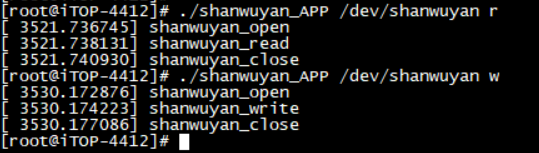
在本章中,我们只是单纯得调用了read和write函数,但是并没有真正的读写数据。读写数据操作将在下一章中出现。
本章的全部代码在这里。
作者:山无言
E-mail:shanwuyan@outlook.com
本博客所有文章仅用于学习、研究和交流目的,欢迎非商业性质转载。转载请附上原文出处链接和本声明。
文章如有谬误,欢迎大家指正。