刚刚出来的小demo,请大佬们多多指教
这是效果图
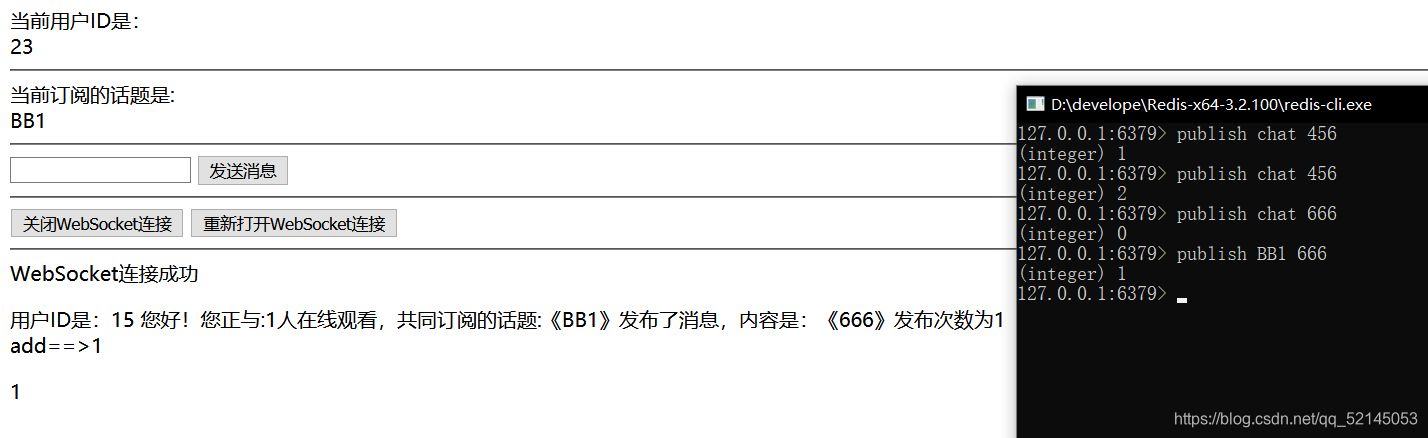
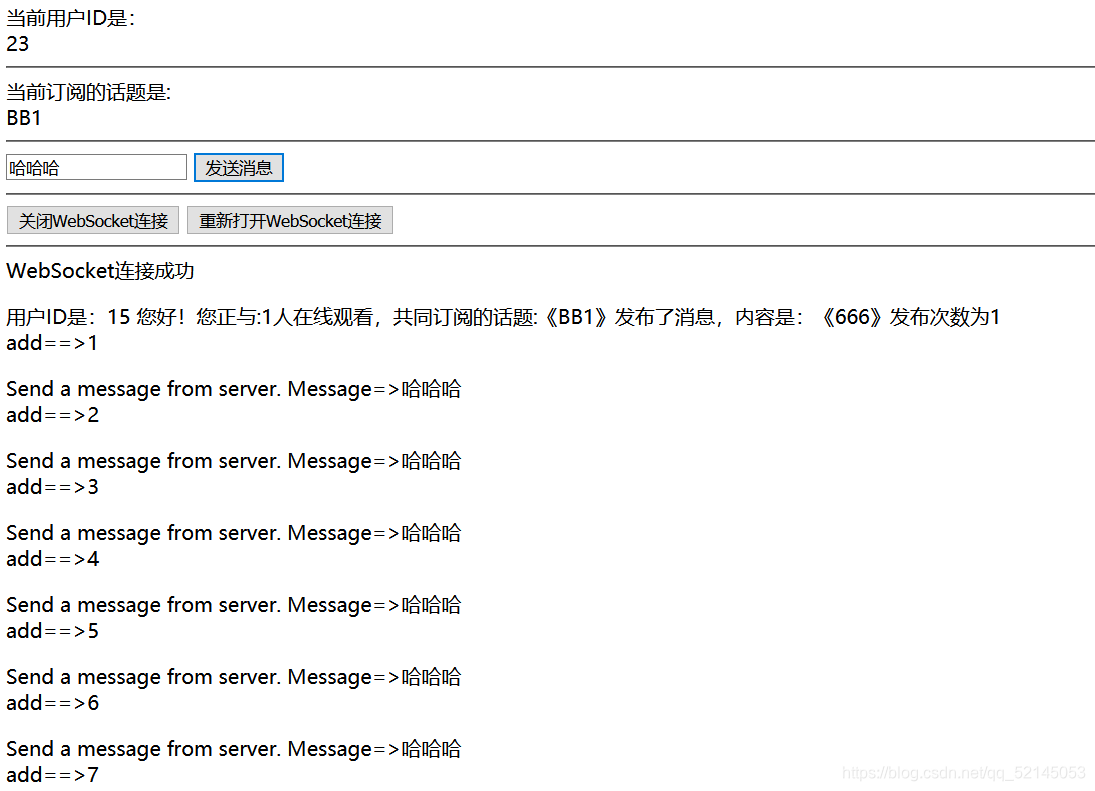
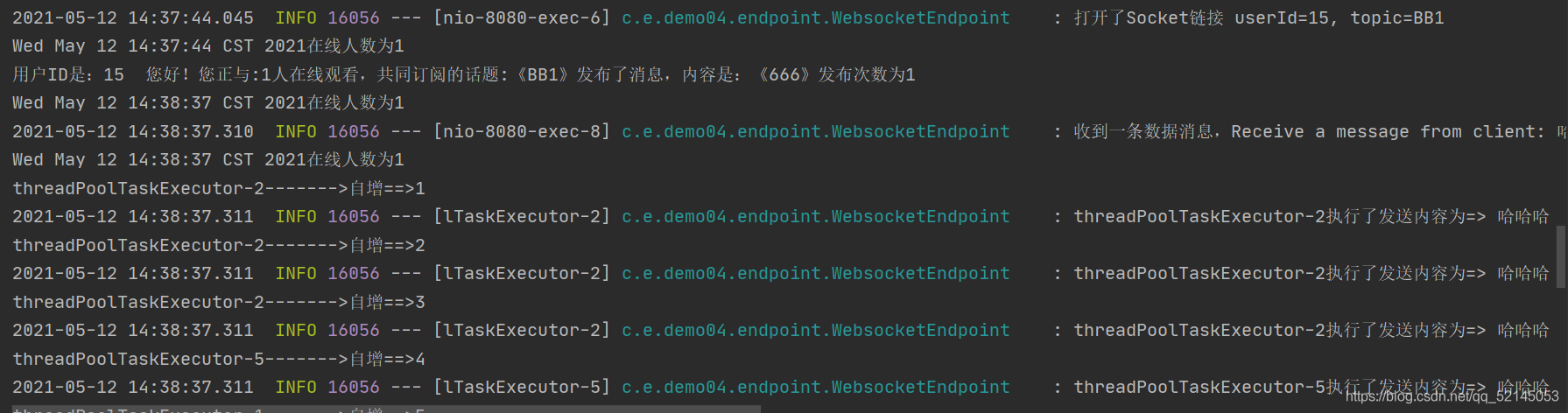
话不多说直接出码了=====================
1.所需依赖
<dependencies>
    <dependency>
        <groupId>org.springframework.boot</groupId>
        <artifactId>spring-boot-starter-data-redis</artifactId>
    </dependency>
    <dependency>
        <groupId>org.springframework.boot</groupId>
        <artifactId>spring-boot-starter-web</artifactId>
    </dependency>
    <dependency>
        <groupId>org.springframework.boot</groupId>
        <artifactId>spring-boot-starter-websocket</artifactId>
    </dependency>
    <dependency>
        <groupId>org.projectlombok</groupId>
        <artifactId>lombok</artifactId>
        <optional>true</optional>
    </dependency>
    <dependency>
        <groupId>org.springframework.boot</groupId>
        <artifactId>spring-boot-starter-test</artifactId>
        <scope>test</scope>
    </dependency>
    <!-- spring-boot-devtools热启动依赖包 start-->
    <dependency>
        <groupId>org.springframework.boot</groupId>
        <artifactId>spring-boot-devtools</artifactId>
        <optional>true</optional>
        <scope>runtime</scope>
    </dependency>
    <dependency>
        <groupId>redis.clients</groupId>
        <artifactId>jedis</artifactId>
        <version>2.9.0</version>
    </dependency>
    <dependency>
        <groupId>io.swagger</groupId>
        <artifactId>swagger-annotations</artifactId>
        <version>1.5.22</version>
    </dependency>
    <dependency>
        <groupId>com.github.wvengen</groupId>
        <artifactId>proguard-maven-plugin</artifactId>
        <version>2.0.4</version>
    </dependency>
    <dependency>
        <groupId>org.jetbrains</groupId>
        <artifactId>annotations</artifactId>
        <version>13.0</version>
        <scope>compile</scope>
    </dependency>
</dependencies>
2.配置类
redis:
@Configuration
public class RedisConfig {

    @Bean("container")
    RedisMessageListenerContainer container(RedisConnectionFactory connectionFactory,
                                            MessageListenerAdapter listenerAdapter) {
        RedisMessageListenerContainer container = new RedisMessageListenerContainer();
        LettuceConnectionFactory lettuceConnectionFactory = (LettuceConnectionFactory) connectionFactory;
        //设置存储的节点
        lettuceConnectionFactory.setDatabase(0);
        container.setConnectionFactory(lettuceConnectionFactory);
        //这里要设定监听的主题是chat
        //container.addMessageListener(listenerAdapter, new PatternTopic("BBB"));
        return container;
    }

    @Bean
    MessageListenerAdapter listenerAdapter(RedisMessageListener receiver) {
        //设置监听
        return new MessageListenerAdapter(receiver);
    }

    @Bean
    StringRedisTemplate template(RedisConnectionFactory connectionFactory) {
        //StringRedisTemplate继承了RedisTemplate,是专门用于字符串操作
        return new StringRedisTemplate(connectionFactory);
    }
}
Thread(可以不用)
@Configuration
//@EnableAsync   //开启异步执行
public class ThreadConfig {
    @Bean
    public ThreadPoolTaskExecutor threadPoolTaskExecutor(){
        //设置线程的名称
        //ThreadFactory springThreadFactory  = new CustomizableThreadFactory("springThread-pool-"+ UUID.randomUUID());
        ThreadPoolTaskExecutor executor = new ThreadPoolTaskExecutor();
        int i = Runtime.getRuntime().availableProcessors();//获取到服务器的cpu内核
        System.out.println("服务器的cpu内核是"+i);
        executor.setCorePoolSize(5);//核心池大小
        executor.setMaxPoolSize(100);//最大线程数
        executor.setQueueCapacity(1000);//队列程度
        executor.setKeepAliveSeconds(1000);//线程空闲时间
        //executor.setThreadNamePrefix("tsak-asyn");//线程前缀名称
        executor.setRejectedExecutionHandler(new ThreadPoolExecutor.AbortPolicy());//配置拒绝策略
        return executor;
    }
}
websocket
/***
 * 配置ServerEndpointExporter,配置后会自动注册所有“@ServerEndpoint”注解声明的Websocket Endpoint
 */
@Configuration
public class WebSocketConfig {

    @Bean
    public ServerEndpointExporter serverEndpointExporter() {
        return new ServerEndpointExporter();
    }
}
2.endpoint
/***
 * 用“@ServerEndPoint”注解来实现,实现简单;
 * 分别是用户ID 和用户订阅的主题
 */
@ServerEndpoint("/socket/{userId}/{topic}")
@RestController
@Slf4j
public class WebsocketEndpoint {

    /***
     * 用来记录当前连接数的变量
     */
    private static AtomicInteger onlineCount=new AtomicInteger(0);


    /***
     * concurrent包的线程安全Set,用来存放每个客户端对应的MyWebSocket对象
     */
    private static CopyOnWriteArraySet<WebsocketEndpoint> webSocketSet = new CopyOnWriteArraySet<WebsocketEndpoint>();


    /**
     * 得到线程池,执行并发操作
     */
    private ThreadPoolTaskExecutor threadPoolTaskExecutor = SpringUtils.getBean(ThreadPoolTaskExecutor.class);


    /**
     * 与某个客户端的连接会话,需要通过它来与客户端进行数据收发
     */
    private Session session;

    private static final Logger LOGGER = LoggerFactory.getLogger(WebsocketEndpoint.class);

    //用来引入刚才在webcoketConfig注入的类
    private RedisMessageListenerContainer container = SpringUtils.getBean("container");

    //自定义的消息发送器
    private RedisMessageListener listener;

    /***
     * socket打开的处理逻辑
     * @param session
     * @param userId
     * @param topic
     * @throws Exception
     */
    @OnOpen
    public void onOpen(Session session, @PathParam("userId") String userId, @PathParam("topic") String topic) throws Exception {
        LOGGER.info("打开了Socket链接 userId={}, topic={}", userId, topic);
        this.session = session;
        //webSocketSet中存当前对象
        webSocketSet.add(this);
        //在线人数加一
        addOnlineCount();
        listener = new RedisMessageListener();
        //放入session
        listener.setSession(session);
        //放入用户ID
        listener.setUserId(userId);
        //放入在线人数
        listener.setOnlineCount(getOnlineCount());
        container.addMessageListener(listener, new PatternTopic(topic));
    }

    @OnClose
    public void onClose() {
        webSocketSet.remove(this);
        subOnlineCount();
        getOnlineCount();
        container.removeMessageListener(listener);
        LOGGER.info("关闭了Socket链接Close a html. ");
    }

    @OnMessage
    public void onMessage(String message, Session session) {
        getOnlineCount();
        LOGGER.info("收到一条数据消息,Receive a message from client: " + message + "用户ID为" + session.getId());
        try {
            this.sendMessage(message);
        } catch (Exception e) {
            e.printStackTrace();
        }
    }

    /**
     * 加一方法
     */
    public volatile int p = 0;
    public synchronized void addOne() {
        p++;
        System.out.println(Thread.currentThread().getName()+"------->" + "自增==>" + p);
    }
    @OnError
    public void onError(Session session, Throwable error) {
        LOGGER.error("socket链接错误错误", error);
    }

    public  void sendMessage(String message) {
        if (session.isOpen()) {
            getOnlineCount();
            for (int i = 0; i < 20; i++) {
                threadPoolTaskExecutor.execute(new Runnable() {
                    @Override
                    public void run() {
                        synchronized (session){
                            try {
                                session.getBasicRemote().sendText("Send a message from server. Message=>" + message);
                                addOne();
                                log.info(Thread.currentThread().getName()+"执行了"+"发送内容为=> "+message);
                            } catch (IOException e) {
                                e.printStackTrace();
                            }
                        }
                    }
                });
            }
        }
    }
    //AtomicInteger是线程安全的 不需要synchronized修饰
    public static AtomicInteger getOnlineCount() {
        System.out.println(new Date() + "在线人数为" + onlineCount);
        return onlineCount;
    }
    //AtomicInteger是线程安全的 内置自增与自减的方法getAndIncrement()
    public static void addOnlineCount() {
        WebsocketEndpoint.onlineCount.getAndIncrement();
    }
    //AtomicInteger是线程安全的 内置自增与自减的方法getAndDecrement()
    public static void subOnlineCount() {
        WebsocketEndpoint.onlineCount.getAndDecrement();
    }
}
3.listener
/***
 * 定义一个RedisMessageListener类实现MessageListener接口,做消息订阅的处理
 */
@Component
public class RedisMessageListener implements MessageListener {

    //用户的session
    private Session session;

    //用户的ID
    private String userId;

    //在线人数
    private AtomicInteger onlineCount;

    public AtomicInteger getOnlineCount() {
        return onlineCount;
    }

    public void setOnlineCount(AtomicInteger onlineCount) {
        this.onlineCount = onlineCount;
    }

    public String getUserId() {
        return userId;
    }

    public void setUserId(String userId) {
        this.userId = userId;
    }

    public Session getSession() {
        return session;
    }

    public void setSession(Session session) {
        this.session = session;
    }

    public volatile int num= 0;
    @Override
    public void onMessage(Message message, byte[] pattern) {
        num++;
        String channel = new String(message.getChannel());
        String topic = new String(pattern);             //主题名字
        String msg = new String(message.getBody());     //消息体
        if (null != session && session.isOpen()) {
            try {
                synchronized (this) {
                    msg = "用户ID是:" + userId + "  您好!您正与:" + onlineCount + "人在线观看," +
                            "共同订阅的话题:《" + topic + "》发布了消息,内容是:《" + msg + "》" + "发布次数为" + num;
                    System.out.println(msg);
                    //jedis.publish(topic,msg);
                    session.getBasicRemote().sendText(msg);

                }
            } catch (IOException e) {
                System.out.println("发送消息异常");
            }
        } else if (userId != null) {
            //用户不在线但是订阅了主题
            System.out.println("用户:  " + userId + "  当前不在线,但是他已经订阅了,所以我们无法给他实时推出数据");
            doLiXian(userId);

        } else {

        }
    }

    public void doLiXian(String userId) {
        System.out.println(userId + "我们可以根据用户的ID来给用户(短信或者邮件)发送一些消息,都在这个方法里完成,比如发邮件、发短信之类的");
    }
}
4.utils
@Component
public class SpringUtils implements BeanFactoryPostProcessor {

    private static ConfigurableListableBeanFactory beanFactory; // Spring应用上下文环境

    @Override
    public void postProcessBeanFactory(ConfigurableListableBeanFactory beanFactory) throws BeansException {
        SpringUtils.beanFactory = beanFactory;
    }

    public static ConfigurableListableBeanFactory getBeanFactory() {
        return beanFactory;
    }

    /**
     * 获取对象
     *
     * @param name
     * @return Object 一个以所给名字注册的bean的实例
     * @throws BeansException
     *
     */
    @SuppressWarnings("unchecked")
    public static <T> T getBean(String name) throws BeansException {
        return (T) getBeanFactory().getBean(name);
    }

    /**
     * 获取类型为requiredType的对象
     *
     * @param clz
     * @return
     * @throws BeansException
     *
     */
    public static <T> T getBean(Class<T> clz) throws BeansException {
        T result = (T) getBeanFactory().getBean(clz);
        return result;
    }

    /**
     * 如果BeanFactory包含一个与所给名称匹配的bean定义,则返回true
     *
     * @param name
     * @return boolean
     */
    public static boolean containsBean(String name) {
        return getBeanFactory().containsBean(name);
    }

    /**
     * 判断以给定名字注册的bean定义是一个singleton还是一个prototype。 如果与给定名字相应的bean定义没有被找到,将会抛出一个异常(NoSuchBeanDefinitionException)
     *
     * @param name
     * @return boolean
     * @throws NoSuchBeanDefinitionException
     *
     */
    public static boolean isSingleton(String name) throws NoSuchBeanDefinitionException {
        return getBeanFactory().isSingleton(name);
    }

    /**
     * @param name
     * @return Class 注册对象的类型
     * @throws NoSuchBeanDefinitionException
     *
     */
    public static Class<?> getType(String name) throws NoSuchBeanDefinitionException {
        return getBeanFactory().getType(name);
    }

    /**
     * 如果给定的bean名字在bean定义中有别名,则返回这些别名
     *
     * @param name
     * @return
     * @throws NoSuchBeanDefinitionException
     *
     */
    public static String[] getAliases(String name) throws NoSuchBeanDefinitionException {
        return getBeanFactory().getAliases(name);
    }
}
5.启动类
@SpringBootApplication
public class Demo04Application {

    public static void main(String[] args) {
        SpringApplication.run(Demo04Application.class, args);
    }

}
6.前端页面(前端较菜)
<!DOCTYPE html>
<html>
<head>
<title>WebSocket示例</title>
<meta content='width=device-width, initial-scale=1, maximum-scale=1, user-scalable=no' name='viewport'/>
<meta http-equiv="Content-Type" content="text/html; charset=utf-8"/>
</head>
<body>
当前用户ID是:<div>23</div>
<hr/>
当前订阅的话题是: <div>chat</div>
<hr/>
<input id="text" type="text"/>
<button οnclick="send()">发送消息</button>
<hr/>
<button οnclick="closeWebSocket()">关闭WebSocket连接</button>
<button οnclick="openWebSocket()">重新打开WebSocket连接</button>
<hr/>
<div id="message"></div>
<div id="number"></div>
</body>
<script type="text/javascript">
var websocket = null;
var i = 0;
//判断当前浏览器是否支持WebSocket
if ('WebSocket' in window) {
//23是一个ID ,chat是要订阅的话题
websocket = new WebSocket("ws://192.168.2.21:8080/socket/15/BB1");
} else {
alert('当前浏览器 Not support websocket')
}
//连接发生错误的回调方法
websocket.onerror = function () {
setMessageInnerHTML("WebSocket连接发生错误");
};
//连接成功建立的回调方法
websocket.onopen = function () {
setMessageInnerHTML("WebSocket连接成功");
}
//接收到消息的回调方法
websocket.onmessage = function (event) {
console.log(event.data)
i++;
setMessageInnerHTML(event.data);
if (i == 1){
document.getElementById('number').innerHTML = i;
}
//alert("数据已接收...");
}
//连接关闭的回调方法
websocket.onclose = function () {
setMessageInnerHTML("WebSocket连接关闭的回调方法,后台已经关闭了这个连接,执行至" + i + "次了");
}
//监听窗口关闭事件,当窗口关闭时,主动去关闭websocket连接,防止连接还没断开就关闭窗口,server端会抛异常。
window.onbeforeunload = function () {
closeWebSocket();
}
//将消息显示在网页上
function setMessageInnerHTML(innerHTML) {
console.log(innerHTML)
if (i == 0){
document.getElementById('message').innerHTML += innerHTML + '<p>'
}else {
document.getElementById('message').innerHTML += innerHTML + '<br/>' + 'add==>' + i + '</p>';
}
}
//关闭WebSocket连接
function closeWebSocket() {
websocket.close();
setMessageInnerHTML("WebSocket连接关闭");
}
//open WebSocket连接
function openWebSocket() {
if (websocket.readyState == 1 || websocket.readyState == 0) {
closeWebSocket();
console.log("如果已经存在,先给他关闭")
setMessageInnerHTML("当前连接没有断开,接下来我们会给他断开,然后重新打开一个");
}
//判断当前浏览器是否支持WebSocket
if ('WebSocket' in window) {
//不存在而且浏览器支持,重新打开连接
websocket = new WebSocket("ws://192.168.2.21:8080/socket/15/BB1");
setMessageInnerHTML("已经重新打开了");
} else {
alert('当前浏览器 Not support websocket')
}
}
//发送消息
function send() {
var message = document.getElementById('text').value;
websocket.send(message);
//alert("数据发送中...");
}
</script>
</html>
7.配置文件
spring.redis.host=127.0.0.1
spring.redis.port=6379
spring.redis.jedis.pool.max-active=8

server.port=8080
server.tomcat.uri-encoding=utf-8

#热部署
spring.devtools.livereload.enabled=true
spring.devtools.restart.additional-paths=src/main/java
spring.devtools.restart.exclude=
#页面不加载缓存,修改即时生效
spring.freemarker.cache=false
记得一键三连---------------------------------------------------------------------------------------------------------------------------------------------------------------------------------------------------------------------------------------------------------哈哈哈