https://github.com/typicode/json-server
Install JSON Server
npm install -g json-server
Create a db.json file with some data
{
“posts”: [
{ “id”: 1, “title”: “json-server”, “author”: “typicode” }
],
“comments”: [
{ “id”: 1, “body”: “some comment”, “postId”: 1 }
],
“profile”: { “name”: “typicode” }
}
Start JSON Server
json-server --watch db.json
Now if you go to http://localhost:3000/posts/1, you’ll get
{ “id”: 1, “title”: “json-server”, “author”: “typicode” }
快捷起json服务器的方式: 在packge.json中的scripts加上最后一行 后面是实际放json假数据的位置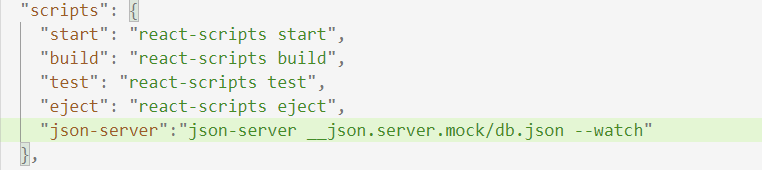
版权声明:本文为Achievek原创文章,遵循CC 4.0 BY-SA版权协议,转载请附上原文出处链接和本声明。