一、简介
label-studio是一个开源的数据标注、注释工具
技术:
- 后端纯python编写,使用了flask
- 前端:React + MST
存储:
- 本地存储
- json
- dir-jsons
- task-json
- completions-dir
- Amazon AWS 简单存储服务(S3)
- 读取
- label-studio start my_project --init --source s3 --source-path my-s3-bucket
- 写入:
- label-studio start my_project --init --target s3-completions --target-path my-s3-bucket
- 读取
- 谷歌云存储(GCS)
- 读取:
- label-studio start my_project --init --source gcs --source-path my-gcs-bucket
- 写入:
- label-studio start my_project --init --target gcs-completions --source-path my-gcs-bucket
- 读取:
其他:
- 没有汉化,但页面简单
- 没有用户权限功能,只支持一个简单的页面初始的登录
- 启动时加上用户名密码参数即可 label-studio start my_project --username user --password pwd
- docker中设置环境变量USERNAME、PASSWORD
- 支持多会话模式:
- 每个会话以会话ID作为名称
- 创建项目 label-studio start-multi-session --root-dir ./session_projects
二、标注平台的使用
标注步骤:
1.设置标注任务的配置
2.导入任务
3.开始标注
4.导出任务
三、架构
主要分为三部分:
- label studio前端:标注
- label studio后端:建立项目、数据导入、任务管理、数据导出
- 机器学习后端
架构图: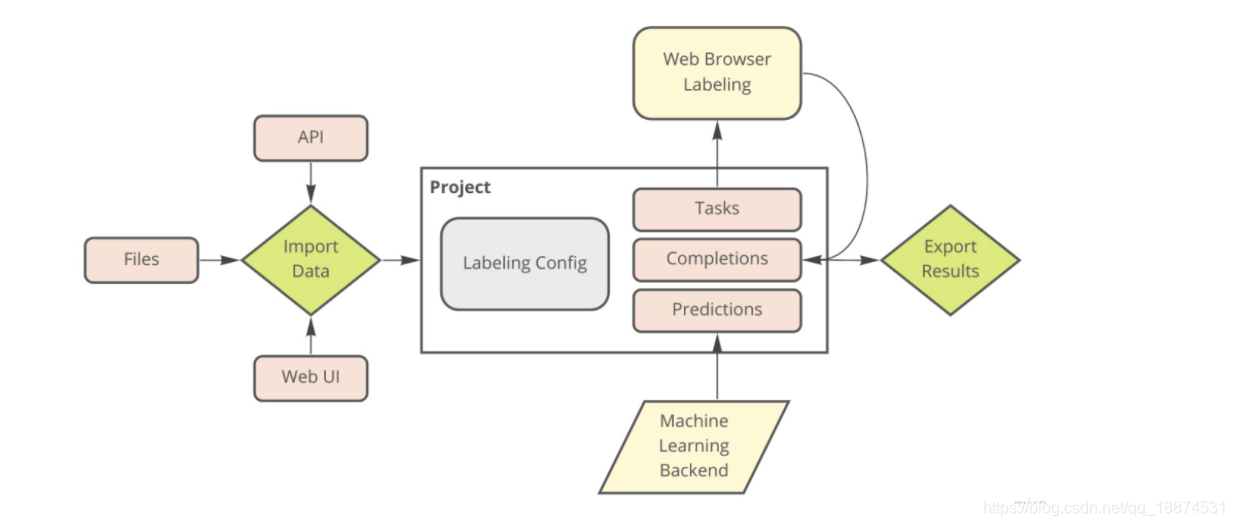
- Tasks:表示一个单独的数据集(文字、图片、音频、视频、html、数字或者混合的)
- Completions:json格式的数据结果。可导出,在机器学习中使用
- 支持导出的格式:
- JSON
- CSV、TSV
- CoNLL 2003
- named entity recognition
- COCO
- image segmentation
- semantic segmentation
- Pascal VOC XML
- image segmentation
- semantic segmentation
- Brush Labels to Numpy & PNG
- image segmentation
- semantic segmentation
- 支持导出的格式:
- Predictions:注释过程中预标记,或者用来验证模型
- Machine learning backend:机器学习后端,使用机器学习模型,自动学习并且预测结果
- Labeling config:标注配置,带有标签的xml
四、启用一个label-studio项目
1.快速启动一个label-studio项目
# Requires >=Python3.5, Python 3.9 is not supported
pip install -U label-studio

# Initialize the project in test_project path
label-studio init test_project

# Start the server at http://localhost:8080
label-studio start test_project
2. 通过docker来部署
docker run --rm -p 8080:8080 -v `pwd`/test_project:/label-studio/test_project --name label-studio heartexlabs/label-studio:latest label-studio start test_project --init

# docker-compose
INIT_COMMAND='--init' docker-compose up -d
- 初次启动,需要加 INIT_COMMAND=’–init’
- 也可把INIT_COMMAND=’–init’配置到.env
- 启用已有项目,加–force
3. 通过项目代码部署
python label_studio/server.py start labeling_project --init
五、机器学习后端
- 利用label-studio-ml
- 创建、初始化创建ML后端目录
- 启动ML后端服务
- 用label-studio,在启动标注平台时,将项目连接到ML后端
- 可通过API:
- 获取预测结果
- curl -X POST -d ‘{“text”:“some text”}’ -H “Content-Type: application/json” http://localhost:8080/api/models/predictions
- 模型训练
- curl -X POST http://localhost:8080/api/models/train
- 获取预测结果
官方文档地址:https://labelstud.io/guide/
github地址:https://github.com/heartexlabs/label-studio
版权声明:本文为qq_18874531原创文章,遵循CC 4.0 BY-SA版权协议,转载请附上原文出处链接和本声明。