mybatis自动生成mapper.xml文件
编写配置文件:config.xml
<?xml version="1.0" encoding="UTF-8"?>
<!DOCTYPE generatorConfiguration  PUBLIC "-//mybatis.org//DTD MyBatis Generator Configuration 1.0//EN" "http://mybatis.org/dtd/mybatis-generator-config_1_0.dtd">
<generatorConfiguration>
 	<classPathEntry location="mysql-connector-java-8.0.13.jar"/>
	<context id="context1"  targetRuntime="MyBatis3">
		<property name="javaFileEncoding" value="UTF-8"/>
		<commentGenerator>
			<property name="suppressDate" value="true"/>
			<property name="suppressAllComments" value="true"/>
		</commentGenerator>
		<!-- 数据库连接信息 -->
		<jdbcConnection driverClass="com.mysql.cj.jdbc.Driver" userId="root" password=""
			connectionURL="jdbc:mysql://localhost/bookshop?useSSL=false"/>
		<javaTypeResolver>
			<property name="forceBigDecimals" value="false"/>
		</javaTypeResolver>
		<!-- java bean -->
		<javaModelGenerator targetPackage="com.demos.pojo" targetProject="src">
			<property name="trimStrings" value="false"/>
		</javaModelGenerator>
		<!-- mapper映射文件 -->
		<sqlMapGenerator targetPackage="com.demos.mapper" targetProject="src">
		</sqlMapGenerator>
		<!-- 配置dao接口 -->
		<javaClientGenerator type="XMLMAPPER" targetPackage="com.demos.dao" targetProject="src">
		</javaClientGenerator>
<!--
		<table tableName="mnt_rule" domainObjectName="Rule" enableCountByExample="false"
			enableUpdateByExample="false" enableDeleteByExample="false" enableSelectByExample="false" selectByExampleQueryId="false" >
			<generatedKey column="id" sqlStatement="JDBC" identity="true"/>
		</table>
-->
		<table tableName="book" domainObjectName="Book" enableCountByExample="false"
			enableUpdateByExample="false" enableDeleteByExample="false" enableSelectByExample="false" selectByExampleQueryId="false" >
			<generatedKey column="id" sqlStatement="JDBC" identity="true"/>
		</table>

	</context>
</generatorConfiguration>
使用时只需要修改
- classPathEntry的connector包,
- 数据库连接信息,
- java bean位置,
- mapper映射文件位置,
- dao接口位置,
- 表名 改成自己的即可
把 以下文件复制到genorator项目根目录下
mybatis-3.5.3.jar,mybatis-generator-core-1.3.2.jar,mybatis-generator-core-cxy.jar,mysql-connector-java-8.0.13.jar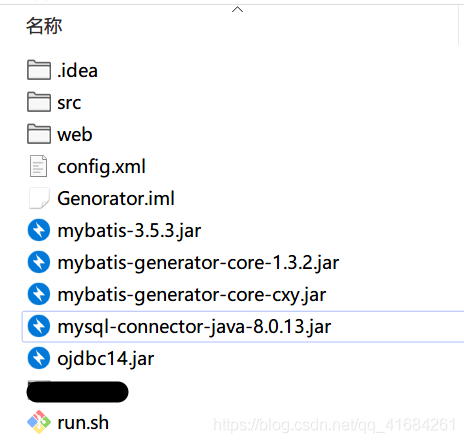
[外链图片转存失败,源站可能有防盗链机制,建议将图片保存下来直接上传(img-dyyUJuaM-1582555257991)(D:\截图\网课\Genorator.png)]
运行脚本:run.sh
#!/bin/bash
java -jar mybatis-generator-core-cxy.jar -configfile config.xml -overwrite
这个和mybatis逆向工程差不多,可以了解一下。
版权声明:本文为qq_41684261原创文章,遵循CC 4.0 BY-SA版权协议,转载请附上原文出处链接和本声明。