一、问题
Plugin execution not covered by lifecycle configuration: org.apache.maven.plugins:maven-compiler-plugin:3.7.0:compile (execution: default-compile, phase: compile)
二、解决方案
Window” -- “Preferences” -- “Maven” -- “Lifecycle Mapping”
查看Change mapping file location一栏的地址,一般都是xxxxx/.metadata/.plugins/org.eclipse.m2e.core/lifecycle-mapping-metadata.xml,然而一般org.eclipse.m2e.core目录下没有lifecycle-mapping-metadata.xml文件
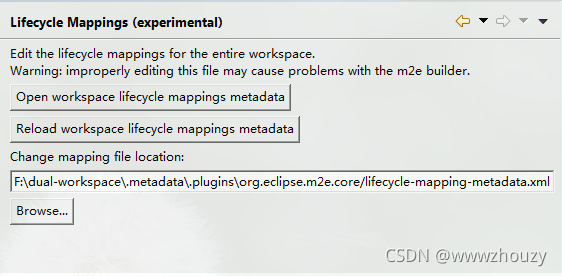
我们需要到Eclipse的安装目录下找到plugins\org.eclipse.m2e.lifecyclemapping.defaults_xxxxx.jar文件,解压之后就会看到一个lifecycle-mapping-metadata.xml文件,打开编辑他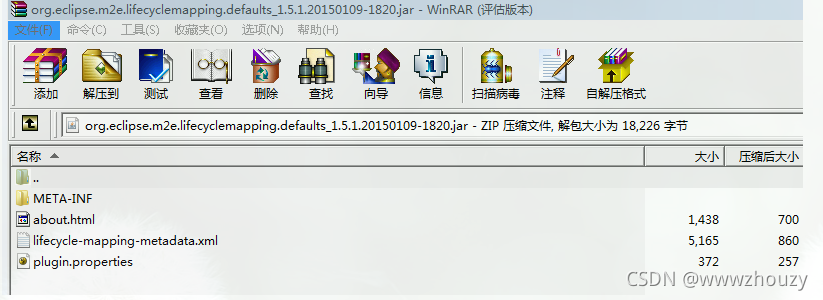
<pluginExecution>
      <pluginExecutionFilter>
        <groupId>org.apache.maven.plugins</groupId>
        <artifactId>maven-compiler-plugin</artifactId>
        <versionRange>[2.5,)</versionRange>
        <goals>
          <goal>testCompile</goal>
          <goal>compile</goal>
        </goals>
      </pluginExecutionFilter>
      <action>
        <ignore />
      </action>
</pluginExecution>
保存之后将其复制到上面说的xxxxx/.metadata/.plugins/org.eclipse.m2e.core/lifecycle-mapping-metadata.xml目录。
可以把Preferences -> Maven中的Update Maven projects on startup选项勾上,然后重启Eclipse即可。
版权声明:本文为wwwzhouzy原创文章,遵循CC 4.0 BY-SA版权协议,转载请附上原文出处链接和本声明。