Java-网络编程
概述
计算机网络是通过传输介质、通信设施和网络通信协议,把分散在不同地点的计算机设备互连起来的,实现资源共享和数据传输的系统。网络编程就是编写程序使互联网的两个(或多个)设备(如计算机)之间进行数据传输。Java语言对网络编程提供了良好的支持。通过其提供的接口我们可以很方便地进行网络编程。
网络编程的目的
数据交换,数据通信,资源共享
网络编程中的两个主要问题
- 如何定位网络上的一台或者多台主机
- 如何通信
网络编程中的要素
- IP 和 端口号 IP类
- 网络通信协议 UDP,TCP
与IP有关的类
ip地址:InetAddress
- 唯一定位一台网络上的计算机
- 127.0.0.1(localhost) 本地环回地址 本机
import java.net.InetAddress;
import java.net.UnknownHostException;

//测试IP类
//InetAddress 只有静态方法
public class TestInetAddress {
    public static void main(String[] args) {
        try {
            //查询本机地址
            InetAddress inetAddress1 = InetAddress.getByName("127.0.0.1");//localhost
            System.out.println(inetAddress1);///127.0.0.1
            InetAddress inetAddress2 = InetAddress.getLocalHost();
            System.out.println(inetAddress2);//LAPTOP-EIUE8T7M/115.199.76.29

            //查询网站ip地址
            InetAddress inetAddress3 = InetAddress.getByName("www.baidu.com");
            System.out.println(inetAddress3);//www.baidu.com/180.101.49.12

            //常用方法
//            System.out.println(inetAddress3.getAddress());//[B@74a14482
//            System.out.println(inetAddress3.getCanonicalHostName());//;规范得名字180.101.49.12
            System.out.println(inetAddress3.getHostAddress());//ip 180.101.49.12
            System.out.println(inetAddress3 .getHostName());//域名www.baidu.com 或者自己电脑得名字


        } catch (UnknownHostException e) {
            e.printStackTrace();
        }
    }
}
端口
端口表示计算机上得一个程序的进程
- 不同的进程有不同的端口号,用来区分软件
- 被规定0~65535
- TCP/UDP:65535*2 TCP 80 UDP 80✔,单个协议下不能冲突
- 端口分类
- 公有端口0-1023
- HTTP:80
- HTTPS:443
- FTP:21
- Telent:23
- 程序注册端口:1024-49151,分配给用户或者程序
- Tomcat:8080
- MySQL:3306
- Oracle:1521
- 动态,私有:49152-65535
- 公有端口0-1023
端口:常见dos命令
netstart -ano#查看所有端口
netstart -ano|findstr "8080"#查看指定端口
tasklist|findstr "8696"#查看指定端口的进程
//IP+端口的类
import java.net.InetSocketAddress;

public class TestSocketAddress {
    public static void main(String[] args) {
        InetSocketAddress inetSocketAddress = new InetSocketAddress("127.0.0.1", 8080);
        System.out.println(inetSocketAddress);

        System.out.println(inetSocketAddress.getAddress());
        System.out.println(inetSocketAddress.getHostName());
        System.out.println(inetSocketAddress.getPort());
    }
}
通信协议
协议:约定
TCP/IP协议簇
重要:
- TCP:用户传输协议
- UDP:用户数据报协议
TCP实现聊天
客户端
1.连接服务器
2.发送消息
import java.io.IOException;
import java.io.OutputStream;
import java.net.InetAddress;
import java.net.Socket;

//客户端
public class TcpClient {
    public static void main(String[] args) {

        OutputStream os = null;
        Socket socket = null;

        try {
            //1.要知道服务器的地址
            InetAddress serverIp = InetAddress.getByName("127.0.0.1");
            //2.端口号
            int port = 9999;
            //3.创建一个Socket连接
            socket = new Socket(serverIp,port);
            //4.发送消息 IO流
            os = socket.getOutputStream();
            os.write("你好,服务器,客户端想你发来问候".getBytes());
        } catch (IOException e) {
            e.printStackTrace();
        }finally {
            if (os!=null){
                try {
                    os.close();
                } catch (IOException e) {
                    e.printStackTrace();
                }
            }
            if (socket!=null){
                try {
                    socket.close();
                } catch (IOException e) {
                    e.printStackTrace();
                }
            }

        }
    }
}
服务器
1.建立服务的端口Server’Socket
2.等待用户连接
3.接受用户的消息
import java.io.ByteArrayOutputStream;
import java.io.IOException;
import java.io.InputStream;
import java.net.ServerSocket;
import java.net.Socket;

//服务端
public class TcpServer {
    public static void main(String[] args) {

        ByteArrayOutputStream baos = null;
        InputStream is = null;
        Socket accept = null;
        ServerSocket serverSocket = null;

        try {
            //1.服务器的地址
            serverSocket = new ServerSocket(9999);
            //2.等待客户端连接过来
            accept = serverSocket.accept();
            //3.读取客户端的消息
            is = accept.getInputStream();

            //管道流
            baos = new ByteArrayOutputStream();
            byte[] buffer = new byte[1024];
            int len;
            while((len=is.read(buffer))!=-1){
                baos.write(buffer,0,len);
            }
            System.out.println(baos.toString());

        } catch (IOException e) {
            e.printStackTrace();
        }finally {
            if (baos!=null){
                try {
                    baos.close();
                } catch (IOException e) {
                    e.printStackTrace();
                }
            }
            if (is!=null){
                try {
                    is.close();
                } catch (IOException e) {
                    e.printStackTrace();
                }
            }
            if (accept!=null){
                try {
                    accept.close();
                } catch (IOException e) {
                    e.printStackTrace();
                }
            }
            if (serverSocket!=null){
                try {
                    serverSocket.close();
                } catch (IOException e) {
                    e.printStackTrace();
                }
            }

        }

    }
}
TCP实现文件上传
客户端
import java.io.*;
import java.net.InetAddress;
import java.net.Socket;

public class TcpClient2 {
    public static void main(String[] args) throws IOException {
        //1.创建一个socket连接
        Socket socket = new Socket(InetAddress.getByName("127.0.0.1"), 9000);
        //2.创建一个输出流
        OutputStream os = socket.getOutputStream();
        //3.读取文件
        FileInputStream fis = new FileInputStream("E:\\Pictures\\akali.jpg");
        //4.写出文件
        byte[] buffer = new byte[1024];
        int len;
        while((len = fis.read(buffer))!=-1){
            os.write(buffer,0, len);
        }
        //通知服务器,我已经结束了
        socket.shutdownOutput();//我已经传输完了,这句不写死等

        //确定服务器接收到了,才能断开
        InputStream is = socket.getInputStream();
        ByteArrayOutputStream baos = new ByteArrayOutputStream();
        byte[] buffer2 = new byte[1024];
        int len2;
        while((len = is.read(buffer2))!=-1){
            baos.write(buffer2,0,len);
        }
        System.out.println(baos.toString());
        //5.关闭资源
        baos.close();
        is.close();
        fis.close();
        os.close();
        socket.close();
    }
}
服务端
import java.io.FileOutputStream;
import java.io.IOException;
import java.io.InputStream;
import java.io.OutputStream;
import java.net.ServerSocket;
import java.net.Socket;

public class TcpServer2 {
    public static void main(String[] args) throws IOException {
        //1.创建服务,端口
        ServerSocket serverSocket = new ServerSocket(9000);
        //2.监听客户端的连接
        Socket socket = serverSocket.accept();//阻塞式监听,会一直等待连接
        //3.获取输入流
        InputStream is = socket.getInputStream();
        //4.文件输出
        FileOutputStream fos = new FileOutputStream("akaliup.jpg");
        byte[] buffer = new byte[1024];
        int len;
        while ((len = is.read(buffer))!=-1){
            fos.write(buffer,0,len);
        }

        //通知客户端,接受完毕
        OutputStream os = socket.getOutputStream();
        os.write("我接受完毕了,你可以断开了".getBytes());
        //关闭资源
        fos.close();
        is.close();
        socket.close();
        serverSocket.close();

    }
}
Tomcat
别人写好的服务器
服务端
- 自定义 S
- Tomcat服务器 S
客户端
- 自定义 C
- 浏览器 B
UDP消息发送
两个类
发:DatagramPacket
接:DatagramSocket
UDP没有服务端,客户端之分,既可以充当接收端,也可以充当发送端
示例
UDP发送端
import java.net.DatagramPacket;
import java.net.DatagramSocket;
import java.net.InetAddress;

//不需要连接服务器
//没有服务器也不会报错
//只管发,不管后续事宜
public class UdpClient {
    public static void main(String[] args) throws Exception {
        //1.建立一个socket
        DatagramSocket socket = new DatagramSocket();//如果在这里也设置端口,这里也能接收信息(无所谓谁式服务,客户)
        //2.建立一个包,并确定发送对象
        String msg = "你好,服务器!";
        InetAddress localhost = InetAddress.getByName("localhost");
        int port = 9090;
        //数据的长度,起止,发送对象
        DatagramPacket packet = new DatagramPacket(msg.getBytes(), 0, msg.getBytes().length, localhost, port);

        //3.发送包
        socket.send(packet);

        //4.关闭流
        socket.close();
    }

}
UDP接收端
import java.net.DatagramPacket;
import java.net.DatagramSocket;

//事实上,不需要服务器,但是需要接收发来的文件
//且一直等待客户端的连接
public class UdpServer {
    public static void main(String[] args) throws Exception {
        //开放端口
        DatagramSocket socket = new DatagramSocket(9090);
        //接受数据包
        byte[] buffer = new byte[1024];
        DatagramPacket packet = new DatagramPacket(buffer, 0, buffer.length);//接受

        socket.receive(packet);//阻塞接收

        System.out.println(packet.getAddress().getHostAddress());
        System.out.println(new String(packet.getData(),0,packet.getLength()));

        //关闭连接
        socket.close();

    }
}
结果
127.0.0.1
你好,服务器!
UDP实现聊天
QQ,微信
发送方,循环发送消息
import java.io.BufferedReader;
import java.io.InputStreamReader;
import java.net.DatagramPacket;
import java.net.DatagramSocket;
import java.net.InetSocketAddress;

//消息发送方
public class UdpSend {
    public static void main(String[] args) throws Exception {

        DatagramSocket socket = new DatagramSocket(8888);
        //准备数据: 从控制台读取
        BufferedReader br = new BufferedReader(new InputStreamReader(System.in));
        while(true) {//循环发送
            String data = br.readLine();//一行一行读
            byte[] buffer = data.getBytes();//必须转字节
            DatagramPacket packet = new DatagramPacket(buffer, 0, buffer.length, new InetSocketAddress("localhost", 7777));
            socket.send(packet);
            if (data.equals("q")){
                break;
            }
        }
        socket.close();
    }
}
接收方,循环接收消息
import java.net.DatagramPacket;
import java.net.DatagramSocket;

//消息接送方
public class UdpReceive {
    public static void main(String[] args) throws Exception {
        DatagramSocket socket = new DatagramSocket(7777);

        //准备接受packet
        byte[] buffer = new byte[1024];
        while (true){
            DatagramPacket packet = new DatagramPacket(buffer,0,buffer.length);
            socket.receive(packet);//阻塞式接受包裹
            //断开连接
            byte[] data = packet.getData();
            String receivedata = new String(data, 0, data.length);
            System.out.println(receivedata);
            if (receivedata.equals("q")){
                break;
            }
        }

        socket.close();
    }
}
UDP多线程在线聊天
发送方线程
import java.io.BufferedReader;
import java.io.IOException;
import java.io.InputStreamReader;
import java.net.DatagramPacket;
import java.net.DatagramSocket;
import java.net.InetSocketAddress;
import java.net.SocketException;


public class TalkSend implements Runnable{
    DatagramSocket socket = null;
    BufferedReader br = null;
    private String toIp;
    private int toPort;
    private int fromPort;

    public TalkSend(String toIp, int toPort) {
        this.toIp = toIp;
        this.toPort = toPort;

        try {
            socket = new DatagramSocket(this.fromPort);
            br = new BufferedReader(new InputStreamReader(System.in));
        } catch (SocketException e) {
            e.printStackTrace();
        }

    }

    @Override
    public void run() {
        while(true) {//循环发送
            try {
                String data = br.readLine();//一行一行读
                byte[] buffer = data.getBytes();//必须转字节
                DatagramPacket packet = new DatagramPacket(buffer, 0, buffer.length, new InetSocketAddress(this.toIp,this.toPort));
                socket.send(packet);
                if (data.equals("q")){
                    break;
                }
            } catch (IOException e) {
                e.printStackTrace();
            }
        }
        socket.close();

    }
}
接收端线程
import java.io.IOException;
import java.net.DatagramPacket;
import java.net.DatagramSocket;
import java.net.SocketException;

public class TalkReceive implements Runnable {
    DatagramSocket socket = null;
    private int port;
    private String msfFrom;

    public TalkReceive(int port, String msfFrom) {
        this.port = port;
        this.msfFrom = msfFrom;
        try {
            socket = new DatagramSocket(this.port);
        } catch (SocketException e) {
            e.printStackTrace();
        }
    }

    @Override
    public void run() {

        while (true){
            try {
                //准备接受packet
                byte[] contianer = new byte[1024];
                DatagramPacket packet = new DatagramPacket(contianer,0,contianer.length);
                socket.receive(packet);//阻塞式接受包裹
                //断开连接
                byte[] data = packet.getData();
                String receivedata = new String(data, 0, data.length);
                System.out.println(msfFrom+":"+receivedata);
                if (receivedata.equals("q")){
                    break;
                }
            } catch (IOException e) {
                e.printStackTrace();
            }
        }

        socket.close();
    }
}
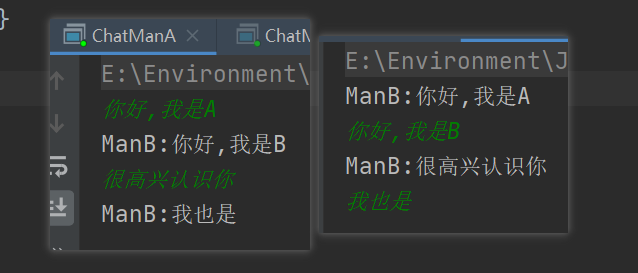
manA开启双线程(同时发送,接收消息)
public class ChatManA{
    public static void main(String[] args) {
        //开启两个线程(接收,发送)
        new Thread(new TalkSend("localhost",8888)).start();
        new Thread(new TalkReceive(7777,"ManB")).start();
    }
}
manB开启双线程(同时发送,接收消息)
public class ChatManB {
    public static void main(String[] args) {
        //开启两个线程
        new Thread(new TalkSend("localhost",7777)).start();
        new Thread(new TalkReceive(8888,"ManB")).start();
    }
}
URL
统一资源定位符,定位互联网上的某一个资源
DNS域名解析:域名->ip
协议://ip地址:端口/资源
import java.io.FileOutputStream;
import java.io.IOException;
import java.io.InputStream;
import java.net.HttpURLConnection;
import java.net.URL;
//模拟下载资源
public class URLDown {
    public static void main(String[] args) throws IOException {
        //下载地址
        URL url = new URL("https://m801.music.126.net/20210313130455/b470d47e65f08850ad36efd70290bcd8/jdyyaac/000f/0f59/5252/7e94d6617383274389b5e84937052d0e.m4a");
        //连接到这个资源
        HttpURLConnection urlConnection = (HttpURLConnection) url.openConnection();
        //
        InputStream is = urlConnection.getInputStream();
        FileOutputStream fos = new FileOutputStream("suyan.m4a");
        byte[] buffer = new byte[1024];
        int len;
        while((len = is.read(buffer))!=-1){
            fos.write(buffer,0,len);
        }
        fos.close();
        is.close();
        urlConnection.disconnect();
    }
}
版权声明:本文为baidu_41656912原创文章,遵循CC 4.0 BY-SA版权协议,转载请附上原文出处链接和本声明。