遇到的问题:传给后端的时候总比前端相差8个小时
需要注意的问题:
- value-format=“yyyy-MM-dd HH:mm:ss” 需要设置value-format的格式
- 对象属性上添加注解 @JsonFormat(shape = JsonFormat.Shape.STRING, pattern=“yyyy-MM-dd HH:mm:ss”, timezone = “GMT+8”)
效果图:
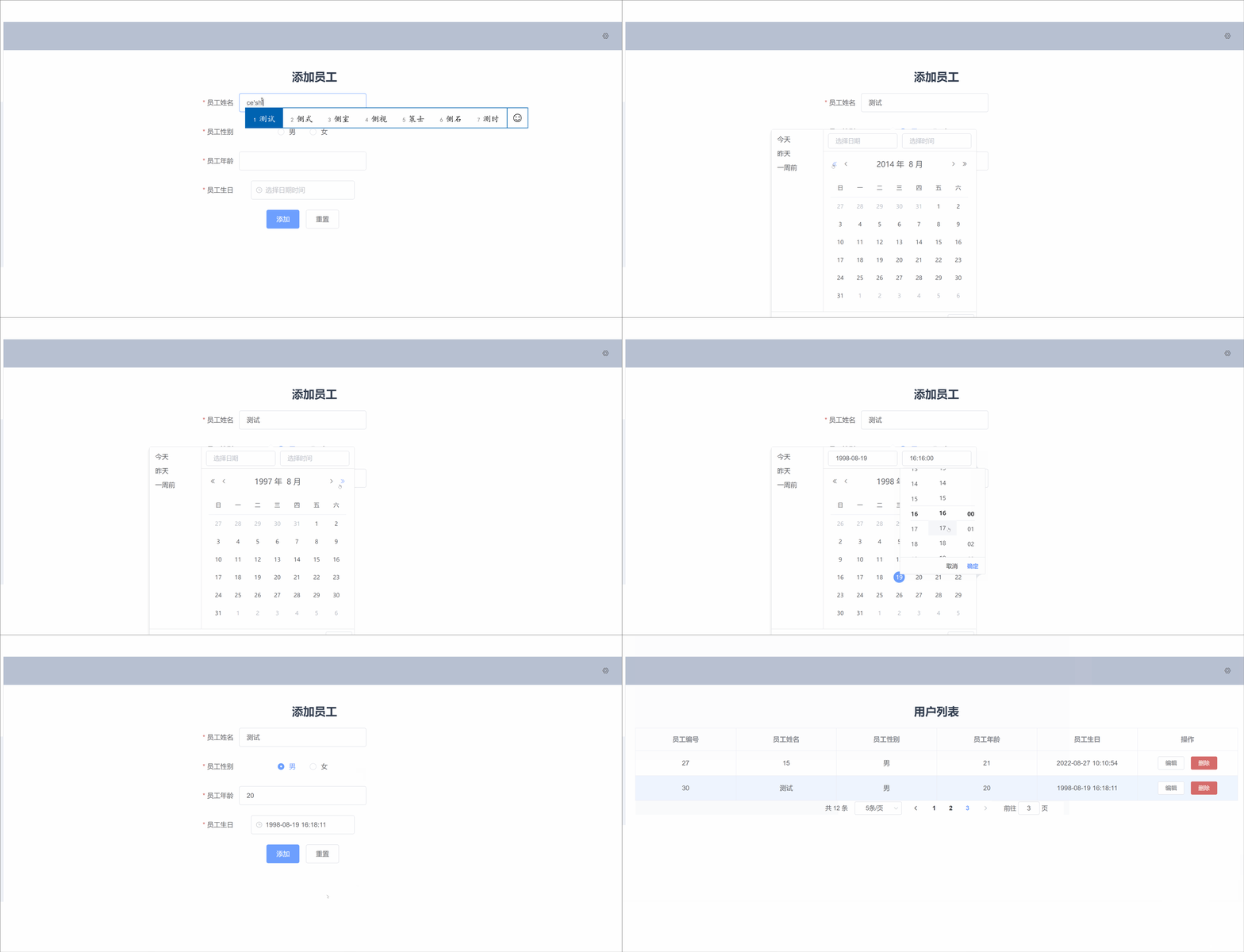
前端
<template>
    <div>
      <h2>添加员工</h2>
      <el-form ref="form" :model="user" :rules="rules" label-width="80px" class="add-box">
        <el-form-item label="员工姓名" prop="name">
          <el-input v-model="user.name"></el-input>
        </el-form-item>
        <el-form-item label="员工性别" prop="sex">
          <el-radio-group v-model="user.sex">
            <el-radio label="男"></el-radio>
            <el-radio label="女"></el-radio>
          </el-radio-group>
        </el-form-item>
        <el-form-item label="员工年龄" prop="age">
          <el-input v-model.number="user.age"></el-input>
        </el-form-item>
        <el-form-item label="员工生日" prop="birth">
          <div class="block">
            <el-date-picker
              v-model="user.birth"               绑定员工的生日字段
              format="yyyy-MM-dd HH:mm:ss"       控件显示的日期格式
              value-format="yyyy-MM-dd HH:mm:ss" 传给后端数据的格式
              :editable="false"                  设置不能手动输入日期
              type="datetime"
              placeholder="选择日期时间"
              align="right"
              :picker-options="pickerOptions">
            </el-date-picker>
          </div>
        </el-form-item>
        <el-form-item>
          <el-button type="primary" @click="add">添加</el-button>
          <el-button @click="reset">重置</el-button>
        </el-form-item>
      </el-form>
    </div>
</template>

<script>
export default {
  name: "add",
  data(){
    return{
      user:{
        name:'',
        sex:'',
        age:'',
        birth:''
      },
      rules:{
        name: [
          { required: true, message: '请输入姓名', trigger: 'blur' },
          { min: 2, max: 10, message: '长度在 2 到 10 个字符', trigger: 'blur' }
        ],
        sex: [
          { required: true, message: '请选择性别', trigger: 'change' }
        ],
        age: [
          { required: true, message: '年龄不能为空'},
          { type: 'number', message: '年龄必须为数字值'}
        ],
        birth: [
          { type: 'date', required: true, message: '请选择日期', trigger: 'change' }
        ],
      },
      pickerOptions: {
        shortcuts: [{
          text: '今天',
          onClick(picker) {
            picker.$emit('pick', new Date());
          }
        }, {
          text: '昨天',
          onClick(picker) {
            const date = new Date();
            date.setTime(date.getTime() - 3600 * 1000 * 24);
            picker.$emit('pick', date);
          }
        }, {
          text: '一周前',
          onClick(picker) {
            const date = new Date();
            date.setTime(date.getTime() - 3600 * 1000 * 24 * 7);
            picker.$emit('pick', date);
          }
        }]
      },
    }
  },
  methods:{
    add(){
      this.$refs.form.validate(valid=>{
        if(!valid) return;
        this.axios.post("/addUser",this.user).then(res=>{
          if(res.data=="ok"){
            this.$notify.success({title: '添加结果', message:'成功'});
            this.$router.push("/userList");
          }else {
            this.$notify.error({title: '添加结果', message:'失败'});
          }
        })
      })
    },
    reset(){
      this.$refs.form.resetFields();
    }
  }
}
</script>

<style scoped>
.add-box{
  height: 350px;
  width: 350px;
  margin-left: 400px;
}
</style>
后端
@Data
@AllArgsConstructor
@NoArgsConstructor
public class User {
    @TableId(type = IdType.AUTO)
    private int id;
    private String name;
    private String sex;
    private int age;
    @JsonFormat(shape = JsonFormat.Shape.STRING, pattern="yyyy-MM-dd HH:mm:ss", timezone = "GMT+8")
    private Date birth;
}
@RequestMapping("/addUser")
public String addUser(@RequestBody User user){
    int result = userService.add(user);
    return result>0?"ok":"no";
}
参考博文:https://blog.csdn.net/weixin_57932451/article/details/124823644
版权声明:本文为weixin_44960905原创文章,遵循CC 4.0 BY-SA版权协议,转载请附上原文出处链接和本声明。