Nginx upstream_check_module模块实现后端节点健康检查功能
nginx自带是没有针对负载均衡后端节点的健康检查的,但是可以通过默认自带的ngx_http_proxy_module模块和ngx_http_upstream_module模块中的相关指令来完成当后端节点出现故障时,自动切换到健康节点来提供访问,但是还会有请求转发到后端的这台后端节点上面去
ngx_http_upstream_module是淘宝技术团队开发的nginx模快nginx_upstream_check_module来检测后方服务的健康状态,如果后端服务器不可用,则所有的请求不转发到这台服务器
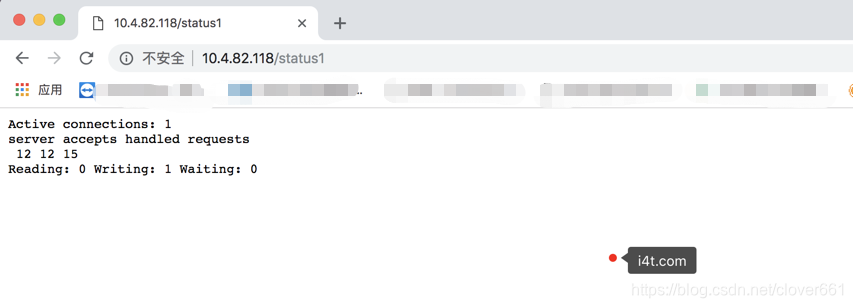
我们常见的nginx状态模块,状态比较少
Active connections: 当前活跃的连接数
12----> 一共处理了多少个链接(请求)
12----> 成功创建多少次握手
15--> 总共创建了多少个请求
Reading:当前读取客户端heardr的数量
Writing:当前返回给客户端heardr的数量  #如果这个指标飙升,说明是后面的节点挂掉了,例如数据库等。
Waiting:大致意思是已经处理完,等待下次请求的数量
upstream_check_module模块展示如下: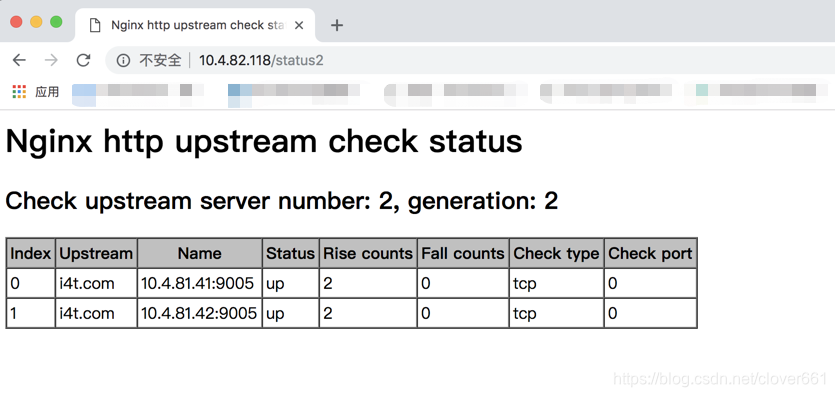
宕机状态如下:
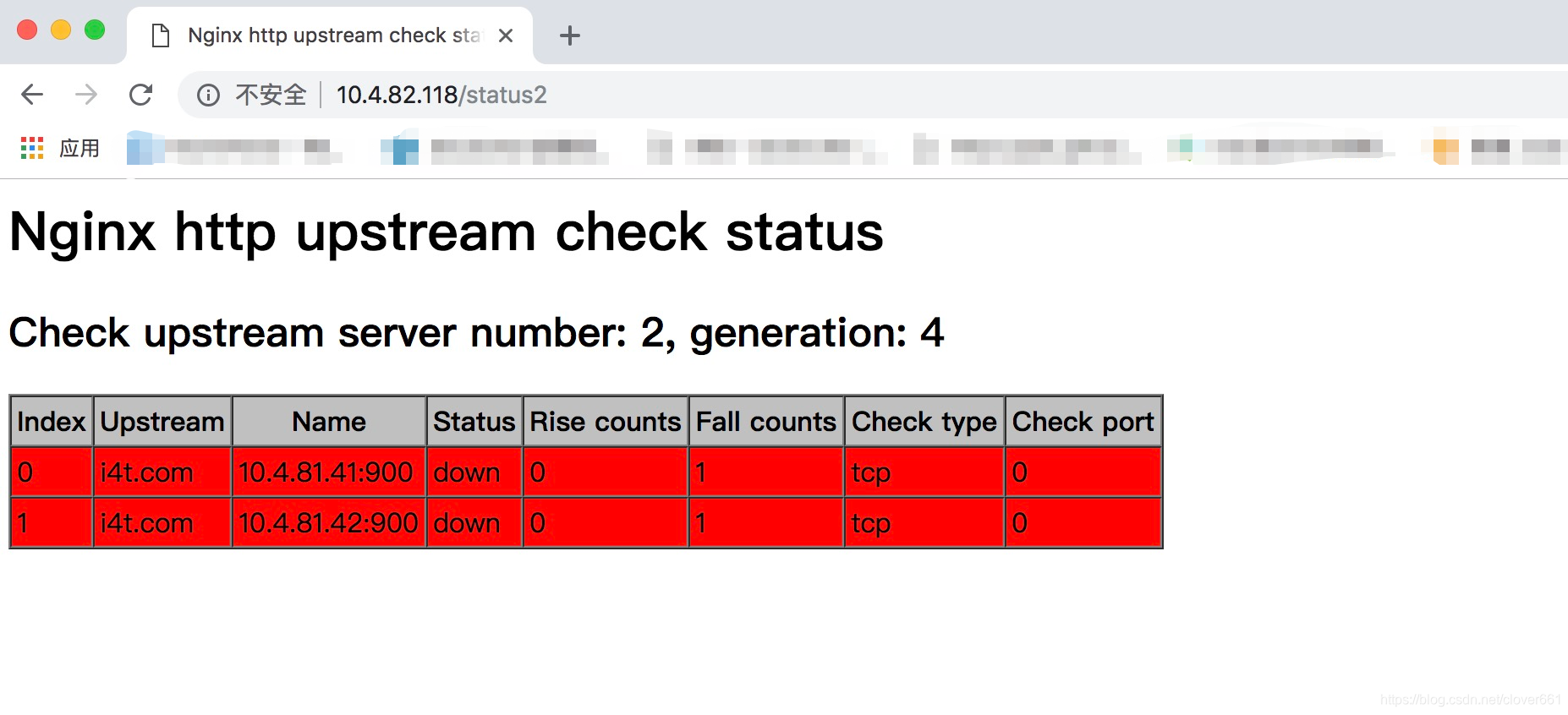
 1. Inde         项目排序
 2. Upstream     upstream名称
 3. Name         后端地址
 4. Status       状态地址 (正常为up|异常为down)
 5. Fall counts  down机时间 (以秒为单位)
 6. Check type   监控类型 (默认tcp)

 具体参数可以查看官方文档https://github.com/yaoweibin/nginx_upstream_check_module
Nginx 编译模块安装
1.安装依赖
yum install -y gcc glibc gcc-c++ prce-devel openssl-devel pcre-devel lua-devel libxml2 libxml2-dev libxslt-devel perl-ExtUtils-Embed GeoIP GeoIP-devel GeoIP-data
2.下载软件包
 useradd -s /sbin/nologin nginx -M
    wget http://nginx.org/download/nginx-1.14.2.tar.gz
    tar xf nginx-1.14.2.tar.gz
3.下载nginx模块
   wget https://codeload.github.com/yaoweibin/nginx_upstream_check_module/zip/master
    unzip master
4.nginx打补丁
yum install -y patch
cd nginx-1.14.2
patch -p1 < …/nginx_upstream_check_module-master/check_1.14.0+.patch
#因为nginx的版本是1.14补丁就选择1.14的,p1代表在nginx目录,p0是不在nginx目录
5.编译Nginx
  ./configure --prefix=/usr/local/nginx-1.14 --user=nginx --group=nginx --with-http_ssl_module --with-http_stub_status_module --add-module=/root/nginx_upstream_check_module-master

    make && make install
    ln -s /usr/local/nginx-1.14 /usr/local/nginx

    启动测试
    /usr/local/nginx/sbin/nginx

    [root@abc137 ~]# lsof -i:80
    COMMAND  PID  USER   FD   TYPE DEVICE SIZE/OFF NODE NAME
    nginx   6731  root    6u  IPv4  44182      0t0  TCP *:http (LISTEN)
    nginx   6732 nginx    6u  IPv4  44182      0t0  TCP *:http (LISTEN)
6.配置模块
首先需要有一个代理后端的upstream,在配置一个健康检查
监控需要配置在server标签下
  [root@abc137]# cat nginx.conf
    worker_processes  1;
    events {
        worker_connections  1024;
    }


    http {
        include       mime.types;
        default_type  application/octet-stream;
        sendfile        on;
        keepalive_timeout  65;

    upstream i4t.com {
           server 10.4.81.41:900;
           server 10.4.81.42:900;
           check interval=3000 rise=2 fall=5 timeout=1000 type=tcp;
        }


        server {
            listen       80;
            server_name  localhost;

            location / {
             proxy_pass http://i4t.com;
            }
            location /status1 {
               stub_status on;      #配置nginx内置健康检查
               access_log  off;
            }
            location /status2 {     #配置upstream_check_module模块健康检查
               check_status;
               access_log off;
               #allow SOME.IP.ADD.RESS; #可以设置允许网段访问
               #deny all;
           }
        }
    }

    修改完配置文件,reload即可
    /usr/local/nginx/sbin/nginx -t
    /usr/local/nginx/sbin/nginx -s reload
配置文件参数解释:
 1. check interval=3000 rise=2 fall=5 timeout=1000 type=tcp;
 2. interval检测间隔时间,单位为毫秒
 3. rsie请求2次正常的话,标记此后端的状态为up
 4. type  类型为tcp
 5. fall表示请求5次都失败的情况下,标记此后端的状态为down
 6. timeout为超时时间,单位为毫秒
版权声明:本文为clover661原创文章,遵循CC 4.0 BY-SA版权协议,转载请附上原文出处链接和本声明。