vue下用canvas实现图片标注工具,允许图片放大、缩小,允许拖拽图片
效果图片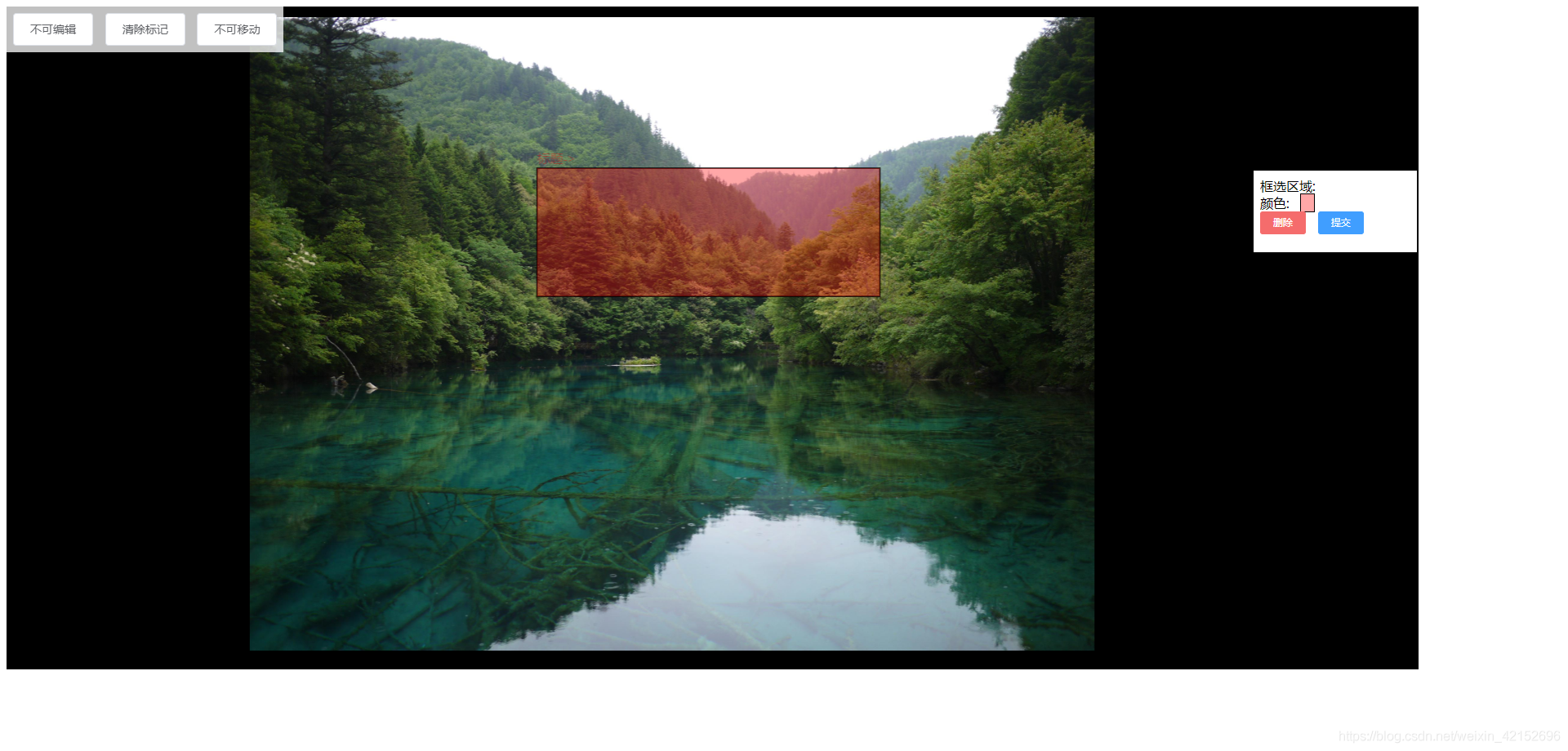
概述:
之前在js版本上实现过canvas标注工具,最近又拎出来,重新用vue来实现该标注功能,希望能给刚入门的小白一个指引,让小白们能少走点弯路
实现过程中遇见的问题:
- canvas放置在html界面上
- 图片如何加载到canvas中
- 如何实现图片放大缩小
- 如何实现图片拖拽
- 如何实现图片框选功能
注意点:代码中需要提前引入element-ui 的内容
以下是实现代码(vue版):
<template>
<div class="divbody">
<el-row class="toolsClass">
<el-button @click="ifIsEditClick">
{{ params.editFlag ? "可编辑" : "不可编辑" }}
</el-button>
<el-button @click="cleanCanvas">清除标记</el-button>
<el-button @click="moveImageClick">{{
params.moveImageFlag ? "可移动" : "不可移动"
}}</el-button>
</el-row>
<!-- canvas 区域 -->
<div class="imgContainer" ref="imgContainer">
<canvas
:ref="'refmyCanvas'"
class="canvasClass"
:width="divWidth"
:height="divHeight"
@mousedown="canvasMouseDown"
@mouseup="canvasMouseUp"
@mousemove="canvasMouseMove"
@mousewheel="canvasMousewheel"
>
</canvas>
<img
:id="'image'"
:src="imageSrc"
:ref="'refimage'"
class="imgClass"
@load="uploadImgLoad"
v-show="false"
/>
<!-- 右侧列表区域 -->
<div class="houseClass">
<div
v-for="(item, index) in nowDictlist"
:key="item.id"
class="fatherClass"
>
<div class="itemClass">
<div>
<span @click="aeroItemClick">框选区域:</span>
</div>
<div>
<span>颜色:</span>
<span
:style="
'margin-left:8px;border:1px solid black;background-color:' +
item.color
"
>  </span
>
</div>
<div>
<el-button
type="danger"
size="mini"
@click="removeHouseClick(index)"
>删除</el-button
>
<el-button type="primary" size="mini" @click="updateHuInfo()"
>提交</el-button
>
</div>
</div>
</div>
</div>
</div>
</div>
</template>
<script>
// 这里的路径之前写错了,目前已做修改
export default {
data() {
return {
imgPath: process.env.VUE_APP_BASE_API,
maxMinStep: 20,
msg: "图片标注拖拽测试",
divWidth: 0,
divHeight: 0,
imageSrc: "http://localhost/mainPage.jpg",
// canvas的配置部分
c: "",
cxt: "",
canvasImg: "",
//------------------------------
imgScale: 1, // canvas 放大缩小倍数
marginX: 0, // x轴偏移量, 图片专用
marginY: 0, // x轴偏移量, 图片专用
//------------------------------
imgWidth: 0, // img框的宽度
imgHeight: 0, // img框的高度
targetMarkIndex: -1, // 目标标注index
params: {
currentX: 0,
currentY: 0,
flag: false, // 用来判断在canvas上是否有鼠标down的事件,
editFlag: false,
editIndex: -1,
moveImageFlag: false,
addHouseFlag: false,
currentHouseIndex: -1
},
colorValue: undefined, // 所选中的颜色值
//-------------------------
// 当前正在标注的数据内容,因为只有一条,所以只定义一个
nowDict: {
x1: undefined,
y1: undefined,
x2: undefined,
y2: undefined,
//--------------------------
// 拖拽需要用的标志位
movex1: undefined,
movey1: undefined,
movex2: undefined,
movey2: undefined,
//--------------------------
left: undefined, // x轴侧偏移量,相对于canvas上的值
top: undefined, // y轴偏移量,相对于canvas上的值
imgScale: 1, // 标注的时候放大缩小倍数
isclick: false, // 区域是否被点击了
// 原始图片上的位置
originX1: undefined,
originX2: undefined,
originY1: undefined,
originY2: undefined,
color: undefined // 上颜色用的的
},
ConstKx: undefined,
ConstKy: undefined,
nowDictlist: [],
detailInfor: {},
detailVisible: false
//------------------------------
};
},
created() {},
beforeMount() {
this.canvasOnDraw(this.imgWidth, this.imgHeight);
},
mounted() {
// 这里是进行初始化canvas的操作 myCanvas
const self = this;
try {
self.c = self.$refs.refmyCanvas;
self.canvasImg = self.$refs.refimage;
self.cxt = self.c.getContext("2d");
self.divWidth = self.$refs.imgContainer.offsetWidth;
self.divHeight = self.$refs.imgContainer.offsetHeight;
} catch (err) {
console.log(err, "====");
}
// 渲染已经标注的矩形区域
this.canvasOnDraw(this.imgWidth, this.imgHeight);
},
beforeUpdate() {
// 渲染已经标注的矩形区域
this.canvasOnDraw(this.imgWidth, this.imgHeight);
},
updated() {
// 渲染已经标注的矩形区域
this.canvasOnDraw(this.imgWidth, this.imgHeight);
},
methods: {
removeHouseClick(index) {
this.nowDictlist = [];
this.nowDict = {};
// 重新渲染界面上的元素
this.canvasOnDraw(this.imgWidth, this.imgHeight);
},
aeroItemClick() {
this.nowDict.isClick = true;
// 执行渲染操作
this.canvasOnDraw(this.imgWidth, this.imgHeight);
},
// 是否允许图片拖动
moveImageClick() {
this.params.moveImageFlag = !this.params.moveImageFlag;
if (this.params.moveImageFlag) {
this.params.editFlag = false;
this.params.addHouseFlag = false;
}
},
// 清除canvas中的内容
cleanCanvas() {
this.nowDictlist = [];
// 重置标志内容
this.nowDict = {
x1: undefined,
y1: undefined,
x2: undefined,
y2: undefined,
//--------------------------
// 拖拽需要用的标志位
movex1: undefined,
movey1: undefined,
movex2: undefined,
movey2: undefined,
//--------------------------
left: undefined, // x轴侧偏移量,相对于canvas上的值
top: undefined, // y轴偏移量,相对于canvas上的值
imgScale: 1, // 标注的时候放大缩小倍数
isclick: false, // 区域是否被点击了
// 原始图片上的位置
originX1: undefined,
originX2: undefined,
originY1: undefined,
originY2: undefined,
color: undefined // 上颜色用的的
};
// 重置canvas偏移量
this.marginX = 0;
this.marginY = 0;
// 重置放大缩小倍数
this.imgScale = 1;
// 重置其他按钮状态
this.params.editFlag = false;
this.params.moveImageFlag = false;
this.params.addHouseFlag = false;
this.canvasOnDraw(this.imgWidth, this.imgHeight);
},
// 是否允许进行标注
ifIsEditClick() {
// 判断一下,只允许标注一条数据,不能乱来
if (this.targetMarkIndex >= 0) {
this.params.editFlag = false;
return;
} else {
this.params.editFlag = !this.params.editFlag;
if (this.params.editFlag) {
this.params.moveImageFlag = false;
}
}
},
// 由于使用体验不太好,这段代码暂时不启用
canvasMousewheel(e) {
var data = Math.max(-1, Math.min(1, e.wheelDelta || -e.detail));
if (data != -1) {
this.wheelMax();
} else {
this.wheelMin();
}
},
// 鼠标滚轮函数
wheelMax() {
this.imgScale += 0.01 * this.maxMinStep;
this.canvasOnDraw(this.imgWidth, this.imgHeight);
},
wheelMin() {
this.imgScale -= 0.02 * this.maxMinStep;
if (this.imgScale <= 1) {
// 改进后的 非常好的体验
this.imgScale = 1;
this.marginX = 0;
this.marginY = 0;
}
this.canvasOnDraw(this.imgWidth, this.imgHeight);
},
// 根据canvas值,获取原始图片上的坐标值
getOriginWHValue(nowX, nowY, nowMoveX, nowMoveY, fuckingScale) {
// 判断一下偏移的方向,x方向负数,代表应该加,正值代表,应该减掉
if (nowMoveX <= 0) {
// 应该做加号运算
nowMoveX = Math.abs(nowMoveX);
// 坐标值变成1倍的情况处理
nowX = (nowX + nowMoveX) / fuckingScale;
} else {
// 应该做减法运算
nowX = (nowX - nowMoveX) / fuckingScale;
}
// 判断一下偏移的方向,y方向,负数,应该加;正数,应该减法
if (nowMoveY <= 0) {
// 应该做加法运算,先取绝对值
nowMoveY = Math.abs(nowMoveY);
// 坐标值变成1倍的情况处理
nowY = (nowY + nowMoveY) / fuckingScale;
} else {
// 这里应该做减法运算,然后处理成1倍情况
nowY = (nowY - nowMoveY) / fuckingScale;
}
// 获取现有canvas加载的图片大小,1倍情况 [tmpW, tmpH]
var resPointList = this.changeOldPointToNewPoint(
this.imgWidth,
this.imgHeight,
this.divWidth,
this.divHeight
);
// 现有图片宽度,canvas上的
var tmpW = resPointList[0];
var tmpH = resPointList[1];
// canvas x * kx = 原图 x
var kx = this.imgWidth / tmpW;
// canvas y * ky = 原图 y
var ky = this.imgHeight / tmpH;
// 全局Canvas操作,后需要用,
this.ConstCanvasW = tmpW;
this.ConstCanvasH = tmpH;
this.ConstKx = kx;
this.ConstKy = ky;
return [nowX * kx, nowY * ky];
},
// 鼠标down事件
canvasMouseDown(e) {
// 代表鼠标有down的动作
this.params.flag = true;
if (!e) {
e = window.event;
// 防止IE文字选中
this.$refs.refmyCanvas.onselectstart = function() {
return false;
};
}
// 这里先判断一下,看是否是在有效数据,并且初始化参数, 允许编辑
if (this.params.flag === true && this.params.editFlag === true) {
this.nowDict.imgScale = this.imgScale;
// 记录canvas上的xy值
this.nowDict.x1 = e.offsetX;
this.nowDict.y1 = e.offsetY;
this.nowDict.x2 = e.offsetX;
this.nowDict.y2 = e.offsetY;
// 把颜色值取下来
this.nowDict.color = "#ff000057";
// 计算出原始图片上的x y 值
var result1 = this.getOriginWHValue(
this.nowDict.x1,
this.nowDict.y1,
// 偏移值
this.marginX,
this.marginY,
this.imgScale
);
var result2 = this.getOriginWHValue(
this.nowDict.x2,
this.nowDict.y2,
// 偏移值
this.marginX,
this.marginY,
this.imgScale
);
// 把原图坐标写回字典中
this.nowDict.originX1 = result1[0];
this.nowDict.originY1 = result1[1];
this.nowDict.originX2 = result2[0];
this.nowDict.originY2 = result2[1];
this.nowDictlist = [];
this.nowDictlist.push(this.nowDict);
// // 执行渲染操作
this.canvasOnDraw(this.imgWidth, this.imgHeight);
} else {
// 允许拖拽图片
if (this.params.moveImageFlag === true && this.params.flag === true) {
// 首次拖拽,记住位置
this.nowDict.movex1 = e.offsetX;
this.nowDict.movey1 = e.offsetY;
this.nowDict.movex2 = e.offsetX;
this.nowDict.movey2 = e.offsetY;
// 执行渲染操作
this.canvasOnDraw(this.imgWidth, this.imgHeight);
} else {
// 这里是被点击的情况,额外进行处理,也是牛皮了
var tmp_x = e.offsetX;
var tmp_y = e.offsetY;
// 这里其实也得判断一下,当前自己勾选的矩形有没有被点击
var xx1 =
(this.nowDict.originX1 / this.ConstKx) * this.imgScale +
this.marginX; // 这里应该加上一个偏移值
var yy1 =
(this.nowDict.originY1 / this.ConstKy) * this.imgScale +
this.marginY; // 这里应该加上一个偏移值
var xx2 =
(this.nowDict.originX2 / this.ConstKx) * this.imgScale +
this.marginX; // 这里应该加上一个偏移值
var yy2 =
(this.nowDict.originY2 / this.ConstKy) * this.imgScale +
this.marginY; // 这里应该加上一个偏移值
// 调整两个点位,找出左上角顶点
var FinalPointListNow = this.findWhichIsFirstPoint(
xx1,
yy1,
xx2,
yy2
);
xx1 = FinalPointListNow[0];
yy1 = FinalPointListNow[1];
xx2 = FinalPointListNow[2];
yy2 = FinalPointListNow[3];
// 说明点位在矩形之内
if (xx1 <= tmp_x && tmp_x <= xx2) {
if (yy1 <= tmp_y && tmp_y <= yy2) {
this.nowDict.isClick = true;
// 这里需要判断一下huid是否为空,若不为空,咋调用一下父元素的方法
if (this.nowDict.huId) {
// huid存在,调用父元素方法
this.fatherDetailMethod(this.nowDict.huId);
}
} else {
this.nowDict.isClick = false;
}
} else {
this.nowDict.isClick = false;
}
// 执行渲染操作
this.canvasOnDraw(this.imgWidth, this.imgHeight);
}
}
},
// 鼠标移动
canvasMouseMove(e) {
if (e === null) {
e = window.event;
}
// 这里是正在标注的情况
if (this.params.flag === true && this.params.editFlag === true) {
this.nowDict.x2 = e.offsetX;
this.nowDict.y2 = e.offsetY;
var result2 = this.getOriginWHValue(
this.nowDict.x2,
this.nowDict.y2,
// 偏移值
this.marginX,
this.marginY,
this.imgScale
);
// 把原图坐标写回字典中
this.nowDict.originX2 = result2[0];
this.nowDict.originY2 = result2[1];
// 执行渲染操作
this.canvasOnDraw(this.imgWidth, this.imgHeight);
} else {
// 这里是 允许拖拽图片
if (this.params.moveImageFlag && this.params.flag) {
this.marginX = e.offsetX - this.nowDict.movex1 + this.marginX;
this.marginY = e.offsetY - this.nowDict.movey1 + this.marginY;
this.nowDict.movex1 = e.offsetX;
this.nowDict.movey1 = e.offsetY;
// 这里其实得做个优化,不能超出边缘
if (this.marginY < 0) {
if (Math.abs(this.marginY) >= this.c.height * this.imgScale - 300) {
this.marginY = (this.c.height * this.imgScale - 300) * -1;
}
} else {
// 说明是大于0 的
if (this.marginY >= this.c.height - 300) {
this.marginY = this.c.height - 300;
}
}
if (this.marginX < 0) {
if (Math.abs(this.marginX) >= this.c.width * this.imgScale - 300) {
this.marginX = (this.c.width * this.imgScale - 300) * -1;
}
} else {
if (this.marginX >= this.c.width - 300) {
this.marginX = this.c.width - 300;
}
}
// 执行渲染操作
this.canvasOnDraw(this.imgWidth, this.imgHeight);
}
}
},
// 鼠标抬起
canvasMouseUp(e) {
// 当正在编辑的标志位为true时,需要传回数据
if (this.params.editFlag === true) {
// 把数据传回父组件,保存用的
this.$emit("mapPointJson", JSON.stringify(this.nowDict));
}
this.params.flag = false;
this.params.editFlag = false;
// 停止区域标注
this.params.addHouseFlag = false;
// 重新渲染界面
this.canvasOnDraw(this.imgWidth, this.imgHeight);
},
// 加载图片用的
uploadImgLoad(e) {
try {
this.imgWidth = e.path[0].naturalWidth;
this.imgHeight = e.path[0].naturalHeight;
this.canvasOnDraw(this.imgWidth, this.imgHeight);
} catch (err) {
console.log(err, " img==s");
}
},
// 输入两个坐标值,判断哪个坐标值离左上角最近,其中特殊情况需要进行坐标查找工作
findWhichIsFirstPoint(x1, y1, x2, y2) {
// 首先判断x轴的距离谁更近
if (x1 <= x2) {
// 说明x1 比较小,接下来判断y谁更近
if (y1 <= y2) {
// 说明第一个坐标离得更近,直接顺序return就好
return [x1, y1, x2, y2];
} else {
// 这里遇见一个奇葩问题,需要进行顶角变换
return [x1, y2, x2, y1];
}
} else {
// 这里是x1 大于 x2 的情况
if (y2 <= y1) {
return [x2, y2, x1, y1];
} else {
// y2 大于 y1 的情况, 这里需要做顶角变换工作
return [x2, y1, x1, y2];
}
}
},
// can vas绘图部分
canvasOnDraw(imgW = this.imgWidth, imgH = this.imgHeight) {
const imgWidth = imgW;
const imgHeight = imgH;
try {
this.divWidth = this.$refs.imgContainer.offsetWidth;
this.divHeight = this.$refs.imgContainer.offsetHeight;
} catch (err) {
return;
}
// 清除canvas内容
this.cxt.clearRect(0, 0, imgWidth, imgHeight);
// 当前的图片和现有的canvas容器之前的一个关系,是否有必要,我们后续做讨论
var resPointList = this.changeOldPointToNewPoint(
imgWidth,
imgHeight,
this.divWidth,
this.divHeight
);
// 这里在加载图片之类的
this.cxt.drawImage(
this.canvasImg,
0,
0,
imgWidth,
imgHeight,
this.marginX, // canvas 上的 x 偏移量
this.marginY, // canvas 上的 y坐标位置 偏移量。
resPointList[0] * this.imgScale, // width, img图像放大后的宽度
resPointList[1] * this.imgScale // height, img图像放大后的宽度
);
//-------------------------------------
// 这里在画矩形框 , 坐标值变成1倍情况,然后变成现有倍数,注意,处理过程中,需要减掉偏移量
var x1 =
(this.nowDict.originX1 / this.ConstKx) * this.imgScale + this.marginX; // 这里应该加上一个偏移值
var y1 =
(this.nowDict.originY1 / this.ConstKy) * this.imgScale + this.marginY; // 这里应该加上一个偏移值
var x2 =
(this.nowDict.originX2 / this.ConstKx) * this.imgScale + this.marginX; // 这里应该加上一个偏移值
var y2 =
(this.nowDict.originY2 / this.ConstKy) * this.imgScale + this.marginY; // 这里应该加上一个偏移值
// 2个顶点转换函数
const FinalPointList = this.findWhichIsFirstPoint(x1, y1, x2, y2);
// 重新配置两个顶点数据 x1变成左上角顶点,x2 变成右下角顶点
x1 = FinalPointList[0];
y1 = FinalPointList[1];
x2 = FinalPointList[2];
y2 = FinalPointList[3];
var wid = x2 - x1;
var hei = y2 - y1;
// 绘制矩形
this.cxt.strokeRect(x1, y1, x2 - x1, y2 - y1);
this.cxt.font = "16px Arial";
// 被点击的情况
if (this.nowDict.isClick) {
// 这里是在处理高亮的地方
this.cxt.fillStyle = "rgba(255, 0, 0, 0.1)";
// 线条颜色
this.canvasDrowBorder("#000000", x1, y1, wid, hei);
// 内容填充,高亮内容
this.canvasDrowInnerColor("rgba(200, 0, 0, 0.3)", x1, y1, wid, hei);
} else {
// 没有被点击的情况
this.cxt.fillStyle = this.nowDict.color
? this.nowDict.color
: "#ffffff57";
// 线条颜色
this.canvasDrowBorder("#000000", x1, y1, wid, hei);
// 内容填充颜色
this.canvasDrowInnerColor(this.nowDict.color, x1, y1, wid, hei);
}
this.cxt.fillText("标题->", x1, parseInt(y1) - 6);
},
// canvas框选区域的内容颜色
canvasDrowInnerColor(color, x, y, w, h) {
this.cxt.fillStyle = color;
this.cxt.fillRect(x, y, w, h);
},
// canvas框选区域的边框颜色
canvasDrowBorder(color, x, y, w, h) {
this.cxt.strokeStyle = color;
this.cxt.strokeRect(x, y, w, h);
},
// 尺寸变换函数
changeOldPointToNewPoint(imgw, imgH, canvasW, canvasH) {
// 这里有个要求,先以宽度为准,然后再一步步调整高度
var tmpW = canvasW;
var tmpH = (tmpW * imgH) / imgw;
// 如果转换之后的高度正好小于框的高度,则直接进行显示
if (tmpH <= canvasH) {
// 尺寸完美匹配
return [tmpW, tmpH];
} else {
// 高度超出框了,需要重新调整高度部分
tmpW = canvasW;
tmpH = (tmpW * imgH) / imgw;
var count = 1;
var raise = 0.05;
while (tmpH > canvasH || tmpW > canvasW) {
tmpW = tmpW * (1 - raise * count);
tmpH = (tmpW * imgH) / imgw;
}
return [tmpW, tmpH];
}
}
}
};
</script>
<style lang="scss" scoped>
.divbody {
width: 100%;
height: 100%;
}
.imgContainer {
position: relative;
/* width: 100vw; */
width: 90vw;
height: 88vh;
}
.canvasClass {
position: absolute;
width: auto;
height: auto;
max-width: 100%;
max-height: 100%;
border: 1px solid black;
background-color: black;
}
.imgClass {
width: auto;
height: auto;
max-width: 100%;
max-height: 100%;
}
.toolsClass {
position: absolute;
z-index: 999;
padding: 8px 8px;
background-color: #ffffffc1;
}
.houseClass {
position: absolute;
float: right;
width: 200px;
height: 100px;
right: 0px;
top: 200px;
z-index: 999;
background-color: white;
border: 1px solid;
overflow: auto;
}
.fatherClass {
height: 10%;
width: calc(100% - 16px);
margin: 8px;
}
.itemClass {
cursor: pointer;
width: calc(100% - 0px);
}
.detail {
width: 100%;
// display: flex;
flex-wrap: wrap;
max-height: 650px;
padding: 0 20px;
.info-title {
line-height: 30px;
background-color: #f5f7fa;
padding: 5px 10px;
margin: 10px 0;
font-weight: 700;
span {
display: inline-block;
&::before {
display: inline-block;
content: "|";
line-height: 18px;
border-radius: 5px;
width: 5px;
background-color: #2161fb;
}
}
}
.detail_item_infor {
// width:33%;
display: flex;
flex-wrap: nowrap;
align-items: flex-start;
padding: 8px 0;
.title_l {
text-align: left;
color: #333;
align-items: center;
font-weight: 700;
margin-right: 10px;
}
.infor {
flex: 1;
align-items: center;
}
}
.line {
border-bottom: 1px dashed #d9d9d9;
margin-bottom: 10px;
height: 2px;
width: 100%;
}
.active {
background: #f8f8f8;
}
}
</style>
版权声明:本文为weixin_42152696原创文章,遵循CC 4.0 BY-SA版权协议,转载请附上原文出处链接和本声明。