Seata配置安装
版本:
seata 1.4
springboot 2.2.X
jdk 1.8
本片内容已经是本人自己学习过程搭建,确定了事务是ok。如果参考过程中,有其他踩坑点,欢迎留言讨论
项目地址:https://gitee.com/ct_nisemono/seata-test
1.下载
地址:http://seata.io/zh-cn/blog/download.html
下载source(源码,其中有sql脚本)与binary(插件)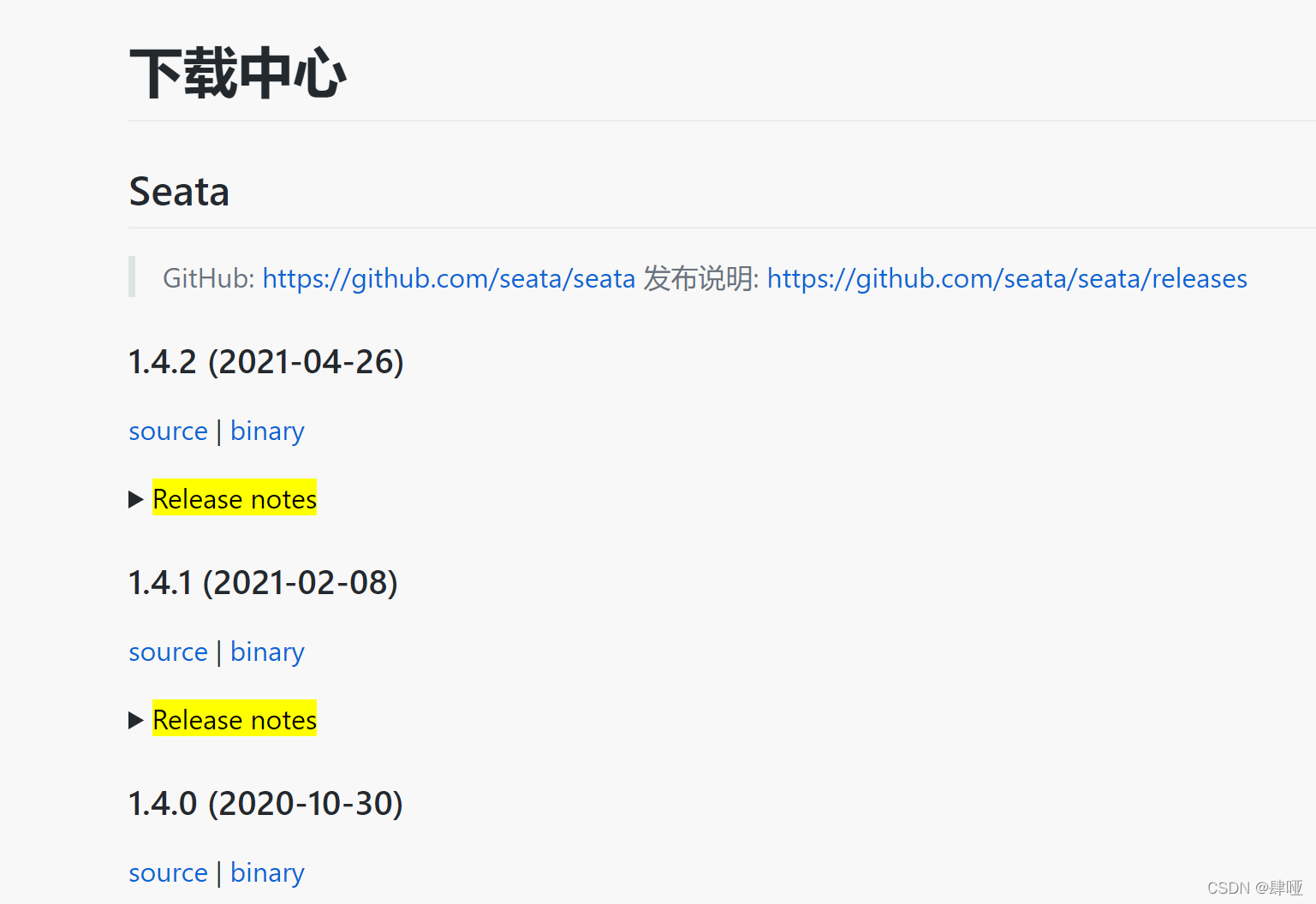
2.切换数据库
- 新建数据库seata_config运行源码中该文件下脚本(script\server\db\mysql.sql)
## 新建数据库seate_server,并执行脚本
-- -------------------------------- The script used when storeMode is 'db' --------------------------------
-- the table to store GlobalSession data
CREATE TABLE IF NOT EXISTS `global_table`
(
    `xid`                       VARCHAR(128) NOT NULL,
    `transaction_id`            BIGINT,
    `status`                    TINYINT      NOT NULL,
    `application_id`            VARCHAR(32),
    `transaction_service_group` VARCHAR(32),
    `transaction_name`          VARCHAR(128),
    `timeout`                   INT,
    `begin_time`                BIGINT,
    `application_data`          VARCHAR(2000),
    `gmt_create`                DATETIME,
    `gmt_modified`              DATETIME,
    PRIMARY KEY (`xid`),
    KEY `idx_gmt_modified_status` (`gmt_modified`, `status`),
    KEY `idx_transaction_id` (`transaction_id`)
) ENGINE = InnoDB
  DEFAULT CHARSET = utf8;

-- the table to store BranchSession data
CREATE TABLE IF NOT EXISTS `branch_table`
(
    `branch_id`         BIGINT       NOT NULL,
    `xid`               VARCHAR(128) NOT NULL,
    `transaction_id`    BIGINT,
    `resource_group_id` VARCHAR(32),
    `resource_id`       VARCHAR(256),
    `branch_type`       VARCHAR(8),
    `status`            TINYINT,
    `client_id`         VARCHAR(64),
    `application_data`  VARCHAR(2000),
    `gmt_create`        DATETIME(6),
    `gmt_modified`      DATETIME(6),
    PRIMARY KEY (`branch_id`),
    KEY `idx_xid` (`xid`)
) ENGINE = InnoDB
  DEFAULT CHARSET = utf8;

-- the table to store lock data
CREATE TABLE IF NOT EXISTS `lock_table`
(
    `row_key`        VARCHAR(128) NOT NULL,
    `xid`            VARCHAR(96),
    `transaction_id` BIGINT,
    `branch_id`      BIGINT       NOT NULL,
    `resource_id`    VARCHAR(256),
    `table_name`     VARCHAR(32),
    `pk`             VARCHAR(36),
    `gmt_create`     DATETIME,
    `gmt_modified`   DATETIME,
    PRIMARY KEY (`row_key`),
    KEY `idx_branch_id` (`branch_id`)
) ENGINE = InnoDB
  DEFAULT CHARSET = utf8;
以上导入的seata服务端配置的SQL文件
## 在项目的每个数据中,导入undo_log脚本
CREATE TABLE `undo_log` (
  `branch_id` bigint(20) NOT NULL COMMENT 'branch transaction id',
  `xid` varchar(100) NOT NULL COMMENT 'global transaction id',
  `context` varchar(128) NOT NULL COMMENT 'undo_log context,such as serialization',
  `rollback_info` longblob NOT NULL COMMENT 'rollback info',
  `log_status` int(11) NOT NULL COMMENT '0:normal status,1:defense status',
  `log_created` datetime(6) NOT NULL COMMENT 'create datetime',
  `log_modified` datetime(6) NOT NULL COMMENT 'modify datetime',
  UNIQUE KEY `ux_undo_log` (`xid`,`branch_id`)
) ENGINE=InnoDB DEFAULT CHARSET=utf8 COMMENT='AT transaction mode undo table';
- 修改conf/file.conf文件
store {
  ## store mode: file、db、redis
  mode = "db"
  ## database store property
  db {
    ## the implement of javax.sql.DataSource, such as DruidDataSource(druid)/BasicDataSource(dbcp)/HikariDataSource(hikari) etc.
    datasource = "druid"
    ## mysql/oracle/postgresql/h2/oceanbase etc.
    dbType = "mysql"
    driverClassName = "com.mysql.jdbc.Driver"
    url = "jdbc:mysql://42.193.***.***:3981/seate_server"
    user = "root"
    password = "*****"
    minConn = 5
    maxConn = 100
    globalTable = "global_table"
    branchTable = "branch_table"
    lockTable = "lock_table"
    queryLimit = 100
    maxWait = 5000
  }
3.切换注册中心到nacos
修改conf/registry.conf
registry {
  # file 、nacos 、eureka、redis、zk、consul、etcd3、sofa
  type = "nacos"
  loadBalance = "RandomLoadBalance"
  loadBalanceVirtualNodes = 10

  nacos {
    application = "seata-server"
    serverAddr = "127.0.0.1:8848"
    group = "SEATA_GROUP"
    namespace = "pubilc"
    cluster = "default"
    username = "nacos"
    password = "nacos"
  }
}
## config中的nacos同样也要修改
config {
  # file、nacos 、apollo、zk、consul、etcd3
  type = "nacos"

  nacos {
    serverAddr = "127.0.0.1:8848"
    namespace = "0e881cdc-31bd-4bbc-8ec9-7cd1e852ca9f"
    group = "seata"
    username = "nacos"
    password = "nacos"
  }
}
踩坑一:io.seata.common.exception.FrameworkException: No available service
未引入setae配置到nacos中
nacos 中导入nacos配置
新增seata命名空间。
conf目录新增register.conf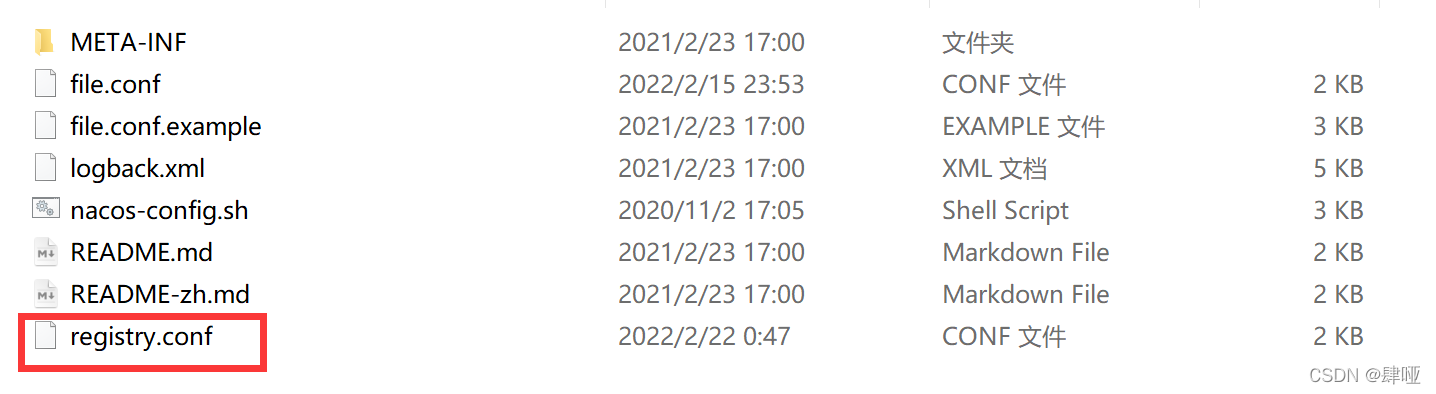
根目录新增config.txt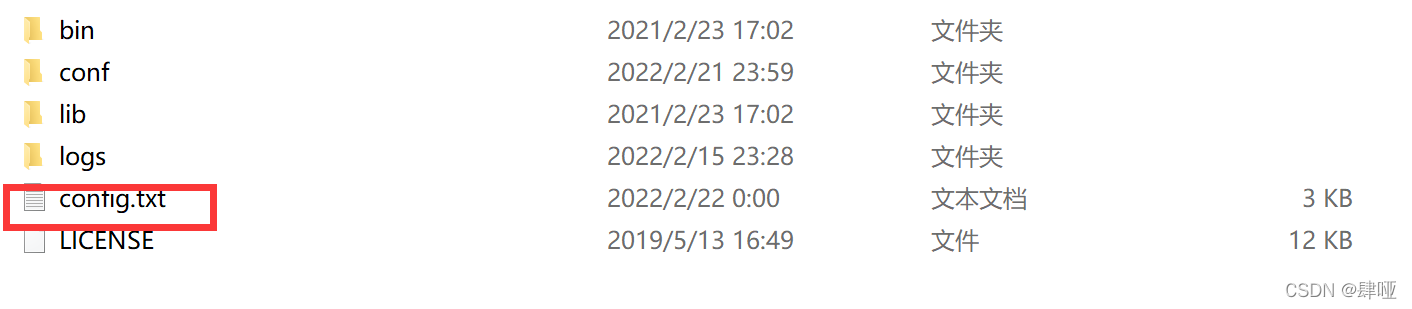
config.txt修改mysql数据库连接地址
register.conf与config.txt文件在对应的版本源码都可以找到
## config修改参数
store.mode=db
store.db.datasource=druid
store.db.dbType=mysql
store.db.driverClassName=com.mysql.jdbc.Driver
store.db.url=jdbc:mysql://42.193.***.***:3981/seate_server?useUnicode=true
store.db.user=root
store.db.password=*****


## 该参数对应项目中yml文件配置seata组
service.vgroupMapping.my_test_tx_group=default
运行bin目录中导入文件
## -h nacos ip
## -p nacos端口号
## -g 导入分组
## -t 命名空间
## -u 用户 -w 密码
 sh nacos-config.sh -h localhost -p 8848 -g seata -t 4cafb530-f57d-48cd-b36e-bcaa4c7f66ba  -u nacos -w nacos
导入成功如下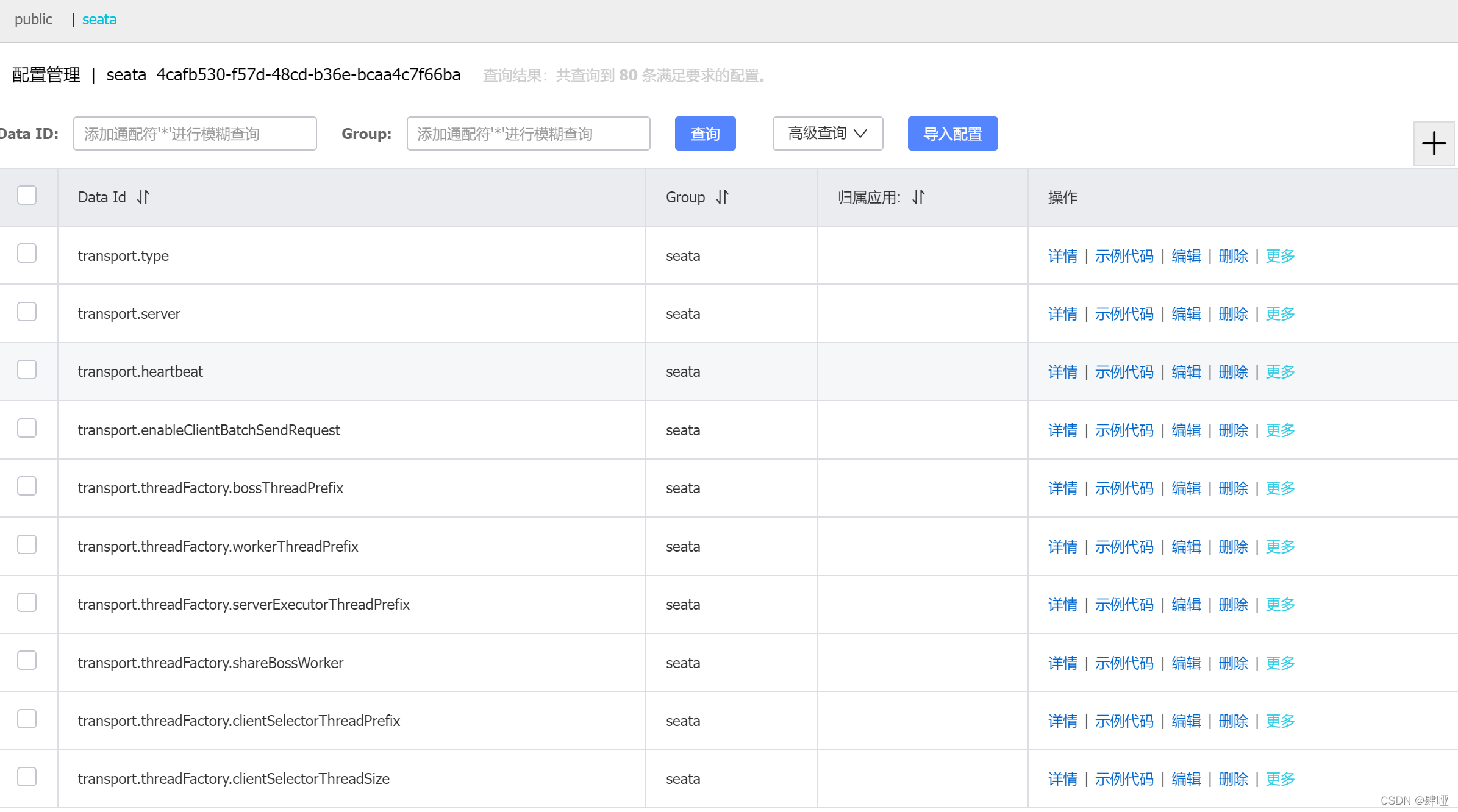
项目中引入seata
以采购入库为例:
本次将采购与库存拆分为两个分布式系统。
采购系统:采购入库入库,负责记录更新采购单信息,并录入库存信息
库存系统:增加批次库存
当然,实际项目场景,通过分布式任务,下发生成对应收货任务比当前分布式调用入库更合理,本次只是举例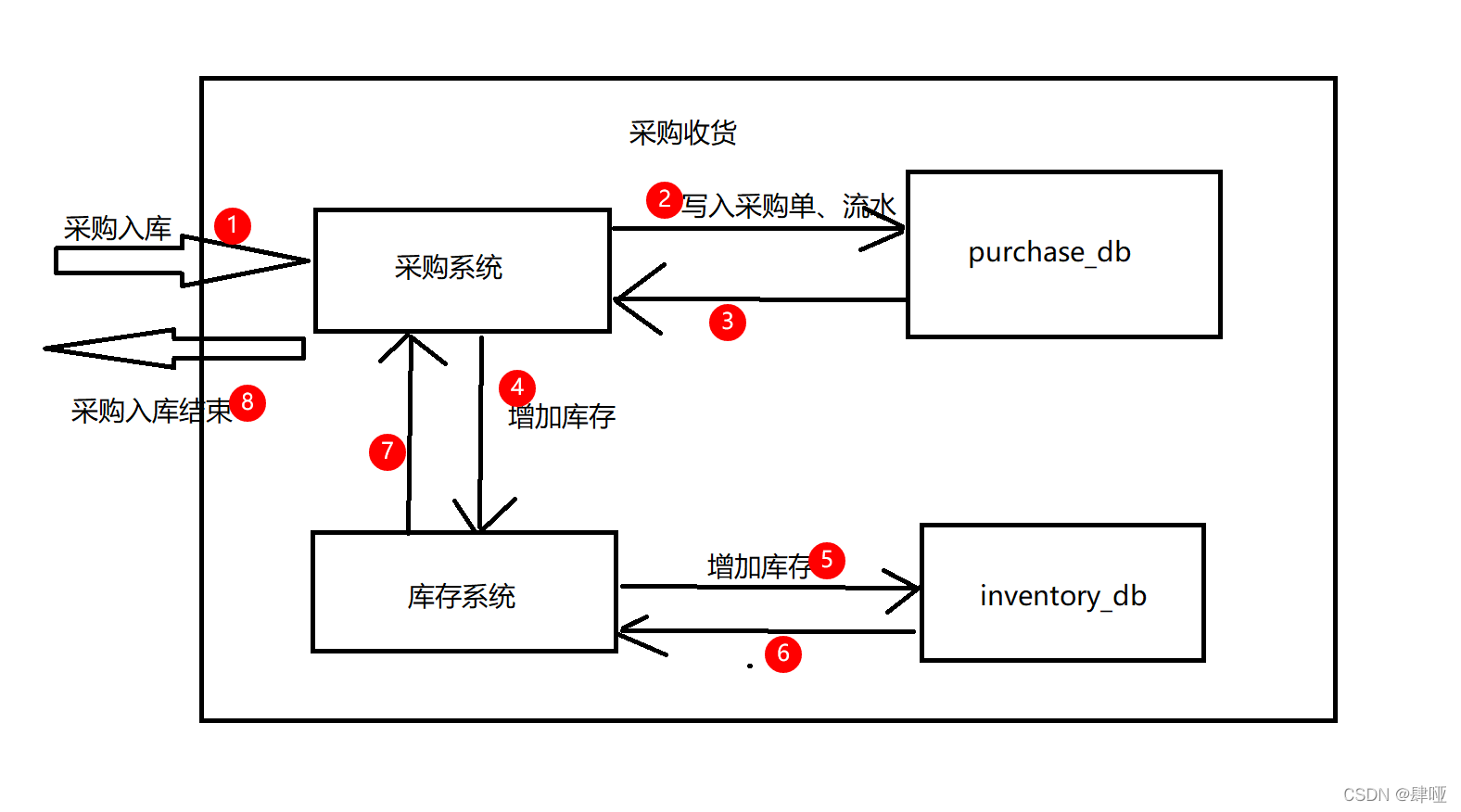
数据库表
## 库存数据
CREATE TABLE `inventory` (
  `id` bigint(20) NOT NULL AUTO_INCREMENT,
  `batch_id` varchar(255) NOT NULL DEFAULT '0',
  `available_num` int(11) NOT NULL DEFAULT '0',
  `user_id` int(11) NOT NULL DEFAULT '0',
  `time` bigint(20) NOT NULL,
  PRIMARY KEY (`id`)
) ENGINE=InnoDB AUTO_INCREMENT=2 DEFAULT CHARSET=latin1;

## 采购库
CREATE TABLE `purchase_order` (
  `id` bigint(20) NOT NULL AUTO_INCREMENT,
  `order_no` varchar(255) NOT NULL DEFAULT '',
  `amount` decimal(16,2) NOT NULL DEFAULT '0.00',
  `user_id` int(11) NOT NULL DEFAULT '0',
  `time` bigint(20) NOT NULL DEFAULT '0',
  PRIMARY KEY (`id`)
) ENGINE=InnoDB AUTO_INCREMENT=4 DEFAULT CHARSET=latin1;
yml文件seata核心配置
seata:
  tx-service-group: my_test_tx_group #与config.txt 中的service.vgroupMapping.yg_tx_group=default一致
  service:
    vgroup-mapping:
      my_test_tx_group: default #与config.txt 中的service.vgroupMapping.yg_tx_group=default一致
    grouplist:
      default: ip:8091 #seata 服务地址
  registry:
    type: nacos
    nacos:
      application: seata-server
      server-addr: 127.0.0.1:8848
      username: nacos
      password: nacos
  config:
    type: nacos
    nacos:
      server-addr: 127.0.0.1:8848
      group: seata
      username: nacos
      password: nacos
      namespace: 0e881cdc-31bd-4bbc-8ec9-7cd1e852ca9f
seata 1.4版本核心pom文件核心配置
        <dependency>
            <groupId>io.seata</groupId>
            <artifactId>seata-spring-boot-starter</artifactId>
            <version>1.4.0</version>
        </dependency>
        <dependency>
            <groupId>com.alibaba.cloud</groupId>
            <artifactId>spring-cloud-starter-alibaba-seata</artifactId>
            <version>2.2.1.RELEASE</version>
            <exclusions>
                <exclusion>
                    <groupId>io.seata</groupId>
                    <artifactId>seata-spring-boot-starter</artifactId>
                </exclusion>
            </exclusions>
        </dependency>
核心代码业务逻辑
    @Autowired
    private PurchaseOrderMapper purchaseOrderMapper;
    @Resource
    private InventoryClient inventoryClient;

    @Override
    @GlobalTransactional(rollbackFor = Exception.class)
    public Boolean inbound(PurchaseOrder purchaseOrder) {
        // 采购入库记录
        purchaseOrderMapper.insert(purchaseOrder);
        // 入库
        Inventory inventory = new Inventory();
        inventory.setBatchId(purchaseOrder.getOrderNo());
        inventory.setAvailableNum(purchaseOrder.getAmount().intValue());
        inventory.setTime(purchaseOrder.getTime());
        inventory.setUserId(purchaseOrder.getUserId());
        inventoryClient.inbound(inventory);
        return true;
    }
核心代码业务逻辑为:采购系统入库,数据录入后,调用库存服务写入库存量
踩坑二:服务启动后:no available service ‘default’ found, please make sure registry config correct
调用后,错误信息:io.seata.common.exception.FrameworkException: No available service
解决办法,替换seata-all版本到1.4. 注意:本人seata下载的版本是1.4版,所以引入1.4
        <dependency>
            <groupId>com.alibaba.cloud</groupId>
            <artifactId>spring-cloud-starter-alibaba-seata</artifactId>
            <version>2021.1</version>
            <exclusions>
                <exclusion>
                    <groupId>io.seata</groupId>
                    <artifactId>seata-spring-boot-starter</artifactId>
                </exclusion>
            </exclusions>
        </dependency>
        <dependency>
            <groupId>io.seata</groupId>
            <artifactId>seata-all</artifactId>
            <version>1.4.0</version>
        </dependency>
踩坑三:启动后,观察到服务与seata服务端都已经注册到nacos,但是,项目打断点GlobalTransactionContext与TransactionalTemplate文件,发现spring未托管seata相关配置。
解决方案:在项目的启动类中,添加@EnableAutoDataSourceProxy注解
到此配置,完成