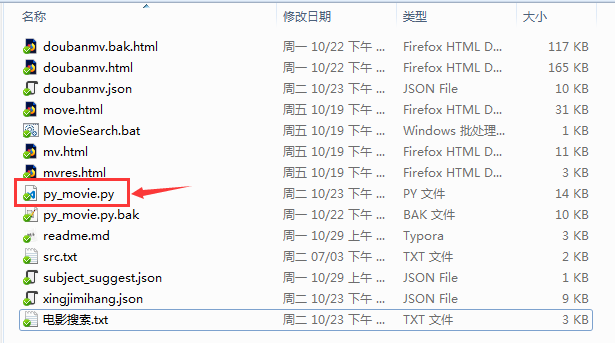
# python一键电影搜索与下载
## 概述
使用python搜索并爬取豆瓣电影信息,包括评分,主演,导演,类型,上映时间,电影简介等信息,然后再从电影天堂搜索并爬取电影下载链接.
## 准备工作
### 安装python3.6
略
### 安装requests库(用于请求静态页面)
```bash
pip install requests -i https://mirrors.ustc.edu.cn/pypi/web/simple
```
### 安装lxml库(用于解析html文件)
```bash
pip install lxml -i https://mirrors.ustc.edu.cn/pypi/web/simple
```
### 本教程爬取的电影信息来自豆瓣电影,下载链接来自电影天堂
```html
https://movie.douban.com/j/subject_suggest?q=电影名称
http://s.ygdy8.com/plus/so.php?keytype=0&pagesize=10&searchtype=title&keyword=电影名称
```
## 页面分析
### 豆瓣电影搜索
豆瓣电影搜索的链接如下:
```html
https://movie.douban.com/j/subject_suggest?q=电影名称
```
只需要一个参数q,它的值是utf-8编码的电影名称,比如我们要搜索 ***星际穿越*** 相关信息, 其中 ***%e6%98%9f%e9%99%85%e7%a9%bf%e8%b6%8a*** 是 ***星际穿越*** 的url格式的utf-8编码.:
```html
https://movie.douban.com/j/subject_suggest?q=%e6%98%9f%e9%99%85%e7%a9%bf%e8%b6%8a
```
服务器返回的搜索结果是一个json文件 ***subject_suggest.json*** ,如下:
```json
[
{
"episode" : "",
"id" : "1889243",
"img" : "https://img3.doubanio.com/view/photo/s_ratio_poster/public/p2206088801.jpg",
"sub_title" : "Interstellar",
"title" : "星际穿越",
"type" : "movie",
"url" : "https://movie.douban.com/subject/1889243/?suggest=%E6%98%9F%E9%99%85%E7%A9%BF%E8%B6%8A",
"year" : "2014"
},
{
"episode" : "",
"id" : "26263467",
"img" : "https://img3.doubanio.com/view/photo/s_ratio_poster/public/p2445481443.jpg",
"sub_title" : "The Science of Interstellar",
"title" : "《星际穿越》中的科学",
"type" : "movie",
"url" : "https://movie.douban.com/subject/26263467/?suggest=%E6%98%9F%E9%99%85%E7%A9%BF%E8%B6%8A",
"year" : "2014"
},
{
"episode" : "",
"id" : "26255844",
"img" : "https://img3.doubanio.com/view/photo/s_ratio_poster/public/p2519643575.jpg",
"sub_title" : "Interstellar: Nolan's Odyssey",
"title" : "星际穿越:诺兰的奥德赛",
"type" : "movie",
"url" : "https://movie.douban.com/subject/26255844/?suggest=%E6%98%9F%E9%99%85%E7%A9%BF%E8%B6%8A",
"year" : "2014"
}
]
```
共搜索到了3个与 ***星际穿越*** 相关的结果,其中我们需要关注的有:
| key | 含义 |
| :-------: | :--------------: |
| title | 标题 |
| sub_title | 子标题(英文标题) |
| url | 详情链接 |
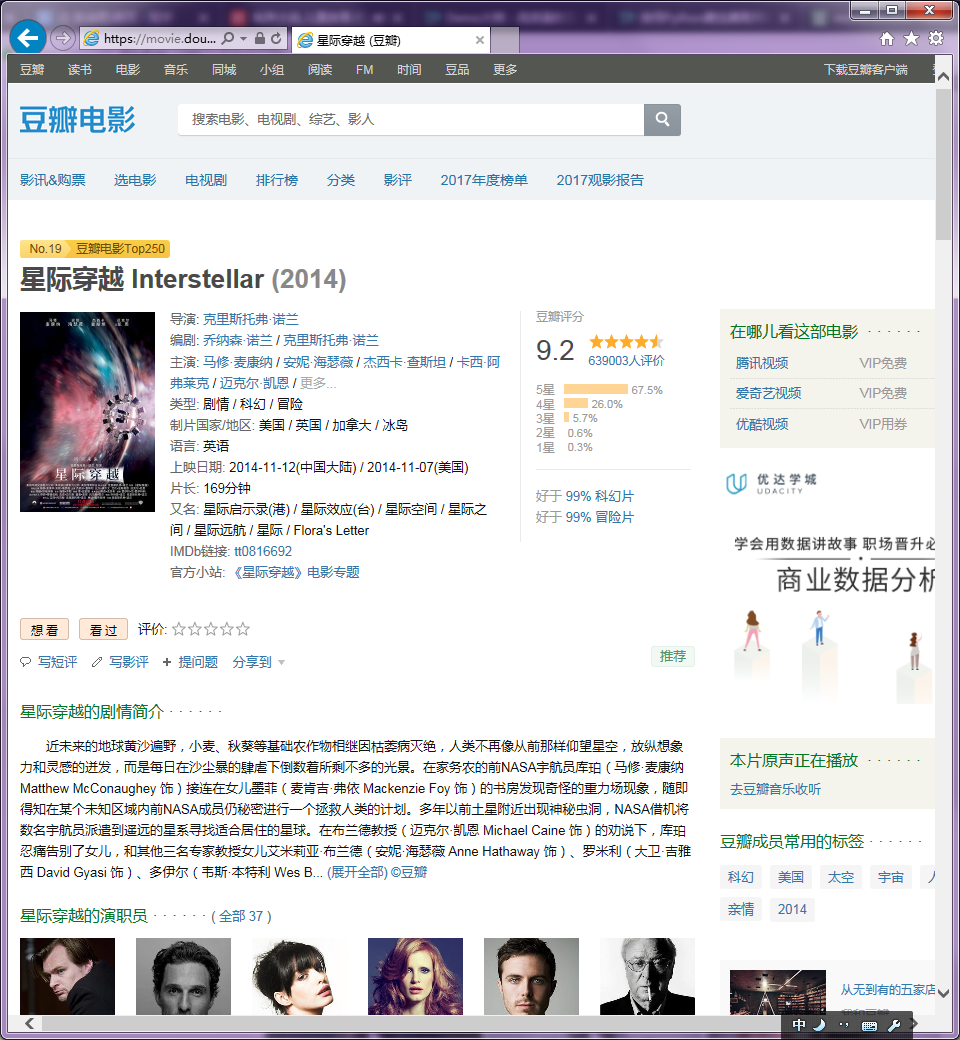
我们需要再次打开搜索结果中对应的电影详情链接,获取电影的评分,导演,主演,类型,上映时间,简介,影评等信息.
比如我们打开搜索结果的第一项,结果如下:
我们打开它的源码看看(按F12打开调试):
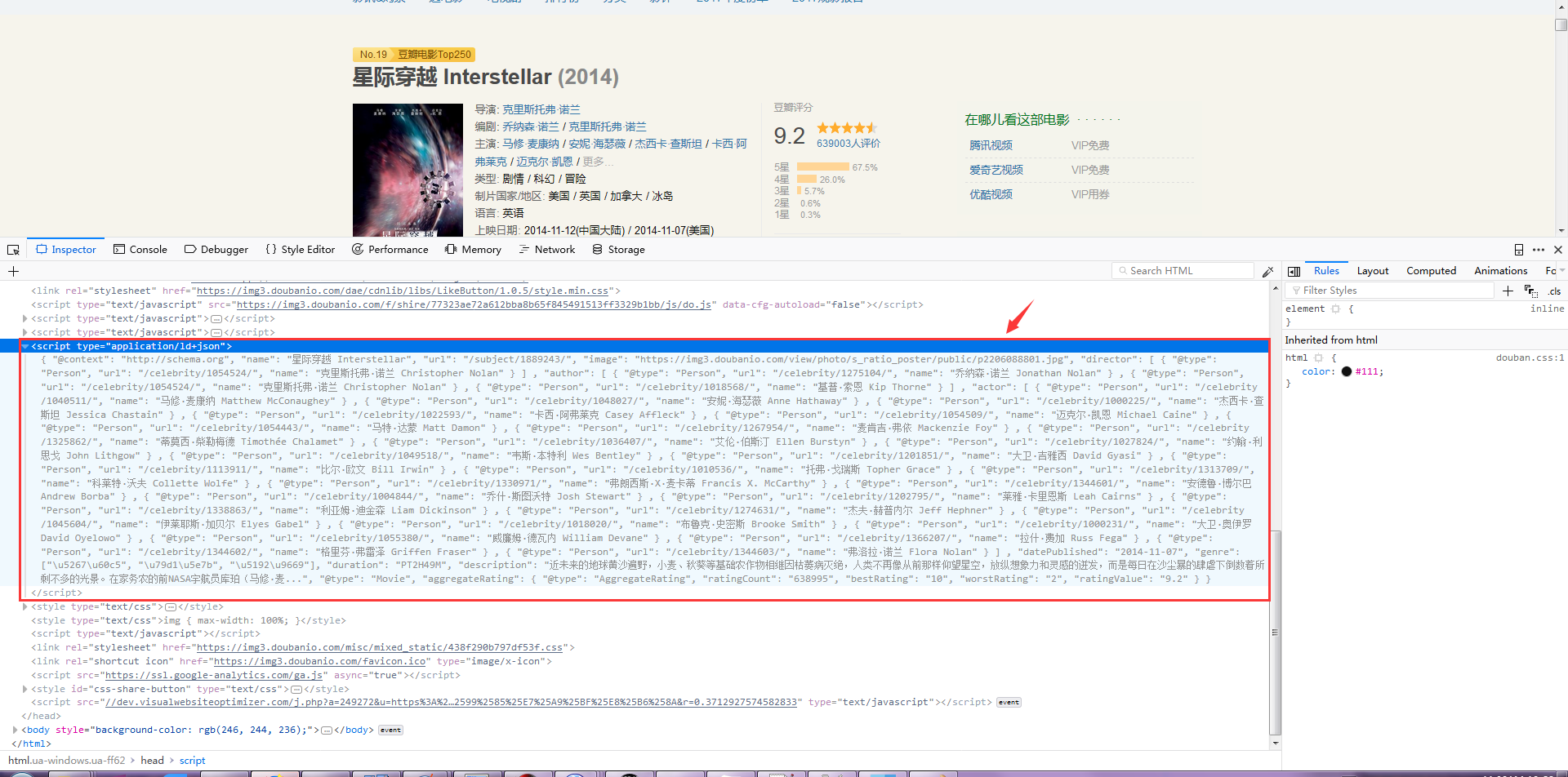
可以看到其head中的一个标签 *** /html/head/script[@type="application/ld+json"] *** 中存放的是一个json文件,这个json中就包含了我们需要的所有电影信息,提取出来如下:
```json
{
"@context": "http://schema.org",
"name": "星际穿越 Interstellar",
"url": "/subject/1889243/",
"image": "https://img3.doubanio.com/view/photo/s_ratio_poster/public/p2206088801.jpg",
"director":
[
{
"@type": "Person",
"url": "/celebrity/1054524/",
"name": "克里斯托弗·诺兰 Christopher Nolan"
}
]
,
"author":
[
{
"@type": "Person",
"url": "/celebrity/1275104/",
"name": "乔纳森·诺兰 Jonathan Nolan"
}
,
{
"@type": "Person",
"url": "/celebrity/1054524/",
"name": "克里斯托弗·诺兰 Christopher Nolan"
}
,
{
"@type": "Person",
"url": "/celebrity/1018568/",
"name": "基普·索恩 Kip Thorne"
}
]
,
"actor":
[
{
"@type": "Person",
"url": "/celebrity/1040511/",
"name": "马修·麦康纳 Matthew McConaughey"
}
,
{
"@type": "Person",
"url": "/celebrity/1048027/",
"name": "安妮·海瑟薇 Anne Hathaway"
}
,
{
"@type": "Person",
"url": "/celebrity/1000225/",
"name": "杰西卡·查斯坦 Jessica Chastain"
}
,
{
"@type": "Person",
"url": "/celebrity/1022593/",
"name": "卡西·阿弗莱克 Casey Affleck"
}
,
{
"@type": "Person",
"url": "/celebrity/1054509/",
"name": "迈克尔·凯恩 Michael Caine"
}
,
{
"@type": "Person",
"url": "/celebrity/1054443/",
"name": "马特·达蒙 Matt Damon"
}
,
{
"@type": "Person",
"url": "/celebrity/1267954/",
"name": "麦肯吉·弗依 Mackenzie Foy"
}
,
{
"@type": "Person",
"url": "/celebrity/1325862/",
"name": "蒂莫西·柴勒梅德 Timothée Chalamet"
}
,
{
"@type": "Person",
"url": "/celebrity/1036407/",
"name": "艾伦·伯斯汀 Ellen Burstyn"
}
,
{
"@type": "Person",
"url": "/celebrity/1027824/",
"name": "约翰·利思戈 John Lithgow"
}
,
{
"@type": "Person",
"url": "/celebrity/1049518/",
"name": "韦斯·本特利 Wes Bentley"
}
,
{
"@type": "Person",
"url": "/celebrity/1201851/",
"name": "大卫·吉雅西 David Gyasi"
}
,
{
"@type": "Person",
"url": "/celebrity/1113911/",
"name": "比尔·欧文 Bill Irwin"
}
,
{
"@type": "Person",
"url": "/celebrity/1010536/",
"name": "托弗·戈瑞斯 Topher Grace"
}
,
{
"@type": "Person",
"url": "/celebrity/1313709/",
"name": "科莱特·沃夫 Collette Wolfe"
}
,
{
"@type": "Person",
"url": "/celebrity/1330971/",
"name": "弗朗西斯·X·麦卡蒂 Francis X. McCarthy"
}
,
{
"@type": "Person",
"url": "/celebrity/1344601/",
"name": "安德鲁·博尔巴 Andrew Borba"
}
,
{
"@type": "Person",
"url": "/celebrity/1004844/",
"name": "乔什·斯图沃特 Josh Stewart"
}
,
{
"@type": "Person",
"url": "/celebrity/1202795/",
"name": "莱雅·卡里恩斯 Leah Cairns"
}
,
{
"@type": "Person",
"url": "/celebrity/1338863/",
"name": "利亚姆·迪金森 Liam Dickinson"
}
,
{
"@type": "Person",
"url": "/celebrity/1274631/",
"name": "杰夫·赫普内尔 Jeff Hephner"
}
,
{
"@type": "Person",
"url": "/celebrity/1045604/",
"name": "伊莱耶斯·加贝尔 Elyes Gabel"
}
,
{
"@type": "Person",
"url": "/celebrity/1018020/",
"name": "布鲁克·史密斯 Brooke Smith"
}
,
{
"@type": "Person",
"url": "/celebrity/1000231/",
"name": "大卫·奥伊罗 David Oyelowo"
}
,
{
"@type": "Person",
"url": "/celebrity/1055380/",
"name": "威廉姆·德瓦内 William Devane"
}
,
{
"@type": "Person",
"url": "/celebrity/1366207/",
"name": "拉什·费加 Russ Fega"
}
,
{
"@type": "Person",
"url": "/celebrity/1344602/",
"name": "格里芬·弗雷泽 Griffen Fraser"
}
,
{
"@type": "Person",
"url": "/celebrity/1344603/",
"name": "弗洛拉·诺兰 Flora Nolan"
}
]
,
"datePublished": "2014-11-07",
"genre": ["\u5267\u60c5", "\u79d1\u5e7b", "\u5192\u9669"],
"duration": "PT2H49M",
"description": "近未来的地球黄沙遍野,小麦、秋葵等基础农作物相继因枯萎病灭绝,人类不再像从前那样仰望星空,放纵想象力和灵感的迸发,而是每日在沙尘暴的肆虐下倒数着所剩不多的光景。在家务农的前NASA宇航员库珀(马修·麦...",
"@type": "Movie",
"aggregateRating": {
"@type": "AggregateRating",
"ratingCount": "638995",
"bestRating": "10",
"worstRating": "2",
"ratingValue": "9.2"
}
}
```
| key | 含义 |
| ---------------------------- | -------- |
| name | 电影名称 |
| director | 电影导演 |
| author | 主要演员 |
| datePublished | 上映时间 |
| genre | 电影类型 |
| description | 电影简介 |
| aggregateRating[ratingValue] | 电影评分 |
### 电影天堂搜索
豆瓣电影搜索的链接如下:
```html
http://s.ygdy8.com/plus/so.php?keytype=0&pagesize=10&searchtype=title&keyword=电影名称
```
只需要一个参数q,它的值是utf-8编码的电影名称,比如我们要搜索 ***星际穿越*** 相关信息. 其中 ***%D0%C7%BC%CA%B4%A9%D4%BD*** 是 ***星际穿越*** 的url格式的gb2312编码::
```html
http://s.ygdy8.com/plus/so.php?keytype=0&keyword=%D0%C7%BC%CA%B4%A9%D4%BD
```
服务器返回的搜索结果是一个html页面其中只有第一项是我们想要的结果,如下:
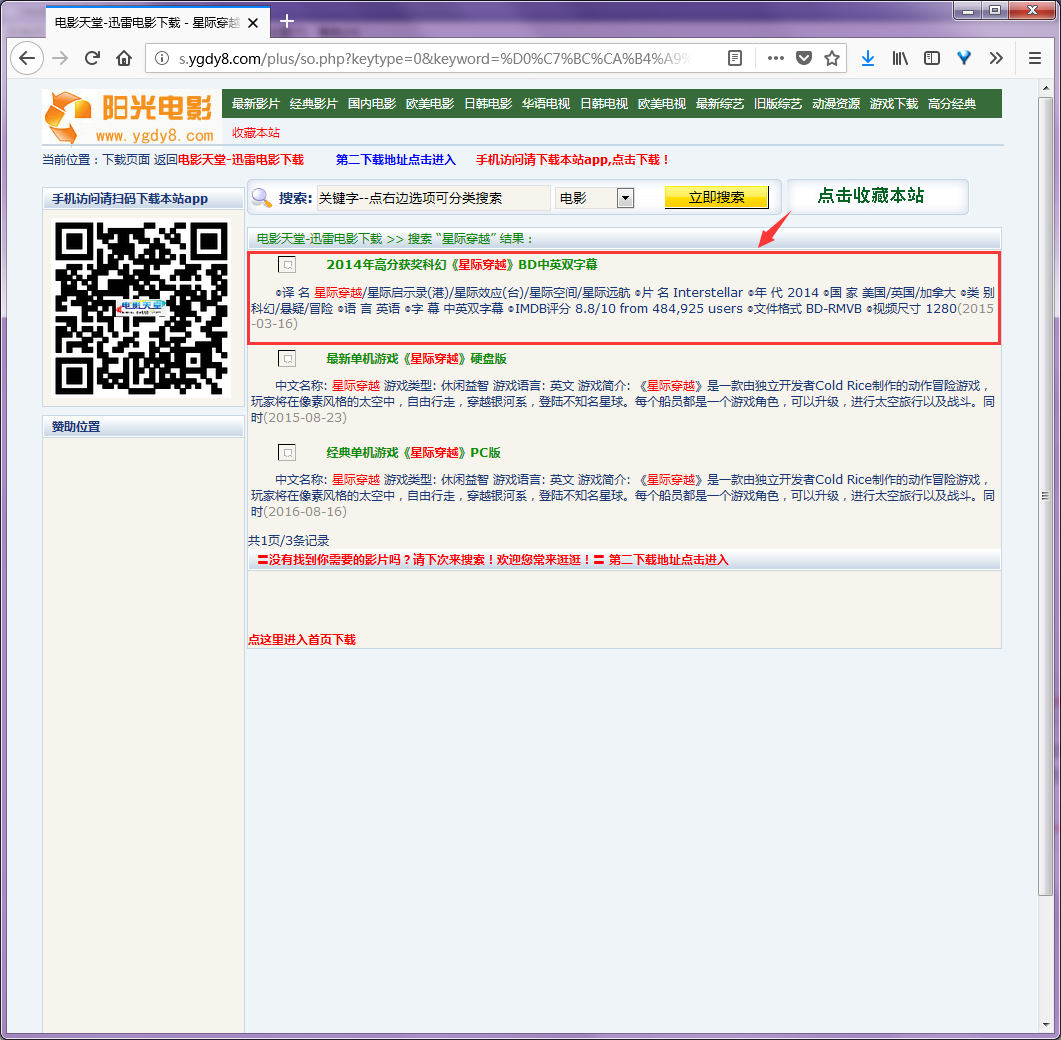
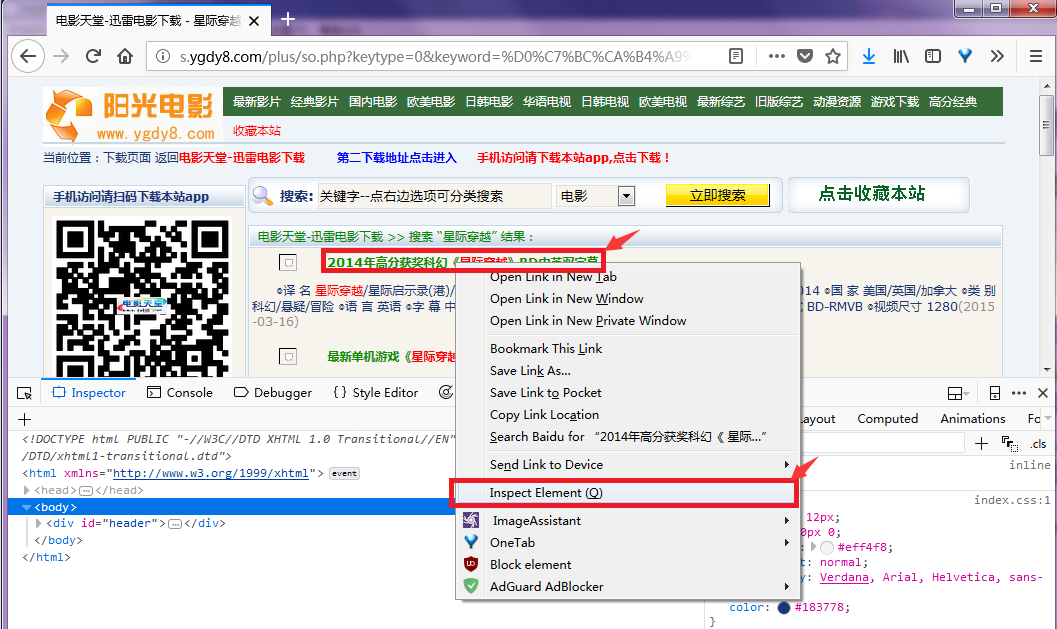
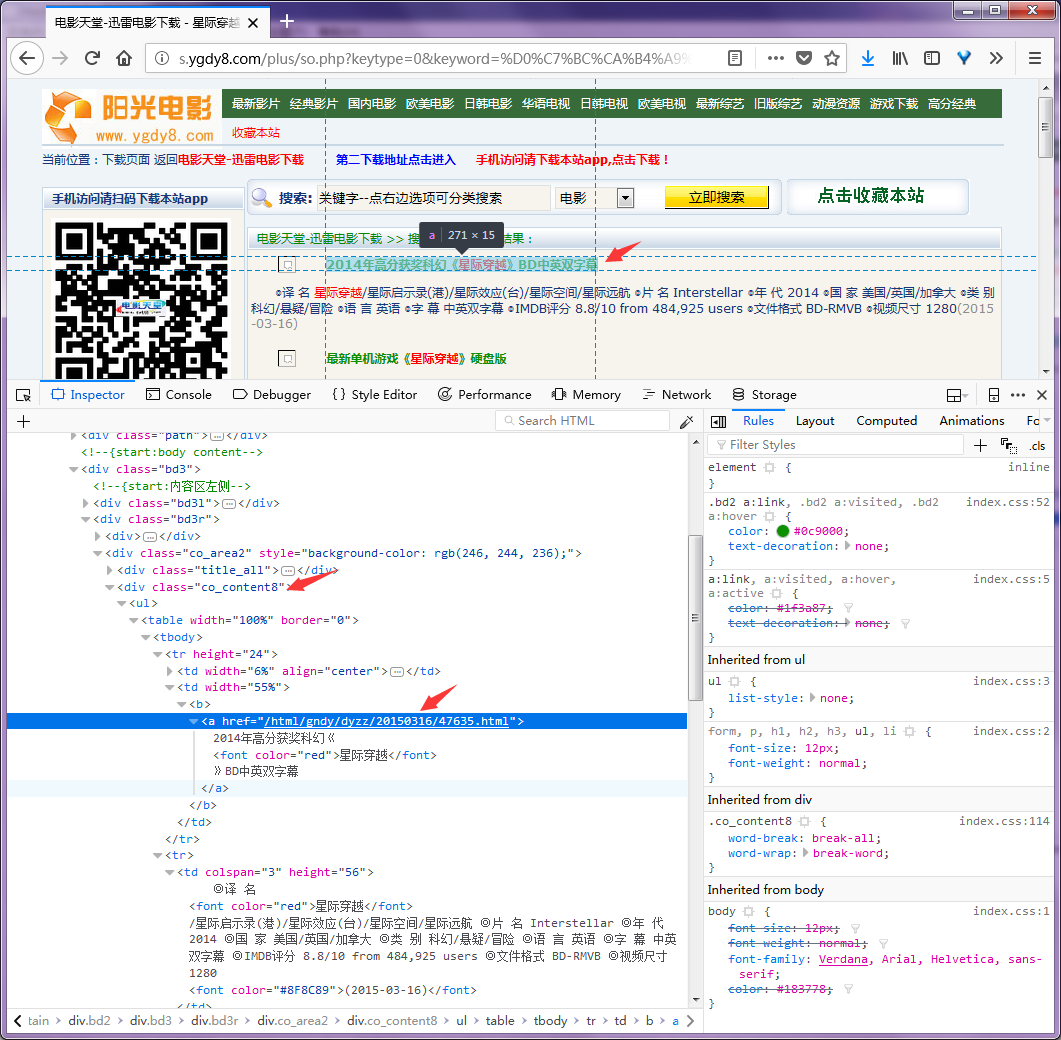
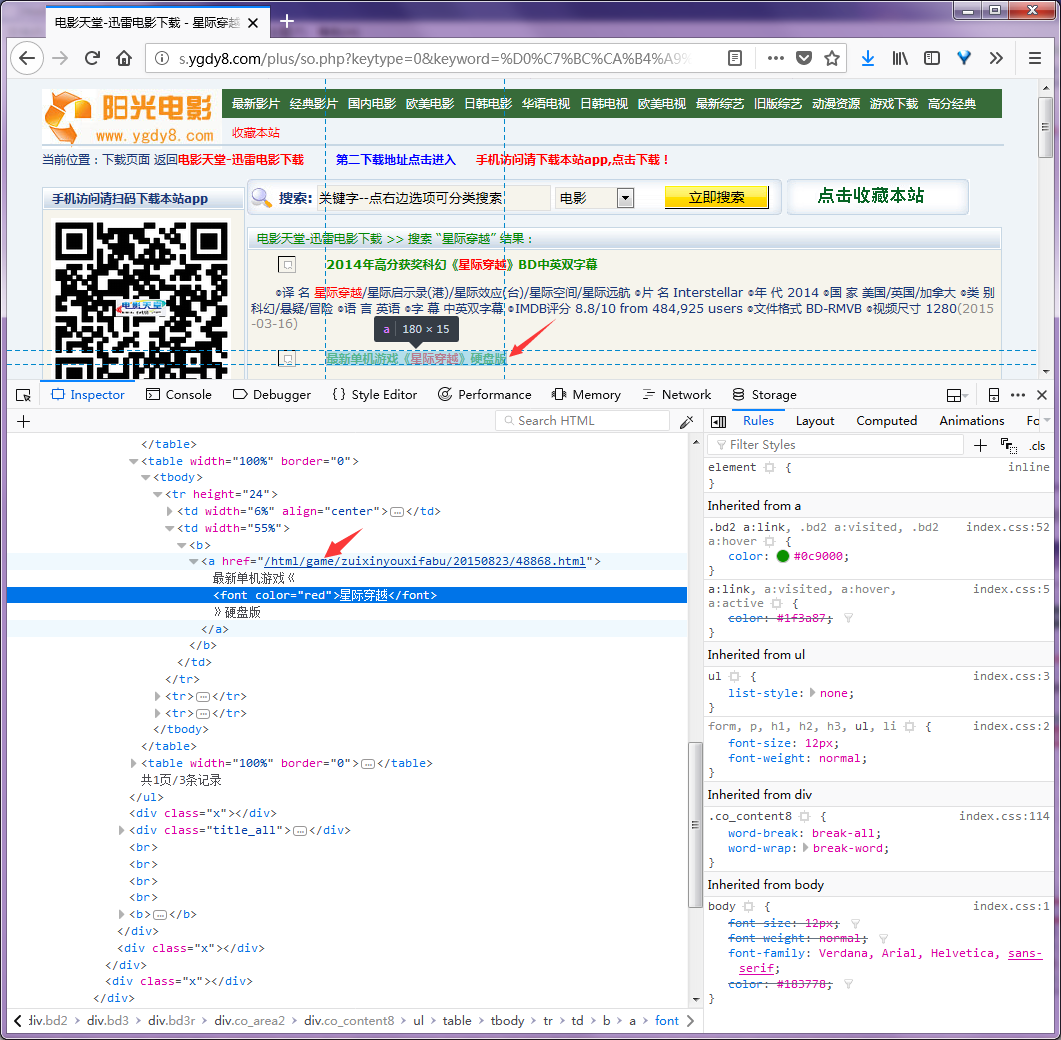
按F12打开调试可以看到,搜索结果列表包含在一个 ***class="co_content8"*** 的div标签中.搜索结果的标题对应的链接就是电影详情页面,其中无用的广告页面的链接中包含 ***game*** ,我们可以据此过滤掉不想要的结果.
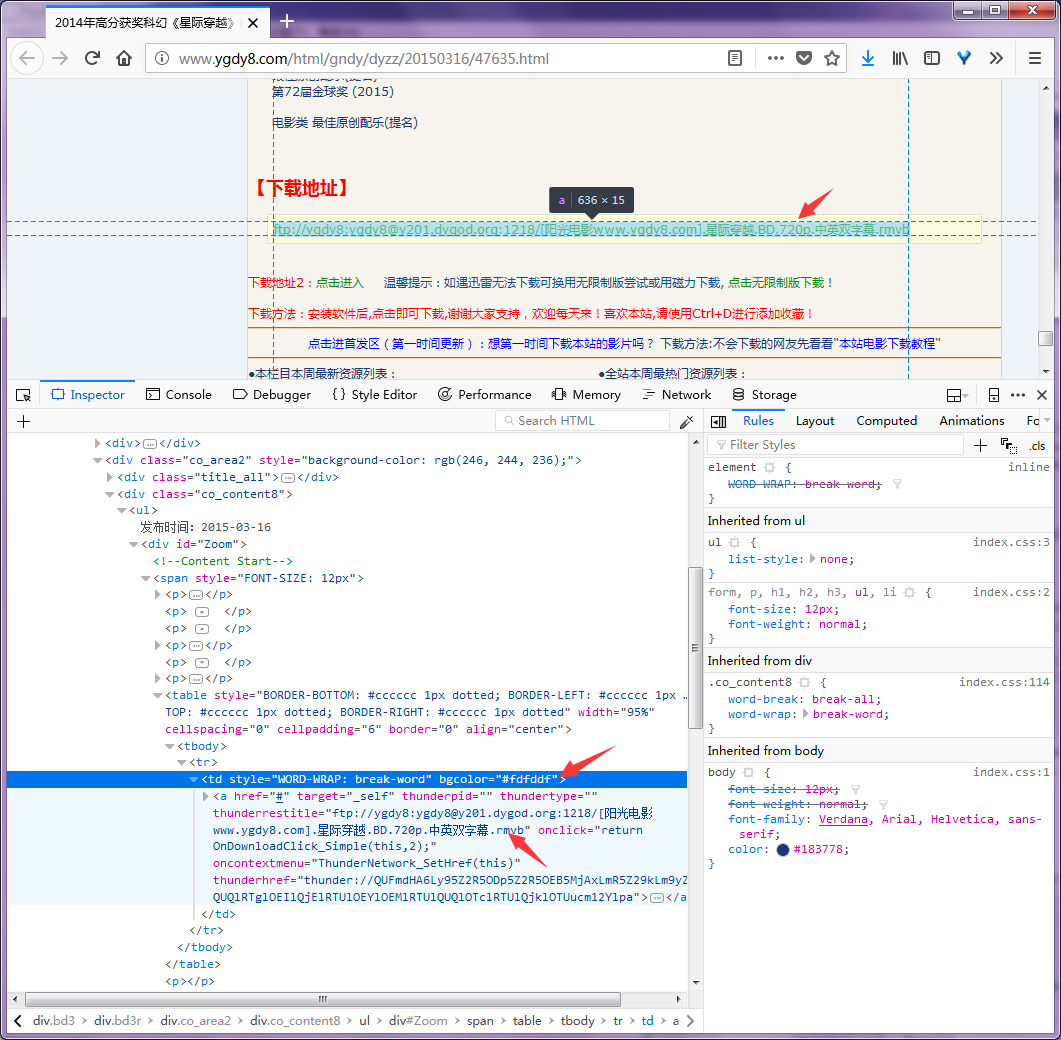
打开电影详情页面,可以看到下载链接包含在一个 ***bgcolor="#fdfddf"*** 的table中:
## 源码详解
### 使用requests下载静态html页面
该函数用于下载图集列表页面,这个页面是静态的,可以直接通过 **requests.get(url)** 函数抓取。但是有一点需要注意,为了把我们的爬虫伪装成正常的浏览器请求,避免我们的爬虫被服务器禁止,我们需要给 **requests** 添加http请求头,其中包含伪造的 **User-Agent** 浏览器标识
```python
def download_page_html(url, sel=0):
phtml = None
page = None
try:
requests_header["Host"] = host_cookie[sel][0]
requests_header["Cookie"] = host_cookie[sel][1]
# 选择一个随机的User-Agent
requests_header["User-Agent"] = random.choice(user_agent_list)
# print(requests_header["User-Agent"])
# print(requests_header)
page = requests.get(url=url, headers=requests_header, timeout=15) # 请求指定的页面
# print(page.encoding)
if page.encoding == "ISO-8859-1":
page.encoding = "gb2312" # 转换页面的编码为gb2312(避免中文乱码)
phtml = page.text # 提取请求结果中包含的html文本
# print("requests success")
except requests.exceptions.RequestException as e:
print("requests error:", e)
phtml = None
finally:
if page != None:
page.close()
return phtml
```
### 从豆瓣电影上搜索并下载电影信息
该函数用于根据指定的电影名称,从豆瓣电影服务器上搜索电影,解析搜索结果并显示,然后根据输入显示指定搜索结果的详情.
```python
def movie_douban(mvsearch_name):
DOUBANMV_SEARCH_URL = "https://movie.douban.com/j/subject_suggest"
DOUBANMV_SEARCH_PAR = {"q": ""}
# mvsearch_name = "星际迷航"
if mvsearch_name == None:
return -1
DOUBANMV_SEARCH_PAR["q"] = mvsearch_name
# url参数编码
mvsearch_par = parse.urlencode(DOUBANMV_SEARCH_PAR, encoding="utf-8")
# print(mvsearch_par)
mvsearch_url = "{0}?{1}".format(DOUBANMV_SEARCH_URL, mvsearch_par)
# print(mvsearch_url)
# 下载指定url
mvsearch_html = download_page_html(mvsearch_url, 2)
if mvsearch_html == None:
print("下载出错,可能IP被服务器封禁,可稍后再试!")
return -1
# 解析下载的结果(json格式)
try:
mvsearch_json = json.loads(mvsearch_html)
except json.JSONDecodeError as e:
print("出现错误:", e)
return -1
if mvsearch_json == None or len(mvsearch_json) == 0:
print("解析出错!")
return -1
# print(mvsearch_json)
# 输出解析结果
print("共找到", len(mvsearch_json), "个关于", mvname, "的结果: ")
for i in range(len(mvsearch_json)):
print("\t", i+1, mvsearch_json[i]["title"],
"/", mvsearch_json[i]["sub_title"])
# 选择需要查看的项
search_sel = input("请选择需要查看的项:")
if search_sel.isdigit() != True:
print("输入有误!")
return -1
search_sel = int(search_sel)
if search_sel > len(mvsearch_json) or search_sel < 1:
print("输入有误!")
return -1
search_sel = search_sel - 1
# 获取需要查看的项的url,下载需要查看的项
mvcontent_url = mvsearch_json[search_sel]["url"]
mvcontent_html = download_page_html(mvcontent_url, 2)
# 解析需要查看的项
doubanmv_etree_html = lxml.html.fromstring(mvcontent_html)
mvcontent_xpath = '/html/head//script[@type="application/ld+json"]/text()'
mvcontent_text = doubanmv_etree_html.xpath(mvcontent_xpath)
if mvcontent_text == None or len(mvcontent_text) == 0:
print("解析出错")
return -1
mvcontent_text[0] = mvcontent_text[0].replace("\n", "") # 替换掉json字符串中的\n
try:
mvcontent_json = json.loads(mvcontent_text[0])
except json.JSONDecodeError as e:
print("解析出错:", e)
return -1
if mvcontent_json == None or len(mvcontent_json) == 0:
print("解析出错")
return -1
# 输出电影详情
print("\t电影名称", mvcontent_json["name"])
# 合并显示电影类型
mvcontent_genre = mvcontent_json["genre"]
mvcontent_genre_str = ""
for lst in mvcontent_genre:
mvcontent_genre_str += (lst + "/")
print("\t电影类型", mvcontent_genre_str)
print("\t上映时间", mvcontent_json["datePublished"])
print("\t豆瓣评分", mvcontent_json["aggregateRating"]["ratingValue"],
"(", mvcontent_json["aggregateRating"]["ratingCount"], ")")
print("\t电影导演", mvcontent_json["director"][0]["name"])
# 合并显示电影主演(只显示前5个)
mvcontent_actor = mvcontent_json["actor"]
mvcontent_actor_str = ""
mvcontent_actor_len = 0
for lst in mvcontent_actor:
mvcontent_actor_str += (lst["name"] + "/")
mvcontent_actor_len += 1
if mvcontent_actor_len > 5:
mvcontent_actor_str += "..."
break
print("\t电影主演", mvcontent_actor_str)
print("\t电影简述", mvcontent_json["description"])
return 0
```
### 从电影天堂上搜索并提取电影下载链接
该函数用于根据指定的电影名称,从电影天堂服务器上搜索电影,解析搜索结果并显示,然后根据输入显示指定搜索结果的下载链接.
```python
def movie_tiantang(mvsearch_name):
MVSEARCH_URL = "http://s.ygdy8.com/plus/so.php"
MVSEARCH_PAR = {"kwtype": "0", "searchtype": "title",
"pagesize": "100", "keyword": ""}
MOVIE_URL = "http://www.ygdy8.com"
# mvsearch_name = "星球大战"
# mvsearch_name = input("请输入电影名称(输入\"exit\"退出):")
if mvsearch_name == None:
print("输入有误!")
return -1
# print("你输入的电影名称为:", mvsearch_name)
# 搜索电影
MVSEARCH_PAR["keyword"] = mvsearch_name
mvsearch_par = parse.urlencode(MVSEARCH_PAR, encoding="gb2312")
# print(mvsearch_par)
mvsearch_url = "{0}?{1}".format(MVSEARCH_URL, mvsearch_par)
# print(mvsearch_url)
mvsearch_html = download_page_html(mvsearch_url, 0)
if mvsearch_html == None:
print("下载出错,可能IP被服务器封禁,可稍后再试!")
return -1
# print(mvsearch_html)
# 获取搜索结果列表
etree_html = lxml.html.fromstring(mvsearch_html)
mvsearch_xpath = '//div[@class="co_content8"]/ul/tr/td/table[@width="100%"]'
mvsearch_list = etree_html.xpath(mvsearch_xpath)
# print(mvsearch_list)
if len(mvsearch_list) == 0:
print("未搜索到任何内容")
return -1
# print("共找到", len(mvsearch_list), "个关于", mvsearch_name, "的结果:")
mvcontent_url = []
mvcontent_title = []
# 提取搜索结果中的电影链接
mvsearch_list_len = len(mvsearch_list)
for idx in range(1, mvsearch_list_len+1):
# 提取链接
mv_title_url = etree_html.xpath(
mvsearch_xpath + '[{0}]//a[@href]/@href'.format(idx))
# print(mv_title_url)
if mv_title_url == None:
print("解析出错!")
return -1
# 过滤掉游戏
if mv_title_url[0].find("/html/game/") < 0:
mv_title_url = "{0}{1}".format(MOVIE_URL, mv_title_url[0])
mvcontent_url.insert(idx-1, mv_title_url)
# 提取标题
mv_title_str_lst = etree_html.xpath(
mvsearch_xpath + '[{0}]//a[@href]//text()'.format(idx))
if mv_title_str_lst == None:
print("解析出错!")
return -1
mv_title_str = "".join(mv_title_str_lst)
mvcontent_title.insert(idx-1, mv_title_str)
# print("\t{0}, {1}, {2}".format(idx, mv_title_str, mv_title_url))
mvcontent_len = len(mvcontent_url)
if mvcontent_len == 0:
print("未搜索到有效结果!")
return -1
# print("其中", mvcontent_len, "个有效结果:")
print("共找到", mvcontent_len, "个关于", mvsearch_name, "的下载:")
for idx in range(mvcontent_len):
print("\t", idx+1, ", ",
mvcontent_title[idx], ", ", mvcontent_url[idx])
# 打开电影详情页面
mvcontent_sel = input("请选择需要下载的项:")
if mvcontent_sel.isdigit() != True:
print("输入有误!")
return -1
mvcontent_sel = int(mvcontent_sel)
if mvcontent_sel > mvcontent_len or mvcontent_sel < 1:
print("输入有误!")
return -1
mvcontent_sel = mvcontent_sel - 1
# 下载电影详情页面
# print("即将下载: ", mvcontent_title[mvcontent_sel],
# ", " + mvcontent_url[mvcontent_sel])
mvcontent_html = download_page_html(mvcontent_url[mvcontent_sel], 1)
# print(mvcontent_html)
if mvcontent_html == None:
print("下载出错,可能IP被服务器封禁,可稍后再试!")
return -1
# 提取电影下载链接
mvcontent_etree_html = lxml.html.fromstring(mvcontent_html)
# '//div[@id="Zoom"]/table/tr/td/table'
mvcontent_xpath = '//td[@bgcolor="#fdfddf"]'
mvcontent_dwurl_lst = []
mvcontent_urllst = mvcontent_etree_html.xpath(
mvcontent_xpath + "//a[@href]/text()")
if mvcontent_urllst == None:
print("解析出错!")
return -1
for url in mvcontent_urllst:
mvcontent_dwurl_lst.append(url)
if mvcontent_dwurl_lst == None:
print("未找到下载链接!")
return -1
# print("共找到", len(mvcontent_dwurl_lst), "个下载链接:")
for dwurl in mvcontent_dwurl_lst:
print("\t", dwurl)
return 0
```
### 程序运行方法
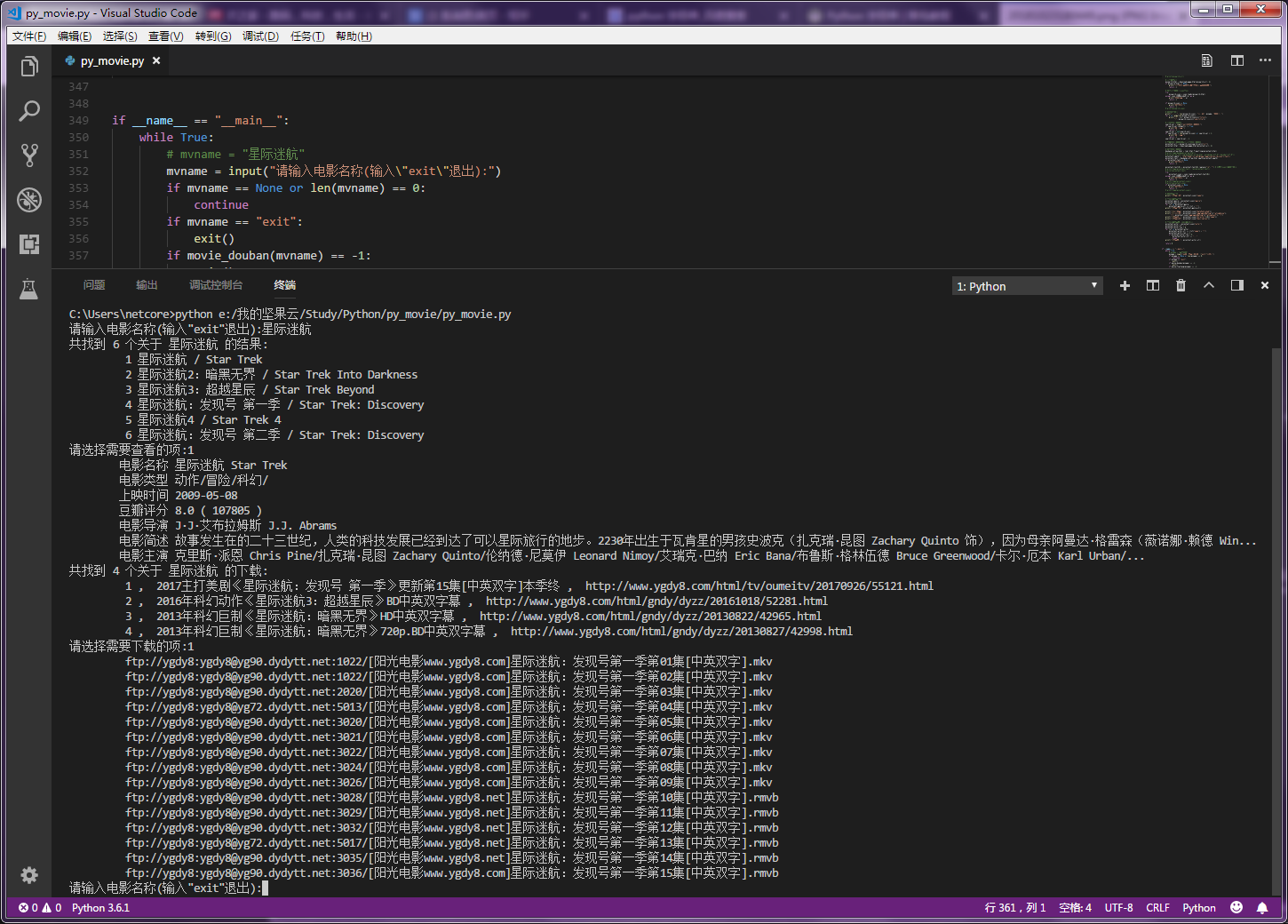
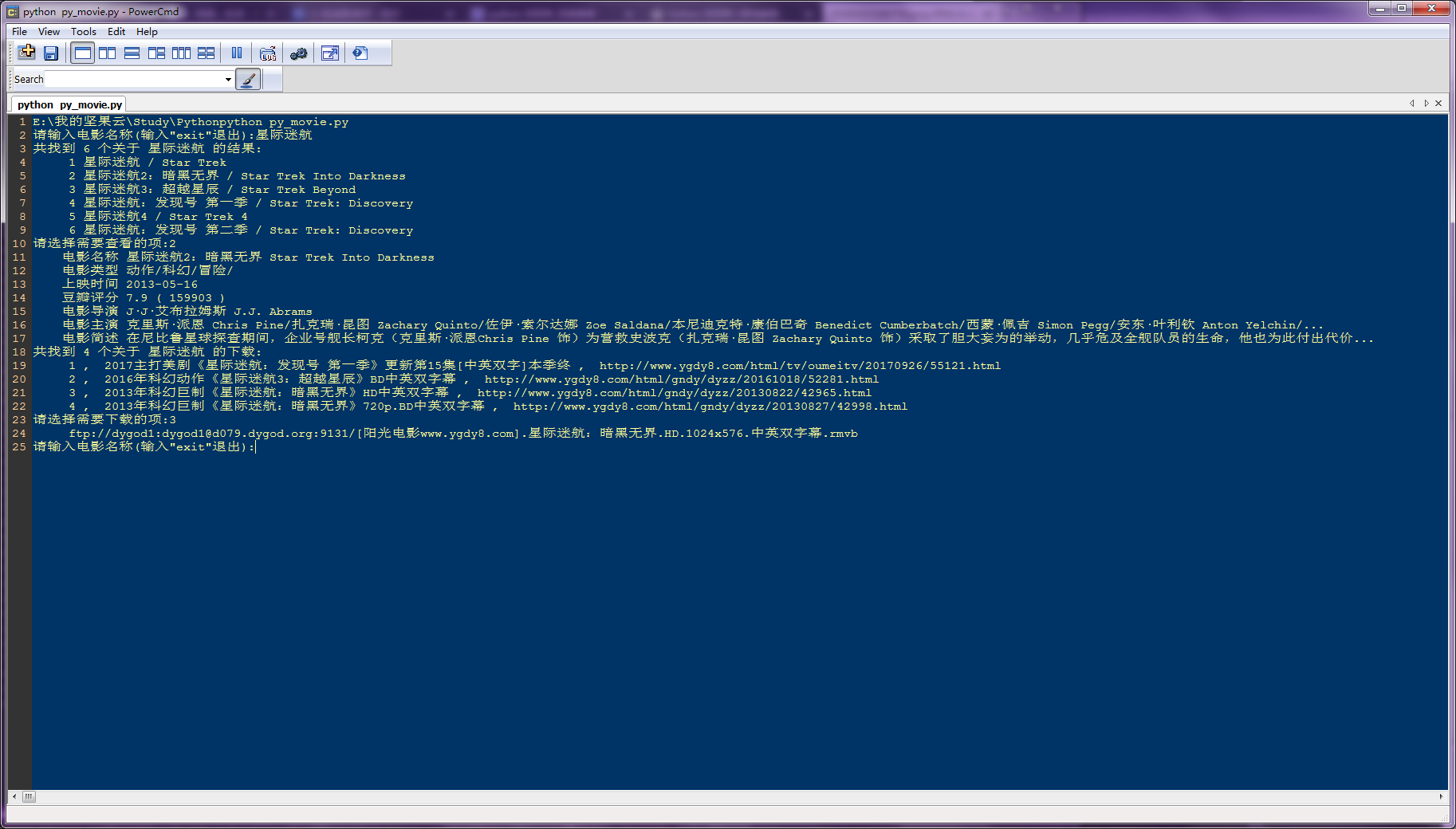
打开命令行,定位到源码所在目录,然后输入 ***python py_movie.py*** ,回车运行
## 程序运行截图

## 项目文件截图