Word转Pdf
一、jacob
准备工作:
导入jar包:jacob.jar
将jacob-1.18-x64.dll添加到 jre 的 bin 目录下
 /**
     * jacob word转pdf
     * @param wordFile wrod文件本地全路径
     * @param pdfFile pdf 文件保存全路径
     */
    public static boolean jacob_WordToPdf(String wordFile, String pdfFile) {
        long start = System.currentTimeMillis();

        ActiveXComponent activeXComponent = null;
        Dispatch documents = null;
        Dispatch doc = null;
        ComThread.InitMTA(true);
        try {
            // 创建一个word对象
            activeXComponent = new ActiveXComponent("Word.Application");
            // 不可见打开word
            activeXComponent.setProperty("Visible", new Variant(false));
            // 禁用宏
            activeXComponent.setProperty("AutomationSecurity", new Variant(3));
            // 获取文挡属性

            documents = activeXComponent.getProperty("Documents").toDispatch();
            // Object[]第三个参数是表示“是否只读方式打开” 调用Documents对象中Open方法打开文档,并返回打开的文档对象Document
            doc = Dispatch.call(documents, "Open", wordFile, false, true).toDispatch();

            // 调用Document对象的SaveAs方法,将文档保存为pdf格式
            // word保存为pdf格式宏,值为17
            Dispatch.call(doc, "SaveAs", pdfFile, wordToPdf);
            System.out.println("jacob_WordToPdf方法转换【"+wordFile+"】,用时:" + (System.currentTimeMillis() - start) + "ms.");
            return true;
        } catch (Exception e) {
            e.printStackTrace();
        } finally {
            if(null != doc){
                Dispatch.call(doc, "Close", false);
                doc.safeRelease();
            }
            if(null != documents){
                documents.safeRelease();
            }
            if (null != activeXComponent){
                activeXComponent.invoke("Quit", new Variant[] {});
                activeXComponent.safeRelease();
            }
            // 如果没有这句话,winword.exe进程将不会关闭
            ComThread.Release();
            ComThread.quitMainSTA();
        }
        return false;
    }
二、aspose
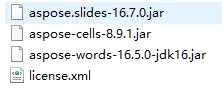
准备工作:导入jar包
  public static boolean getLicense() {
        boolean result = false;
        try {
            // license.xml应放在..\WebRoot\WEB-INF\classes路径下
            InputStream is = WordConverter.class.getClassLoader().getResourceAsStream("license.xml");
            License aposeLic = new License();
            aposeLic.setLicense(is);
            result = true;
        } catch (Exception e) {
            e.printStackTrace();
        }
        return result;
    }

    /**
     * aspose word转pdf
     * @param wordFile
     * @param pdfFile
     * @return
     */
    public static boolean aspose_WordToPdf(String wordFile, String pdfFile) {
        // 验证License 若不验证则转化出的pdf文档会有水印产生
        if (!getLicense()) {
            return false;
        }
        FileOutputStream fos = null;
        try {
            long start = System.currentTimeMillis();

            // 新建一个空白pdf文件
            File file = new File(pdfFile);
            fos = new FileOutputStream(file);
            // Address是将要被转化的word文档
            Document doc = new Document(wordFile);
            // 全面支持DOC, DOCX, OOXML, RTF HTML, OpenDocument, PDF,
            doc.save(fos, SaveFormat.PDF);
            // EPUB, XPS, SWF 相互转换
            System.out.println("aspose_WordToPdf方法转换【"+wordFile+"】,用时:" + (System.currentTimeMillis() - start) + "ms.");
        } catch (Exception e) {
            e.printStackTrace();
            return false;
        }finally {
            if (null != fos) {
                try {
                    fos.flush();
                    fos.close();
                } catch (IOException e) {
                    e.printStackTrace();
                }
            }
        }
        return true;
    }
将 license.xml 放到 resources 下
<?xml version="1.0" encoding="UTF-8" ?>
<License>
    <Data>
        <Products>
            <Product>Aspose.Total for Java</Product>
            <Product>Aspose.Words for Java</Product>
        </Products>
        <EditionType>Enterprise</EditionType>
        <SubscriptionExpiry>20991231</SubscriptionExpiry>
        <LicenseExpiry>20991231</LicenseExpiry>
        <SerialNumber>8bfe198c-7f0c-4ef8-8ff0-acc3237bf0d7</SerialNumber>
    </Data>
    <Signature>sNLLKGMUdF0r8O1kKilWAGdgfs2BvJb/2Xp8p5iuDVfZXmhppo+d0Ran1P9TKdjV4ABwAgKXxJ3jcQTqE/2IRfqwnPf8itN8aFZlV3TJPYeD3yWE7IT55Gz6EijUpC7aKeoohTb4w2fpox58wWoF3SNp6sK6jDfiAUGEHYJ9pjU=</Signature>
</License>
三、openoffice
准备工作:
安装Apache_OpenOffice
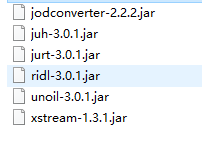
导入jar包:
/**
     * openoffice word转pdf
     * @param wordFile
     * @param pdfFile
     * @return
     */
    public static boolean openoffice_WordToPdf(String wordFile, String pdfFile){
        // 源文件目录
        File inputFile = new File(wordFile);
        Process p = null;
        OpenOfficeConnection connection = null;
        try{
            long start = System.currentTimeMillis();
            // 输出文件目录
            File outputFile = new File(pdfFile);
            if (!outputFile.getParentFile().exists()) {
                outputFile.getParentFile().exists();
            }
            // 调用openoffice服务线程
            /** 我把openOffice下载到了 E:/OpenOffice下  ,下面的写法自己修改编辑就可以**/
            String command = "E:/OpenOffice/program/soffice.exe -headless -accept=\"socket,host=127.0.0.1,port=8100;urp;\"";
            p = Runtime.getRuntime().exec(command);
            // 连接openoffice服务
            connection = new SocketOpenOfficeConnection("127.0.0.1", 8100);
            connection.connect();
            // 转换
            DocumentConverter converter = new OpenOfficeDocumentConverter(connection);
            converter.convert(inputFile, outputFile);
            System.out.println("openoffice_WordToPdf方法转换【"+wordFile+"】,用时:" + (System.currentTimeMillis() - start) + "ms.");
            return true;
        }catch (Exception e){
            e.printStackTrace();
        }finally {
            if(null != connection){
                // 关闭连接
                connection.disconnect();
            }
            if(null != p){
                // 关闭进程
                p.destroy();
            }
        }
        return false;
    }
工具包下载: https://download.csdn.net/download/qq_39668819/12888900
版权声明:本文为qq_39668819原创文章,遵循CC 4.0 BY-SA版权协议,转载请附上原文出处链接和本声明。