文章目录
Clickhouse centos7集群搭建
1 准备
准备阶段操作略
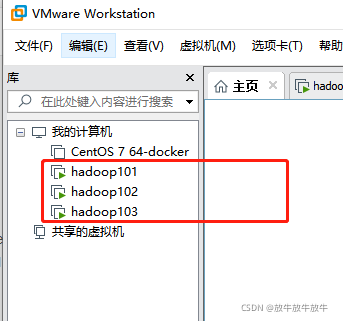
Zookeeper集群:hadoop101,hadoop102,hadoop103(一主一从一observer)
Zookeeper集群搭建三个节点centos7:hadoop101,hadoop102,hadoop103分别安装clickhouse
2 配置三节点版本集群及副本(2个分片,只有一个分片有副本)
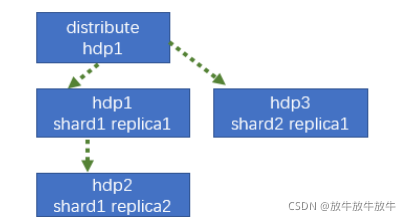
2.1 hadoop101 配置
- /etc/clickhouse-server/config.d/目录下创建metrika-shard.xml
添加以下配置
<?xml version="1.0"?>
	<yandex>
		<remote_servers>
			<!-- 集群名称-->
			<gmall_cluster>
				 <!--集群的第一个分片-->
				<shard>
					<internal_replication>true</internal_replication>
					<!--该分片的第一个副本-->
					<replica>
						<host>hadoop101</host>
						<port>9000</port>
					</replica>
					<!--该分片的第二个副本-->
					<replica>
						<host>hadoop102</host>
						<port>9000</port>
						</replica>
				</shard>
				<!--集群的第二个分片-->
				<shard>
					<internal_replication>true</internal_replication>
					<!--该分片的第一个副本-->
					<replica>
						<host>hadoop103</host>
						<port>9000</port>
					</replica>
				</shard>
			</gmall_cluster>
		</remote_servers>
	<!-- zookeeper集群连接配置 -->
	<zookeeper-servers>
		<node index="1">
			<host>hadoop101</host>
			<port>2181</port>
		</node>
		<node index="2">
			<host>hadoop102</host>
			<port>2181</port>
		</node>
	</zookeeper-servers>
	<!-- 参数配置,创建表参数可动态引用 -->
	<macros>
		<!--不同机器放的分片数不一样-->
		<shard>01</shard>
		<!--不同机器放的副本数不一样 rep_分片索引_副本-->
		<replica>rep_1_1</replica>
	</macros>
</yandex>
- 将metrika-shard.xml引用到config.xml配置文件中
<zookeeper incl="zookeeper-servers" optional="true" />
<include_from>/etc/clickhouse-server/config.d/metrika-shard.xml</include_from>
2.2 hadoop102 配置
- /etc/clickhouse-server/config.d/目录下创建metrika-shard.xml
添加以下配置
<?xml version="1.0"?>
	<yandex>
		<remote_servers>
			<!-- 集群名称-->
			<gmall_cluster>
				 <!--集群的第一个分片-->
				<shard>
					<internal_replication>true</internal_replication>
					<!--该分片的第一个副本-->
					<replica>
						<host>hadoop101</host>
						<port>9000</port>
					</replica>
					<!--该分片的第二个副本-->
					<replica>
						<host>hadoop102</host>
						<port>9000</port>
						</replica>
				</shard>
				<!--集群的第二个分片-->
				<shard>
					<internal_replication>true</internal_replication>
					<!--该分片的第一个副本-->
					<replica>
						<host>hadoop103</host>
						<port>9000</port>
					</replica>
				</shard>
			</gmall_cluster>
		</remote_servers>
	<!-- zookeeper集群连接配置 -->
	<zookeeper-servers>
		<node index="1">
			<host>hadoop101</host>
			<port>2181</port>
		</node>
		<node index="2">
			<host>hadoop102</host>
			<port>2181</port>
		</node>
	</zookeeper-servers>
	<!-- 参数配置,创建表参数可动态引用 -->
	<macros>
		<!--不同机器放的分片数不一样-->
		<shard>01</shard>
		<!--不同机器放的副本数不一样 rep_分片索引_副本-->
		<replica>rep_1_2</replica>
	</macros>
</yandex>
- 将metrika-shard.xml引用到config.xml配置文件中
<zookeeper incl="zookeeper-servers" optional="true" />
<include_from>/etc/clickhouse-server/config.d/metrika-shard.xml</include_from>
2.3 hadoop103 配置
- /etc/clickhouse-server/config.d/目录下创建metrika-shard.xml
添加以下配置
<?xml version="1.0"?>
	<yandex>
		<remote_servers>
			<!-- 集群名称-->
			<gmall_cluster>
				 <!--集群的第一个分片-->
				<shard>
					<internal_replication>true</internal_replication>
					<!--该分片的第一个副本-->
					<replica>
						<host>hadoop101</host>
						<port>9000</port>
					</replica>
					<!--该分片的第二个副本-->
					<replica>
						<host>hadoop102</host>
						<port>9000</port>
						</replica>
				</shard>
				<!--集群的第二个分片-->
				<shard>
					<internal_replication>true</internal_replication>
					<!--该分片的第一个副本-->
					<replica>
						<host>hadoop103</host>
						<port>9000</port>
					</replica>
				</shard>
			</gmall_cluster>
		</remote_servers>
	<!-- zookeeper集群连接配置 -->
	<zookeeper-servers>
		<node index="1">
			<host>hadoop101</host>
			<port>2181</port>
		</node>
		<node index="2">
			<host>hadoop102</host>
			<port>2181</port>
		</node>
	</zookeeper-servers>
	<!-- 参数配置,创建表参数可动态引用 -->
	<macros>
		<!--不同机器放的分片数不一样-->
		<shard>02</shard>
		<!--不同机器放的副本数不一样 rep_分片索引_副本-->
		<replica>rep_2_1</replica>
	</macros>
</yandex>
- 将metrika-shard.xml引用到config.xml配置文件中
<zookeeper incl="zookeeper-servers" optional="true" />
<include_from>/etc/clickhouse-server/config.d/metrika-shard.xml</include_from>
2.4 检查启动关闭
- 检查 /etc/clickhouse-server目录下的文件权限是否均归属clickhouse账户(确保是clickhouse,否则启动会失败)
# 修改
chown -R clickhouse:clickhouse /etc/clickhouse-server
- 逐台启动
# 启动
systemctl start clickhouse-server
# 关闭
systemctl stopclickhouse-server
# 环境指令
clickhouse start/stop/restart
2.5 查看集群是否搭建成功
# 连接clickhouse
[root@hadoop101 clickhouse-server]# clickhouse-client -m
ClickHouse client version 21.8.5.7 (official build).
Connecting to localhost:9000 as user default.
Connected to ClickHouse server version 21.8.5 revision 54449.

hadoop101 :) select * from system.clusters;

SELECT *
FROM system.clusters

Query id: 44bec642-9bd9-49b4-9658-da3314528a77

┌─cluster──────────────────────────────────────┬─shard_num─┬─shard_weight─┬─replica_num─┬─host_name─┬─host_address───┬─port─┬─is_local─┬─user────┬─default_database─┬─errors_count─┬─slowdowns_count─┬─estimated_recovery_time─┐
│ gmall_cluster                                │         1 │            1 │           1 │ hadoop101 │ 192.168.10.101 │ 9000 │        1 │ default │                  │            0 │               0 │                       0 │
│ gmall_cluster                                │         1 │            1 │           2 │ hadoop102 │ 192.168.10.102 │ 9000 │        0 │ default │                  │            0 │               0 │                       0 │
│ gmall_cluster                                │         2 │            1 │           1 │ hadoop103 │ 192.168.10.103 │ 9000 │        0 │ default │                  │            0 │               0 │                       0 │
│ test_cluster_two_shards                      │         1 │            1 │           1 │ 127.0.0.1 │ 127.0.0.1      │ 9000 │        1 │ default │                  │            0 │               0 │                       0 │
│ test_cluster_two_shards                      │         2 │            1 │           1 │ 127.0.0.2 │ 127.0.0.2      │ 9000 │        0 │ default │                  │            0 │               0 │                       0 │
│ test_cluster_two_shards_internal_replication │         1 │            1 │           1 │ 127.0.0.1 │ 127.0.0.1      │ 9000 │        1 │ default │                  │            0 │               0 │                       0 │
│ test_cluster_two_shards_internal_replication │         2 │            1 │           1 │ 127.0.0.2 │ 127.0.0.2      │ 9000 │        0 │ default │                  │            0 │               0 │                       0 │
│ test_cluster_two_shards_localhost            │         1 │            1 │           1 │ localhost │ ::1            │ 9000 │        1 │ default │                  │            0 │               0 │                       0 │
│ test_cluster_two_shards_localhost            │         2 │            1 │           1 │ localhost │ ::1            │ 9000 │        1 │ default │                  │            0 │               0 │                       0 │
│ test_shard_localhost                         │         1 │            1 │           1 │ localhost │ ::1            │ 9000 │        1 │ default │                  │            0 │               0 │                       0 │
│ test_shard_localhost_secure                  │         1 │            1 │           1 │ localhost │ ::1            │ 9440 │        0 │ default │                  │            0 │               0 │                       0 │
│ test_unavailable_shard                       │         1 │            1 │           1 │ localhost │ ::1            │ 9000 │        1 │ default │                  │            0 │               0 │                       0 │
│ test_unavailable_shard                       │         2 │            1 │           1 │ localhost │ ::1            │    1 │        0 │ default │                  │            0 │               0 │                       0 │
└──────────────────────────────────────────────┴───────────┴──────────────┴─────────────┴───────────┴────────────────┴──────┴──────────┴─────────┴──────────────────┴──────────────┴─────────────────┴─────────────────────────┘

13 rows in set. Elapsed: 0.015 sec.
3 创建集群分布式表
3.1 创建基础表
create table develop.t_order_mt on cluster gmall_cluster (
   id UInt32,
   sku_id String,
   total_amount Decimal(16,2),
   create_time Datetime
) engine = ReplicatedMergeTree('/clickhouse/tables/{shard}/t_order_mt','{replica}')
 partition by toYYYYMMDD(create_time)
 primary key (id)
 order by (id,sku_id);
3.2 创建分布式表
- Distributed
create table develop.t_order_mt_all on cluster gmall_cluster (
 id UInt32,
 sku_id String,
 total_amount Decimal(16,2),
 create_time Datetime
) engine = Distributed(gmall_cluster,develop, t_order_mt,hiveHash(sku_id));
Distributed 参数含义:
- Distributed(集群名称,库名,本地表名,分片键)
- 分片键必须是整型数字,所以用 hiveHash 函数转换,也可以 rand()
- 造数
insert into develop.t_order_mt_all values
(201,'sku_001',1000.00,'2020-06-01 12:00:00') ,
(202,'sku_002',2000.00,'2020-06-01 12:00:00'),
(203,'sku_004',2500.00,'2020-06-01 12:00:00'),
(204,'sku_002',2000.00,'2020-06-01 12:00:00'),
(205,'sku_003',600.00,'2020-06-02 12:00:00');
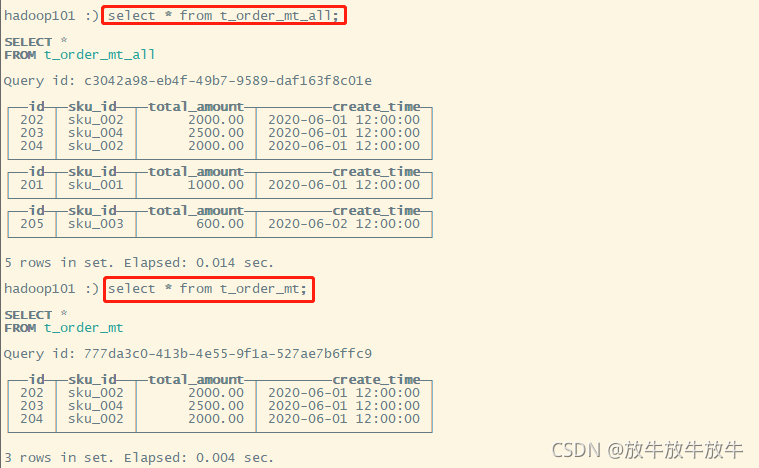
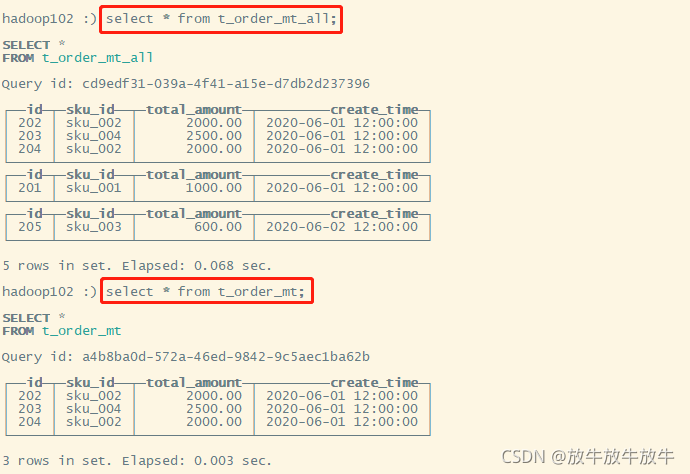
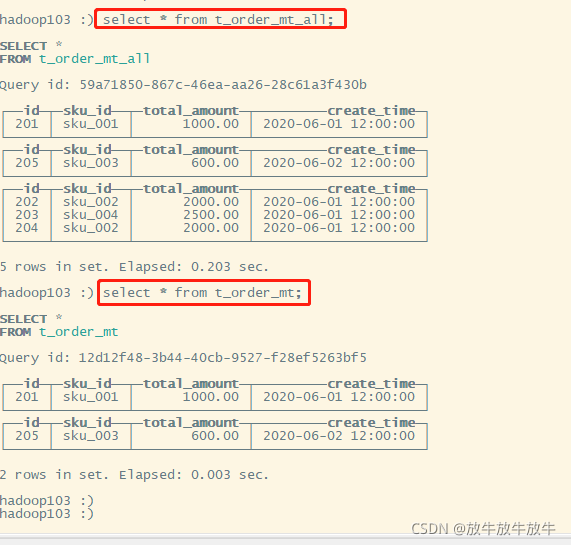
3.3 验证
hadoop101
hadoop102
hadop103
版权声明:本文为qq_27242695原创文章,遵循CC 4.0 BY-SA版权协议,转载请附上原文出处链接和本声明。