前言
本小节我们将学习一下使用阿里云容器镜像服务来管理我们的镜像。
Docker 环境准备(已安装的可省略此步骤)
docker version > /dev/null || curl -fsSL get.docker.com | bash
service docker restart
systemctl enable docker  #设置开机自启
使用阿里云容器镜像服务并创建自己的镜像仓库:
- 创建你的命名空间:名为dustyone

- 假设你的阿里云登录账号为123456789
- 假设你创建的镜像仓库:名为dustyone_repository
https://cr.console.aliyun.com/cn-shenzhen/instances/repositories
- 创建你的命名空间:名为dustyone
设置镜像仓库访问授权,以方便通过Docker CTL 登录并访问我们的阿里云镜像仓库
 此处我们设置访问凭证,建议为固定的凭证,假设你设置的固定凭证abcde
Docker Login
使用如下命令登录:sudo docker login --username=123456789 --password=abcde registry.cn-shenzhen.aliyuncs.com其中‘123456789 ’为你的阿里云登录账号,abcde为镜像仓库的访问凭证
Docker镜像PUSH操作
查看本地镜像:假设本地有个如下镜像
[root@iZwz92qakfc7zvdr9h0gipZ kodexplorer]# docker images
REPOSITORY                          TAG                 IMAGE ID            CREATED             SIZE
docker.io/baiyuetribe/kodexplorer   latest              cc7aef62c0b1        7 weeks ago         102 MB
[root@iZwz92qakfc7zvdr9h0gipZ kodexplorer]#
给指定的镜像打Tag
sudo docker tag cc7aef62c0b1 registry.cn-shenzhen.aliyuncs.com/dustyone/dustyone_repository:kodExplorer-latest查看镜像信息
[root@iZwz92qakfc7zvdr9h0gipZ kodexplorer]# sudo docker tag cc7aef62c0b1 registry.cn-shenzhen.aliyuncs.com/dustyone/dustyone_repository:kodExplorer-latest
[root@iZwz92qakfc7zvdr9h0gipZ kodexplorer]# docker images
REPOSITORY                                                       TAG                  IMAGE ID            CREATED             SIZE
registry.cn-shenzhen.aliyuncs.com/dustyone/dustyone_repository   kodExplorer-latest   cc7aef62c0b1        7 weeks ago         102 MB
docker.io/baiyuetribe/kodexplorer                                latest               cc7aef62c0b1        7 weeks ago         102 MB
将镜像push到阿里云镜像服务上去
sudo docker push registry.cn-shenzhen.aliyuncs.com/dustyone/dustyone_repository:kodExplorer-latestkodExplorer-latest: digest: sha256:58983b0e28a73394d73a23efe61431945bcfdfae2319222f9e18fe72276eaf99 size: 3456 [root@iZwz92qakfc7zvdr9h0gipZ kodexplorer]#
Docker镜像PULL操作
如上所示我们已经成功把我们本地的镜像推到了阿里云镜像服务指定的仓库中去了,下面我们将模拟从阿里云镜像服务指定的镜像仓库中拉去镜像并运行镜像清除所有镜像(建议你谨慎执行此操作,如不需要建议不要操作此步骤)
[root@iZwz92qakfc7zvdr9h0gipZ kodexplorer]# docker rmi -f cc7aef62c0b1
Untagged: docker.io/baiyuetribe/kodexplorer:latest
Untagged: docker.io/baiyuetribe/kodexplorer@sha256:58983b0e28a73394d73a23efe61431945bcfdfae2319222f9e18fe72276eaf99
Untagged: registry.cn-shenzhen.aliyuncs.com/dustyone/dustyone_repository:kodExplorer-latest
Untagged: registry.cn-shenzhen.aliyuncs.com/dustyone/dustyone_repository@sha256:58983b0e28a73394d73a23efe61431945bcfdfae2319222f9e18fe72276eaf99
Deleted: sha256:cc7aef62c0b120883bd2fc9af1d78ae4d83a32aee7369f5f3d6eaf1137a7e005
Deleted: sha256:cf67d7d28e6a2a188a44ed47ad5204c84b6cb808d81a50cb21d7626c1e086e6f
Deleted: sha256:9f11944369bb433d31ef3ed3d9522086a7191076f1794970ad6dc55300f95758
Deleted: sha256:7330430d35e1a38131caf76efed6c2799147bc893c8457c9df70a501c44ca30d
Deleted: sha256:7969b7059ac817a269f03093ef50954dc7207609fc5bf15adb216fdb5f8a7d95
Deleted: sha256:946b91a8737490afdb4054e47fcbf3abec697f40f91889e953db90895fbe8c8a
Deleted: sha256:a53ab340e7178be123278124d61cf9494dd207ea11eaba232da91585c4f0743c
Deleted: sha256:d2df4e1e893d8794771ab13d92e18c3de4daa4cd29bc566dc5b9605365d10618
Deleted: sha256:e1b2e8b71488ff071e6ca961dd7e6c61992a8025ae35197738e33f81027bd6d8
Deleted: sha256:e82dda6f591ff265446c9c85e0d47ded27e3679c5930d20fb0d88a964550925b
Deleted: sha256:49f1cb8675bd28a70d2d6b4ed2bc27eb4bf54b95ba32eee8794f26cd230398c1
Deleted: sha256:d2ba51284efae51eb0f30133b8c1f9f483cb5830df2ca8d1c0674021ee12d797
Deleted: sha256:6212ec45892bc28e564274fd486ce6fc131f2a9a3e109159e1521ed141d5db49
Deleted: sha256:bef1b909a06fb0634ff4dbcdc6b0dbabfca418b9352b99856664a57bcd7d27c6
Deleted: sha256:40c6ea91f8a2e3797cae2dbf29c25dc8903eb5dc5a80a6391042cab3e8f71449
Deleted: sha256:256a7af3acb11f89914205b6eef07e05e4196e898329575d97185758b450eb52
[root@iZwz92qakfc7zvdr9h0gipZ kodexplorer]#
[root@iZwz92qakfc7zvdr9h0gipZ kodexplorer]# docker images REPOSITORY TAG IMAGE ID CREATED SIZE [root@iZwz92qakfc7zvdr9h0gipZ kodexplorer]#拉取镜像
[root@iZwz92qakfc7zvdr9h0gipZ kodexplorer]# clear
[root@iZwz92qakfc7zvdr9h0gipZ kodexplorer]# sudo docker pull registry.cn-shenzhen.aliyuncs.com/dustyone/dustyone_repository:kodExplorer-latest
Trying to pull repository registry.cn-shenzhen.aliyuncs.com/dustyone/dustyone_repository ...
kodExplorer-latest: Pulling from registry.cn-shenzhen.aliyuncs.com/dustyone/dustyone_repository
921b31ab772b: Pull complete
ec33bcc1a1af: Pull complete
bf881c6a6074: Pull complete
467133301b1c: Pull complete
2c5b686148a1: Pull complete
17e1890d3196: Pull complete
62d119a8bbbb: Pull complete
4b644a81d74f: Pull complete
3089b3a8f0ce: Pull complete
0c2d29eabaf3: Pull complete
893e4114c684: Pull complete
4a7c3a88b8d2: Pull complete
06b7eb0573a8: Pull complete
62985fac8021: Pull complete
52ffab81df10: Pull complete
Digest: sha256:58983b0e28a73394d73a23efe61431945bcfdfae2319222f9e18fe72276eaf99
Status: Downloaded newer image for registry.cn-shenzhen.aliyuncs.com/dustyone/dustyone_repository:kodExplorer-latest
[root@iZwz92qakfc7zvdr9h0gipZ kodexplorer]#
[root@iZwz92qakfc7zvdr9h0gipZ kodexplorer]# docker images REPOSITORY TAG IMAGE ID CREATED SIZE registry.cn-shenzhen.aliyuncs.com/dustyone/dustyone_repository kodExplorer-latest cc7aef62c0b1 7 weeks ago 102 MB [root@iZwz92qakfc7zvdr9h0gipZ kodexplorer]#运行镜像
docker run -d -p 8088:80 --name kodexplorer -v "$PWD":/code cc7aef62c0b1-d容器后台运行,-p指定运行端口,-name 镜像在容器中的名字, -v "P W D " : / c o d e 容 器 运 行 挂 在 的 文 件 路 径 , 其 中 " PWD":/code 容器运行挂在的文件路径,其中"PWD":/code容器运行挂在的文件路径,其中"PWD"表示当前路径,cc7aef62c0b1 镜像ID
[root@iZwz92qakfc7zvdr9h0gipZ kodexplorer]# docker images REPOSITORY TAG IMAGE ID CREATED SIZE registry.cn-shenzhen.aliyuncs.com/dustyone/dustyone_repository kodExplorer-latest cc7aef62c0b1 7 weeks ago 102 MB [root@iZwz92qakfc7zvdr9h0gipZ kodexplorer]# docker run -d -p 8088:80 --name kodexplorer -v "$PWD":/code cc7aef62c0b1 9bcdabdc4e31003b0fa6d5d008ddc1489506bdcb6174082ea07cc8158ca6547c [root@iZwz92qakfc7zvdr9h0gipZ kodexplorer]# docker ps -a CONTAINER ID IMAGE COMMAND CREATED STATUS PORTS NAMES 9bcdabdc4e31 cc7aef62c0b1 "entrypoint.sh php..." 5 minutes ago Up 5 minutes 0.0.0.0:8088->80/tcp kodexplorer [root@iZwz92qakfc7zvdr9h0gipZ kodexplorer]#
如上便表示kodexplorer镜像已运行了
检验
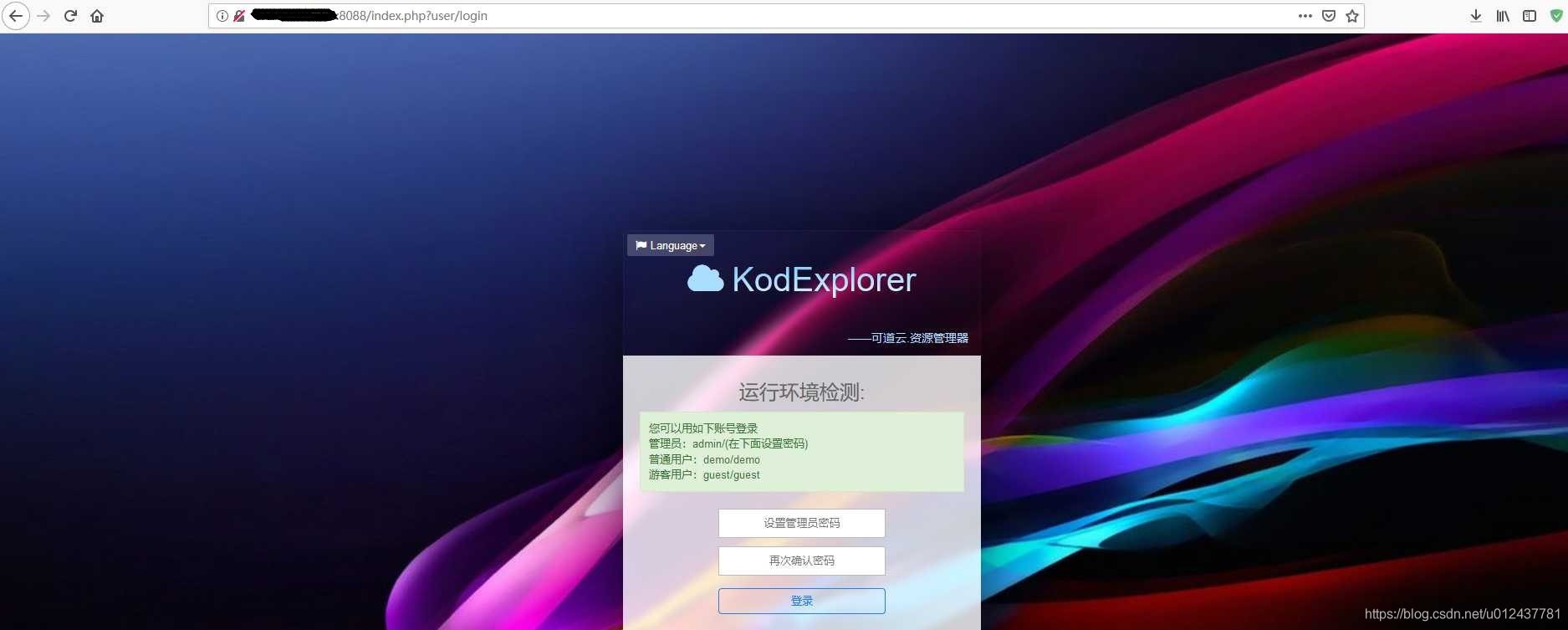
- 如上使用的案例所运行的Docker容器在我的云服务器上,因而输入:http://公网IP:8088/index.php?user/login 或者
http://公网IP:8088即可。 - 若使用阿里云服务器运行Docker容器,请提前设置安全组规则,即给所需服务开端口。
- 如上使用的案例所运行的Docker容器在我的云服务器上,因而输入:http://公网IP:8088/index.php?user/login 或者
版权声明:本文为u012437781原创文章,遵循CC 4.0 BY-SA版权协议,转载请附上原文出处链接和本声明。