【实例简介】
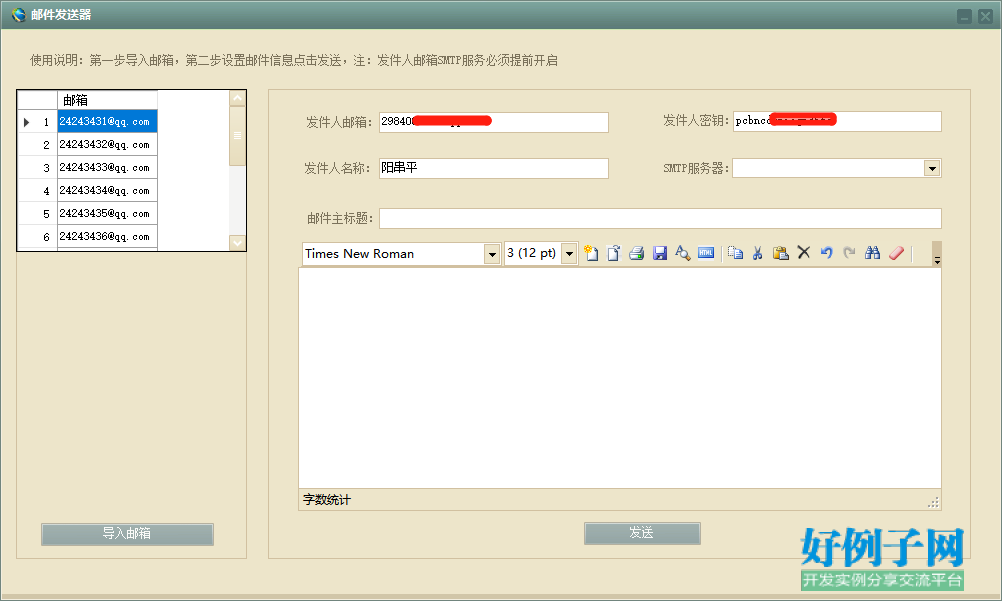
【实例截图】
【核心代码】
using System;
using System.Collections.Generic;
using System.ComponentModel;
using System.Data;
using System.Drawing;
using System.Linq;
using System.Text;
using System.Windows.Forms;
using WinHtmlEditor;
using System.Data.OleDb;
using System.IO;
namespace MailSending
{
public partial class Form1 : Form
{
public Form1()
{
InitializeComponent();
}
private void Form1_Load(object sender, EventArgs e)
{
//初始化邮箱服务器
//Dictionary dicList = new Dictionary();
//dicList.Add("smtp.qq.com", 25);
//dicList.Add("smtp.163.com", 25);
//dicList.Add("smtp.mail.yahoo.com", 25);
//dicList.Add("smtp.126.com", 25);
//dicList.Add("smtp.sina.com", 25);
//dicList.Add("smtp.sohu.com", 25);
//dicList.Add("smtp.gmail.com", 25);
//foreach (var item in dicList)
//{
// ddlList.Items.Add(item.Key);
//}
//ddlList.SelectedIndex = 0;
//初始化皮肤
//skinEngine1.SkinFile = "Skins\\PageColor2.ssk";
//skinEngine1.SkinFile = "Skins\\CalmnessColor1.ssk";
//skinEngine1.SkinFile = "Skins\\CalmnessColor2.ssk";
skinEngine1.SkinFile = "Skins\\WarmColor1.ssk";
skinEngine1.AddForm(this);
this.htmlEditor1.BodyInnerHTML = "";
//this.editor.FontName = new FontFamily("Arial");
//this.editor.FontSize = FontSize.Seven;
}
private void button1_Click(object sender, EventArgs e)
{
//固定只能看表格
openFileDialog1.Filter = "Microsoft Excel files(*.xls)|*.xls;*.xlsx";
openFileDialog1.InitialDirectory = Application.StartupPath;
//路径选择
DialogResult dr = openFileDialog1.ShowDialog();
if (dr == DialogResult.OK)
{
string filepath = openFileDialog1.FileName;
string fullname = filepath.Substring(filepath.LastIndexOf(@"\") 1);
string filename = fullname.Substring(0, fullname.LastIndexOf("."));
//路径添加到textBox
textBox1.Text = filepath;
#region 读取相应的表名的Excel文件中数据到当前DataGridview中显示
string strConn = string.Format("Provider=Microsoft.ACE.OLEDB.12.0;" "Data Source={0};" "Extended Properties='Excel 8.0;HDR=NO;IMEX=1';", textBox1.Text.Trim());
if ((System.IO.Path.GetExtension(textBox1.Text.Trim())).ToLower() == ".xls")
{
strConn = "Provider=Microsoft.Jet.OLEDB.4.0;" "data source=" textBox1.Text.Trim() ";Extended Properties=Excel 5.0;Persist Security Info=False";
//sConnString = "Provider=Microsoft.Jet.OLEDB.4.0;Data Source=" txtFilePath.Text.Trim() ";Extended Properties=\"Excel 8.0;HDR=" strHead ";IMEX=1\"";
}
using (OleDbConnection oleDbConn = new OleDbConnection(strConn))
{
oleDbConn.Open();
DataTable dt = oleDbConn.GetOleDbSchemaTable(OleDbSchemaGuid.Tables, new object[] { null, null, null, "TABLE" });
//判断是否cmb中已有数据,有则清空
comboBox1.DataSource = null;
comboBox1.Items.Clear();
//遍历dt的rows得到所有的TABLE_NAME,并Add到cmb中
foreach (DataRow drow in dt.Rows)
{
comboBox1.Items.Add((String)drow["TABLE_NAME"]);
}
if (comboBox1.Items.Count > 0)
{
comboBox1.SelectedIndex = 0;
}
}
getExcelDataByTableName(comboBox1.Text.Trim(), strConn);
#endregion
}
}
//按Excel表名查询表下所有数据
public void getExcelDataByTableName(string sTableName, string strConn)
{
OleDbConnection ole = null;
OleDbDataAdapter da = null;
DataTable dtShow = null;
string strExcel = "select * from [" sTableName "]";
try
{
ole = new OleDbConnection(strConn);
ole.Open();
da = new OleDbDataAdapter(strExcel, ole);
dtShow = new DataTable();
da.Fill(dtShow);
this.dataGridView1.DataSource = dtShow;
int j = 0;
dataGridView1.Rows[j].HeaderCell.Value = "序号";
for (int i = 0; i < dataGridView1.Rows.Count; i )
{
j = i 1;
dataGridView1.Rows[i].HeaderCell.Value = j.ToString();
}
//因为生成Excel的时候第一行是标题,所以要做如下操作:
//1.修改DataGridView列头的名字,
//2.数据列表中删除第一行
//int aaa = dtShow.Columns.Count;
//for (int i = 0; i < dtShow.Columns.Count; i )
//{
// //dgvdata.Columns[i].AutoSizeMode = DataGridViewAutoSizeColumnMode.AllCells;
// //dgvdata.Columns[i].Name = dt.Columns[i].ColumnName;
// dataGridView1.Columns[i].HeaderCell.Value = dtShow.Rows[0][i].ToString();//c# winform 用代码修改DataGridView列头的名字,设置列名,修改列名
//}
//DataGridView删除行
//dataGridView1.Rows.Remove(dataGridView1.Rows[0]);//删除第一行
//dgvdata.Rows.Remove(dgvdata.CurrentRow);//删除当前光标所在行
//dgvdata.Rows.Remove(dgvdata.Rows[dgvdata.Rows.Count - 1]);//删除最后一行
//dgvdata.Rows.Clear();//删除所有行
ole.Close();
}
catch (Exception ex)
{
MessageBox.Show(ex.Message);
}
finally
{
if (ole != null)
ole.Close();
}
}
private void button2_Click(object sender, EventArgs e)
{
if (txtSendUser.Text.Trim().Length == 0 || txtSendUserPwd.Text.Trim().Length == 0)
{
MessageBox.Show("发件人和密码不能为空!"); return;
}
if (who.Text.Trim().Length==0 || txtTitle.Text.Trim().Length == 0)
{
MessageBox.Show("中文名称和标题不能为空!"); return;
}
int conut = this.dataGridView1.Rows.Count;
int bb = 0;
int cc = 0;
for (int i = 0; i < conut-1; i )
{
//获取发送内容
string content = this.dataGridView1.Rows[i].Cells[0].Value.ToString().Trim();
//判断邮箱类型 dicList.Add("smtp.qq.com", 25);
//dicList.Add("smtp.163.com", 25);
//dicList.Add("smtp.mail.yahoo.com", 25);
//dicList.Add("smtp.126.com", 25);
//dicList.Add("smtp.sina.com", 25);
//dicList.Add("smtp.sohu.com", 25);
//dicList.Add("smtp.gmail.com", 25);
string smtp = "";
if (txtSendUser.Text.Contains("@qq.com"))
{
smtp = "smtp.qq.com";
}
else if (txtSendUser.Text.Contains("@163.com"))
{
smtp = "smtp.163.com";
}
else if (txtSendUser.Text.Contains("@126.com"))
{
smtp = "smtp.126.com";
}
else if (txtSendUser.Text.Contains("@sina.com"))
{
smtp = "smtp.sina.com";
}
else if (txtSendUser.Text.Contains("@sohu.com"))
{
smtp = "smtp.sohu.com";
}
else if (txtSendUser.Text.Contains("@mail.yahoo.com"))
{
smtp = "smtp.mail.yahoo.com";
}
else if (txtSendUser.Text.Contains("@gmail.com"))
{
smtp = "smtp.gmail.com";
}
//滚动到发送的行
this.dataGridView1.CurrentCell= this.dataGridView1.Rows[i].Cells[0];
//设置行样式为红色
this.dataGridView1.Rows[i].Cells[0].Style.BackColor = Color.Red;
//发送邮件
bool flag = MailHelper.SendMail(txtSendUser.Text, who.Text, txtSendUser.Text, txtSendUserPwd.Text, txtTitle.Text, htmlEditor1.BodyInnerHTML, content, openFileDialog1, smtp, null);
//判断记录发送成功和发送失败的数量
if (flag)
{
bb ;
}
else
{
cc ;
}
}
MessageBox.Show("发送完成!共发送" (bb cc) "条!成功:" bb "条!失败:" cc "条!");
//bool flag = MailHelper.SendMail(txtSendUser.Text, txtSendUser.Text, txtSendUser.Text, txtSendUserPwd.Text, txtTitle.Text, htmlEditor1.BodyInnerHTML, txtRecvierUser.Text, openFileDialog1, ddlList.Text, null);
//if (flag)
//{
// MessageBox.Show("发送成功!");
//}
//else
//{
// MessageBox.Show("发送失败!");
//}
}
//private void dataGridView1_RowPostPaint(object sender, DataGridViewRowPostPaintEventArgs e)
//{
// Rectangle rectangle = new Rectangle(e.RowBounds.Location.X, e.RowBounds.Location.Y, dataGridView1.RowHeadersWidth - 4, e.RowBounds.Height);
// TextRenderer.DrawText(e.Graphics, (e.RowIndex 1).ToString(), dataGridView1.RowHeadersDefaultCellStyle.Font, rectangle,
// dataGridView1.RowHeadersDefaultCellStyle.ForeColor,
// TextFormatFlags.VerticalCenter | TextFormatFlags.Right);
//}
}
}