1、ctrl+shift+p快捷键召唤控制台,输入snippets并回车
2、这时会出来vue.json文件
3、在json文件中编写你要定义的模板
{
	/*
		// Place your snippets for Vue here. Each snippet is defined under a snippet name and has a prefix, body and
		// description. The prefix is what is used to trigger the snippet and the body will be expanded and inserted. Possible variables are:
		// $1, $2 for tab stops, $0 for the final cursor position, and ${1:label}, ${2:another} for placeholders. Placeholders with the
		// same ids are connected.
		// Example:
		"Print to console": {
			"prefix": "log",
			"body": [
				"console.log('$1');",
				"$2"
			],
			"description": "Log output to console"
		}
	*/
	"Print to console": {
		"prefix": "vue",
		"body": [
			"<template>",
			"  <div class=\"myDiv\">$0</div>",
			"</template>",
			"",
			"<script>",
			"export default {",
			"  name: '',",
			"  components:{},",
			"  props:{},",
			"  data(){",
			"    return {",
			"    }",
			"  },",
			"  watch:{},",
			"  computed:{},",
			"  methods:{},",
			"  created(){},",
			"  mounted(){}",
			"}",
			"</script>",
			"<style lang=\"less\" scoped>",
			"@media screen and (min-width: 200px) and (max-width: 1600px) {}",
    		"@media screen and (min-width: 1601px) {}",
			"</style>",

		],
		"description": "A vue file template"
	}
}
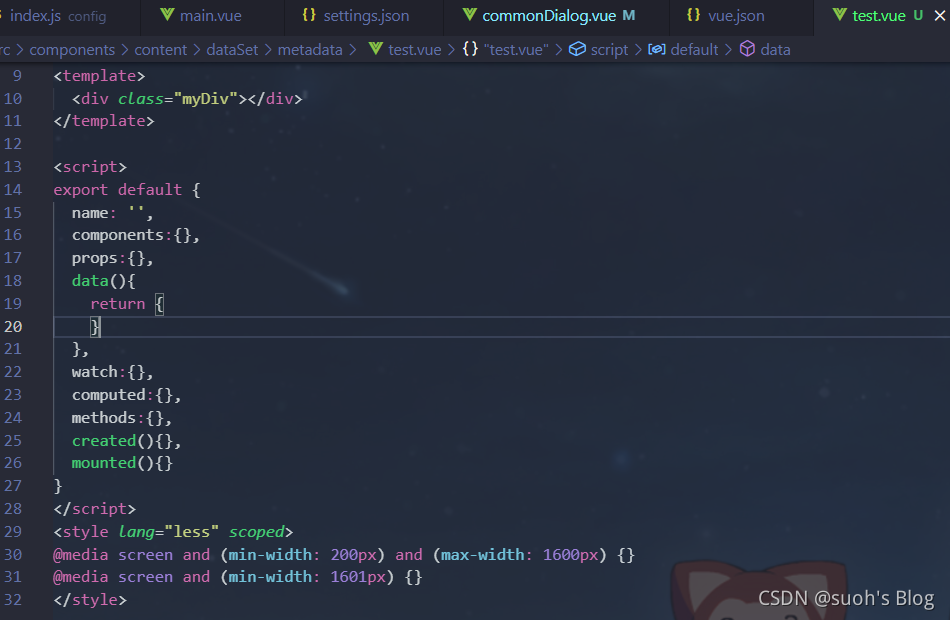
4、此时,新建一个vue文件,输入vue即可出现定义好的模板
版权声明:本文为qq_41579104原创文章,遵循CC 4.0 BY-SA版权协议,转载请附上原文出处链接和本声明。