Vue-百度地图插件
Vue Baidu Map 官网
https://dafrok.github.io/vue-baidu-map/#/
百度地图 javascript API(插件的文档有些并未解释完全,需要结合官方API文档阅读)
密钥申请(必须要申请开发者密钥才可以使用百度地图)
准备工作
安装vue-baidu-map
$ npm install vue-baidu-map --save
安装vue-jsonp(根据地址转换成经纬度需要用到)
$ npm install vue-jsonp
申请秘钥
密钥申请(必须要申请开发者密钥才可以使用百度地图)
准备工作已完成,直接看代码:
// 全局引入百度地图插件
import BaiduMap from 'vue-baidu-map'
Vue.use(BaiduMap, {
 // ak 是在百度地图开发者平台申请的密钥 详见 http://lbsyun.baidu.com/apiconsole/key */
 ak: '你的AK秘钥'
})
// 全局引入vue-jsonp
import {VueJsonp} from 'vue-jsonp'
Vue.use(VueJsonp)
<template>
  <div>
    <baidu-map
      class="box_map"
      :center="locations"
      :zoom="zoom"
      :scroll-wheel-zoom="true"
      @ready="handler"
    >
      <!-- :scroll-wheel-zoom="true" 该属性为鼠标滚轮缩放 -->
      <div class="inputVal">
        <input v-model="addressVal" type="text" />
        <button @click="btn">OK</button>
      </div>
      <!-- 比例尺 -->
      <bm-scale anchor="BMAP_ANCHOR_TOP_RIGHT"></bm-scale>
      <!-- 定位控件 -->
      <bm-geolocation
        anchor="BMAP_ANCHOR_BOTTOM_RIGHT"
        :showAddressBar="true"
        :autoLocation="true"
        @locationSuccess="locationSuccess"
      ></bm-geolocation>
      <!-- 标点 -->
      <bm-marker
        :position="{ lng: locations.lng, lat: locations.lat }"
        :dragging="true"
        animation="BMAP_ANIMATION_BOUNCE"
      >
      </bm-marker>
    </baidu-map>
  </div>
</template>

<script>
// let timeId;
export default {
  data() {
    return {
      center: "",
      locations: {
        // 红色标点的经纬度需要设一个初始值,不然地图无法渲染处理
        lng: 0,
        lat: 0,
      },
      zoom: 3,
      addressVal: "",
    };
  },
  created() {
    this.geoTest();
  },
  methods: {
    handler({ BMap, map }) {
      console.log(55, BMap, map);
      this.center = "";
      this.zoom = 15;
      // 获取IP地址的经纬度,详情查看官方文档:
      // https://mapopen-pub-jsapi.bj.bcebos.com/jsapi/reference/jsapi_webgl_1_0.html#a8b42
      const geolocation = new BMap.Geolocation();
      geolocation.getCurrentPosition((res) => {
        // IP地址赋值给locations对象
        this.locations.lng = res.point.lng;
        this.locations.lat = res.point.lat;
      });
    },
    locationSuccess() {
      console.log(`定位成功`);
    },
    async geoTest() {
      // 调用百度地图API,根据地址获取经纬度
      await this.$jsonp("http://api.map.baidu.com/geocoding/v3/", {
        address: this.addressVal, // input框输入的地址
        output: "json",
        ak: "你的AK秘钥", // 你的AK秘钥
      })
        .then((json) => {
          console.log(`json success:`, json);
          this.locations = json.result.location;
        })
        .catch((err) => {
          // clearTimeout(timeId);
          // if (err) {
          //   timeId = setTimeout(() => {
          //     this.geoTest();
          //   }, 2000);
          // }
          console.log(`json err:`, err);
        });
    },
    // 修改地址
    btn() {
      this.geoTest();
    },
  },
};
</script>

<style scoped>
.box_map {
  margin: 30px auto;
  width: 1000px;
  height: 600px;
  background-color: #f0f;
  position: relative;
}
.inputVal {
  position: absolute;
  left: 0;
  top: 0;
  width: 50%;
}

input {
  width: 60%;
}
button {
  margin-top: 10px;
  margin-left: 20px;
  width: 40px;
  height: 30px;
}
</style>
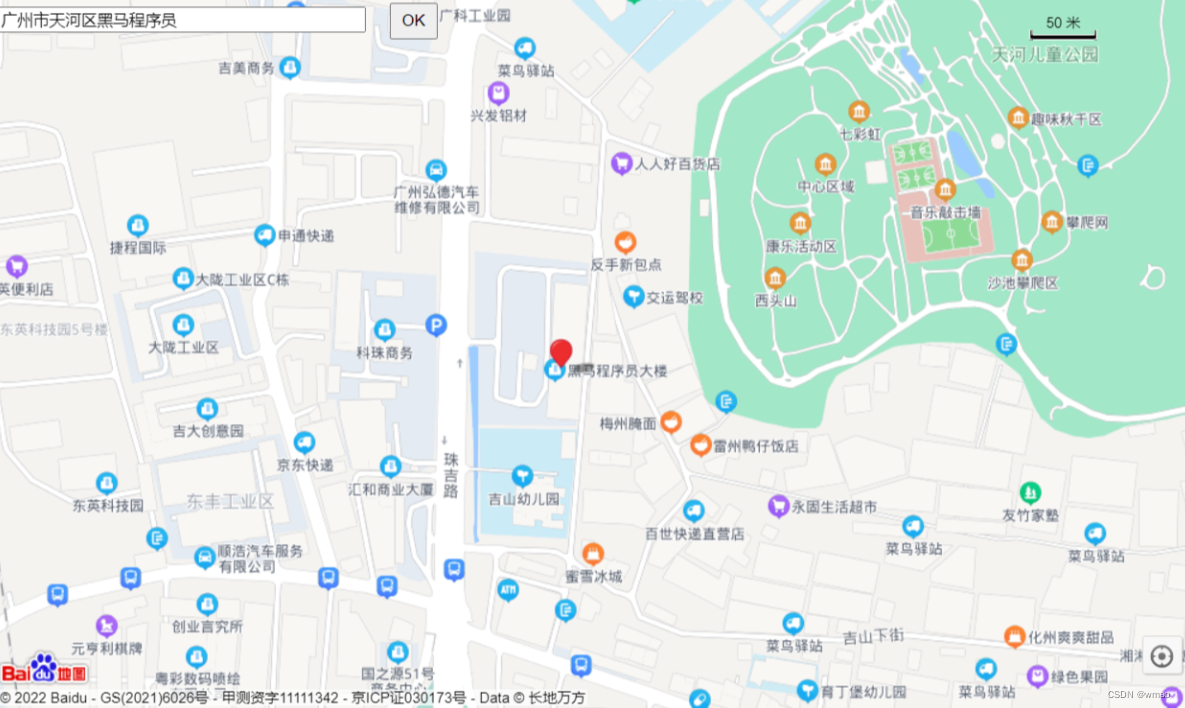
效果图:
版权声明:本文为wyq12138原创文章,遵循CC 4.0 BY-SA版权协议,转载请附上原文出处链接和本声明。