效果图:
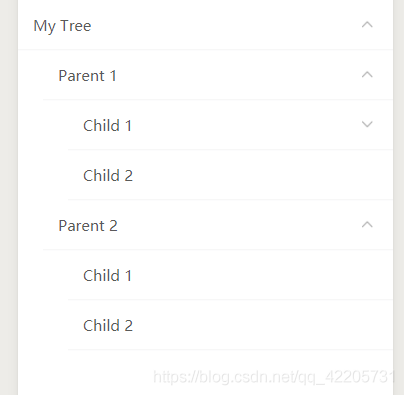
源码地址:https://download.csdn.net/download/qq_42205731/19547193
实现思路: 组件的递归调用
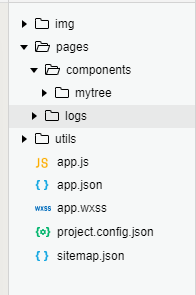
mytree为组件,最主要的在组件的自调用。
mytree.json
{
  "component": true,
  "usingComponents": {
    "mytree": "../mytree/mytree"
  }
}
mytree.wxml
<view class="ul">
  <view class="li-item" bindtap='{{isBranch?"toggle":"tapItem"}}' data-itemid='{{ model.id }}'>
    <text>{{model.text}}</text>
    <image src="https://open.oss.taozhi.cn/audiobook/asset/read/{{open?'shangla':'xiala'}}.png" class="menu-img" wx:if='{{ isBranch }}' ></image>
  </view>
  <view style='padding-left: 50rpx;' wx:if='{{ isBranch }}' hidden='{{ !open }}'>
    <mytree wx:for='{{ model.childMenus }}' wx:key='id' model='{{ item }}'></mytree>
  </view>
</view>
mytree.js
// pages/components/mytree/mytree.js
Component({
  properties: {
    model: Object,
  },
  data: {
    open: false,     //是否展开
    isBranch: false, //是否有子级
  },

  methods: {
    toggle: function (e) {
      if (this.data.isBranch) {
        this.setData({
          open: !this.data.open,
        })
      }
    },
    tapItem: function (e) {
      var itemid = e.currentTarget.dataset.itemid;
      console.log('组件里点击的id: ' + itemid);
      this.triggerEvent('tapitem', { itemid: itemid }, { bubbles: true, composed: true });
    }
  },

  ready: function (e) {
    this.setData({
      isBranch: Boolean(this.data.model.childMenus && this.data.model.childMenus.length),
    });
    console.log(this.data);
  },
})
要引用的页面
<!--index.wxml-->
<view>
  <mytree model='{{ treeData }}' bind:tapitem='tapItem'></mytree>
</view>
treeData数据
treeData: {
      text: 'My Tree',
      id: 0,
      childMenus: [
        {
          text: 'Parent 1',
          id: 1,
          childMenus: [
            {
              text: 'Child 1',
              id: 2,
              childMenus: [
                {
                  text: 'Grandchild 1',
                  id: 3,
                },
                {
                  text: 'Grandchild 2',
                  id: 4,
                },
              ]
            },
            {
              text: 'Child 2',
              id: 5,
            }
          ]
        },
        {
          text: 'Parent 2',
          id: 6,
          childMenus: [
            {
              text: 'Child 1',
              id: 7,
            },
            {
              text: 'Child 2',
              id: 8,
            }
          ]
        }
      ]
},版权声明:本文为qq_42205731原创文章,遵循CC 4.0 BY-SA版权协议,转载请附上原文出处链接和本声明。