@[TOC] 动态组件
在一些场景,往往需要我们动态切换页面部分区域的试图,这个时候内置组件***component***t就表现得很为重要了
component接收一个名为is的属性,is的值应为在父组件中注册过的组件的名称:如下
<!DOCTYPE html>
<html lang="en">
<head>
    <meta charset="UTF-8">
    <title>动态组件</title>
    <script src="https://cdn.staticfile.org/vue/2.2.2/vue.min.js"></script>

    <style>
        .tabs{
            margin: 0;
            padding: 0;
            list-style: none;
        }
        .per-tab{
            display: inline-block;
            width: 120px;
            line-height: 32px;
            border-left: 1px solid #ccc;
            border-top: 1px solid #cccccc;
        }
        <!--最后的边框-->
        .per-tab:last-child{
            border-right: 1px solid #cccccc;
        }

        .tab-content{
            height: 240px;
            border: 1px solid #cccccc;
        }
    </style>
</head>
<body>
    <div id="app">
        <ul class="tabs">
            <li class="per-tab" @click="toggleView('home')">Home</li>
            <li class="per-tab" @click="toggleView('About')">About</li>
        </ul>
        <div class="tab-content">
            <component :is="view"></component><!--view为变量-->
        </div>
    </div>
</body>
<script type="text/javascript">
    let Home = {//Home组件
        template:'<p style="color: #787878;">Hello Home!</p>'
    }
    let About={//About组件
        template: '<p>Hello About!</p>'
    }
    let vm = new Vue({
        el:'#app',
        components:{Home,About},
        data(){
            return{
                view:'Home'
            }
        },
        methods:{
            toggleView(view) {
                this.view = view
            }
        }
    })

</script>
</html>
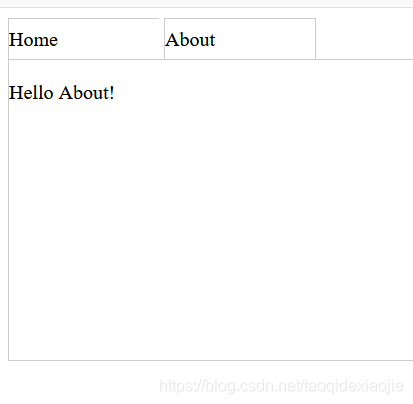
效果图如下: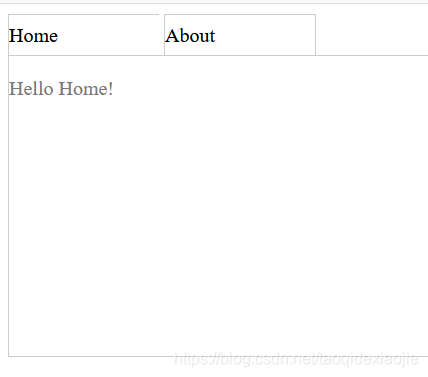
版权声明:本文为taoqidexiaojie原创文章,遵循CC 4.0 BY-SA版权协议,转载请附上原文出处链接和本声明。