高德地图开发(四、点聚合)
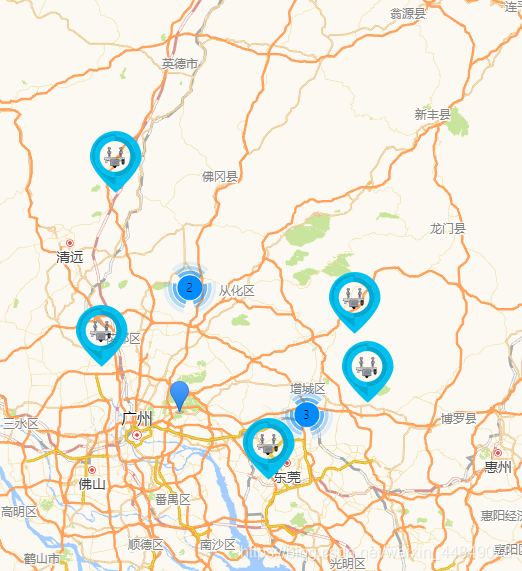
一、设置点聚合
只截取了部分代码,几个方法都处于一个类中。
let markers = []; // 点聚合数组
for (let i = 0; i < 10; i++) {
     customMark();
 }
 initMarkerClusterer();
 cluster.setMaxZoom(15);

// 添加自定义标记
function customMark () {
    let lonlat = [Math.random() + 113, Math.random() + 23];
    // 创建 AMap.Icon 实例:
    let icon = new AMap.Icon({
        size: new AMap.Size(58, 70),    // 图标尺寸
        image: 'http://localhost:8080/static/img/patrol.png',  // Icon的图像
        imageSize: new AMap.Size(58, 70)   // 根据所设置的大小拉伸或压缩图片
    });

    // 将 Icon 实例添加到 marker 上:
    let marker = new AMap.Marker({
        position: new AMap.LngLat(lonlat[0], lonlat[1]),
        offset: new AMap.Pixel(-10, -10),
        icon: icon, // 添加 Icon 实例
        title: '自定义图标',
        zoom: 13

    });
    map.add(marker);
    markers.push(marker);
}
// 初始化点聚合
 function initMarkerClusterer () {
   //添加聚合组件
    map.plugin(["AMap.MarkerClusterer"],function() {
        cluster = new AMap.MarkerClusterer(
            map,     // 地图实例
            markers);
        cluster.setMaxZoom(12);
    });
}

// 添加点标记至点聚合中
this.addMarkerClusterer = function () {
    let lonlat = [Math.random() + 113, Math.random() + 23];
    // 创建 AMap.Icon 实例:
    let icon = new AMap.Icon({
        size: new AMap.Size(58, 70),    // 图标尺寸
        image: 'http://localhost:8080/static/img/patrol.png',  // Icon的图像
        imageSize: new AMap.Size(58, 70)   // 根据所设置的大小拉伸或压缩图片
    });

    // 将 Icon 实例添加到 marker 上:
    let marker = new AMap.Marker({
        position: new AMap.LngLat(lonlat[0], lonlat[1]),
        offset: new AMap.Pixel(-10, -10),
        icon: icon, // 添加 Icon 实例
        title: '自定义图标',
        zoom: 13
    });
    markerEvent(marker, lonlat);
    cluster.addMarker(marker);
}
二、点聚合中添加删除标记
// 添加点标记至点聚合中
this.addMarkerClusterer = function () {
    let lonlat = [Math.random() + 113, Math.random() + 23];
    // 创建 AMap.Icon 实例:
    let icon = new AMap.Icon({
        size: new AMap.Size(58, 70),    // 图标尺寸
        image: 'http://localhost:8080/static/img/patrol.png',  // Icon的图像
        imageSize: new AMap.Size(58, 70)   // 根据所设置的大小拉伸或压缩图片
    });

    // 将 Icon 实例添加到 marker 上:
    let marker = new AMap.Marker({
        position: new AMap.LngLat(lonlat[0], lonlat[1]),
        offset: new AMap.Pixel(-10, -10),
        icon: icon, // 添加 Icon 实例
        title: '自定义图标',
        zoom: 13
    });
    markerEvent(marker, lonlat);
    cluster.addMarker(marker);
}
	// 删除点标记
    cluster.removeMarker(marker);
三、方法和事件
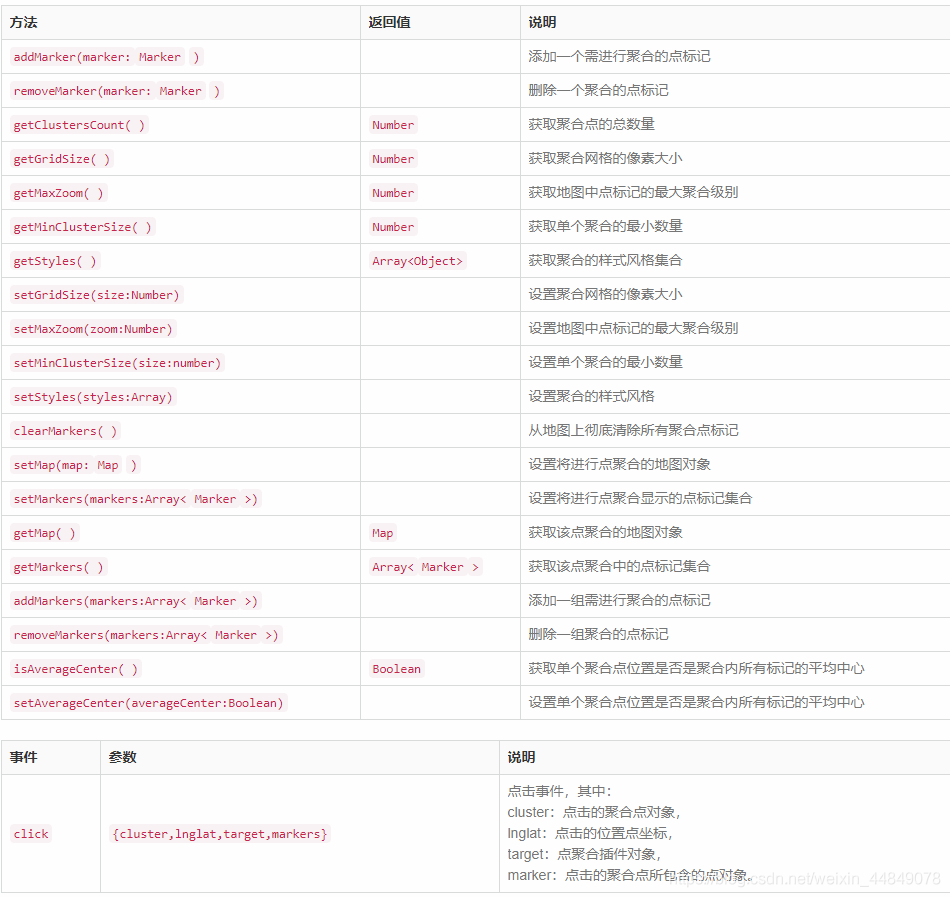
https://lbs.amap.com/api/javascript-api/reference/plugin#AMap.MarkerClusterer
版权声明:本文为weixin_44849078原创文章,遵循CC 4.0 BY-SA版权协议,转载请附上原文出处链接和本声明。