IO流
文件基础知识
文件在程序中是以流的形式才操作的


文件(磁盘)----> java程序(内存)文件读取数据到程序中叫做输入流

java程序(内存)---->文件(磁盘) 把java程序中的数据或内存,输出到磁盘中叫做输出流


流:数据在数据源(文件)和程序(内存)之间经历的路径

输入流:数据从数据源(文件)到程序(内存)的路径

输出流:数据从程序(内存)到数据源(文件)的路径
创建文件
//方式1  new File(String pathname)根据路径构建一个File对象

//方式2  new File(File patent,String child)根据父类目录文件+子路径构建

//方式3  new File(String pathname)根据父类目录文件+子路径构建
//方式1  new File(String pathname)根据路径构建一个File对象
    @Test
    public void create01(){
        String filePath = "d:\\news1.text";
        File file = new File(filePath);
        try {
            file.createNewFile();
            System.out.println("创建文件成功!");
        } catch (IOException e) {
            e.printStackTrace();
        }
    }

    //方式2  new File(File patent,String child)根据父类目录文件+子路径构建
    @Test
    public void create03(){
        File parentFile= new File("d:\\");
        String fileName= "\\news3.text";
        //这里的file对象,在java中只是一个对象
        //只有执行createNewFile()方法才会在磁盘中创建该文件
        File file = new File(parentFile,fileName);
        try {
            //
            file.createNewFile();
            System.out.println("创建文件成功!");
        } catch (IOException e) {
            e.printStackTrace();
        }
    }

    //方式3  new File(String pathname)根据父类目录文件+子路径构建
    @Test
    public void create02(){
        File parentFile= new File("d:\\");
        String fileName= "\\news2.text";
        //这里的file对象,在java中只是一个对象
        //只有执行createNewFile()方法才会在磁盘中创建该文件
        File file = new File(parentFile,fileName);
        try {
            //
            file.createNewFile();
            System.out.println("创建文件成功!");
        } catch (IOException e) {
            e.printStackTrace();
        }
    }
获取文件信息
| 方法 | 返回类型 | 作用 |
|---|---|---|
| getName() | String | 获取文件名称 |
| isDirectory() | boolean | 是不是一个目录 |
| isFile() | boolean | 是不是一个文件 |
| exists() | boolean | 文件是否存在 |
| length() | long | 获取文件大小(字节) |
| getParent() | String | 获取文件父级目录 |
| getAbsolutePath() | String | 获取文件绝对路径 |
| getPath() | String | 获取文件相对路径 |
目录的操作和文件的删除
| 方法/返回值 | 作用 |
|---|---|
| mkdir()/boolean | 创建一级目录 |
| mkdirs()/boolean | 创建多级目录 |
| delete() | 删除空目录或文件(只能删除空的,如果里面有文件必须先清空) |
IO流原理
Java IO流原理

1.I/O是Input/Output的缩写,I/O技术是非常实用的技术,用于处理数据传输。
如读/写文件,网络通讯等。

2. Java程序中,对于数据的输入/输出操作以”流(stream)”的方式进行。

3. java.io包下提供了各种“流”类和接口,用以获取不同种类的数据,并通过方
法输入或输出数据
aa
4.输入input:读取外部数据
(磁盘、光盘等存储设备的数据)到程序(内存)中。

5.输出output:将程序(内存)
数据输出到磁盘、光盘等存储设备中
流的分类
IO流四大分类
InputStream

OutputStream

FileReader

FileWriter

这四个都是抽象类
按操作数据单位不同分为:字节流(8bit)适合二进制文件,字符流(按字符)适合文本文件

按数据流向不同分为:输入流,输出流

按流的角色的不同分为:节点流,处理流也叫包装流
| 抽象基类 | 字节流 | 字符流 |
|---|---|---|
| 输入流 | InputStream | Reader |
| 输出流 | OutputStream | Writer |
1.Java的IO流共涉及40多个类,实际上非常规则,都是从如上4个抽象基类派生的

2.有这四个类派生出来的子类名称都是以其父类名作为子类名后缀
文件和流的关系
文件 就像是 外卖

流 就像是 外卖小哥

外卖通过外卖小哥运输====文件通过流来运输
FileInputStream
构造方法
| Constructor and Description |
|---|
FileInputStream(File file) 通过打开与实际文件的连接创建一个 FileInputStream ,该文件由文件系统中的 File对象 file命名。 |
FileInputStream(FileDescriptor fdObj) 创建 FileInputStream通过使用文件描述符 fdObj ,其表示在文件系统中的现有连接到一个实际的文件。 |
FileInputStream(String name) 通过打开与实际文件的连接来创建一个 FileInputStream ,该文件由文件系统中的路径名 name命名。 |
方法
| Modifier and Type | Method | Description |
|---|---|---|
int | available() | 返回从此输入流中可以读取(或跳过)的剩余字节数的估计值,而不会被下一次调用此输入流的方法阻塞。 |
void | close() | 关闭此文件输入流并释放与流相关联的任何系统资源。 |
protected void | finalize() | 确保当这个文件输入流的 close方法没有更多的引用时被调用。 |
FileChannel | getChannel() | 返回与此文件输入流相关联的唯一的FileChannel对象。 |
FileDescriptor | getFD() | 返回表示与此 FileInputStream正在使用的文件系统中实际文件的连接的 FileDescriptor对象。 |
int | read() | 从该输入流读取一个字节的数据。 |
int | read(byte[] b) | 从该输入流读取最多 b.length个字节的数据为字节数组。 |
int | read(byte[] b, int off, int len) | 从该输入流读取最多 len字节的数据为字节数组。 |
long | skip(long n) | 跳过并从输入流中丢弃 n字节的数据。 |
  @Test
    public void readFile01(){
        String filePath = "d:\\Hello.txt";
        int readData = 0;
        FileInputStream fileInputStream = null;
        try {
            //创建 FileInputStream 对象,用于读取  文件
            fileInputStream = new FileInputStream(filePath);
            //从该输入流读取一个字节的数据。如果没有输入可用,此方法将阻止。
            //如果返回-1,表示读取完毕
            while ((readData = fileInputStream.read()) !=-1){
                System.out.print((char) readData);
            }
        } catch (IOException e) {
            e.printStackTrace();
        }finally {
            try {
                //关闭流节省资源
                fileInputStream.close();
            } catch (IOException e) {
                e.printStackTrace();
            }
        }

    }


    /*
    * 使用read(byte[] b) 读取文件提高效率
    *
    * */
    @Test
    public void readFile02(){
        String filePath = "d:\\Hello.txt";
        //字节数组
        byte[] bytes = new byte[8];//一起读8个字节
        int readLen= 0;
        FileInputStream fileInputStream = null;
        try {
            //创建 FileInputStream 对象,用于读取  文件
            fileInputStream = new FileInputStream(filePath);
            //从该输入流读取最多b.length字节的数据到字节数组,此方法将阻塞,直到某些输入可用
            //如果返回-1,表示读取完毕
            //如果读取正常,返回实际读取的字节数
            while ((readLen = fileInputStream.read(bytes)) !=-1){
                //把读到的字节转换成String类型
                System.out.print(new String(bytes,0,readLen));
            }
        } catch (IOException e) {
            e.printStackTrace();
        }finally {
            try {
                //关闭流节省资源
                fileInputStream.close();
            } catch (IOException e) {
                e.printStackTrace();
            }
        }
    }
FileOutputStream
构造方法
| Constructor and Description |
|---|
FileOutputStream(File file)创建文件输出流以写入由指定的 File对象表示的文件。 |
FileOutputStream(File file, boolean append) 创建文件输出流以写入由指定的 File对象表示的文件。 |
FileOutputStream(FileDescriptor fdObj) 创建文件输出流以写入指定的文件描述符,表示与文件系统中实际文件的现有连接。 |
FileOutputStream(String name) 创建文件输出流以指定的名称写入文件。 |
FileOutputStream(String name, boolean append) 创建文件输出流以指定的名称写入文件。 |
方法
| Modifier and Type | Method and Description |
|---|---|
void | close() 关闭此文件输出流并释放与此流相关联的任何系统资源。 |
protected void | finalize() 清理与文件的连接,并确保当没有更多的引用此流时,将调用此文件输出流的 close方法。 |
FileChannel | getChannel() 返回与此文件输出流相关联的唯一的FileChannel对象。 |
FileDescriptor | getFD() 返回与此流相关联的文件描述符。 |
void | write(byte[] b) 将 b.length个字节从指定的字节数组写入此文件输出流。 |
void | write(byte[] b, int off, int len) 将 len字节从位于偏移量 off的指定字节数组写入此文件输出流。 |
void | write(int b) 将指定的字节写入此文件输出流。 |
 /*
    *演示使用 FileOutputStream 将数据写到文件中
    * 如果该文件不存在,则创建该文件
    *
    * */
    @Test
    public void writeFile() {

        //创建FileOutputStream对象

        String filePath = "D:\\a.txt";

        FileOutputStream fileOutputStream = null;

        try {
            //得到 FileOutputStream 对象
            //老师说明
            //1. new FileOutputStream(filePath) 创建方式,当写入内容时,会覆盖原来的内容
            //2. new FileOutputStream(filePath,true) 创建方式,当写入内容时,是追加到文件后面
            fileOutputStream = new FileOutputStream(filePath,true);
            //写入一个字节
            fileOutputStream.write('a');
            //写入字符串
            String str = "word";
            //str.getBytes() 可以把  字符串 -> 字节数组
            fileOutputStream.write(str.getBytes(StandardCharsets.UTF_8));

            /*
            * write(byte[],int off,int len) 这个是中间截取一段
            * */

        } catch (IOException e) {
            e.printStackTrace();
        } finally{
            try {
                fileOutputStream.close();
            } catch (IOException e) {
                e.printStackTrace();
            }
        }


    }
文件拷贝
    public static void main(String[] args) {

        //完成文件拷贝  将c:\1.png 拷贝到d:

        //思路分析
        //1.创建文件的输入流 ,将文件读入到程序中
        //2.创建文件的输出流,将读取到的文件数据,写入到指定的文件中

        String srcFilePath = "c:\\1.png";
        String destFilePath = "d:\\1.png";
        FileInputStream fileInputStream = null;
        FileOutputStream fileOutputStream = null;

        //先从c盘中把图片拿到我们的程序中,这个叫做输入流
        try {
            fileInputStream = new FileInputStream(srcFilePath);
            fileOutputStream = new FileOutputStream(destFilePath);
            //定义一个字节数组,提高读取效率
            byte[] bytes = new byte[1024];
            int readLen = 0;
            while ((readLen=fileInputStream.read(bytes))!=-1){
                //读取到后就写入到文件 通过fileOutputStream
                //边读边写
                fileOutputStream.write(bytes,0,readLen);//一定要用这个方法,不然会出错
            }
             System.out.println("复制成功");
        } catch (IOException e) {
            e.printStackTrace();
        }finally {
            try {
                //关闭输入流和输出流,释放资源
                if (fileInputStream != null) {
                    fileInputStream.close();
                }
                if (fileOutputStream != null){
                    fileOutputStream.close();
                }
            }catch (IOException e){
                e.printStackTrace();
            }
        }
    }
字符流
FileReader
| Modifier and Type | Method | Description |
|---|---|---|
abstract void | close() | 关闭流并释放与之相关联的任何系统资源。 |
void | mark(int readAheadLimit) | 标记流中的当前位置。 |
boolean | markSupported() | 告诉这个流是否支持mark()操作。 |
int | read() | 读一个字符 |
int | read(char[] cbuf) | 将字符读入数组。 |
abstract int | read(char[] cbuf, int off, int len) 。 | 将字符读入数组的一部分 |
int | read(CharBuffer target) | 尝试将字符读入指定的字符缓冲区。 |
boolean | ready() | 告诉这个流是否准备好被读取。 |
void | reset() | 重置流。 |
//相关API
new String (char[])将char[]转换成字符串

new String (char[],int off,int len)将char[]的指定部分装换成String
   @Test
    public void FileReader_01() {
        /*
         * 单个字符读取文件
         * */
        String filePath = "d:\\story.txt";
        FileReader fileReader = null;
        int data =0;
        //创建 FileReader 对象
        try {
            fileReader = new FileReader(filePath);
            //循环读取 使用read,单个字符读取
            while ((data=fileReader.read())!=-1){
                System.out.print((char) data);
            }
        } catch (IOException e) {
            e.printStackTrace();
        }finally {
            if (fileReader!=null){
                try {
                    fileReader.close();
                } catch (IOException e) {
                    e.printStackTrace();
                }
            }
        }
    }

    @Test
    public void FileReader_02() {
        /*使用字符数组读取文件
         *
         * */
        String filePath = "d:\\story.txt";
        FileReader fileReader = null;
        int readLen =0;
        char[]  chars= new char[8];

        //创建 FileReader 对象
        try {
            fileReader = new FileReader(filePath);
            //循环读取 使用read(chars) ,返回的是实际读取到的字符串
            //如果返回-1,怎说明文件读取结束
            while ((readLen=fileReader.read(chars))!=-1){
                System.out.print(new String(chars,0,readLen));
            }
        } catch (IOException e) {
            e.printStackTrace();
        }finally {
            if (fileReader!=null){
                try {
                    fileReader.close();
                } catch (IOException e) {
                    e.printStackTrace();
                }
            }
        }
    }
FileWriter
| Modifier and Type | Method and Description |
|---|---|
Writer | append(char c) 将指定的字符附加到此作者。 |
Writer | append(CharSequence csq)将指定的字符序列附加到此作者。 |
Writer | append(CharSequence csq, int start, int end) 将指定字符序列的子序列附加到此作者。 |
abstract void | close() 关闭流,先刷新。 |
abstract void | flush() 刷新流。 |
void | write(char[] cbuf) 写入一个字符数组。 |
abstract void | write(char[] cbuf, int off, int len) 写入字符数组的一部分。 |
void | write(int c) 写一个字符 |
void | write(String str) 写一个字符串 |
void | write(String str, int off, int len)写一个字符串的一部分。 |
//相关API

//String类   toCharArray:将String转换成char[]

//注意:
//FileWriter使用后,必须关闭close()或者刷新flush(),否则写不到指定文件夹
        //路径
        String filePath = "d:\\notes.txt";
        //创建File对象
        FileWriter fileWriter = null;
        char[] chars = {'s','w','w'};
        try {
            fileWriter = new FileWriter(filePath);
//            3) write(int):写入单个字符
            fileWriter.write('H');
//            4) write(char[]):写入指定数组
            fileWriter.write(chars);
//            5) write(char[], off, len):写入指定数组的指定部分
            fileWriter.write(chars,0,1);
//            6) write (string):写入整个字符串
            fileWriter.write("任大锅");
//            7) write(string, off , len):写入字符串的指定部分
            fileWriter.write("我的同桌是我大哥",0,5);

        } catch (IOException e) {
            e.printStackTrace();
        }finally {
            try {
                //fileWriter.flush();
                //这里.close()等价于.flush()+.close()
                fileWriter.close();
            } catch (IOException e) {
                e.printStackTrace();
            }
        }
什么是节点流
//节点流可以从一个特定的数据源读写数据,

///节点流针对某个数据源进行操作
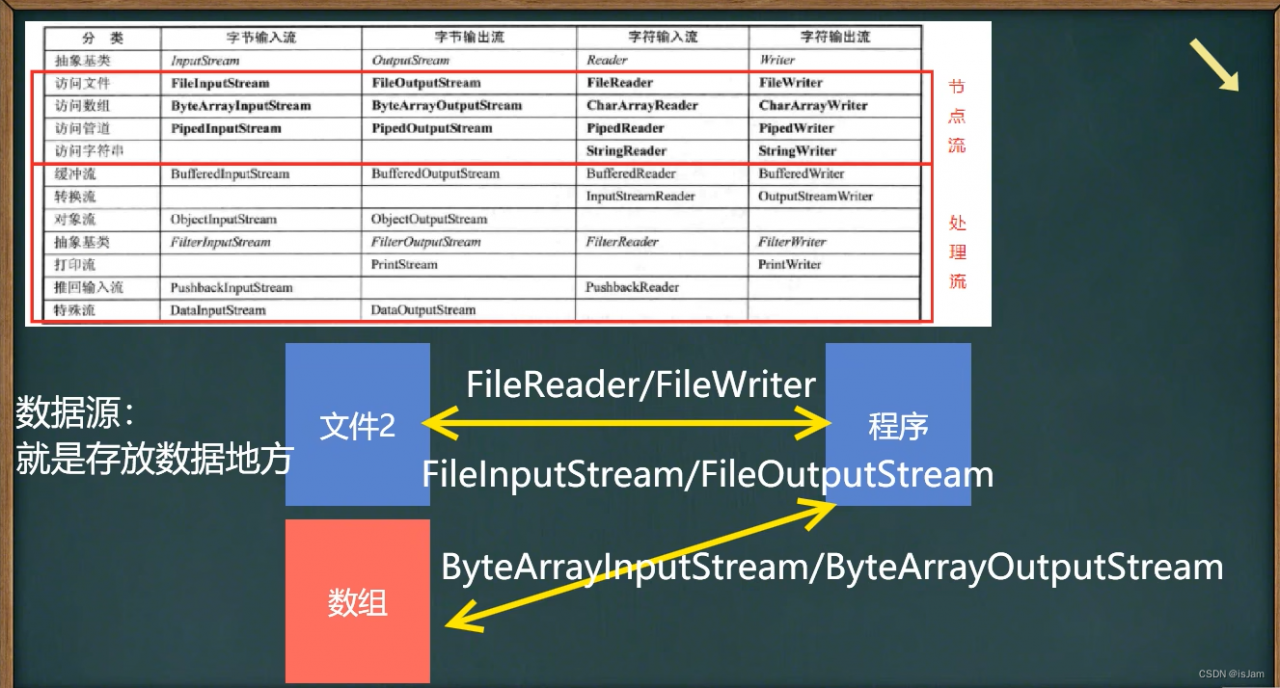
什么是处理流(包装流)
//处理流(也叫包装流)是“连接”在已存在的流(节点流或处理流)之上,为程序提供更为强大的读写功能,如BufferedReader、BufferedWriter [源码]


//简单理解就是声明一下,就可以操作这个流的任意数据,节点流只能操作一个,这个可以操作r

节点流和出处理流的区别和联系
节点流是底层流/低级流,直接跟数据源相接。

处理流(包装流)包装节点流,既可以消除不同节点流的实现差异,也可以提供更方便的方法来完成输入输出。[源码理解]

处理流(也叫包装流)对节点流进行包装,使用了修饰器设计模式,不会直接与数据源相连[模拟修饰器设计模式]

处理流的功能主要体现在以下两个方面:
性能的提高:主要以增加缓冲的方式来提高输入输出的效率。
操作的便捷:处理流可能提供了一系列便捷的方法来一次输入输出大批量的数据.使用更加灵活方便
 //处理流设计模式
 //有一个公共的父类
 public abstract class Reader_ {
    public void readFile(){}

    public void readString(){}
}
//读字符串
public class StringReader_ extends Reader_{
    public void readString(){
        System.out.println("读取字符串");
    }
}
//读文件
public class FileReader_ extends Reader_{
    public void readFile(){
        System.out.println("读取文件");
    }
}
//为了便捷,我们把读文件,和读字符串包装起来
public class BufferedReader_ extends Reader_{

    //不管传进来是那个对象,都可以调用他们相应的方法

    private Reader_ reader_;//属性是Reader_类型

    public BufferedReader_(Reader_ reader_){
        this.reader_ = reader_;
    }

    public void readFile(int num){
        for (int i = 0; i < num; i++) {
            reader_.readFile();
        }
    }

    public void readString(int num){
        for (int i = 0; i < num; i++) {
            reader_.readString();
        }
    }
}
//测试
public class Test {
    public static void main(String[] args) {
        BufferedReader_ bufferedReader_ = new BufferedReader_(new FileReader_());
        BufferedReader_ bufferedReader_2 = new BufferedReader_(new StringReader_());
        bufferedReader_.readFile();
        bufferedReader_.readFile(10);
        bufferedReader_2.readString(10);
        bufferedReader_2.readString();
    }
}
BufferedReader
//BufferedReader 和 BufferedWriter属于字符流,是按照字符来读取数据的关闭时处理流,只需要关闭外层流即可[后面看源码]
//不要去操作  二进制文件【生硬,视频,doc,pdf,】,可能造成文件的损坏
    public static void main(String[] args) throws IOException {

        String file = "d:\\1.txt";

        String line;

        BufferedReader bufferedReader = new BufferedReader(new FileReader(file));

        while ((line = bufferedReader.readLine())!=null){
            System.out.println(line);
        }

        //关闭流这里只需要关闭BufferedReader,因为底层会自动的去关闭  节点流
        bufferedReader.close();


    }
BufferedWriter
    @SneakyThrows
    public static void main(String[] args) {
        String file = "d:\\2.txt";

        BufferedWriter bufferedWriter = new BufferedWriter(new FileWriter(file));

        bufferedWriter.write("小小的脑袋");
        //换行
        bufferedWriter.newLine();

        bufferedWriter.close();
    }
处理流 BufferedInputStream和BufferedOutputStream
BufferedInputStream 是字节流,再创建 BufferedInputStream时,会创建一个内部缓冲区数组

BufferedOutputStream 是字节流,实现缓冲的输出流,可以将多个字节写入底层输出流中,而不必对每次字节写入调用底层系统
BufferedInputStream和BufferedOutputStream
对象的节点流和处理流(序列化和反序列化)
ObjectInputStream和ObjectOutputStream
对象流-ObjectlnputStream和ObjectOutputStream
看一个需求

将int num = 100这个int数据保存到文件中,注意不是100数字,而是int 100,并且,能够从文件中直接恢复int 100

将Dog dog = new Dog(“小黄”..3) 这个dog对象保存到.文件中,并月能够从文件恢复.上面的要求,就是能够将基本数据类型或者对象进行序列化和反序列化操作

序列化和反序列化

序列化就是在保存数据时,保存数据的值和数据类型反序列化就是在恢复数据时,恢复数据的值和数据类型

需要让某个对象支持序列化机制,则必须让其类是可序列化的,为了让某个类是可序列化时,以类必须实现如下两个接口之一:

>Serializable/这是一个标记接口>
Externalizable
package com.ytzl.chapter03.demo.objectInputStream_;

import java.io.FileInputStream;
import java.io.FileOutputStream;
import java.io.ObjectInputStream;
import java.io.ObjectOutputStream;

//反序列化:
public class ObjectInputStream_ {
    public static void main(String[] args) throws Exception{
        //指出返序列化的文件
        String filePath = "d:\\data.txt";

        ObjectInputStream ob = new ObjectInputStream(new FileInputStream(filePath));

        //读取//老师解读
        //1.读取(反序列化)的顺序需要和你保存数据(序列化)的顺序一致
        //2.否则会出现异常
        System.out.println(ob.readInt());
        System.out.println(ob.readDouble());
        System.out.println(ob.readChar());
        System.out.println(ob.readBoolean());
        System.out.println(ob.readUTF());
        Object dog = ob.readObject();
        //加载类对象
        System.out.println("运行类型=="+dog.getClass());
        System.out.println("dog信息=="+dog);
        Dog dog1 = (Dog) dog;
        System.out.println(dog1.getName());

        ob.close();
    }
}
package com.ytzl.chapter03.demo.objectInputStream_;


import java.io.FileOutputStream;
import java.io.ObjectOutput;
import java.io.ObjectOutputStream;

//序列化
public class ObjectOutputStream_01 {
    public static void main(String[] args) throws Exception{
        //序列化之后,保存的文件格式,不是存文本,而是按照他的格式来保存
        String filePath = "d:\\data.txt";

        ObjectOutputStream obj = new ObjectOutputStream(new FileOutputStream(filePath));


        //序列化数据到:"d:\\data.txt"
        //他们会自己转换成包装类,都实现了Serializable接口
        obj.writeInt(100);
        obj.writeDouble(72.2);
        obj.writeBoolean(true);
        obj.writeChar('a');
        obj.writeUTF("坚持两天不看朋友圈");
        //保存一个dog对象
        obj.writeObject(new Dog("大哥",20));

        obj.close();
        System.out.println("数据序列化完毕~~~~");

    }
}
package com.ytzl.chapter03.demo.objectInputStream_;

import java.io.Serializable;

public class Dog implements Serializable {
    private String name;
    private int age;

    public Dog(String name, int age) {
        this.name = name;
        this.age = age;
    }

    public String getName() {
        return name;
    }

    public void setName(String name) {
        this.name = name;
    }

    public int getAge() {
        return age;
    }

    public void setAge(int age) {
        this.age = age;
    }
}
注意事项和细节说明
1)读写顺序要一致
2)要求序列化或反序列化对象,需要实现Serializable
3)序列化的类中建议添加SerialVersionUID,为了提高版本的兼容性
4)序列化对象时,默认将里面所有属性都进行序列化,但除了static或transient修饰的成员5)序列化对象时,要求里面属性的类型也需要实现序列化接口
6)序列化具备可继承性,也就是如果某类已经实现了序列化,则它的所有子类也已经默认实现了序列化
标准输入输出流
						类型					  默认设备
System.in标准输入		InputStream					键盘
System.out标准输出       PrintStream                 显示器
        //System 类  的 public final static InputStream in = null;
        //System.in 编译类型   InpuStream
        //System.in 运行类型   BufferedInputStream
        //表示的是标准的输入  键盘
        System.out.println(System.in.getClass());


        //浩哥解读
        //1.System.out public final static PrintStream out = null;
        //2.PrintStream 编译类型
        //3.PrintStream 运行类型
        //4.表示标准的输出  显示器
        System.out.println(System.out.getClass());
转换流
转换流-InputStreamReader 和 OutputStreamWriter介绍

1.InputStreamReader:Reader的子类,可以将InputStream(字节流)包装成Reader(字符流)

2.OutputStreamWriter:Writer的子类,实现将OutputStream(字节流)
包装成Writer(字符流)

3.当处理纯文本数据时,如果使用字符流效率更高,并且可以有效解决中文
问题,所以建议将字节流转换成字符流

4.可以在使用时指定编码格式(比如utf-8, gbk , gb2312, IS08859-1等)
InputStream(字节流)包装成Reader(字符流)
/*
*
*演示使用InputStreamReader转换流解决中文乱码问题
* 将字节流FileInputStream转成字符流InputStreamReader,指定编码 gbk/utf-8
*
* */
    public static void main(String[] args) throws IOException {

        String file = "a.txt";

        //解读
        //1。把 FileInputStream转成 InputStreamReader
        // 2.指定编码gbk
//        InputStreamReader isr = new InputStreamReader(Files.newInputStream(Paths.get(file)),"gbk");
        // 3.把InputStreamReader传入BufferedReader
//        BufferedReader br = new BufferedReader(isr);

        //这里是把2和3合并了
        BufferedReader bw = new BufferedReader(new InputStreamReader(Files.newInputStream(Paths.get(file)),"gbk"));

        String s = bw.readLine();

        System.out.println("准换之后读取到的内容:"+s);

        bw.close();
    }
}
OutputStream(字节流)包装成Writer(字符流)
    public static void main(String[] args) throws IOException {

        String file = "a.txt";

        //将OutputStream 转换成 OutputStreamWriter 再将 OutputStreamWriter 包装一下 BufferedWriter
        //并且保存格式为gbk
        BufferedWriter bw = new BufferedWriter(new OutputStreamWriter(
                Files.newOutputStream(Paths.get(file)),"gbk"));

        bw.write("Hi~,郭浩耀,浩哥!!!");

        bw.close();

        System.out.println("保存成功!");
    }
打印流
//打印流只有输出流,没有输入流
1. PrintStream	字节打印流
2. PrintWrite	字符打印流
PrintStream 字节打印流
/*
 * PrintStream 字节打印流
 *
 * */
public class PrintStream_ {
    public static void main(String[] args) throws IOException {


        PrintStream out = System.out;
        //在默认情况下,printStream  输出的数据的位置是 标准输出,即显示器


        out.write("个地方还是".getBytes());

        out.close();

        //我们可以修改打印流输出的位置/设备
        System.setOut(new PrintStream("ghy.txt"));
        System.out.println("hello,郭浩耀,浩哥!!!");

    }
}
PrintWrite 使用方法
/*
*
*演示PrintWrite 使用方法
* */
public class PrintWrite_ {
    public static void main(String[] args) throws IOException {
        PrintWriter printWriter = new PrintWriter(new FileWriter("ghy1.txt"));
        printWriter.print("hi,北京你好~~~");
        //必须关流,这里是真真写入数据的地方
        printWriter.close();
    }
}
配置文件引出Properties
    public static void main(String[] args) throws IOException {

        BufferedReader bw = new BufferedReader(new FileReader("src\\mysql.properties"));
        String s = null;
        while ((s= bw.readLine())!=null){
            //这里我只想拿到一个id,如果数据多的话用判断的话,会麻烦,所以就有properties类
            String[] split = s.split("=");
            System.out.println(split[0]+"值是:"+split[1]);
        }
        bw.close();
    }
Properties介绍
1)专门用于读写配置文件的集合类
配置文件的格式:
键=值
键=值

2)注意:键值对不需要有空格,值不需要用引号一起来。默认类型是String
Properties常见方法
| 方法 | 说明 |
|---|---|
| list | 将数据显示的指定设备 |
| getproperty(key) | 根据键获取值 |
| setProperty(key,value) | 设置键值对到Properties对象 |
| store | 将properties中的键值对存储到配置文件,在idea中,保存信息配置文件,如果含有中文,会存储为unicode码 |
| load | 加载配置文件的键值对到Properties对象 |
使用Properties类完成对mysql.properties的读取,看老师代码演示
        public static void main(String[] args) throws IOException {

        //1、创建properties对象
        Properties properties = new Properties();
        //2、加载指定配置文件
        properties.load(new FileReader("src\\mysql.properties"));
        //3、把k-v显示控制台
        properties.list(System.out);
        //4、根据key获取对应的值
        String user = properties.getProperty("user");
        Object pwd = properties.get("pwd");
        System.out.println("用户明="+user);
        System.out.println("密码="+pwd);


    }
/使用Properties类添加key-val 到新文件 mysql2.properties中
使用Properties类完成对mysqI.properties的读取,并修改某个key-val

        public static void main(String[] args) throws IOException {
        //使用properties 类来创建 配置文件 ,修改配置文件内容
        Properties properties = new Properties();

        //创建
        //如果该文件没有key 就是创建
        //如果该文件有key 就是修改

        /*
        * properties 父类是 Hashtable ,底层就是 Hashtable 核心方法
        *
                                *  public synchronized V put(K key, V value) {
                                // Make sure the value is not null
                                if (value == null) {
                                    throw new NullPointerException();
                                }

                                // Makes sure the key is not already in the hashtable.
                                Entry<?,?> tab[] = table;
                                int hash = key.hashCode();
                                int index = (hash & 0x7FFFFFFF) % tab.length;
                                @SuppressWarnings("unchecked")
                                Entry<K,V> entry = (Entry<K,V>)tab[index];
                                for(; entry != null ; entry = entry.next) {
                                    if ((entry.hash == hash) && entry.key.equals(key)) {
                                        V old = entry.value;
                                        entry.value = value;
                                        return old;
                                    }
                                }

                                addEntry(hash, key, value, index);
                                return null;
                            }
        *
        *
        *
        * */
        properties.setProperty("charset","utf-8");
        properties.setProperty("user","汤姆");
        properties.setProperty("pwd","123");

        //将k-v 存储到文件中
        properties.store(new FileOutputStream("src\\mysql2.properties"),"第一次学习properties");
        System.out.println("配置文件成功");

    }