(本指导以seata1.4.0为例)
一、server端
1、安装seata
1、下载
https://github.com/seata/seata/releases/tag/v1.4.0 下载地址
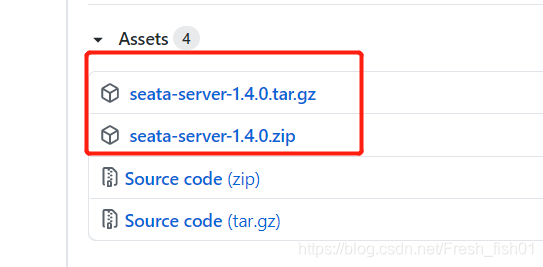
下载安装包seata-server-1.4.0.zip,解压
2、修改配置
注意:以下.conf文件中的中文注释要去掉,可能会导致服务启动失败。**
解压出来文件夹下,到conf目录下,主要是两个配置文件,registry.conf和file.conf
registry.conf 用来配置seata服务要注册到哪里
file.config 当registry.conf中的配置模式是file时才生效,用来配置seata服务
registry.conf
registry {  #seata服务的注册模式
  # file 、nacos 、eureka、redis、zk、consul、etcd3、sofa
  type = "nacos"  # 使用 nacos作为注册中心,根据实际修改
  loadBalance = "RandomLoadBalance"
  loadBalanceVirtualNodes = 10

  nacos {
    application = "seata-server"  #seata服务在nacos中的服务名,默认即可
    serverAddr = "127.0.0.1:8848" # nacos的地址
    group = "SEATA_GROUP"         # seata服务的的组名,默认即可
    namespace = "seata001"     # 命名空间,根据实际填写,默认是"",注册到public命名空间
    cluster = "seataTest"			  # seata服务在nacos中的集群名称,后面会用到
    username = "nacos"			  # nacos的用户名,使用nacos默认的
    password = "nacos"			  #	密码,使用nacos默认的
  }
  eureka {
    serviceUrl = "http://localhost:8761/eureka"
    application = "default"
    weight = "1"
  }
  redis {
    serverAddr = "localhost:6379"
    db = 0
    password = ""
    cluster = "default"
    timeout = 0
  }
  zk {
    cluster = "default"
    serverAddr = "127.0.0.1:2181"
    sessionTimeout = 6000
    connectTimeout = 2000
    username = ""
    password = ""
  }
  consul {
    cluster = "default"
    serverAddr = "127.0.0.1:8500"
  }
  etcd3 {
    cluster = "default"
    serverAddr = "http://localhost:2379"
  }
  sofa {
    serverAddr = "127.0.0.1:9603"
    application = "default"
    region = "DEFAULT_ZONE"
    datacenter = "DefaultDataCenter"
    cluster = "default"
    group = "SEATA_GROUP"
    addressWaitTime = "3000"
  }
  file {
    name = "file.conf"
  }
}

config {  #seata服务的配置模式
  # file、nacos 、apollo、zk、consul、etcd3
  type = "file"   #使用 file模式

  nacos {
    serverAddr = "127.0.0.1:8848"
    namespace = ""
    group = "SEATA_GROUP"
    username = ""
    password = ""
  }
  consul {
    serverAddr = "127.0.0.1:8500"
  }
  apollo {
    appId = "seata-server"
    apolloMeta = "http://192.168.1.204:8801"
    namespace = "application"
    apolloAccesskeySecret = ""
  }
  zk {
    serverAddr = "127.0.0.1:2181"
    sessionTimeout = 6000
    connectTimeout = 2000
    username = ""
    password = ""
  }
  etcd3 {
    serverAddr = "http://localhost:2379"
  }
  file {
    name = "file.conf"
  }
}
file.conf
transport {
  # tcp, unix-domain-socket
  type = "TCP"
  #NIO, NATIVE
  server = "NIO"
  #enable heartbeat
  heartbeat = true
  # the client batch send request enable
  enableClientBatchSendRequest = false
  #thread factory for netty
  threadFactory {
    bossThreadPrefix = "NettyBoss"
    workerThreadPrefix = "NettyServerNIOWorker"
    serverExecutorThreadPrefix = "NettyServerBizHandler"
    shareBossWorker = false
    clientSelectorThreadPrefix = "NettyClientSelector"
    clientSelectorThreadSize = 1
    clientWorkerThreadPrefix = "NettyClientWorkerThread"
    # netty boss thread size
    bossThreadSize = 1
    #auto default pin or 8
    workerThreadSize = "default"
  }
  shutdown {
    # when destroy server, wait seconds
    wait = 3
  }
  serialization = "seata"
  compressor = "none"
}

## transaction log store, only used in server side
store {   # 事务日志的存储模式
  ## store mode: file、db
  mode = "db"    # db模式
  ## file store property
  file {
    ## store location dir
    dir = "sessionStore"
    # branch session size , if exceeded first try compress lockkey, still exceeded throws exceptions
    maxBranchSessionSize = 16384
    # globe session size , if exceeded throws exceptions
    maxGlobalSessionSize = 512
    # file buffer size , if exceeded allocate new buffer
    fileWriteBufferCacheSize = 16384
    # when recover batch read size
    sessionReloadReadSize = 100
    # async, sync
    flushDiskMode = async
  }

  ## database store property
  db {
    ## the implement of javax.sql.DataSource, such as DruidDataSource(druid)/BasicDataSource(dbcp) etc.
    datasource = "druid"   #配置数据源
    ## mysql/oracle/postgresql/h2/oceanbase etc.
    dbType = "mysql"
    driverClassName = "com.mysql.jdbc.Driver"
    url = "jdbc:mysql://127.0.0.1:3306/seata"   # 数据库的连接地址,根据实际填写
    user = "root"						#用户名,根据实际填写
    password = ""						#密码,根据实际填写
    minConn = 5
    maxConn = 30
    globalTable = "global_table"
    branchTable = "branch_table"
    lockTable = "lock_table"
    queryLimit = 100
  }
}
## server configuration, only used in server side
server {
	vgroupMapping.my_test_tx_group="seataTest" #事务分组的名称my_test_tx_group,分组对应的集群的名称seataTest,就是registry.conf中  cluster = "seataTest"	的名称
	seataTest.grouplist="127.0.0.1:8091"  #事务分组中的连接地址
	enableDegrade=false
	disableGlobalTransaction=false
	# 上述四个属性在1.4.0版本的file.conf.example中删掉了,实测可以添加进来使用
  recovery {
    #schedule committing retry period in milliseconds
    committingRetryPeriod = 1000
    #schedule asyn committing retry period in milliseconds
    asynCommittingRetryPeriod = 1000
    #schedule rollbacking retry period in milliseconds
    rollbackingRetryPeriod = 1000
    #schedule timeout retry period in milliseconds
    timeoutRetryPeriod = 1000
  }
  undo {
    logSaveDays = 7
    #schedule delete expired undo_log in milliseconds
    logDeletePeriod = 86400000
  }
  #check auth
  enableCheckAuth = true
  #unit ms,s,m,h,d represents milliseconds, seconds, minutes, hours, days, default permanent
  maxCommitRetryTimeout = "-1"
  maxRollbackRetryTimeout = "-1"
  rollbackRetryTimeoutUnlockEnable = false
}

## metrics configuration, only used in server side
metrics {
  enabled = false
  registryType = "compact"
  # multi exporters use comma divided
  exporterList = "prometheus"
  exporterPrometheusPort = 9898
}
3、事务日志存储的sql脚本
在mysql数据库中建立一个seata数据库,和file.conf中db的设置相对应
-- -------------------------------- The script used when storeMode is 'db' --------------------------------
-- the table to store GlobalSession data
CREATE TABLE IF NOT EXISTS `global_table`
(
    `xid`                       VARCHAR(128) NOT NULL,
    `transaction_id`            BIGINT,
    `status`                    TINYINT      NOT NULL,
    `application_id`            VARCHAR(32),
    `transaction_service_group` VARCHAR(32),
    `transaction_name`          VARCHAR(128),
    `timeout`                   INT,
    `begin_time`                BIGINT,
    `application_data`          VARCHAR(2000),
    `gmt_create`                DATETIME,
    `gmt_modified`              DATETIME,
    PRIMARY KEY (`xid`),
    KEY `idx_gmt_modified_status` (`gmt_modified`, `status`),
    KEY `idx_transaction_id` (`transaction_id`)
) ENGINE = InnoDB
  DEFAULT CHARSET = utf8;

-- the table to store BranchSession data
CREATE TABLE IF NOT EXISTS `branch_table`
(
    `branch_id`         BIGINT       NOT NULL,
    `xid`               VARCHAR(128) NOT NULL,
    `transaction_id`    BIGINT,
    `resource_group_id` VARCHAR(32),
    `resource_id`       VARCHAR(256),
    `branch_type`       VARCHAR(8),
    `status`            TINYINT,
    `client_id`         VARCHAR(64),
    `application_data`  VARCHAR(2000),
    `gmt_create`        DATETIME(6),
    `gmt_modified`      DATETIME(6),
    PRIMARY KEY (`branch_id`),
    KEY `idx_xid` (`xid`)
) ENGINE = InnoDB
  DEFAULT CHARSET = utf8;

-- the table to store lock data
CREATE TABLE IF NOT EXISTS `lock_table`
(
    `row_key`        VARCHAR(128) NOT NULL,
    `xid`            VARCHAR(96),
    `transaction_id` BIGINT,
    `branch_id`      BIGINT       NOT NULL,
    `resource_id`    VARCHAR(256),
    `table_name`     VARCHAR(32),
    `pk`             VARCHAR(36),
    `gmt_create`     DATETIME,
    `gmt_modified`   DATETIME,
    PRIMARY KEY (`row_key`),
    KEY `idx_branch_id` (`branch_id`)
) ENGINE = InnoDB
  DEFAULT CHARSET = utf8;
二、client端
1、事务日志存储的sql脚本
在需要用到seata的 业务数据库 中执行该建表语句
-- for AT mode you must to init this sql for you business database. the seata server not need it.
CREATE TABLE IF NOT EXISTS `undo_log`
(
    `branch_id`     BIGINT(20)   NOT NULL COMMENT 'branch transaction id',
    `xid`           VARCHAR(100) NOT NULL COMMENT 'global transaction id',
    `context`       VARCHAR(128) NOT NULL COMMENT 'undo_log context,such as serialization',
    `rollback_info` LONGBLOB     NOT NULL COMMENT 'rollback info',
    `log_status`    INT(11)      NOT NULL COMMENT '0:normal status,1:defense status',
    `log_created`   DATETIME(6)  NOT NULL COMMENT 'create datetime',
    `log_modified`  DATETIME(6)  NOT NULL COMMENT 'modify datetime',
    UNIQUE KEY `ux_undo_log` (`xid`, `branch_id`)
) ENGINE = InnoDB
  AUTO_INCREMENT = 1
  DEFAULT CHARSET = utf8 COMMENT ='AT transaction mode undo table';
2、引入pom依赖
		<dependency>
            <groupId>io.seata</groupId>
            <artifactId>seata-all</artifactId>
            <version>1.4.0</version>
        </dependency>
         <dependency>
            <groupId>com.alibaba.cloud</groupId>
            <artifactId>spring-cloud-alibaba-seata</artifactId>
              <version>2.1.0.RELEASE</version>
        </dependency>
3、修改配置
file.conf和registry.conf配置文件加到实际工程中,放到resource目录下
registry.conf
registry {  # 告诉客户端到哪里去找seata服务
  # file 、nacos 、eureka、redis、zk、consul、etcd3、sofa、custom
  type = "nacos"    # seata服务注册模式是nacos
  loadBalance = "RandomLoadBalance"
  loadBalanceVirtualNodes = 10

  nacos {
    application = "seata-server"  #seata服务在nacos中的服务名,默认即可
    serverAddr = "192.168.0.102:8848"   # nacos的地址
    group = "SEATA_GROUP"               # seata服务的的组名,默认即可
    namespace = "seata001"           # 命名空间,根据实际填写,默认是"",注册到public命名空间
    username = "nacos"                  # nacos的用户名,使用nacos默认的
    password = "nacos"                   #	密码,使用nacos默认的
  }
  eureka {
    serviceUrl = "http://localhost:8761/eureka"
    weight = "1"
  }
  redis {
    serverAddr = "localhost:6379"
    db = "0"
    password = ""
    timeout = "0"
  }
  zk {
    serverAddr = "127.0.0.1:2181"
    sessionTimeout = 6000
    connectTimeout = 2000
    username = ""
    password = ""
  }
  consul {
    serverAddr = "127.0.0.1:8500"
  }
  etcd3 {
    serverAddr = "http://localhost:2379"
  }
  sofa {
    serverAddr = "127.0.0.1:9603"
    region = "DEFAULT_ZONE"
    datacenter = "DefaultDataCenter"
    group = "SEATA_GROUP"
    addressWaitTime = "3000"
  }
  file {
    name = "file.conf"
  }
  custom {
    name = ""
  }
}

config {
  # file、nacos 、apollo、zk、consul、etcd3、springCloudConfig、custom
  type = "file" # seata服务的配置模式是file

  nacos {
    serverAddr = "192.168.0.102:8848"
    namespace = ""
    group = "SEATA_GROUP"
    username = ""
    password = ""
  }
  consul {
    serverAddr = "127.0.0.1:8500"
  }
  apollo {
    appId = "seata-server"
    apolloMeta = "http://192.168.1.204:8801"
    namespace = "application"
    apolloAccesskeySecret = ""
  }
  zk {
    serverAddr = "127.0.0.1:2181"
    sessionTimeout = 6000
    connectTimeout = 2000
    username = ""
    password = ""
  }
  etcd3 {
    serverAddr = "http://localhost:2379"
  }
  file {
    name = "file.conf"
  }
  custom {
    name = ""
  }
}
file.conf
transport {
  # tcp, unix-domain-socket
  type = "TCP"
  #NIO, NATIVE
  server = "NIO"
  #enable heartbeat
  heartbeat = true
  # the client batch send request enable
  enableClientBatchSendRequest = true
  #thread factory for netty
  threadFactory {
    bossThreadPrefix = "NettyBoss"
    workerThreadPrefix = "NettyServerNIOWorker"
    serverExecutorThread-prefix = "NettyServerBizHandler"
    shareBossWorker = false
    clientSelectorThreadPrefix = "NettyClientSelector"
    clientSelectorThreadSize = 1
    clientWorkerThreadPrefix = "NettyClientWorkerThread"
    # netty boss thread size
    bossThreadSize = 1
    #auto default pin or 8
    workerThreadSize = "default"
  }
  shutdown {
    # when destroy server, wait seconds
    wait = 3
  }
  serialization = "seata"
  compressor = "none"
}
service {
  #transaction service group mapping
  vgroupMapping.my_test_tx_group = "seataTest" #设置事务分组my_test_tx_group对应的seata服务集群名称,要和server端的保持一致
  #only support when registry.type=file, please don't set multiple addresses
  seataTest.grouplist = "192.168.0.102:8091"
  #degrade, current not support
  enableDegrade = false
  #disable seata
  disableGlobalTransaction = false
}

client {
  rm {
    asyncCommitBufferLimit = 10000
    lock {
      retryInterval = 10
      retryTimes = 30
      retryPolicyBranchRollbackOnConflict = true
    }
    reportRetryCount = 5
    tableMetaCheckEnable = false
    reportSuccessEnable = false
    sagaBranchRegisterEnable = false
  }
  tm {
    commitRetryCount = 5
    rollbackRetryCount = 5
    defaultGlobalTransactionTimeout = 60000
    degradeCheck = false
    degradeCheckPeriod = 2000
    degradeCheckAllowTimes = 10
  }
  undo {
    dataValidation = true
    onlyCareUpdateColumns = true
    logSerialization = "jackson"
    logTable = "undo_log"
  }
  log {
    exceptionRate = 100
  }
}
springboot中的配置
spring.cloud.alibaba.seata.tx-service-group=my_test_tx_group
 #指定事务分组的名称,客户端和服务端配置的事务分组的名称要和该名称保持一致,不指定默认为 ${spring.application.name}
3、启动
1、启动nacos
2、启动seata,使用seata的bin目录下使用  seata-server.bat -h 192.168.0.102 -p 8091
3、启动服务
详细信息参见官网 http://seata.io/zh-cn/docs/overview/what-is-seata.html
目前以file作为seata服务的配置模式,后面在更新nacos模式
关于nacos有空再写,写这个太耗时间了呀!!!!
版权声明:本文为Fresh_fish01原创文章,遵循CC 4.0 BY-SA版权协议,转载请附上原文出处链接和本声明。