解决eclipse中web.xml报错Multiple annotations found at this line的问题
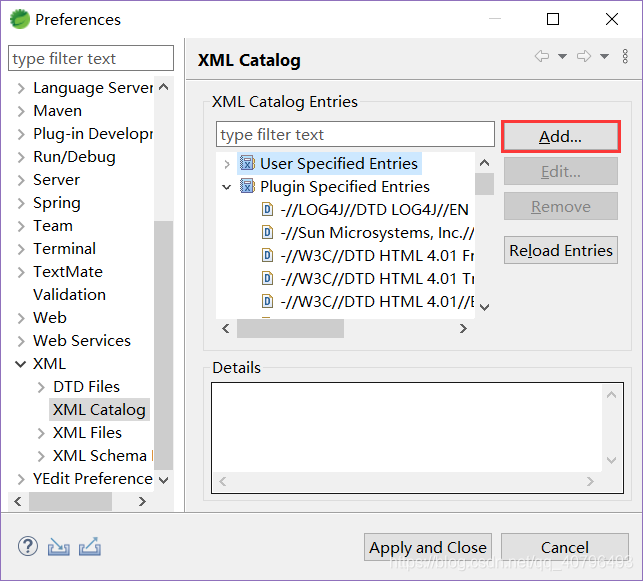
window -> preferences -> XML -> XML Catalog -> User Specified Entries -> Add
选择已经下载到本地的.xsd文件路径(ctrl+鼠标左键点击web.xml中的.xsd链接即可下载相应的.xsd文件到本地目录)
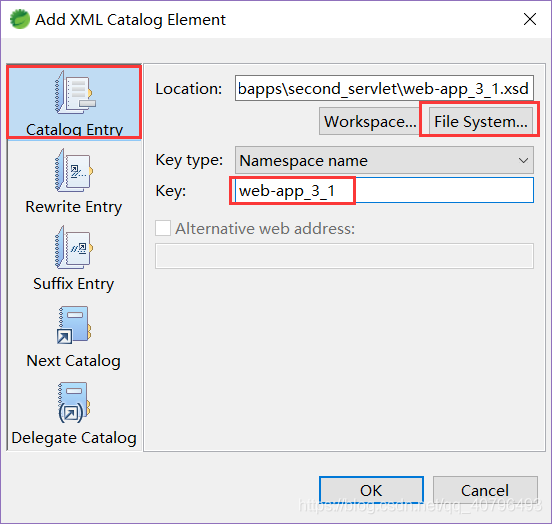
在web.xml中加入id=上图中设置的key值

右键点击web.xml -> validate
版权声明:本文为qq_40796493原创文章,遵循CC 4.0 BY-SA版权协议,转载请附上原文出处链接和本声明。