Preview
Q1: 啥是SurfaceView?
[一个自带surface 画布的view]
[能在子线程中做UI操作]
Q2:在Activity 中 内嵌 SurfaceView的情况下 , UI 是如何绘制的?
1)Activity 中ViewRoot 自带一个surface,我们叫它aSurface; SurfaceView 也自带一个surface,我们叫它mSurface。
2)UI 绘制在这个两个surface中进行,surface是按照Z 轴进行Layer 分层的,aSurface 的Z 轴值大于mSurface,所以它们的分层如图:mSurface 躲在aSurface的后面。
3)aSurface 躲在后面是如何显示的呢?SurfaceView 会对他的所有Parent 设置一个透明块,然后我们就看到了SurfaceView了。
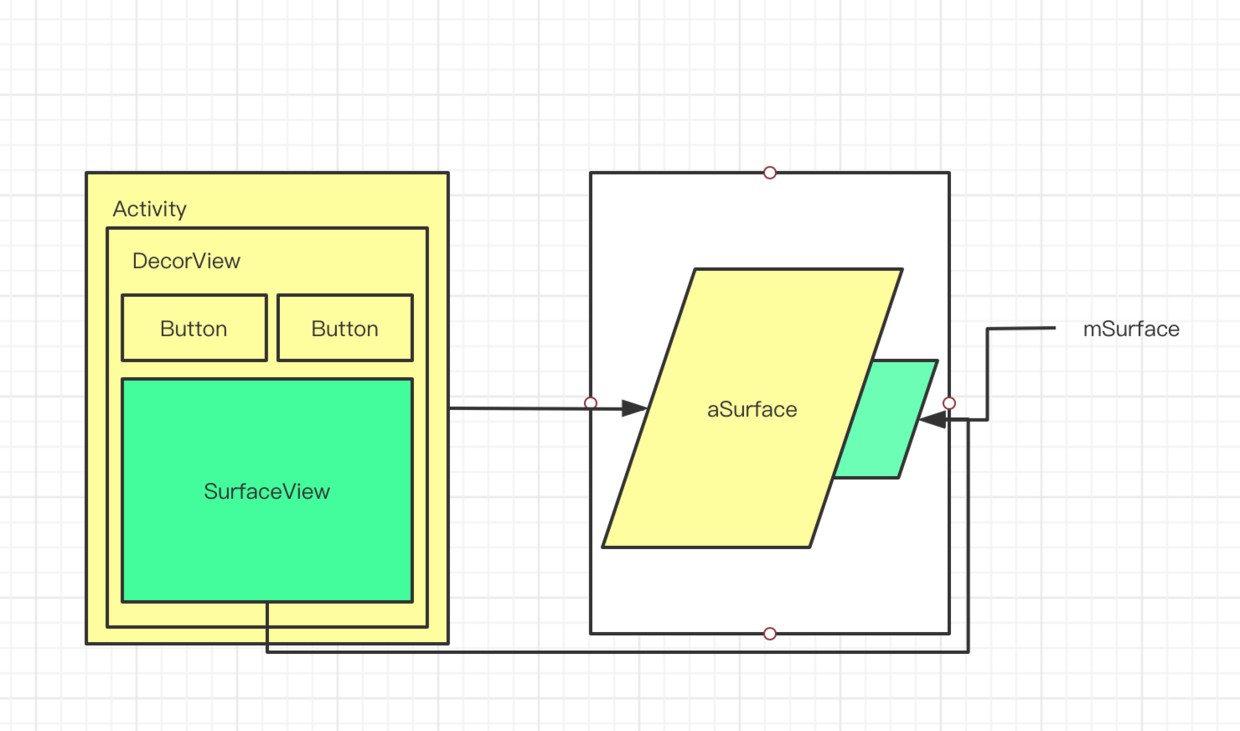
Depth
了解SurfaceView 原理,我们需要回答三个核心问题
1)SurfaceView 是如何创建Surface的?
2)SurfaceView 是如何给Parent 设置透明区域的?
3)SurfaceView 是如何利用Surface来绘制的?
SurfaceView 是如何创建Surface的?
直接成员变量new 一个final对象出来
public class SurfaceView extends View implements ViewRootImpl.WindowStoppedCallback {
...
final Surface mSurface = new Surface(); // Current surface in use
...
}
复制代码
SurfaceView 是如何给Parent 设置透明区域的?
SurfaceView.onAttachedToWindow
@Override
protected void onAttachedToWindow() {
super.onAttachedToWindow();
...
mParent.requestTransparentRegion(SurfaceView.this);
...
}
复制代码
ViewRootImpl.dispatchWindwoVisibiltyChanged() 入口
然后回调到View的gatherTransparentRegion()设置透明区域
public boolean gatherTransparentRegion(Region region) {
...
if (mBackground != null && mBackground.getOpacity() != PixelFormat.TRANSPARENT) {
// The SKIP_DRAW flag IS set and the background drawable exists, we remove
// the background drawable's non-transparent parts from this transparent region.
applyDrawableToTransparentRegion(mBackground, region);
}
return true;
...
}复制代码
SurfaceView 是如何利用Surface来绘制的?
SurfaceFliger那一套