Redisson
1、使用Redis手动管理缓存
在之前我们是使用手动管理缓存,把根据一级分类id查询到的2/3级分类存储到缓存中,再次请求查询相同的pid就查缓存,不再走数据库。
    /**
     * 手动缓存管理
     * @param pid
     * @return
     */
    @Override
    public List<CategoryEntity> queryLvl2CategoriesWithSub(Long pid) {
        //1.先查询缓存
        String key = "idx:cache:cates:"+pid;
        Object obj = redisTemplate.opsForValue().get(key);
        //缓存有的话直接返回
        if(obj!=null){
            return (List<CategoryEntity>) obj;
        }

        //2.缓存没有再查询数据库
        ResponseVo<List<CategoryEntity>> listResponseVo = pmsFeign.queryCategoriesWithSub(pid);

        //3.将查询到的值设置到redis缓存中
        long ttl=1800+new Random().nextInt(200);
        //缓存空值-解决缓存穿透问题
        if(CollectionUtils.isEmpty(listResponseVo.getData())){
            //如果是空值,ttl有效期就设置的短一些
            ttl=new Random().nextInt(500);
        }
        redisTemplate.opsForValue()
                .set(key,listResponseVo.getData(),ttl, TimeUnit.SECONDS);

        return listResponseVo.getData();
    }
这段代码里隐晦的解决了一些个问题:
1.缓存穿透的问题:我们使用缓存空值来解决,空值缓存的时间短一些
2.缓存雪崩的问题:在要缓存的key的有效期加入随机数来解决
2、Redisson实现分布式锁
Redisson是一个在Redis的基础上实现的Java驻内存数据网格,它不仅提供了一系列的分布式的Java常用对象,还提供了许多分布式服务。
Redisson的宗旨是促进使用者对Redis的关注分离(Separation of Concern),从而让使用者能够将精力更集中地放在处理业务逻辑上
1、依赖、配置
<dependency>
    <groupId>org.redisson</groupId>
    <artifactId>redisson</artifactId>
    <version>3.11.2</version>
</dependency>
创建配置类
@Configuration
public class RedissonConfig {

    //初始化redis客户端对象注入到容器中
    @Bean
    public RedissonClient redissonClient(){
        Config config = new Config();
        // 可以用"rediss://"来启用SSL连接
        config.useSingleServer().setAddress("redis://192.168.2.108:6379");
        return Redisson.create(config);
    }
}
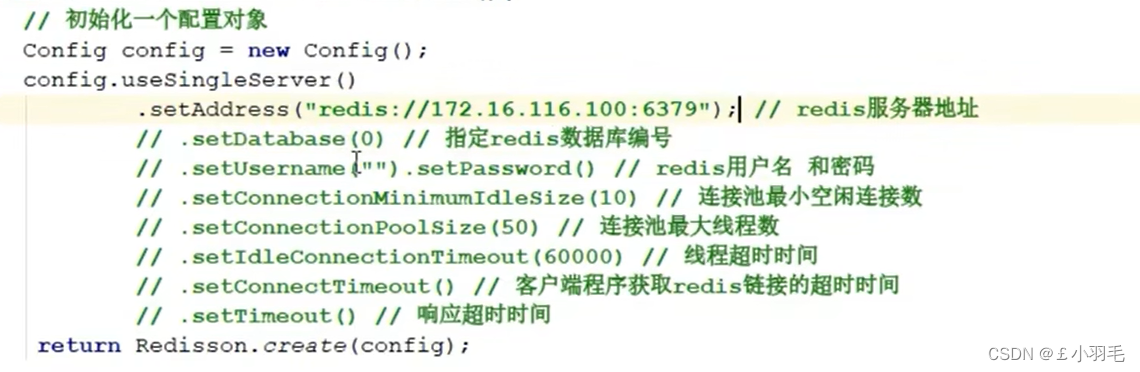
当然了还有一些常用配置,参考如下:
2、Redisson实现分布式锁
实际开发中保证在finally中释放锁,我这里就没注意那么多了,直接写的
/**
 * 秒杀案例测试
 */
@GetMapping("index/testlock")
public void testLock() {
    //只要锁的名称相同就是同一把锁  getlock()获取一个可重入的锁
    RLock lock = this.redissonClient.getLock("lock");
    //阻塞等待获取锁,默认等待3秒
    lock.lock();
    //获取redis中num的值
    int num = Integer.parseInt(
            redisTemplate.opsForValue().get("num").toString()
    );
    num++;
    //设置到redis中
    redisTemplate.opsForValue().set("num", num);
    //解锁
    lock.unlock();
}
获取锁的其他方式
Redisson还通过加锁的方法提供了
leaseTime的参数来指定加锁的时间。超过这个时间后锁便自动解开了。[可以防止死锁]//可重入锁,最经常使用的锁 lock.lock(); // 加锁以后10秒钟自动解锁 // 无需调用unlock方法手动解锁 lock.lock(10, TimeUnit.SECONDS); // 尝试加锁,最多等待100秒,上锁以后10秒自动解锁 boolean res = lock.tryLock(100, 10, TimeUnit.SECONDS);
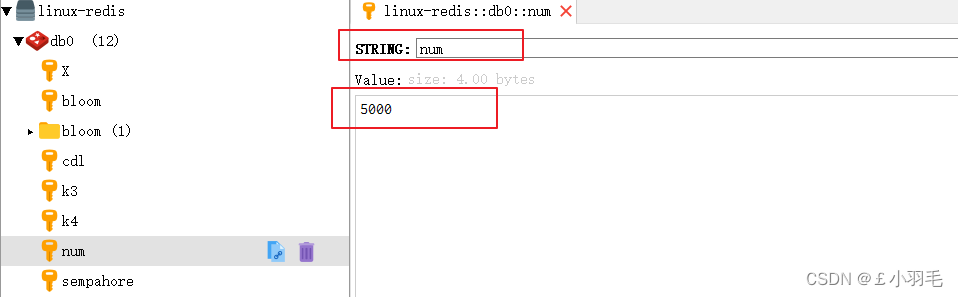
测试一下,服务多实例启动,并给num设置为0
使用ab测试
ab -n 5000 -c 100 http://www.gmall.com/index/testlockredis客户端结果,真不错
redlock算法
redis在分布式系统中保证分布式锁 分布式数据安全的一种算法
安全属性(Safety property): 独享(相互排斥)。在任意一个时刻,只有一个客户端持有锁。 setnx
活性A(Liveness property A): 无死锁。即便持有锁的客户端崩溃(crashed)或者网络被分裂(gets partitioned),锁仍然可以被获取。 设置过期时间
活性B(Liveness property B): 容错。 只要大部分Redis节点都活着,客户端就可以获取和释放锁.
红锁:多个锁组成的锁,超过一半成功才代表获取到锁
除了最常用的可重入锁,还有公平锁和读写锁
读写锁:允许一个写锁和多个读锁同时竞争


3、 使用Ridisson管理缓存
热点key单个或者批量同时失效,大量的请求缓存查询失败,会去查询数据库。线程处理请求的时间变长,服务器并发能力下降,可能导致服务器宕机
解决办法:只让一个请求线程查询数据库,然后设置到缓存中 其他的请求以后走缓存
    @Override
    public List<CategoryEntity> queryLvl2CategoriesWithSub(Long pid) {
        //1.先查询缓存
        String key = "idx:cache:cates:" + pid;
        Object obj = redisTemplate.opsForValue().get(key);
        //缓存有的话直接返回
        if (obj != null) {
            return (List<CategoryEntity>) obj;
        }

        //2.缓存没有,加锁控制只让一个线程查询数据库的数据
        RLock lock = redissonClient.getLock("cates:lock");
        lock.lock(30l, TimeUnit.SECONDS);
        try {
            // 双查:解决并发多个等待获取锁查询数据库数据的线程每个都查询数据库:
            // 再次查询缓存 如果有缓存直接返回
            obj = redisTemplate.opsForValue().get(key);
            if (obj != null) {
                return (List<CategoryEntity>) obj;
            }
            //-只有第一个线程才会这么通过,远程服务调用查询2/3级分类
            ResponseVo<List<CategoryEntity>> listResponseVo = pmsFeign.queryCategoriesWithSub(pid);

            //3.将查询到的值设置到redis缓存中
            long ttl = 1800 + new Random().nextInt(200);
            //校验空值-解决缓存穿透问题
            if (CollectionUtils.isEmpty(listResponseVo.getData())) {
                //如果是空值,ttl有效期就设置的短一些
                ttl = new Random().nextInt(500);
            }
            redisTemplate.opsForValue()
                    .set(key, listResponseVo.getData(), ttl, TimeUnit.SECONDS);

            return listResponseVo.getData();
        } catch (Exception e) {
            e.printStackTrace();
        } finally {
            lock.unlock();
        }
        return null;
    }
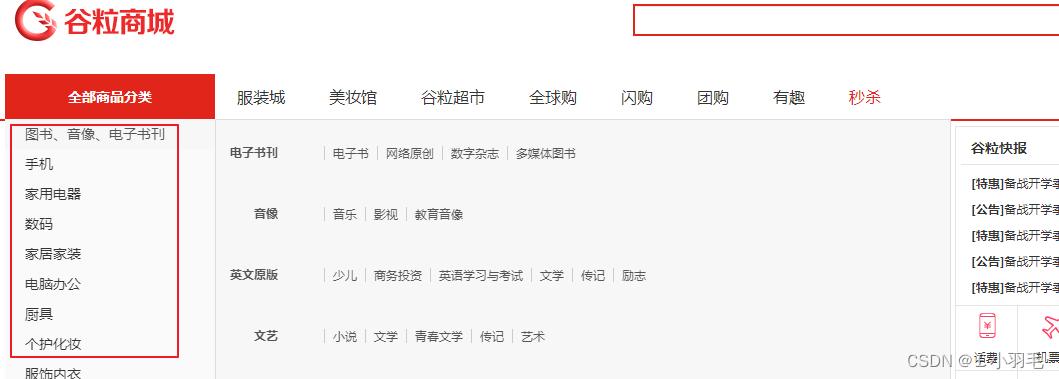
在首页上触发鼠标移动事件,去查询2/3级分类
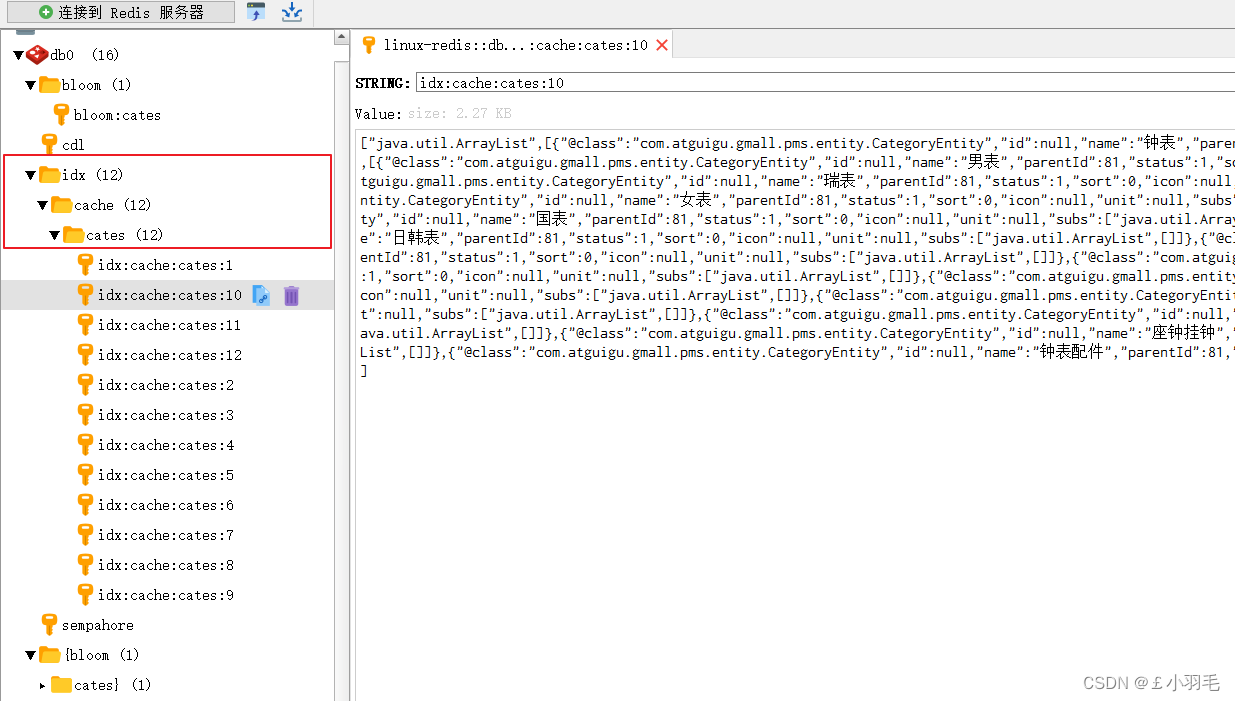
redis数据库中:
4、自定义注解@GmallCache
@Target(ElementType.METHOD)
@Documented
@Retention(RetentionPolicy.RUNTIME)
public @interface GmallCache {
    // 自定义注解需要管理的参数:缓存的key、锁的名称(击穿)、缓存过期时间、随机过期时间(雪崩)
    String key() default "cache";
    String lockName() default "lock";
    int timeout() default 5*60;//单位秒
    int random() default 2*60;//单位秒
}此时我们就可以这么使用了,对缓存管理抽取,把上面那么长的方法简化到极致
@Override
@GmallCache(key = "idx:cache:cates" ,lockName = "cates:lock",timeout = 30*60 , random = 10*60)
public List<CategoryEntity> queryLvl2CategoriesWithSub(Long pid) {
    //远程服务调用查询2/3级分类
    ResponseVo<List<CategoryEntity>> listResponseVo = pmsFeign.queryCategoriesWithSub(pid);
    return listResponseVo.getData();
}但是我们还得使用aop赋能,通过切面给注解添加功能
5、AOP封装缓存管理+分布式锁
1.小试牛刀
编写一个切面类,咱不使用切入点表达式了,使用@annotation 对指定注解进行切面通知
环绕通知:@Around,目标方法的执行需要我们手动调用,在它的前后进行扩展
joinPoint.getSignature() 获取切入点方法信息
joinPoint.proceed() 目标对象方法的执行
获取标注@GmallCache的方法信息以及该方法上注解的信息。。。
@Aspect
@Component
public class GmallCacheAspect {

    //环绕通知: 对使用自定义注解GmallCache的方法进行增强
    //@annotation 对指定注解进行切面通知
    @Around("@annotation(com.atguigu.gmall.index.aspect.GmallCache)")
    public Object around(ProceedingJoinPoint joinPoint) throws Throwable {//切入点: 可以获取到切入点方法对象 和参数等信息
        MethodSignature signature = (MethodSignature) joinPoint.getSignature();//获取切入点方法信息
        Method method = signature.getMethod();//获取目标方法的对象
        Class returnType = signature.getReturnType();
        //1.获取目标方法的返回值类型
        System.out.println("目标方法的返回值类型: "+returnType.getName());

        //2、获取目标方法的参数列表
        Object[] args = joinPoint.getArgs();
        System.out.println("目标方法的参数: "+args[0].toString());

        //3、获取目标方法上的注解对象:获取注解对象中的 缓存key  lockkey  过期时间...
        GmallCache gmallCache = method.getAnnotation(GmallCache.class);
        String key = gmallCache.key();
        String lockName = gmallCache.lockName();
        int timeout = gmallCache.timeout();
        int random = gmallCache.random();
        System.out.println("目标方法上的注解: "+"key="+key+",lockName="+lockName+",timeout="+timeout+",random="+random);

        //4、执行目标方法:查询数据库中的二级分类和子集合数据
        Object result = joinPoint.proceed(args);
        return result;
    }
}
浏览器访问: http://localhost:18087/index/cates/2
控制台打印:

=========
2.大显身手
在上面获取到那么多的信息之后,我们就可以对该方法做缓存管理了
@Aspect
@Component
public class GmallCacheAspect {
    @Autowired
    RedisTemplate redisTemplate;
    @Autowired
    RedissonClient redissonClient;

    //环绕通知: 对使用自定义注解GmallCache的方法进行增强
    //@annotation 对指定注解进行切面通知
    @Around("@annotation(com.atguigu.gmall.index.aspect.GmallCache)")
    public Object around(ProceedingJoinPoint joinPoint) throws Throwable {//切入点: 可以获取到切入点方法对象 和参数等信息
        MethodSignature signature = (MethodSignature) joinPoint.getSignature();//获取切入点方法信息
        Method method = signature.getMethod();//获取目标方法的对象
        Class returnType = signature.getReturnType();
        //1.获取目标方法的返回值类型
        System.out.println("目标方法的返回值类型: "+returnType.getName());

        //2、获取目标方法的参数列表
        Object[] args = joinPoint.getArgs();
        System.out.println("目标方法的参数: "+args[0].toString());

        //3、获取目标方法上的注解对象:获取注解对象中的 缓存key  lockkey  过期时间...
        GmallCache gmallCache = method.getAnnotation(GmallCache.class);
        String key = gmallCache.key();
        String lockName = gmallCache.lockName();
        int timeout = gmallCache.timeout();
        int random = gmallCache.random();
        System.out.println("目标方法上的注解: "+"key="+key+",lockName="+lockName+",timeout="+timeout+",random="+random);


        //4,判断是否存在缓存,有缓存则直接返回
        String cacheKey = key;
        if(ArrayUtils.isNotEmpty(args)){
            cacheKey = key+":"+ StringUtils.join(args,"-");
            lockName = lockName+":"+StringUtils.join(args,"-");
        }

        //使用布隆过滤器去决定是否查询缓存。。 todo

        // redisTemplate配置过键和值的序列化器,所以返回的Object真实类型就是原数据自己的类型
        Object obj = redisTemplate.opsForValue().get(cacheKey);
        if(obj!=null){
            return obj;
        }

        //5、缓存不存在,执行目标方法:查询数据库中的二级分类和子集合数据
        //分布式锁:解决雪崩
        RLock lock = redissonClient.getLock(lockName);
        lock.lock();
        //再次判断是否有缓存
        obj = redisTemplate.opsForValue().get(cacheKey);
        if(obj!=null){
            lock.unlock();//查询到缓存后释放锁
            return obj;
        }
        try{
            Object result = joinPoint.proceed(args);
            long cacheTime = timeout+new Random().nextInt(random);
            if(result==null  || (result instanceof List && CollectionUtils.isEmpty((List)result))){
                //空值也存入到缓存中  时间稍短
                cacheTime = random;
            }
            //存入缓存
            redisTemplate.opsForValue().set(cacheKey , result , cacheTime, TimeUnit.SECONDS);
            return result;
        }finally {
            lock.unlock();
        }
    }
}
6、信号量和闭锁
在配置类中可以初始化信号量和闭锁
//初始化redis客户端对象注入到容器中
@Bean
public RedissonClient redissonClient(){
    Config config = new Config();
    // 可以用"rediss://"来启用SSL连接
    config.useSingleServer().setAddress("redis://192.168.2.108:6379");
    RedissonClient redissonClient = Redisson.create(config);
    //1初始化信号量
    RSemaphore sempahore = redissonClient.getSemaphore("sempahore");
    //设置资源数量
    sempahore.trySetPermits(1);
    //2 初始化闭锁
    RCountDownLatch cdl = redissonClient.getCountDownLatch("cdl");
    cdl.trySetCount(1);
    return redissonClient;
}
这里就测试一下闭锁。。
    @Autowired
    private RedissonClient redissonClient;

    @ResponseBody
    @GetMapping("/index/testlock2")
    public ResponseVo testLock2(){
        //testLock2 的请求阻塞等待cdl 闭锁的值为0才继续执行
        RCountDownLatch cdl = redissonClient.getCountDownLatch("cdl");
        try {
            cdl.await();
        } catch (InterruptedException e) {
            e.printStackTrace();
        }
        System.out.println("testLock2终于执行了....");
        return ResponseVo.ok();
    }

    @ResponseBody
    @GetMapping("/index/testlock3")
    public ResponseVo testLock3(){
        RCountDownLatch cdl = redissonClient.getCountDownLatch("cdl");
        try {
            cdl.countDown();//倒计数-1
        } catch (Exception e) {
            e.printStackTrace();
        }
        System.out.println("testLock3执行了....");
        return ResponseVo.ok();
    }
访问testLock2方法:
浏览器效果
访问testlock3方法:
浏览器效果俩个效果都出来了。。。

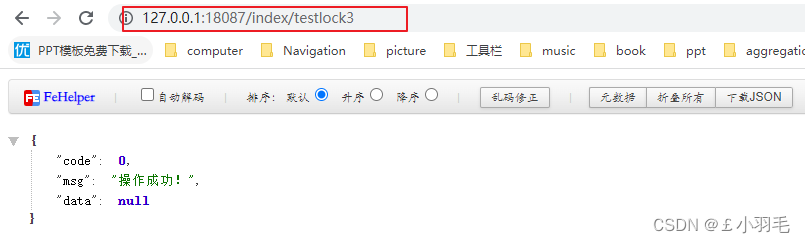
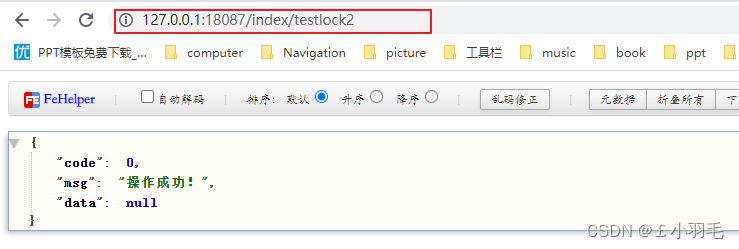
布隆过滤器
1、布隆过滤器特征
布隆过滤器是一种数据结构,比较巧妙的概率型数据结构,特点是高效地插入和查询,可以用来告诉 “某样东西一定不存在或者可能存在”。
==================
布隆过滤器是一种牺牲准确率换取空间及时间效率的概率型数据结构,它的3个特征
布隆过滤器判定一个数据不存在,它就一定不存在
判定一个数据存在,它可能不存在(误判)
数据只能插入不能删除
=====
影响布隆过滤器误判率的因素,有两个:
布隆过滤器的bit数组长度
过小的布隆过滤器很快所有的 bit 位均为 1,那么查询任何值都会返回“可能存在”,起不到过滤的目的了。布隆过滤器的长度会直接影响误报率,布隆过滤器越长其误报率越小。
布隆过滤器的hash函数个数
个数越多则布隆过滤器 bit 位置位 1 的速度越快,且布隆过滤器的效率越低;但是如果太少的话,那我们的误报率会变高。
如何选择适合业务的 哈希函数的个数(k) 和bit数组的长度(m)值呢,公式如下:
k 为哈希函数个数,m 为布隆过滤器长度,n 为插入的元素个数,p 为误报率
布隆过滤器真实失误率p公式:


布隆过滤器不需要我们自己来实现,因为已经有很多成熟的实现方案:
Google的guava
redisson
redis插件 官方地址:GitHub - RedisBloom/RedisBloom: Probabilistic Datatypes Module for Redis
2、谷歌guava
引入依赖
<dependency>
    <groupId>com.google.guava</groupId>
    <artifactId>guava</artifactId>
    <version>30.1.1-jre</version>
</dependency>
测试类
@SpringBootTest //自动提供IOC容器
public class MybatisTest {

    BloomFilter<String> bloomFilter;

    @PostConstruct //布隆过滤器的初始化
    public void init(){
        //参数1: 指定将来存入布隆过滤器的 数据 类型+编码 (计算hash的算法)
        //参数2: 预期的元素个数
        //参数3: 误判率
        bloomFilter =
                BloomFilter.create(Funnels.stringFunnel(Charsets.UTF_8), 10, 0.3);
        //存入数据:使用多个hash算法为存入的数据计算 并对数组长度求余 设置到布隆过滤器的数组中
        bloomFilter.put("1");
        bloomFilter.put("2");
        bloomFilter.put("3");
        bloomFilter.put("4");
        bloomFilter.put("5");
    }

    @Test
    public void contextLoads() {
        System.out.println("1:"+bloomFilter.mightContain("1"));
        System.out.println("2:"+bloomFilter.mightContain("2"));
        System.out.println("3:"+bloomFilter.mightContain("3"));
        System.out.println("4:"+bloomFilter.mightContain("4"));
        System.out.println("5:"+bloomFilter.mightContain("5"));
        System.out.println("6:"+bloomFilter.mightContain("6"));
        System.out.println("7:"+bloomFilter.mightContain("7"));
        System.out.println("8:"+bloomFilter.mightContain("8"));
        System.out.println("9:"+bloomFilter.mightContain("9"));
        System.out.println("10:"+bloomFilter.mightContain("10"));
        System.out.println("11:"+bloomFilter.mightContain("11"));
        System.out.println("12:"+bloomFilter.mightContain("12"));
        System.out.println("13:"+bloomFilter.mightContain("13"));
        System.out.println("14:"+bloomFilter.mightContain("14"));
        System.out.println("15:"+bloomFilter.mightContain("15"));
        System.out.println("16:"+bloomFilter.mightContain("16"));
    }

}
不存在的一定不存在 认为存在的可能不存在,看看结果
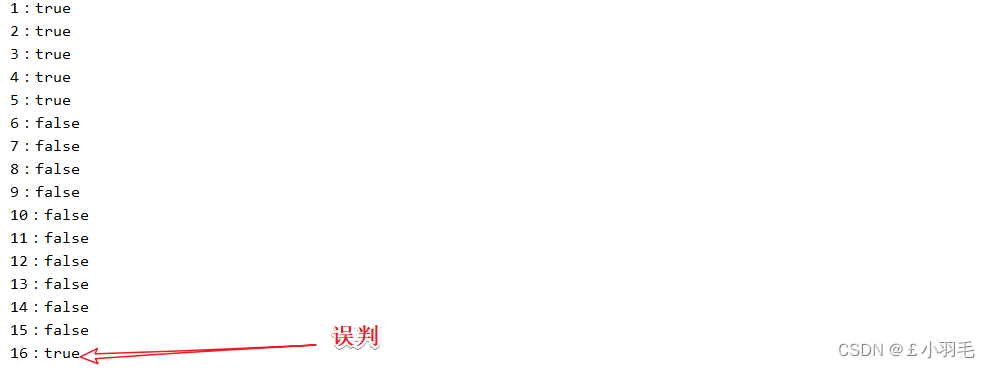
3、redisson的布隆过滤器
依赖的话就是之前引入的这个
<dependency>
    <groupId>org.redisson</groupId>
    <artifactId>redisson</artifactId>
    <version>3.11.2</version>
</dependency>
配置类配置
@Configuration
public class RedissonConfig {

    //初始化redis客户端对象注入到容器中
    @Bean
    public RedissonClient redissonClient(){
        Config config = new Config();
        // 可以用"rediss://"来启用SSL连接
        config.useSingleServer().setAddress("redis://192.168.2.108:6379");
        return Redisson.create(config);
    }
}
测试类中测试
@Autowired
RedissonClient redissonClient;
@Test
public void testRedissonBloom(){
    RBloomFilter<String> bloom = this.redissonClient.getBloomFilter("bloom");
    bloom.tryInit(10l, 0.3);
    bloom.add("1");
    bloom.add("2");
    bloom.add("3");
    bloom.add("4");
    bloom.add("5");
    System.out.println("1:"+bloom.contains("1"));
    System.out.println("2:"+bloom.contains("2"));
    System.out.println("3:"+bloom.contains("3"));
    System.out.println("4:"+bloom.contains("4"));
    System.out.println("5:"+bloom.contains("5"));
    System.out.println("6:"+bloom.contains("6"));
    System.out.println("7:"+bloom.contains("7"));
    System.out.println("8:"+bloom.contains("8"));
    System.out.println("9:"+bloom.contains("9"));
    System.out.println("10:"+bloom.contains("10"));
    System.out.println("11:"+bloom.contains("11"));
    System.out.println("12:"+bloom.contains("12"));
    System.out.println("13:"+bloom.contains("13"));
    System.out.println("14:"+bloom.contains("14"));
    System.out.println("15:"+bloom.contains("15"));
    System.out.println("16:"+bloom.contains("16"));
}
结果打印:看的出来确实没人家谷歌算法做得好
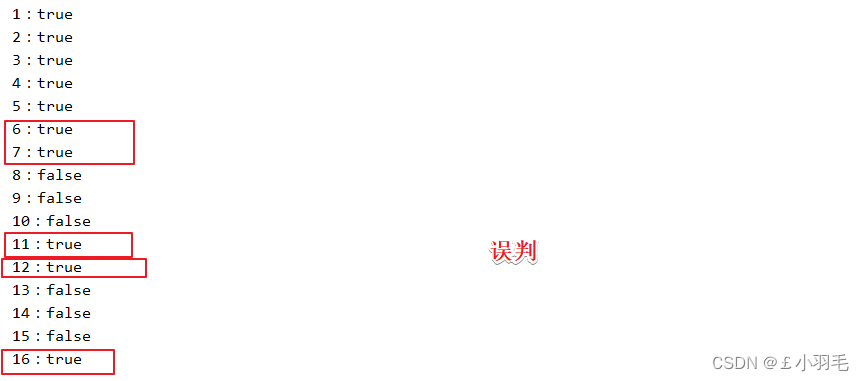
4、BloomFilter解决缓存穿透问题
上面使用Ridisson缓存管理的缓存穿透解决方案是:缓存空值,但是会导致 redis中内存占用过高
添加布隆过滤器的配置类:
这样在项目启动时就可以将所有的二级分类的id存入到布隆过滤器中
项目启动时可以将存在的数据查询出来 使用布隆过滤器的多种hash算法,每个算法计算数据的hash值
得到了多个值再和非常长的数组的长度进行求余 将多个hash算法计算后hash值%数组 的余存到数组中
@Configuration
public class BloomFilterConfig {

    @Autowired
    private RedissonClient redissonClient;

    @Autowired
    private GmallPmsFeign gmallPmsFeign;

    @Bean
    public RBloomFilter rBloomFilter(){
        // 初始化布隆过滤器
        RBloomFilter<String> bloomfilter = this.redissonClient.getBloomFilter("bloom:cates");
        //参数1:预期的元素个数  参数2:误判率
        bloomfilter.tryInit(50l, 0.03);

        //远程服务调用查询所有的二级分类id
        ResponseVo<List<CategoryEntity>> listResponseVo = this.gmallPmsFeign.queryCategory(0l);
        List<CategoryEntity> categoryEntities = listResponseVo.getData();
        if (!CollectionUtils.isEmpty(categoryEntities)){
            //每个二级分类的分类id存入到布隆过滤器
            categoryEntities.forEach(categoryEntity -> {
                bloomfilter.add(categoryEntity.getId().toString());
            });
        }
        return bloomfilter;
    }
}
修改缓存封装代码:
如果传入二级分类的id了,布隆过滤器说不存在那就是一定不存在,所以直接return null,不用再去查询缓存了
if(ArrayUtils.isNotEmpty(args)){
    //使用布隆过滤器判断查询的数据是否存在:
    //cid查询它的二级分类: cid必须存在 并且它有二级分类集合  这个cid就有数据
    // 项目启动时 可以将存在并且有二级分类的cid存入到布隆过滤器中
    RBloomFilter<Object> bloomFilter = redissonClient.getBloomFilter("bloom:cates");
    boolean contains = bloomFilter.contains(args[0].toString());
    if(!contains){
        //缓存一定不存在
        log.info("bloomfilter判断数据不存在:{}" ,args[0].toString());
        return null;
    }
    cacheKey = key+":"+StringUtils.join(args,"-");
    lockName = lockName+":"+StringUtils.join(args,"-");
}
总结:缓存穿透的解决方案
1、布隆过滤器过滤大部分的空值请求,但是它有误判率
2、redis缓存空值