Algorithmic trading automates the systematic trading process, where orders are executed at the best price possible based on a variety of factors, such as pricing, timing, and volume. Brokerage firms may offer an Application Programming Interface (API) as part of their service offering for customers who wish to deploy their own trading algorithms. An algorithmic trading system must be highly robust to handle any point of failure during the order execution. Network configuration, hardware, memory management, speed, and user experience are a number of factors to be considered when designing a system for executing orders. Designing larger systems inevitably adds more complexity to the framework.
As soon as a position in a market is opened, it is subjected to various types of risk, such as market risk, interest rate risk, and liquidity risk. To preserve the trading capital as much as possible, it is important to incorporate risk management measures into the trading system. Perhaps the most common risk measure used in the financial industry is the Value at Risk (VaR) technique. We will discuss the beauty and flaws of VaR, and how it can be incorporated into our trading system that we will develop in this chapter.
In this chapter, we will cover the following topics:
- An overview of algorithmic trading
- A list of brokers and system vendors with a public API
- Choosing a programming language for a trading system
- Designing an algorithmic trading platform
- Setting up API access on the Oanda v20 Python module
- Implementing a mean-reverting algorithmic trading strategy
- Implementing a trend-following algorithmic trading strategy
- Introducing VaR for risk management in our trading system
- Performing VaR calculations in Python on AAPL
Introducing algorithmic trading
In the 1990s, exchanges had already begun to use electronic trading systems. By 1997, 44 exchanges worldwide used automated systems for trading futures and options with more exchanges in the process of developing automated technology. Exchanges such as the Chicago Board of Trade (CBOT) and the London International Financial Futures and Options Exchange (LIFFE) used their electronic trading systems as an after-hours complement to the traditional open outcry/ˈaʊtkraɪ/公开喊价,大声疾呼,尖叫 trading pits, thus giving traders 24-hour access to the exchange's risk management tools. With these improvements in technology, technology-based trading became less expensive, fueling/ ˈfjuːəlɪŋ /给……提供燃料,推动 the growth of trading platforms that are faster and more powerful. The higher reliability of order execution and the lower rate of message transmission error has deepened the reliance on technology by financial institutions. The majority of asset managers, proprietary/ prəˈpraɪəteri / traders自营交易员, and market makers have since moved from the trading pits to electronic trading floors.
As systematic or computerized trading becomes more commonplace常见的东西, speed is the most important factor in determining the outcome of a trade. Quants定量分析专家,金融工程师, by utilizing sophisticated fundamental models, are able to recompute fair values of trading products on the fly and execute trading decisions, enabling them to reap/riːp/获得,收获 profits at the expense of those fundamental traders using traditional tools. This has given way to the term high-frequency trading (HFT), which relies on fast computers to execute the trading decisions before anyone else can. In fact, HFT has evolved into a billion-dollar industry.
Algorithmic trading refers to the automation of the systematic trading process, where the order execution is heavily optimized to give the best price possible. It is not part of the portfolio allocation process.
Banks, hedge funds, brokerage firms, clearing firms, and trading firms typically have their servers placed right next to the electronic exchange to receive the latest market prices and to perform the fastest order execution where possible. They bring enormous/ɪˈnɔːrməs/巨大的 trading volumes to the exchange. Anyone who wishes to participate in low-latency, high-volume trading activities (such as complex event processing or capturing fleeting/ˈfliːtɪŋ/短暂的 price discrepancies/dɪˈskrepənsi/差异) by acquiring exchange connectivity may do so in the form of co-location主机代管, where their server hardware can be placed on a rack right next to the exchange for a fee.
The Financial Information eXchange (FIX, https://blog.csdn.net/Linli522362242/article/details/122613472) protocol is the industry standard for electronic communications with the exchange from the private server for direct market access (DMA) to real-time information. C++ is the common choice of programming language for trading over the FIX protocol, though other languages, such as .NET Framework Common Language and Java can also be used. The Representational State Transfer(REST) API offerings are becoming more common for retail investors. Before creating an algorithmic trading platform, you will need to assess various factors, such as the speed and ease of learning before deciding on a specific language for the purpose.
Brokerage firms will provide a trading platform of some sort for their customers in order for them to execute orders on selected exchanges in return for the commission fees. Some brokerage firms may offer an API as part of their service offering to technically-inclined customers who wish to run their own trading algorithms. In most circumstances, customers may also choose from a number of commercial trading platforms offered by third-party vendors. Some of these trading platforms may also offer API access to route orders electronically to the exchange. It is important to read the API documentation beforehand to understand the technical capabilities offered by your broker and to formulate an approach in developing an algorithmic trading system.
Trading platforms with a public API
The following table lists some brokers and trading platform vendors who have their API documentation publicly available:
| Broker/vendor | URL | Programming languages supported |
| CQG | https://www.cqg.com | REST, FIX, C#, C++, and VB/VBA |
| Cunningham Trading Systems | http://www.ctsfutures.com | Microsoft .Net Framework 4.0 and FIX |
| E*Trade | https://developer.etrade.com/home | Python, Java, and Node.js |
| Interactive Brokers | https://www.interactivebrokers.com/en/index.php?f=5041 | Java, C++, Python, C#, C++, and DDE |
| IG | https://labs.ig.com/ | REST, Java, JavaScript, .NET, Clojure, and Node.js |
| Tradier | https://developer.tradier.com/ | REST |
| Trading Technologies | https://www.tradingtechnologies.com/trading/apis/ | REST, .NET, and FIX |
| OANDA | https://developer.oanda.com/ | REST, Java, and FIX |
| FXCM | https://www.fxcm.com/uk/algorithmic-trading/api-trading/ | REST, Java, and FIX |
11_14_TheFXCMTradingPlatform, | https://blog.csdn.net/Linli522362242/article/details/102816913,https://blog.csdn.net/Linli522362242/article/details/122613472 | FXCM, quickFIX |
Choosing a programming language
With many options of programming languages available to interface with brokers or vendors, the question that comes naturally to anyone starting out in algorithmic trading platform development is Which language should I use?
Before answering this question, it is important to find out if your broker provides developer tools. RESTful APIs are becoming the most common offering alongside FIX protocol access. A small number of brokers support Java and C#. With RESTful APIs, it is easy to search for, or even write a wrapper around it in almost any programming language that supports the HyperText Transfer Protocol (HTTP).
Bear in mind that each tool option presents its own limitations. Your broker may rate-limit price and event updates. How your product will be developed, the performance metrics to follow, the costs involved, latency threshold, risk measures, and the expected user interface are pieces of the puzzle to be taken into consideration. The risk manager, execution engine, and portfolio optimizer are some major components that will affect the design of your system. Your existing trading infrastructure, choice of operating system, programming language compiler capability, and available software tools pose further constraints on the system design, development, and deployment.
System functionalities
It is important to define the outcomes of your trading system. An outcome could be a research-based system concerned with obtaining high-quality data from data vendors, performing computations or running models, and evaluating a strategy through signal generation. Part of the research component might include a data-cleaning module or a backtesting interface to run a strategy with theoretical parameters over historical data. The CPU speed, memory size, and bandwidth are factors to be considered while designing our system.
Another outcome could be an execution-based system that is more concerned with risk management and order handling features to ensure the timely execution of multiple orders. The system must be highly robust in order to handle any point of failure during the order execution. As such, network configuration, hardware, memory management and speed, and user experience are some factors to be considered when designing a system that executes orders.
A system may contain one or more of these functionalities. Designing larger systems inevitably adds complexity to the framework. It is recommended that you choose one or more programming languages that can address and balance the development speed, ease of development, scalability, and reliability of your trading system.
Building an algorithmic trading platform
In this section, we will design and build a live algorithmic trading system in Python. Since developer tools and offerings vary with each broker, it is important to take into consideration the different programming implementation that is required in integrating with our very own trading system. With a good system design, we can build a generic service that allows configurations of different brokers to plug in and play together nicely with our trading system.
Designing a broker interface
When designing a trading platform, the following three functionalities are highly desirable to fulfill any given trading plan:
- Getting prices: Pricing data is the one of the most basic units of information available from an exchange. It represents the quotation prices that are made by the marketplace to buy or sell a traded product. A broker may redistribute data from the exchange to be delivered to you in its own format. The most basic form of price data available is the date and time of the quotes, the symbol of the traded product, and the quoted bidding and asking price of the traded product. More often than not, this pricing data is useful to base your trading decisions on.
The following diagram describes the communication between the initiator发起者, which is the trading system, and the acceptor, which is the exchange: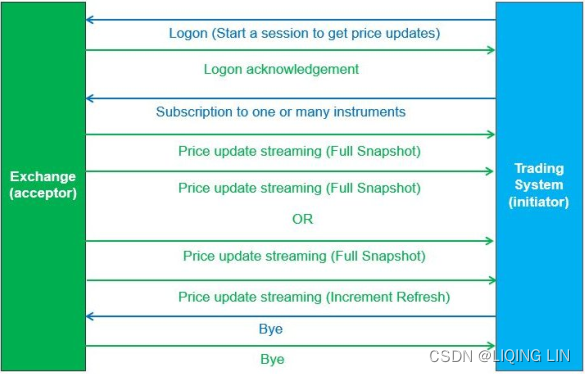
The following diagram represents the FIX messages that are exchanged between the acceptor and the initiator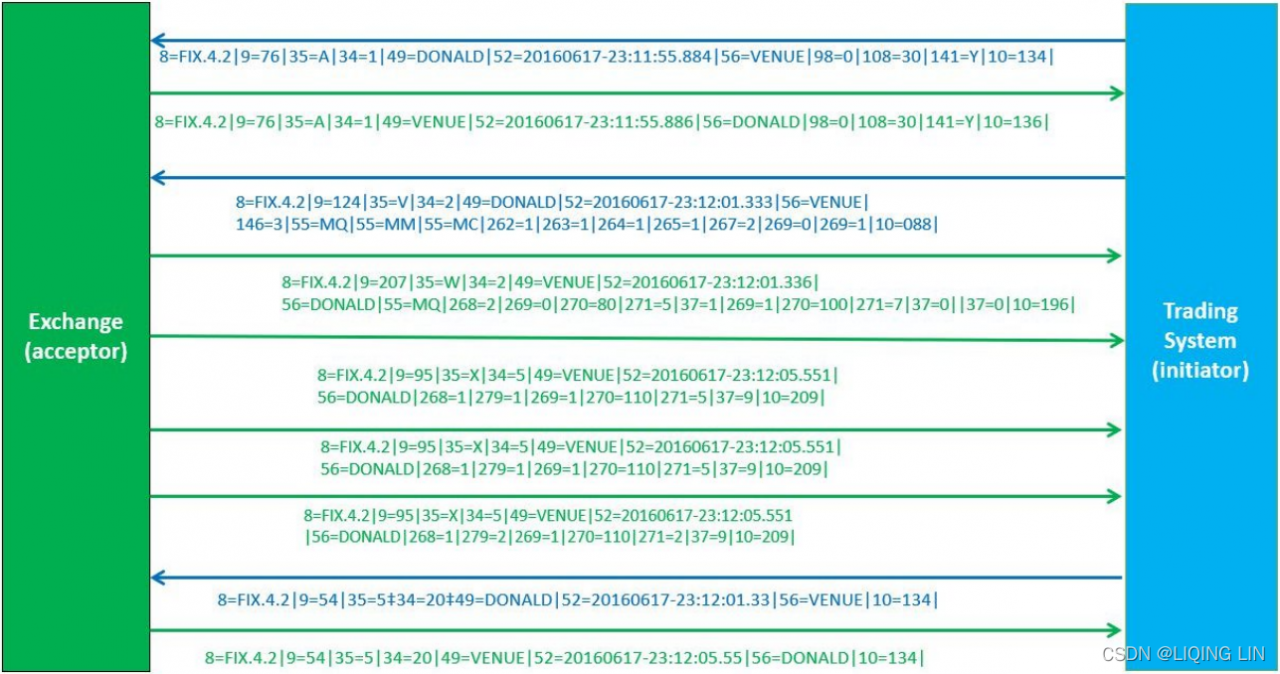
- The best quoted bidding and asking prices are known as the Level 1 quote. In most cases, it is possible to request for Level 2, 3, or even additional quote levels from your broker.
- Sending orders to the market: When sending orders to the marketplace, it may or may not be executed by your broker or the exchange. If it does get executed, you will have opened a position in the traded product and subjected yourself to all forms of risk, as well as returns. The simplest form of order states the product to trade (usually denoted by a symbol), the quantity to trade, the position that you want to take (that is, whether you are buying or selling), and, for a non-market order, theprice to trade at. Depending on your needs, there are many different types of orders available to help manage your trading risks.
The trading system will communicate the orders to the exchange by opening a trading session with the exchange. While this active trading session stays open, order messages will be sent to the exchange. The exchange will communicate the state of these orders by using FIX messages. This is shown in the following diagram: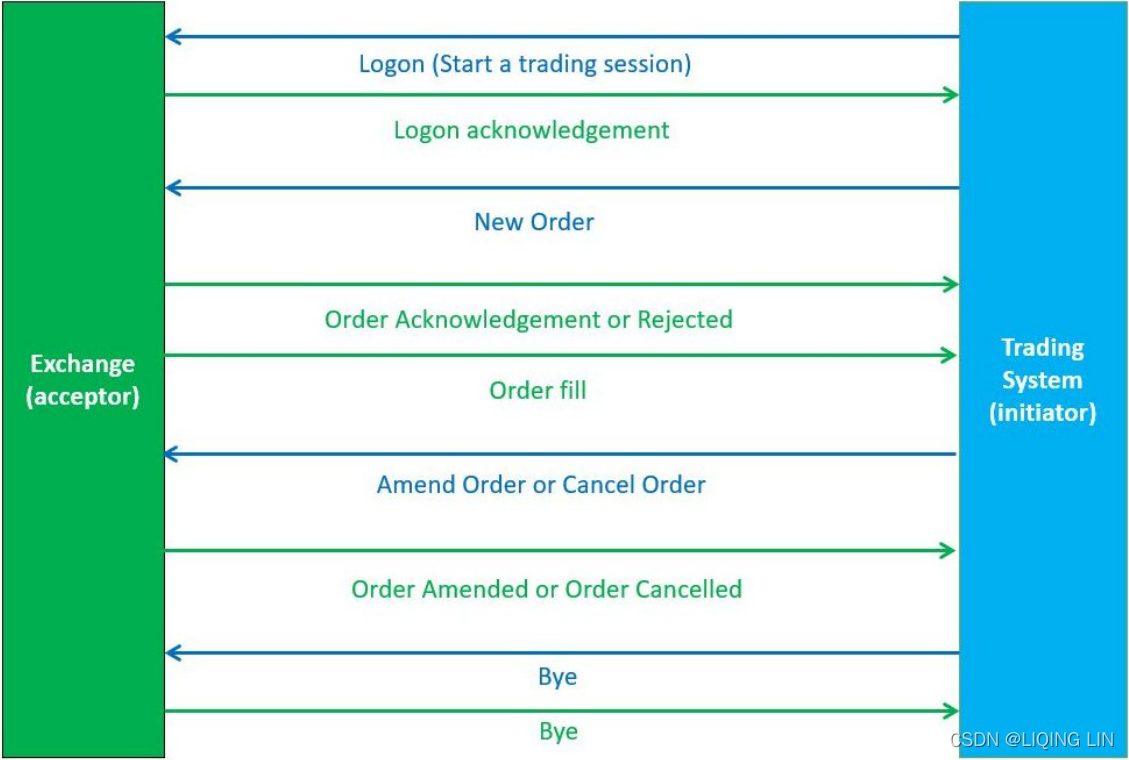
The following diagram represents the FIX messages that are exchanged between the initiator and the acceptor: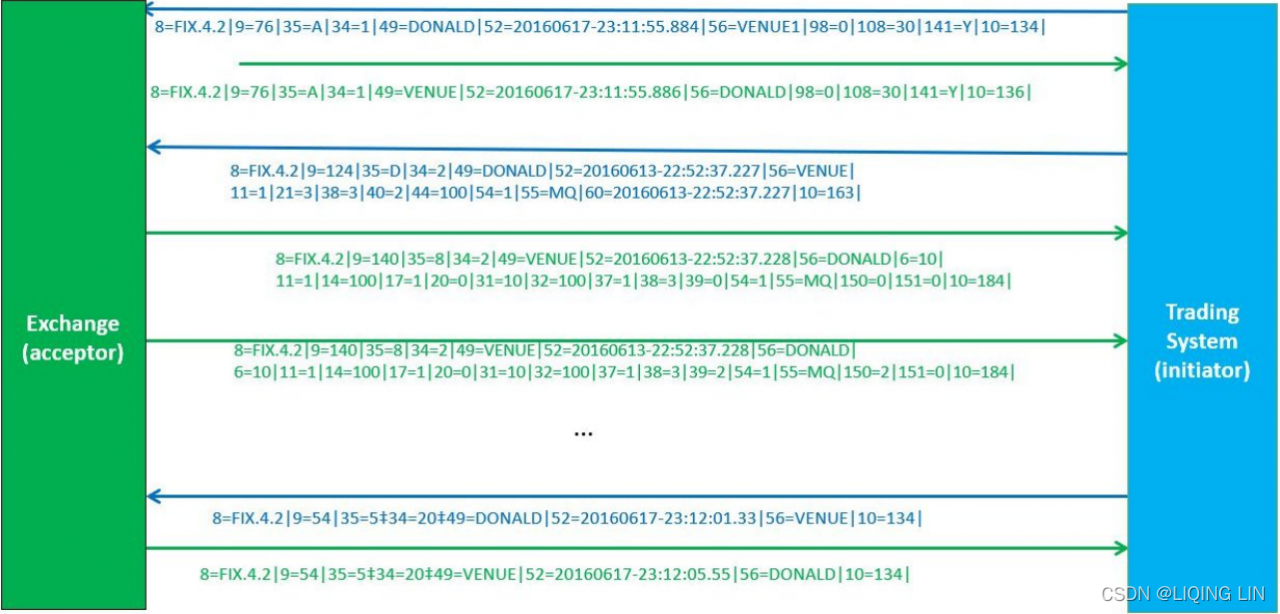
- Your broker may not support all order types. It is prudent to check with your broker which types of order are available and which can best manage your trading risks. The most common order type used by market participants are market orders, limit orders, and good-till-canceled orders.
A market order is an order to buy or sell a product right away in the market. Because it is executed based on the current market prices, an execution price is not required for this type of order. Typically, if you are going to buy a stock, then you will pay a price at or near the posted ask. If you are going to sell a stock, you will receive a price at or near the posted bid.
One important thing to remember is that the last traded price is not necessarily the price at which the market order will be executed. In fast-moving and volatile markets, the price at which youactually execute (or fill) the trade can deviate fromthe last traded price. The price will remain the same only when the bid/ask price is exactly at the last traded price.
Market orders are popular among individual investors who want to buy or sell a stock without delay. The advantage of using market orders is that you are guaranteed to get the trade filled;in fact, it will be executed as soon as possible. Although the investor doesn't know the exact price at which the stock will be bought or sold, market orders on stocks that trade over tens of thousands of shares per day will likely be executed close to the bid/ask prices
A limit order is an order to buy or sell a product at a specific or better price.
A limit order, sometimes referred to as a pending order, allows investors to buy and sell securities at a certain price in the future. This type of order is used to execute a trade if the price reaches the pre-defined level; the order will not be filled if the price does not reach this level. In effect, a limit order sets themaximum or minimum price at which you are willing to buy or sell.
For example, if you wanted to buy a stock at $10, you could enter a limit order for this amount. This means that you would not pay one cent over $10 for that particular stock. However, it is still possible that you could buy it for less than the $10 per share specified in the order.
There are 4 types of limit orders:
Buy Limit: an order to purchase a security at or below a specified price. Limit orders must be placed on the correct side of the market to ensure they will accomplish the task of improving the price. For a buy limit order, this means placing the order at or below the current market bid.(The reason is that you think the stock price will fall in the recent period, but will rise in the future)
Sell Limit: an order to sell a security at or above a specified price. To ensure an improved price, the order must be placed at or above the current market ask.(The reason is that you think the stock price will rise in the recent period or the price will reach your expected price, but it will fall in the future, so sell it for profit)
Buy Stop: an order to buy a security at a price above the current market bid(The reason is that you predict that the stock price will continue to rise, and set a limit for the rise of the stock price. If your limit price has been reached in the recent period of time, it proves that your prediction is correct. After buying, the price is likely to continue rise.). A stop order to buy becomes active only after a specified price level has been reached (known as the stop level). Buy stop are orders placed above the market and sell stop orders placed below the market(The reason is that you have set a limit for the price of the stock to fall. If the stock falls to your limit price (the maximum loss you can afford) in the recent period of time, it proves that your prediction is correct, and you can sell it and stop the loss in time.)
(the opposite of buy and sell limit orders, respectively). Once a stop level has been reached, the order will be immediately converted into a market or limit order.
Sell Stop: an order to sell a security at a price below the current market ask. Like the buy stop, a stop order to sell becomes active only after a specified price level has been reached.
When deciding between amarket or limit order, investors should be aware of the added costs. Typically, the commissions are cheaper for market orders than for limit orders. The difference in commission can be anywhere from a couple of dollars to more than $10. For example, a $10 commission on a market order can be boosted up to $15 when you place a limit restriction on it. When you place a limit order, make sure it's worthwhile.
Let's say your broker charges $7 for a market order and $12 for a limit order. Stock XYZ is presently trading at $50 per share and you want to buy it at $49.90. By placing a market order to buy 10 shares, you pay $500 (10 shares x $50 per share) + $7 commission, which is a total of $507. By placing a limit order for 10 shares at $49.90, you would pay $499 + $12 commissions, which is a total of $511.
Even though you save a little from buying the stock at a lower price (10 shares x $0.10 = $1), you will lose it in the added costs for the order ($5), a difference of $4. Furthermore, in the case of the limit order, it is possible that the stock doesn't fall to $49.90 or less. Thus, if it continues to rise, you may lose the opportunity to buy.
A good-till-canceled (GTC) order is an order that remains in the exchange queue for execution until the stated expiry time. Unless specified, most orders are GTC orders that expire at the end of the trading day. This is a time restriction that you can place on different orders. A good-til-canceled order will remain active until you decide to cancel it. Brokerages will typically limit the maximum time you can keep an order open (or active) to 90 days
You can find more information of various order types at https://www.investopedia.com/investing/basics-trading-stock-know-your-orders/.
- Your broker may not support all order types. It is prudent to check with your broker which types of order are available and which can best manage your trading risks. The most common order type used by market participants are market orders, limit orders, and good-till-canceled orders.
- Tracking positions: As soon as your order is executed, you will enter into a position. Keeping track of your opened position will help determine how well (or badly!) your trading strategy is doing, as well as manage and plan your risks. Your gains and losses from opened positions vary according to market movements, and is known as unrealized profits and losses. After closing your position, you will have realized profits and losses, which are the final outcome of your trading strategy.
P&LRealized (points) = (Sell Price - Buy Price) * Qty
P&LUnrealized (points) = (Theoretical Exit Price - Average Open Price) * Position
P<otal (points)= P&LRealized (points) + P&LUnrealized (points)
https://blog.csdn.net/Linli522362242/article/details/121896073
With these three basic functionalities in mind, we can design a generic Broker class implementing these functions that can be easily extended to any broker-specific configurations.
Python library requirements
In this chapter, we will be using the publicly-available v20 module with Oanda as our broker. All method implementations mentioned in this chapter uses the v20 Python library as an example.
Installing v20
The official repository for OANDA v20 REST API is at https://github.com/oanda/v20-python. Install using pip with the terminal command:
pip install v20 Detailed documentation on the use of the OANDA v20 REST API can be found at https://developer.oanda.com/rest-live-v20/introduction/. The use of APIs varies with each broker, so make sure that you consult with your broker for the appropriate documentation before writing your trading system implementation. 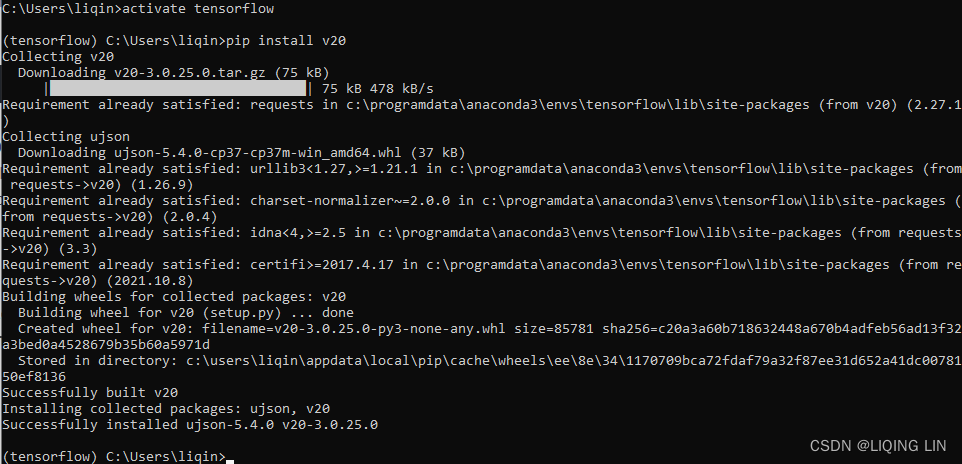
Writing an event-driven broker class
Whether we are fetching prices, sending orders, or tracking positions, an event-driven system design willtrigger key parts of our system in a multi-threaded fashion without blocking the main thread.
Let's begin writing our Broker class in Python, as follows:
from abc import abstractmethod

class Broker( object ):
    def __init__(self, host, port):
        self.host = host
        self.port = port

        self.__price_event_handler = None
        self.__order_event_handler = None
        self.__position_event_handler = None
In the constructor, we can provide the host and port public connection configurations of our broker for the inheriting child classes. 3 variables are declared for storing the event handlers of prices, orders, and position updates, respectively. Here, we are designing for only one listener for each event. A more complex trading system might support multiple listeners on the same event handler.
Storing the price event handler
Inside the Broker class, add the following 2 methods as the getter and setter for the price event handler, respectively:
    # @property:https://www.programiz.com/python-programming/property
    @property
    def on_price_event( self ):
        """
        Listeners will receive: symbol(ticker), bid, ask
        """
        return self.__price_event_handler

    @on_price_event.setter
    def on_price_event( self, event_handler ):
        self.__price_event_handler = event_handler
After an order is routed to your broker, the inheriting child classes will notify the listeners through the on_order_event method invocation, along with the order transaction ID.
Storing the position event handler
Add the following two methods as the getter and setter for the position event handler:
    @property
    def on_position_event(self):
        """
        Listeners will receive: symbol, is_long, units, unrealized_pnl, pnl
        """
        return self.__position_event_handler

    @on_position_event.setter
    def on_position_event( self, event_handler):
        self.__position_event_handler = event_handler
When a position update event is received from your broker, the inheriting child classes will notify the listeners through the on_position_event method invocation containing the symbol information, a flag indicating a long or short position,the number of units traded, the unrealized profit and loss, and the realized profit and loss.
Declaring an abstract method for getting prices
Since fetching prices from a data source is a main requirement of any trading system, create an abstract method named get_prices() to perform such a function. It expects a symbols parameter to contain a list of broker-defined symbols, that will be used for querying data from our broker. The inheriting child classes are expected to implement this method, otherwise a NotImplementedError exception is thrown:
    @abstractmethod
    def get_price( self, symbols=[] ):
        """
        Query market prices from a broker
        : param symbols: list of symbols recognized by your broker
        """
        raise NotImplementedError('Method is required!')
Note that this get_prices() method is expected to perform a one-time fetch of the current market prices. This gives us a snapshot of the market at a particular time. For a continuously-running trading system, we will require streaming market prices to feed our trading logic in real time, which we will define next.
Declaring an abstract method for streaming prices
Add a stream_prices() abstract method that accepts a list of symbols in streaming prices using the following code:
    @abstractmethod
    def stream_prices( self, symbols=[] ):
        """
        Continuously stream prices from a broker.
        : param symbols: list of symbols recognized by your broker
        """
        raise NotImplementedError("Method is required!")
The inheriting child classes are expected to implement this method in streaming prices from your broker, otherwise a NotImplementedError exception message will be thrown.
Declaring an abstract method for sending orders
Add a send_market_order() abstract method for the inheriting child classes to implement when sending a market order to your broker:
    @abstractmethod
    def send_market_order( self, symbol, quantity, is_buy ):
        raise NotImplementedError("Method is required!")
Using the preceding methods written in our Broker base class, we can now write broker-specific classes in the next section.
from abc import abstractmethod

class Broker( object ):
    def __init__(self, host, port):
        self.host = host
        self.port = port

        self.__price_event_handler = None
        self.__order_event_handler = None
        self.__position_event_handler = None

    # @property:https://www.programiz.com/python-programming/property
    @property
    def on_price_event( self ):
        """
        Listeners will receive: symbol(ticker), bid, ask
        """
        return self.__price_event_handler

    @on_price_event.setter
    def on_price_event( self, event_handler ):
        self.__price_event_handler = event_handler

    @property
    def on_order_event( self ):
        """
        Listeners will receive: transaction_id
        """
        return self.__order_event_handler

    @on_order_event.setter
    def on_order_event( self, event_handler ):
        self.__order_event_handler = event_handler

    @property
    def on_position_event(self):
        """
        Listeners will receive: symbol, is_long, units, unrealized_pnl, pnl
        """
        return self.__position_event_handler

    @on_position_event.setter
    def on_position_event( self, event_handler):
        self.__position_event_handler = event_handler

    @abstractmethod
    def get_price( self, symbols=[] ):
        """
        Query market prices from a broker
        : param symbols: list of symbols recognized by your broker
        """
        raise NotImplementedError('Method is required!')

    @abstractmethod
    def stream_prices( self, symbols=[] ):
        """
        Continuously stream prices from a broker.
        : param symbols: list of symbols recognized by your broker
        """
        raise NotImplementedError("Method is required!")

    @abstractmethod
    def send_market_order( self, symbol, quantity, is_buy ):
        raise NotImplementedError("Method is required!")
Implementing the broker class
In this section, we will implement the abstract methods of the Broker classthat are specific to our broker, Oanda. This requires the use of the v20 library. However, you can easily change the configuration and any implemented methods that are specific to a broker of your choice.
Initializing the broker class
pip install pyyaml 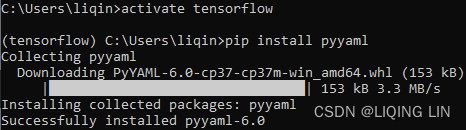
Write the following OandaBroker class, which is specific to our broker, extending the generic Broker class:http://developer.oanda.com/rest-live-v20/development-guide/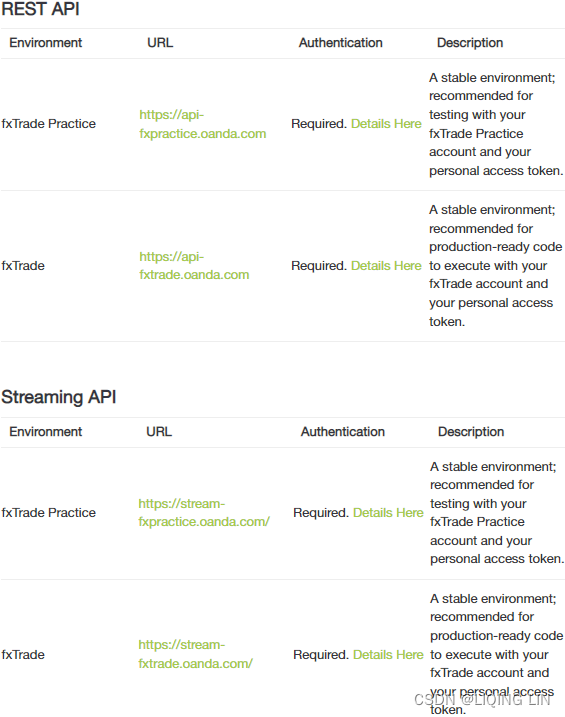
import v20

class OandaBroker( Broker ):
    # http://developer.oanda.com/rest-live-v20/development-guide/

    # REST API
    # 120 requests per second. Excess requests will receive HTTP 429 error.
    # This restriction is applied against the requesting IP address.
    PRACTICE_API_HOST = 'api-fxpractice.oanda.com'       # fxTrade Practice
    # Stream API
    # 20 active streams. Requests above this threshold will be rejected.
    # This restriction is applied against the requesting IP address.
    PRACTICE_STREAM_HOST = 'stream-fxpractice.oanda.com' # fxTrade Practice

    # REST API
    LIVE_API_HOST = 'api-fxtrade.oanda.com'              # fxTrade
    # Stream API
    LIVE_STREAM_HOST = 'stream-fxtrade.oanda.com'        # fxTrade

    PORT = '443'

    def __init__( self, accountid, token, is_live = False ):

        if is_live:
            host = self.LIVE_API_HOST
            stream_host = self.LIVE_STREAM_HOST
        else:
            host = self.PRACTICE_API_HOST
            stream_host = self.PRACTICE_STREAM_HOST

        super( OandaBroker, self ).__init__(host, self.PORT)

        self.accountid = accountid
        self.token = token

        # https://github.com/oanda/v20-python/blob/master/src/v20/__init__.py
        self.api = v20.Context( host,       # hostname: The hostname of the v20 REST server
                                self.port,  # port: The port of the v20 REST server
                                token=token
                              )# token: The authorization token to use when making requests to the v20 server
        self.stream_api = v20.Context( stream_host, self.port, token=token )
Note that Oanda uses two different hosts for regular API endpoints and a streaming API endpoint. These endpoints are different for their practice and live trading environments. All endpoints are connected on the standard Secure Socket Layer (SSL) port 443(Secure Sockets Layer (SSL) was designed to protect HTTP (Hypertext Transfer Protocol) data: HTTPS uses TCP port 443.). In the constructor, the is_live Boolean flag chooses the appropriate endpoints for the chosen trading environment for saving in the parent class. A True value for is_live indicates a live trading environment. The constructor argument also saves the account ID and token, which are required for authenticating the account used for trading. This information can be obtained from your broker.
The api and stream_api variables hold the v20 library's Context objects that are used by calling methods to send instructions to your broker.
Implementing the method for getting prices
https://oanda-api-v20.readthedocs.io/en/master/endpoints/pricing/pricinginfo.html
{
  "prices": [
    {
      "status": "tradeable",
      "instrument": "EUR_USD",
      "quoteHomeConversionFactors": {
        "negativeUnits": "0.89160730",
        "positiveUnits": "0.89150397"
      },
      "asks": [
        {
          "price": "1.12170",
          "liquidity": 10000000
        },
        {
          "price": "1.12172",
          "liquidity": 10000000
        }
      ],
      "time": "2016-10-05T05:28:16.729643492Z",
      "closeoutAsk": "1.12174",
      "bids": [
        {
          "price": "1.12157",
          "liquidity": 10000000
        },
        {
          "price": "1.12155",
          "liquidity": 10000000
        }
      ],
      "closeoutBid": "1.12153",
      "unitsAvailable": {
        "default": {
          "short": "506246",
          "long": "506128"
        },
        "reduceOnly": {
          "short": "0",
          "long": "0"
        },
        "openOnly": {
          "short": "506246",
          "long": "506128"
        },
        "reduceFirst": {
          "short": "506246",
          "long": "506128"
        }
      }
    },
    {
      "status": "tradeable",
      "instrument": "EUR_JPY",
      "quoteHomeConversionFactors": {
        "negativeUnits": "0.00867085",
        "positiveUnits": "0.00866957"
      },
      "asks": [
        {
          "price": "115.346",
          "liquidity": 1000000
        },
        {
          "price": "115.347",
          "liquidity": 2000000
        },
        {
          "price": "115.348",
          "liquidity": 5000000
        },
        {
          "price": "115.350",
          "liquidity": 10000000
        }
      ],
      "time": "2016-10-05T05:28:15.621238671Z",
      "closeoutAsk": "115.350",
      "bids": [
        {
          "price": "115.329",
          "liquidity": 1000000
        },
        {
          "price": "115.328",
          "liquidity": 2000000
        },
        {
          "price": "115.327",
          "liquidity": 5000000
        },
        {
          "price": "115.325",
          "liquidity": 10000000
        }
      ],
      "closeoutBid": "115.325",
      "unitsAvailable": {
        "default": {
          "short": "506262",
          "long": "506112"
        },
        "reduceOnly": {
          "short": "0",
          "long": "0"
        },
        "openOnly": {
          "short": "506262",
          "long": "506112"
        },
        "reduceFirst": {
          "short": "506262",
          "long": "506112"
        }
      }
    }
  ]
}
    def process_price( self, price ):
        # The price object contains an instrument property of a string object,
        symbol = price.instrument

        if not symbol:
            print( 'Price symbol is empty!' )
            return

        # along with list objects in the bids and asks properties.
        # Typically, Level 1 quotes are available,
        # so we read the first item of the each list.
        # Each item in the list is a price_bucket object,
        # from which we extract the bid and ask price.

        bids = price.bids or []
        price_bucket_bid = bids[0] if bids and len(bids) > 0 else None
        bid = price_bucket_bid.price if price_bucket_bid else 0

        asks = price.asks or []
        price_bucket_ask = asks[0] if asks and len(asks) > 0 else None
        ask = price_bucket_ask.price if price_bucket_ask else 0

        self.on_price_event( symbol, bid, ask )
The price object contains aninstrument property of a string object, along with list objects in the bids and asks properties. Typically, Level 1 quotes are available, so we read the first item of the each list. Each item in the list is a price_bucket object, from which we extract the bid and ask price.
With this information extracted, we pass it to the on_price_event() event handler method. Note that, in this example, we are passing only three values. In more complex trading systems, you might want to consider extracting more detailed information, such as traded volume, last traded price, or multilevel quotes, and pass this to the price event listeners.
The following codes implement the parent get_prices() method in the OandaBroker class for getting prices from your broker:
    def get_prices( self, symbols=[] ):
    # accountID: Account Identifier
    # instruments: List of Instruments to stream Prices for.
    # snapshot: Flag that enables/disables the sending of a pricing snapshot
    #           when initially connecting to the stream.
    # includeUnitsAvailable: Flag that enables the inclusion of the
    #                        unitsAvailable field in the returned Price objects
    # https://oanda-api-v20.readthedocs.io/en/master/endpoints/pricing/pricinginfo.html
    # "unitsAvailable": {
    #                     "default": {
    #                                  "short": "506246",
    #                                  "long": "506128"
    #                                },
    #                     "reduceOnly": {
    #                                     "short": "0",
    #                                     "long": "0"
    #                                   },
    #                      "openOnly": {
    #                                    "short": "506246",
    #                                    "long": "506128"
    #                                  },
    #                      "reduceFirst": {
    #                                       "short": "506246",
    #                                       "long": "506128"
    #                                     }
    #                   }
    # https://github.com/oanda/v20-python/blob/master/src/v20/pricing.py
        response = self.api.pricing.get(
                                        self.accountid,
                                        # "instruments": "EUR_USD,EUR_JPY"
                                        instruments = ",".join( symbols ),
                                        snapshot = True,
                                        includeUnitsAvailable=False
                                       )
        body = response.body
        prices = body.get( 'prices', [] )
        for price in prices:
            self.process_price( price )
The body of the response contains a prices attribute and a list of objects.https://oanda-api-v20.readthedocs.io/en/master/endpoints/pricing/pricinginfo.html Each item in the list is processed by the process_price() method.
Implementing the method for streaming prices
Add the following stream_prices() method in the OandaBroker class to start streaming prices from your broker:
    def stream_prices( self, symbols=[] ):
        # https://github.com/oanda/v20-python/blob/master/src/v20/pricing.py
        # accountID : Account Identifier
        # instruments : List of Instruments to stream Prices for.
        # snapshot: Flag that enables/disables the sending of a pricing snapshot
        #           when initially connecting to the stream.
        response = self.stream_api.pricing.stream(
                                                    self.accountid,
                                                    instruments = ",".join(symbols),
                                                    snapshot = True
                                                 )
        # https://github.com/oanda/v20-python/blob/master/src/v20/response.py
        # response.parts() ==> call self.line_parser ==> class Parser() in the pricing.py
        for msg_type, msg in response.parts():
            if msg_type == "pricing.PricingHeartbeat":
                continue
            elif msg_type == "pricing.ClientPrice":
                self.process_price( msg )
Since the host connection expects a continuous stream, the response object has a parts() method that listens for incoming data. The msg object is essentially a price object, which we can reuse with the process_price() method to notify the listeners of an incoming price event.
Implementing the method for sending market orders
Add the following send_market_order() method in the OandaBroker class, which will send a market order to your broker:
    def send_market_order( self, symbol, quantity, is_buy ):
        # https://github.com/oanda/v20-python/blob/master/src/v20/order.py
        # def market( self, accountID, **kwargs )
        #    return self.create(
        #                        accountID,
        #                        order=MarketOrderRequest(**kwargs) ==>
        #                      ) # ==> response=self.ctx.request(request) ==> return response

        # https://github.com/oanda/v20-python/blob/f28192f4a31bce038cf6dfa302f5878bec192fe5/src/v20/order.py#L2185
        # A MarketOrderRequest specifies the parameters that may be set
        # when creating a Market Order.
        # class MarketOrderRequest(BaseEntity):

        # type : The type of the Order to Create. Must be set to "MARKET" when creating a Market Order.
        #    self.type = kwargs.get("type", "MARKET")

        # The Market Order's Instrument
        #    self.instrument = kwargs.get("instrument")

        # The quantity requested to be filled by the Market Order.
        # A posititive number of units results in a long Order, and
        # a negative number of units results in a short Order.
        #    self.units = kwargs.get("units")
        response = self.api.order.market( self.accountid,
                                          units = abs(quantity)*(1 if is_buy else -1),
                                          instrument = symbol,
                                          type = 'MARKET',
                                        )
        # 201 : indicate a successful connection to the broker
        if response.status != 201:
            # the order event is triggered with
            # an empty transaction ID along with a NOT_FILLED status,
            # indicating that the order is incomplete.
            # def on_order_event(symbol, quantity, is_buy, transaction_id, status):
            self.on_order_event( symbol, quantity, is_buy, None, 'NOT_FILLED' )
            return

        # https://github.com/oanda/v20-python/blob/f28192f4a31bce038cf6dfa302f5878bec192fe5/src/v20/order.py#L3548
        # elif if str(response.status) == "201":
        # if jbody.get('orderCancelTransaction') is not None:
        #     parsed_body['orderCancelTransaction'] = ...
        # response.body = parsed_body
        body = response.body
        if 'orderCancelTransaction' in body:
            self.on_order_event( symbol, quantity, is_buy, None, 'NOT_FILLED' )
            return

        # if jbody.get('lastTransactionID') is not None:
        #     parsed_body['lastTransactionID'] = ...
        # https://github.com/oanda/v20-python/blob/master/src/v20/response.py
        # def get(self, field, status=None):
        #     value = self.body.get(field)
        transaction_id = body.get( 'lastTransactionID', None )
        self.on_order_event( symbol, quantity, is_buy, transaction_id, 'FILLED' )
When the market() method of the v20 order library is called, the status of the response is expected to be 201 to indicate a successful connection to the broker. A further check on the response body is recommended for signs of error in the execution of our orders. In the case of a successful execution, the transaction ID and the details of the order are passed along to the listeners by calling the on_order_event() event handler. Otherwise, the order event is triggered with an empty transaction ID along with a NOT_FILLED status, indicating that the order is incomplete.
Implementing the method for fetching positions
Add the following get_positions() method in the OandaBroker class, which will fetch all the available position information for a given account:https://oanda-api-v20.readthedocs.io/en/master/endpoints/positions/positionlist.html
{
  "positions": [
    {
      "short": {
        "units": "0",
        "resettablePL": "-272.6805",
        "unrealizedPL": "0.0000",
        "pl": "-272.6805"
      },
      "unrealizedPL": "0.0000",
      "long": {
        "units": "0",
        "resettablePL": "0.0000",
        "unrealizedPL": "0.0000",
        "pl": "0.0000"
      },
      "instrument": "EUR_GBP",
      "resettablePL": "-272.6805",
      "pl": "-272.6805"
    },
    {
      "short": {
        "unrealizedPL": "870.0000",
        "tradeIDs": [
          "2121",
          "2123"
        ],
        "resettablePL": "-13959.3000",
        "units": "-20",
        "averagePrice": "10581.5",
        "pl": "-13959.3000"
      },
      "unrealizedPL": "870.0000",
      "long": {
        "units": "0",
        "resettablePL": "404.5000",
        "unrealizedPL": "0.0000",
        "pl": "404.5000"
      },
      "instrument": "DE30_EUR",
      "resettablePL": "-13554.8000",
      "pl": "-13554.8000"
    },
    {
      "short": {
        "units": "0",
        "resettablePL": "0.0000",
        "unrealizedPL": "0.0000",
        "pl": "0.0000"
      },
      "unrealizedPL": "0.0000",
      "long": {
        "units": "0",
        "resettablePL": "-12.8720",
        "unrealizedPL": "0.0000",
        "pl": "-12.8720"
      },
      "instrument": "EUR_USD",
      "resettablePL": "-12.8720",
      "pl": "-12.8720"
    }
  ],
  "lastTransactionID": "2124"
}
def get_positions(self):
# https://github.com/oanda/v20-python/blob/master/src/v20/position.py
# def list( self, accountID, **kwargs ):
# List all Positions for an Account.
# The Positions returned are for 'every instrument' that
# has had a position during the lifetime of an the Account.
response = self.api.position.list( self.accountid )
body = response.body
positions = body.get( 'positions', [] )
for position in positions:
# The Position's Instrument.
symbol = position.instrument
# The unrealized profit/loss of all open Trades that contribute to this Position.
unrealized_pnl = position.unrealizedPL
# Profit/loss realized by the Position over the lifetime of the Account.
pnl = position.pl
# The details of the long side of the Position.
long = position.long
# The details of the short side of the Position.
short = position.short
if short.units:
# def on_position_event(symbol, is_long, units, upnl, pnl):
self.on_position_event( symbol, False, short.units, unrealized_pnl, pnl )
elif long.units:
self.on_position_event( symbol, True, long.units, unrealized_pnl, pnl )
else:
self.on_position_event( symbol, None, 0, unrealized_pnl, pnl )In the response body, the position property contains a list of position objects, each having attributes for the contract symbol(instrument), the unrealized and realized gains or losses(unrealizedPL and pl), and the number of long and short positions. This information is passed along to the listeners through the on_position_event() event handler.
import v20
class OandaBroker( Broker ):
# http://developer.oanda.com/rest-live-v20/development-guide/
# REST API
# 120 requests per second. Excess requests will receive HTTP 429 error.
# This restriction is applied against the requesting IP address.
PRACTICE_API_HOST = 'api-fxpractice.oanda.com' # fxTrade Practice
# Stream API
# 20 active streams. Requests above this threshold will be rejected.
# This restriction is applied against the requesting IP address.
PRACTICE_STREAM_HOST = 'stream-fxpractice.oanda.com' # fxTrade Practice
# REST API
LIVE_API_HOST = 'api-fxtrade.oanda.com' # fxTrade
# Stream API
LIVE_STREAM_HOST = 'stream-fxtrade.oanda.com' # fxTrade
PORT = '443'
def __init__( self, accountid, token, is_live = False ):
if is_live:
host = self.LIVE_API_HOST
stream_host = self.LIVE_STREAM_HOST
else:
host = self.PRACTICE_API_HOST
stream_host = self.PRACTICE_STREAM_HOST
super( OandaBroker, self ).__init__(host, self.PORT)
self.accountid = accountid
self.token = token
# https://github.com/oanda/v20-python/blob/master/src/v20/__init__.py
self.api = v20.Context( host, # hostname: The hostname of the v20 REST server
self.port, # port: The port of the v20 REST server
token=token
)# token: The authorization token to use when making requests to the v20 server
self.stream_api = v20.Context( stream_host, self.port, token=token )
def process_price( self, price ):
# The price object contains an instrument property of a string object,
symbol = price.instrument
if not symbol:
print( 'Price symbol is empty!' )
return
# along with list objects in the bids and asks properties.
# Typically, Level 1 quotes are available,
# so we read the first item of the each list.
# Each item in the list is a price_bucket object,
# from which we extract the bid and ask price.
bids = price.bids or []
price_bucket_bid = bids[0] if bids and len(bids) > 0 else None
bid = price_bucket_bid.price if price_bucket_bid else 0
asks = price.asks or []
price_bucket_ask = asks[0] if asks and len(asks) > 0 else None
ask = price_bucket_ask.price if price_bucket_ask else 0
self.on_price_event( symbol, bid, ask )
def get_prices( self, symbols=[] ):
# accountID: Account Identifier
# instruments: List of Instruments to stream Prices for.
# snapshot: Flag that enables/disables the sending of a pricing snapshot
# when initially connecting to the stream.
# includeUnitsAvailable: Flag that enables the inclusion of the
# unitsAvailable field in the returned Price objects
# https://oanda-api-v20.readthedocs.io/en/master/endpoints/pricing/pricinginfo.html
# "unitsAvailable": {
# "default": {
# "short": "506246",
# "long": "506128"
# },
# "reduceOnly": {
# "short": "0",
# "long": "0"
# },
# "openOnly": {
# "short": "506246",
# "long": "506128"
# },
# "reduceFirst": {
# "short": "506246",
# "long": "506128"
# }
# }
# https://github.com/oanda/v20-python/blob/master/src/v20/pricing.py
response = self.api.pricing.get(
self.accountid,
# "instruments": "EUR_USD,EUR_JPY"
instruments = ",".join( symbols ),
snapshot = True,
includeUnitsAvailable=False
)
body = response.body
prices = body.get( 'prices', [] )
for price in prices:
self.process_price( price )
def stream_prices( self, symbols=[] ):
# https://github.com/oanda/v20-python/blob/master/src/v20/pricing.py
# accountID : Account Identifier
# instruments : List of Instruments to stream Prices for.
# snapshot: Flag that enables/disables the sending of a pricing snapshot
# when initially connecting to the stream.
response = self.stream_api.pricing.stream(
self.accountid,
instruments = ",".join(symbols),
snapshot = True
)
# https://github.com/oanda/v20-python/blob/master/src/v20/response.py
# response.parts() ==> call self.line_parser ==> class Parser() in the pricing.py
for msg_type, msg in response.parts():
if msg_type == "pricing.PricingHeartbeat":
continue
elif msg_type == "pricing.ClientPrice":
self.process_price( msg )
def send_market_order( self, symbol, quantity, is_buy ):
# https://github.com/oanda/v20-python/blob/master/src/v20/order.py
# def market( self, accountID, **kwargs )
# return self.create(
# accountID,
# order=MarketOrderRequest(**kwargs) ==>
# ) # ==> response=self.ctx.request(request) ==> return response
# https://github.com/oanda/v20-python/blob/f28192f4a31bce038cf6dfa302f5878bec192fe5/src/v20/order.py#L2185
# A MarketOrderRequest specifies the parameters that may be set
# when creating a Market Order.
# class MarketOrderRequest(BaseEntity):
# type : The type of the Order to Create. Must be set to "MARKET" when creating a Market Order.
# self.type = kwargs.get("type", "MARKET")
# The Market Order's Instrument
# self.instrument = kwargs.get("instrument")
# The quantity requested to be filled by the Market Order.
# A posititive number of units results in a long Order, and
# a negative number of units results in a short Order.
# self.units = kwargs.get("units")
response = self.api.order.market( self.accountid,
units = abs(quantity)*(1 if is_buy else -1),
instrument = symbol,
type = 'MARKET',
)
# 201 : indicate a successful connection to the broker
if response.status != 201:
# the order event is triggered with
# an empty transaction ID along with a NOT_FILLED status,
# indicating that the order is incomplete.
# def on_order_event(symbol, quantity, is_buy, transaction_id, status):
self.on_order_event( symbol, quantity, is_buy, None, 'NOT_FILLED' )
return
# https://github.com/oanda/v20-python/blob/f28192f4a31bce038cf6dfa302f5878bec192fe5/src/v20/order.py#L3548
# elif if str(response.status) == "201":
# if jbody.get('orderCancelTransaction') is not None:
# parsed_body['orderCancelTransaction'] = ...
# response.body = parsed_body
body = response.body
if 'orderCancelTransaction' in body:
self.on_order_event( symbol, quantity, is_buy, None, 'NOT_FILLED' )
return
# if jbody.get('lastTransactionID') is not None:
# parsed_body['lastTransactionID'] = ...
# https://github.com/oanda/v20-python/blob/master/src/v20/response.py
# def get(self, field, status=None):
# value = self.body.get(field)
transaction_id = body.get( 'lastTransactionID', None )
self.on_order_event( symbol, quantity, is_buy, transaction_id, 'FILLED' )
    def get_positions(self):
        # https://github.com/oanda/v20-python/blob/master/src/v20/position.py
        # def list( self, accountID, **kwargs ):
        # List all Positions for an Account.
        # The Positions returned are for 'every instrument' that
        # has had a position during the lifetime of an the Account.
        response = self.api.position.list( self.accountid )
        body = response.body
        positions = body.get( 'positions', [] )
        for position in positions:
            # The Position's Instrument.
            symbol = position.instrument
            # The unrealized profit/loss of all open Trades that contribute to this Position.
            unrealized_pnl = position.unrealizedPL
            # Profit/loss realized by the Position over the lifetime of the Account.
            pnl = position.pl
            # The details of the long side of the Position.
            long = position.long
            # The details of the short side of the Position.
            short = position.short

            if short.units:
                # def on_position_event(symbol, is_long, units, upnl, pnl):
                self.on_position_event( symbol, False, short.units, unrealized_pnl, pnl )
            elif long.units:
                self.on_position_event( symbol, True, long.units, unrealized_pnl, pnl )
            else:
self.on_position_event( symbol, None, 0, unrealized_pnl, pnl )Getting the prices
With the methods of broker now defined, we can test the connection that is set up between our broker by reading the current market prices. The Broker class may be instantiated using the following Python codes:https://www.oanda.com/demo-account/
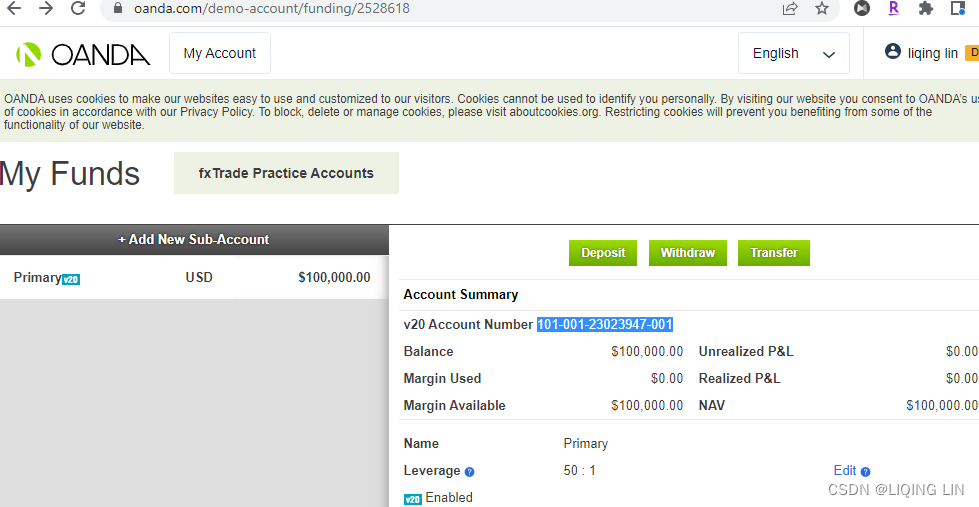
https://www.oanda.com/demo-account/tpa/personal_token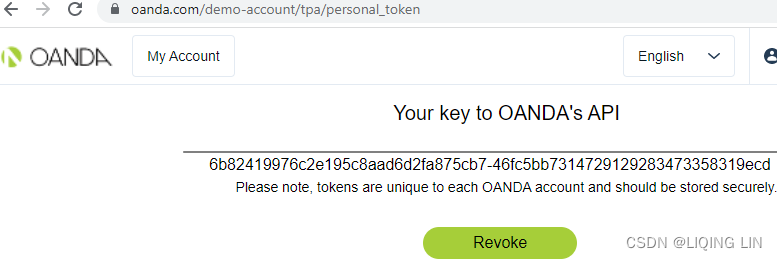
# Replace these 2 values with your own!
ACCOUNT_ID = '101-001-23023947-001'
API_TOKEN = '5abdaad02938a76a10164a78a37d3cfc-87fabd8764bcb251a45fecb285a9cc63'

broker = OandaBroker( ACCOUNT_ID, API_TOKEN )
Replace the two constant variables, ACCOUNT_ID and API_TOKEN , with your own credentials given by your broker, which identifies your own trading account. The broker variable is an instance of OandaBroker , which we can use to perform various broker-specific calls.
Suppose that we are interested in finding out the current market price of the EUR/USD currency pair. Let's define a constant variable to hold the symbol of this instrument that is recognized by our broker:
SYMBOL = 'EUR_USD'Next, define a price event listener coming from our broker, using the following code:
import datetime as dt

def on_price_event(symbol, bid, ask):
    print( dt.datetime.now(),
           '\n[PRICE]',
           symbol, '\nbid:', bid, '\nask:', ask
         )

broker.on_price_event = on_price_event
The on_price_event()function is defined as the listener for incoming price information and is assigned to the broker. on_price_event event handler. We expect three values from a pricing event – the contractsymbol, the bid price, and the ask price – which we simply print to the console.
The get_prices() method is called to fetch the current market price from our broker:
# def get_prices( self, symbols=[] ):
broker.get_prices( symbols=[SYMBOL] )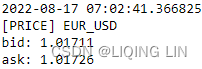
Sending a simple market order
In the same way that we use for fetching prices, we can reuse the broker variable to send a market order to our broker.
Now suppose that we are interested in buying 1 unit of the same EUR/USD currency pair; the following code performs this action:
def on_order_event( symbol, quantity, is_buy, transaction_id, status ):
    print( dt.datetime.now(), '[ORDER]',
           '\ntransaction_id:', transaction_id,
           '\nstatus:', status,
           '\nsymbol:', symbol,
           '\nquantity:', quantity,
           '\nis_buy:', is_buy,
         )
broker.on_order_event = on_order_event

# def send_market_order( self, symbol, quantity, is_buy ):
# ...
#    self.on_order_event( symbol, quantity, is_buy, transaction_id, 'FILLED' )
broker.send_market_order( SYMBOL, 1, True ) 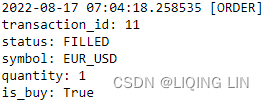
https://www.oanda.com/demo-account/transaction-history/
Getting position updates
With a long position opened by sending a market order to buy, we should be able to view our current EUR/USD position. We can do so on the broker object using the following code:
def on_position_event( symbol, is_long, units, upnl, pnl ):
    print( dt.datetime.now(), '\n[POSITION]',
           'symbol:', symbol,
           '\nis_long:', is_long,
           '\nunits:', units,
           '\nupnl:', upnl,
           '\npnl:', pnl
         )
broker.on_position_event = on_position_event

# def get_positions(self):
# ...
#    self.on_position_event( symbol, True, long.units, unrealized_pnl, pnl )
broker.get_positions()
The on_position_event() function is defined as the listener for incoming position updates from our broker and is assigned to the broke.on_position_event event handler. When the get_positions() method is called, the broker returns the position information and triggers the following output: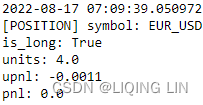 https://www.oanda.com/demo-account/transaction-history/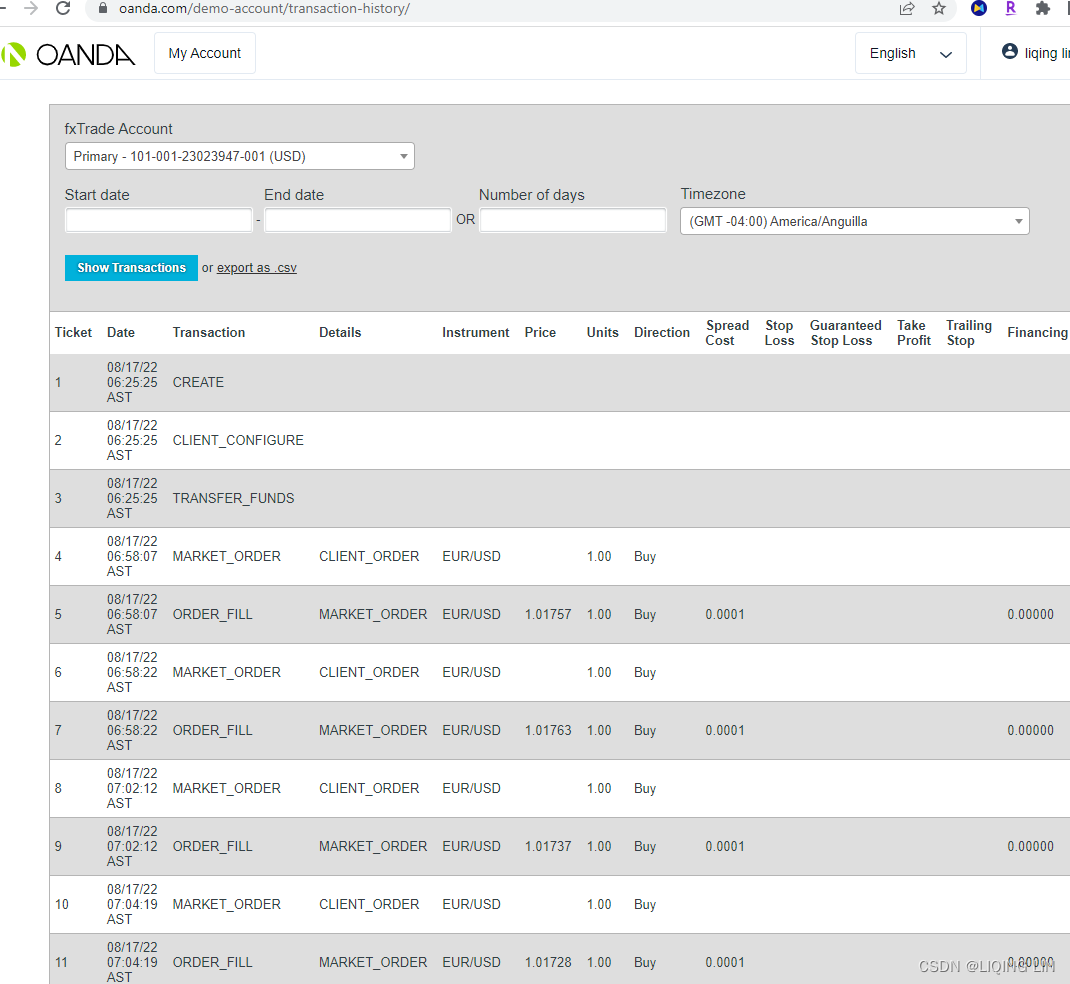
Building a mean-reverting algorithmic trading system
With our broker now accepting orders and responding to our requests, we can begin to design a fully-automated trading system. In this section, we will explore how to design and implement a mean-reverting algorithmic trading system.
Designing the mean-reversion algorithm
Suppose we believe that in normal market conditions, prices fluctuate, but tend to revert back to some short-term level, such as the average of the most recent prices. In this example, we assume that the EUR/USD currency pair is exhibiting a mean-reversion property in the near short-term period. First, we resample the raw tick-level data into standard time series intervals, for example, at one-minute intervals. Then, taking a number of the most recent periods for calculating the short-term average price (for example, with five periods), we are saying that we believe the EUR/USD prices will revert toward the average of the prior five minutes' prices.
- As soon as the bidding price of the EUR/USD currency pairexceedsthe short-term average price, with five minutes as our example, our trading system shall generate a sell signal, and we can choose to enter into a short position with a sell market order.
- Likewise, when the asking price of EUR/USD falls below the average price, a buy signal is generated and we can choose to enter into a long position witha buy market order.
The moment that a position is opened, we may use the same signals to close out our position.
- When a long position is opened, we close our position on a sell signal by entering an order to sell at the market.
- Likewise, when a short position is opened, we close our position on a buy signal by entering an order to buy at the market.
You might observe that there are plenty of flaws in our trading strategy. Closing out our position does not guarantee a profit. Our belief of the market can be wrong; in adverse market conditions, a signal might remain in one direction for some time and there is a high probability of closing out our position at a huge loss! As a trader, you should figure out a personal trading strategy that suits your beliefs and risk appetite.
Implementing the mean-reversion trader class
The resample interval and the number of periods in our calculation are two important parameters that are required by our trading system. First, create a class named MeanReversionTrader, which we can instantiate and run as our trading system:
import datetime as dt
import pandas as pd

class MeanReversionTrader( object ):
    def __init__( self, broker, symbol=None, units=1,
                  resample_interval='60s', mean_periods=5
                ):
        """
        A trading platform that trades on 'one side'
            based on a mean-reverting algorithm.

        : param broker : Broker object
        : param symbol : A str object recognized by the broker for trading
        : param units : Number of units to trade
        : param resample_interval :
            Frequency for resampling price time series
        : param mean_periods: Number of resampled intervals
            for calculating the average price
        """
        # The setup_broker() method call sets up our class
        # to handle events from our broker object
        self.broker = self.setup_broker( broker )

        self.resample_interval = resample_interval
        # the number of periods for our mean calculation.
        self.mean_periods = mean_periods
        self.symbol = symbol
        self.units = units

        # to store received price data in self.df_prices
        self.df_prices = pd.DataFrame( columns=[symbol] )
        self.pnl=0  # realized Profit and Loss
        self.upnl=0 # unrealized Profit and Loss

        # The latest bid and ask prices
        self.bid_price=0
        self.ask_price=0
        self.position = 0 # the number of units of our current position
        # whether an order is pending execution by our broker
        self.is_order_pending = False
        # whether the current trading state cycle is open
        self.is_next_signal_cycle = True
The five parameters in our constructor initialize the state of our trading system
- the broker used,
- the symbol to trade,
- the number of units to trade,
- the resampling interval of our price data,
- and the number of periods for our mean calculation.
These values are simply stored as class variables.
The setup_broker() method call sets up our class to handle events from our broker object, which we will define shortly. As we receive price data, these are stored in a pandas DataFrame variable, df_prices. The latest bid and ask prices are stored in the bid_price and ask_price variables for calculating signals. The mean variable will store the calculated mean of the prior number of mean_period prices. The position variable will store the number of units of our current position.
- A negative value indicates a short position,
- and a positive value indicates a long position.
The is_order_pending Boolean flag indicates whether an order is pending execution by our broker, and the is_next_signal_cycle Boolean flag indicates whether the current trading state cycle is open. Note that our system states can be as follows:
- Wait for a buy or sell signal.
- Place an order on a buy or sell signal.
- When a position is opened, wait for a sell or buy signal.
- Place an order on a sell or buy signal.
- When the position is closed, go to step 1.
For every cycle of steps from 1 to 5, we will only trade one unit. These Boolean flags act as a lock to prevent multiple orders from entering into the system at any one time.
Writing the mean-reversion signal generators
We want our decision-making algorithm to recalculate trading signals on every price or orderupdate. Let's create a generate_signals_and_think() method inside the MeanReversionTrader class to do this:
    def generate_signals_and_think(self):
        # ffill: propagate last valid observation forward to next valid
        df_resampled = self.df_prices.resample( self.resample_interval )\
                                     .ffill()\
                                     .dropna()
        resampled_len = len( df_resampled.index )

        if resampled_len < self.mean_periods:
            print( 'Insufficient data size to calculate logic. Need',
                   self.mean_periods - resampled_len,
                   'more.'
                 )
            print("Please wait...")
            return
        # df_resampled=(bid+ask)/2 ==> .tail( self.mean_periods ).mean()
        mean = df_resampled.tail( self.mean_periods ).mean()[self.symbol]

        # Signal flag calculation
        is_signal_buy = mean > self.ask_price
        is_signal_sell = mean < self.bid_price

        print( 'is_signal_buy:', is_signal_buy,
               'is_signal_sell:', is_signal_sell,
               'average_price: %.5f' % mean,
               'bid:', self.bid_price,
               'ask:', self.ask_price
             )
        self.think( is_signal_buy, is_signal_sell )
Since price data are stored in the df_prices variable as a pandas DataFrame, we can resample them at regular intervals, as defined by the resample_interval variable given in the constructor. The ffill() method forward-fills any missing data and the dropna() command removes the first missing value after resampling. There must be sufficient data available for calculating the mean, otherwise this method simply exits. The mean_periods variable represents the minimum length of resampled data that must be available.
The tail(self.mean_periods) method takes the most recent resampled intervals(resample_interval) and calculates the average using the mean() method, resulting in another pandas DataFrame. The mean level is taken by index referencing the column of the DataFrame, which is simply the instrument symbol.
Using the average price available for the mean-reversion algorithm, we can generate the buy and sell signals. Here,
- a buy signal is generated when the average price is greater than the market asking price(The term "ask" refers to the lowest price at which a seller will sell the stock.), and
- a sell signal is generated when the average price is lower than the market bidding price.(The term "bid" refers to the highest price a buyer will pay to buy a specified number of shares of a stock at any given time.)
- Our short-term belief is that market prices will revert to the average price.
After printing these calculated values to the console for better debugging, we can now make use of the buy and sell signals to perform actual tradesin a separate method named think() inside the same class:
    def think( self, is_signal_buy, is_signal_sell ):
        if self.is_order_pending:
            # you might want to add your own logic to handle orders that
            # have stayed in the pending state for too long
            # and try another strategy
            return

        if self.position == 0:
            self.think_when_position_flat( is_signal_buy, is_signal_sell )
        elif self.position > 0:
            self.think_when_position_long( is_signal_sell )
        elif self.position < 0:
            self.think_when_position_short( is_signal_buy )
If an order is still in pending state by a broker, we simply do nothing and exit the method. Since market conditions may change at any time, you might want to add your own logic to handle orders that have stayed in the pending state for too long and try another strategy.
The three if-else statements handles the trading logic when our position is flat, long, or short, respectively. When our position is flat, the think_when_position_flat() method is called, written as the following:
    def think_when_position_flat( self, is_signal_buy, is_signal_sell ):
        # is_signal_buy = mean > self.ask_price
        if is_signal_buy and self.is_next_signal_cycle:
            print( 'Opening position, BUY',
                   self.symbol, self.units, 'units'
                 )
            self.is_order_pending = True
            # def send_market_order( self, symbol, quantity, is_buy ):
            self.send_market_order( self.symbol, self.units, True )
            return

        # is_signal_sell = mean < self.bid_price
        if is_signal_sell and self.is_next_signal_cycle:
            print( 'Opening position, SELL',
                   self.symbol, self.units, 'units'
                 )
            self.is_order_pending = True
            self.send_market_order( self.symbol, self.units, False )
            return

        # self.bid_price <= mean <= self.ask_price
        # wait for a buy or sell signal
        if not is_signal_buy and not is_signal_sell:
self.is_next_signal_cycle = True- The first if statement handles the condition that, upon a buy signal and when the current trading cycle is open(self.is_next_signal_cycle == True), we enter into a long position by sending a market order to buy and mark that order as pending.
- Conversely, the second if statement handles the condition to enter into a short position upon a sell signal.
- Otherwise, since the position is flat with neither a buy nor sell signal (self.bid_price(buyer will pay to buy) <= mean <= self.ask_price(a seller will sell) ), we simply set the is_next_signal_cycle to True(self.is_next_signal_cycle == True) until a signal becomes available.
When we are in a long position, the think_when_position_long() method is called, written as the following:
    def think_when_position_long( self, is_signal_sell ):
        # is_signal_sell = mean < self.bid_price
        if is_signal_sell:
            print( 'Closing position, SELL',
                   self.symbol, self.units, 'units'
                 )
            self.is_order_pending = True
            self.send_market_order( self.symbol, self.units, False )
On a sell signal (is_signal_sell = mean < self.bid_price(buyer will pay to buy) ), we mark the order as pending and close out our long position immediately by sending a market order to sell.
Similarly, when we are in a short position, the think_when_position_short() method is called, written as the following:
    def think_when_position_short( self, is_signal_buy ):
        # is_signal_buy = mean > self.ask_price
        if is_signal_buy:
            print( 'Closing position, BUY',
                   self.symbol, self.units, 'units'
                 )
            self.is_order_pending = True
            self.send_market_order( self.symbol, self.units, True )
On a buy signal (is_signal_buy = mean > self.ask_price(a seller will sell)), we mark the order as pending and close out our short position immediately by sending a market order to buy.
To perform the order routing functionality, add the following send_market_order() class method to our MeanReversionTrader class:
    def send_market_order( self, symbol, quantity, is_buy ):
        print("########## send market order ##########")
        self.broker.send_market_order( symbol, quantity, is_buy )
The order information is simply forwarded to our Broker class for execution.
Adding event listeners
Let's hook up the price, order, and position events in our MeanReversionTrader class.
Add the setup_broker() method into this class, as follows:
    def setup_broker( self, broker ):
        broker.on_price_event = self.on_price_event
        broker.on_order_event = self.on_order_event
        broker.on_position_event = self.on_position_event

        return broker
We are simply assigning three class methods as listeners on any broker-generated event to listen to price, order, and position updates.
get the current position
Write the get_position() method to retrieve the up-to-date position information from our broker, as follows:
    def get_positions( self ):
        try:
            self.broker.get_positions()
        except Exception as ex:
            print('get_positions error:', ex)
on_price_event()
Add the on_price_event() method into this class, as follows:
    def on_price_event( self, symbol, bid, ask ):
        print( dt.datetime.now(), '[PRICE]',
               ', Symbol:' , symbol,
               ', Bid:', bid,
               ', Ask:', ask
             )
        self.bid_price = bid
        self.ask_price = ask
        self.df_prices.loc[pd.Timestamp.now(), # index
                           symbol              # column
                          ] = (bid+ask)/2.

        self.get_positions() # Update positions before thinking

        self.generate_signals_and_think()

        self.print_state()
When a price event is received(stream_prices() ==>process_price() ==>on_price_event() ), we store them in our bid_price , ask_price , and df_prices class variables. As the price changes, so do our open positions and signal values.
- The get_position() method call retrieves up-to-date information on our positions, and
- the generate_signals_and_think()call recalculates our signals and decides whether to make the trade.
- The current state of the system is printed to the console using the print_state() command.
print_state()
Add the print_state() method into our class, as follows:
    @property
    def position_state( self ):
        if self.position == 0:
            return 'FLAT'
        elif self.position > 0:
            return 'LONG'
        elif self.position < 0:
            return 'SHORT'

    def print_state( self ):
        print( dt.datetime.now(),
               'Symbol:',self.symbol,
               self.position_state, abs(self.position),
               ', upnl:', self.upnl,
               ', pnl:', self.pnl
             )
As soon as there are any updates to our orders, positions, or market prices, we print the latest state of our system to the console.
on_order_event()
Add the on_order_event() method into our class, as follows:
    def on_order_event( self, symbol, quantity, is_buy,
                        transaction_id, status
                      ):
        print( "########## Order Processing result ##########" )
        print( dt.datetime.now(), '[ORDER]',
               ', Transaction_id:', transaction_id,
               ', Status:', status,
               ', Symbol:', symbol,
               ', Quantity:', quantity,
               ', is_buy:', is_buy,
             )

        if status == 'FILLED':
            self.is_order_pending = False
            self.is_next_signal_cycle = False

            print('After Filled, the current position:')
            self.get_positions() # Update positions before thinking
            # self.generate_signals_and_think() #########
When an order event is received( run() ==> stream_prices() ==>process_price() ==>on_price_event() ==>self.generate_signals_and_think() ==>think(), {flat,long,short}, perform decision-making ==> send_market_order( self, symbol, quantity, is_buy ) ==> on_order_event() ), we print them out to the console. In our broker's on_order_event implementation, an order that is executed successfully will pass either a status value of FILLED or NOT_FILLED . Only on a successful order can we turn off our Boolean locks, retrieve our latest position, and perform decision-making for closing out our position.
on_position_event()
Add the on_position_event() method into our class, as follows:
    def on_position_event( self, symbol, is_long, units, upnl, pnl ):
        if symbol == self.symbol:
            self.position = abs(units) * (1 if is_long else -1)
        self.pnl = pnl
        self.upnl = upnl
        self.print_state()
When a position update event is received ( on_order_event() ==> get_positions() ==> on_position_event() ) for our intended trade symbol, we store our position information, the realized gains, and unrealized gains. The current state of the system is printed to the console using the print_state() command.
###################################################
def on_order_event( symbol, quantity, is_buy, transaction_id, status ):
    print( dt.datetime.now(), '[ORDER]',
           '\ntransaction_id:', transaction_id,
           '\nstatus:', status,
           '\nsymbol:', symbol,
           '\nquantity:', quantity,
           '\nis_buy:', is_buy,
         )
broker.on_order_event = on_order_event

# def send_market_order( self, symbol, quantity, is_buy ):
# ...
#    self.on_order_event( symbol, quantity, is_buy, transaction_id, 'FILLED' )
broker.send_market_order( SYMBOL, 1, False )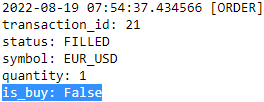
def on_position_event( symbol, is_long, units, upnl, pnl ):
    print( dt.datetime.now(), '\n[POSITION]',
           'symbol:', symbol,
           '\nis_long:', is_long,
           '\nunits:', units,
           '\nupnl:', upnl,
           '\npnl:', pnl
         )
broker.on_position_event = on_position_event

# def get_positions(self):
# ...
#    self.on_position_event( symbol, True, long.units, unrealized_pnl, pnl )
broker.get_positions()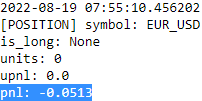
###################################################
Running our trading system
Finally, to start running our trading system, we need an entry point. Add the following run() class method to the MeanReversionTrader class:
    def run( self ):
        self.broker.stream_prices( symbols = [self.symbol] )
During the first run of our trading system, we read our current positions and use the information to initialize all position-related information. Then, we request our broker to start streaming prices for the given symbol and hold the connection until the program is terminated.
With an entry point defined, all we need to do is initialize our MeanReversionTrader class and call the run() command using the following codes:
trader = MeanReversionTrader( broker,
                              resample_interval='60s',
                              symbol='EUR_USD',
                              units=1
                            )
trader.run()
Remember that the broker variable contains an instance of the OandaBroker class as defined from the previous Getting prices section, and we can reuse it for this class. Our trading system will use this broker object to perform broker-related calls. We are interested in the EUR/USD currency pair, trading one unit at each time. The resample_interval variable with a value of 60s states that our stored prices are to be resampled at one-minute intervals. The mean_periods variable with a value of 5 states that we will take the average of the most recent five intervals, or the average price of the past five minutes.
To start our trading system, make the call to run() ; pricing updates will start trickling in, enabling our system to trade on its own. You should see an output on the console that is similar to the following: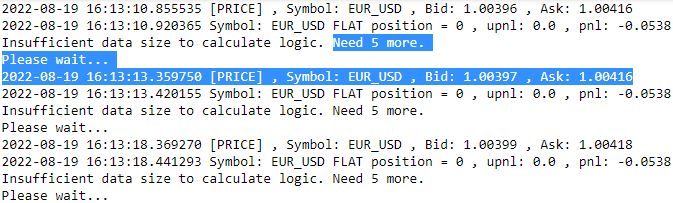
From the output, it looks as though our position is currently flat, and there is insufficient pricing data for calculating our trading signals.
P&LUnrealized or P&LRealized
https://www1.oanda.com/resources/legal/united-states/legal/margin-rules
https://blog.csdn.net/Linli522362242/article/details/121896073
After several minutes, when there is sufficient data for a trading signal calculation, we should be able to observe the following outcome:
https://www.oanda.com/demo-account/transaction-history/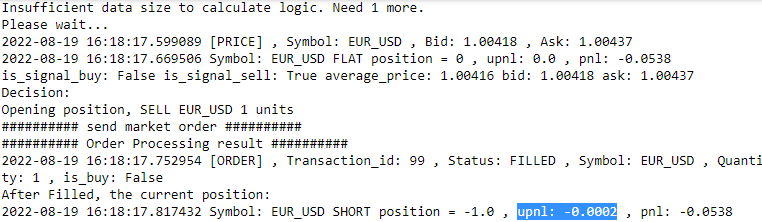
The average price is 1.00416. Since the current market bidding price for EUR/USD is 1.00418, more than the average price, a sell signal is generated (based on mean reversion) . A sell market order is generated to open a short position in EUR/USD of one unit. This leads to an realized loss of $0002.
#############
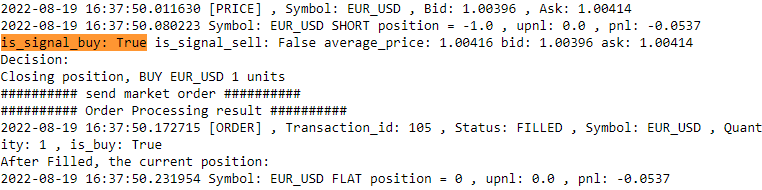
The average price is 1.00416. Since the current market asking price for EUR/USD is 1.00414, less than the average price, a buy signal is generated. A buy market order is generated to open a long position in EUR/USD of one unit. This leads to an unrealized loss of $0, and the realized loss is 0.0537.
Let the system run on its own for a while, and it should be able to close out the positions on its own. To stop trading, terminate the running process using Ctrl + Z or something similar. Remember to manually close out any remaining trading positions once the program stops running. You now have a fully functional and automated trading system!
The system design and trading parameters here are stated as an example and don't necessarily lead to positive outcomes!You should experiment with various trading parameters and improve the handling of events to figure out the optimal strategy for your trading plan.
def on_order_event( symbol, quantity, is_buy, transaction_id, status ):
    print( dt.datetime.now(), '[ORDER]',
           '\ntransaction_id:', transaction_id,
           '\nstatus:', status,
           '\nsymbol:', symbol,
           '\nquantity:', quantity,
           '\nis_buy:', is_buy,
         )
broker.on_order_event = on_order_event

# def send_market_order( self, symbol, quantity, is_buy ):
# ...
#    self.on_order_event( symbol, quantity, is_buy, transaction_id, 'FILLED' )
broker.send_market_order( SYMBOL, 1, True )

def on_position_event( symbol, is_long, units, upnl, pnl ):
    print( dt.datetime.now(), '\n[POSITION]',
           'symbol:', symbol,
           '\nis_long:', is_long,
           '\nunits:', units,
           '\nupnl:', upnl,
           '\npnl:', pnl
         )
broker.on_position_event = on_position_event

# def get_positions(self):
# ...
#    self.on_position_event( symbol, True, long.units, unrealized_pnl, pnl )
broker.get_positions()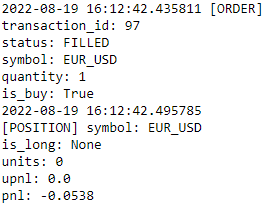
Full code:
import datetime as dt
import pandas as pd

class MeanReversionTrader( object ):
    def __init__( self, broker, symbol=None, units=1,
                  resample_interval='60s', mean_periods=5
                ):
        """
        A trading platform that trades on 'one side'
            based on a mean-reverting algorithm.

        : param broker : Broker object
        : param symbol : A str object recognized by the broker for trading
        : param units : Number of units to trade
        : param resample_interval :
            Frequency for resampling price time series
        : param mean_periods: Number of resampled intervals
            for calculating the average price
        """
        # The setup_broker() method call sets up our class
        # to handle events from our broker object
        self.broker = self.setup_broker( broker )

        self.resample_interval = resample_interval
        # the number of periods for our mean calculation.
        self.mean_periods = mean_periods
        self.symbol = symbol
        self.units = units

        # to store received price data in self.df_prices
        self.df_prices = pd.DataFrame( columns=[symbol] )
        self.pnl=0  # realized Profit and Loss
        self.upnl=0 # unrealized Profit and Loss

        # The latest bid and ask prices
        self.bid_price=0
        self.ask_price=0
        self.position = 0 # the number of units of our current position
        # whether an order is pending execution by our broker
        self.is_order_pending = False
        # whether the current trading state cycle is open
        self.is_next_signal_cycle = True

    def setup_broker( self, broker ):
        broker.on_price_event = self.on_price_event
        broker.on_order_event = self.on_order_event
        broker.on_position_event = self.on_position_event

        return broker

    def get_positions( self ):
        try:
            self.broker.get_positions()
        except Exception as ex:
            print('get_positions error:', ex)

    def send_market_order( self, symbol, quantity, is_buy ):
        print("########## send market order ##########")
        self.broker.send_market_order( symbol, quantity, is_buy )

    def think_when_position_flat( self, is_signal_buy, is_signal_sell ):
        # is_signal_buy = mean > self.ask_price
        if is_signal_buy and self.is_next_signal_cycle:
            print( 'Opening position, BUY',
                   self.symbol, self.units, 'units'
                 )
            self.is_order_pending = True
            # def send_market_order( self, symbol, quantity, is_buy ):
            self.send_market_order( self.symbol, self.units, True )
            return

        # is_signal_sell = mean < self.bid_price
        if is_signal_sell and self.is_next_signal_cycle:
            print( 'Opening position, SELL',
                   self.symbol, self.units, 'units'
                 )
            self.is_order_pending = True
            self.send_market_order( self.symbol, self.units, False )
            return

        # self.bid_price <= mean <= self.ask_price
        # wait for a buy or sell signal
        if not is_signal_buy and not is_signal_sell:
            self.is_next_signal_cycle = True

    def think_when_position_long( self, is_signal_sell ):
        # is_signal_sell = mean < self.bid_price
        if is_signal_sell:
            print( 'Closing position, SELL',
                   self.symbol, self.units, 'units'
                 )
            self.is_order_pending = True
            self.send_market_order( self.symbol, self.units, False )

    def think_when_position_short( self, is_signal_buy ):
        # is_signal_buy = mean > self.ask_price
        if is_signal_buy:
            print( 'Closing position, BUY',
                   self.symbol, self.units, 'units'
                 )
            self.is_order_pending = True
            self.send_market_order( self.symbol, self.units, True )

    def think( self, is_signal_buy, is_signal_sell ):
        print('Decision:')
        if self.is_order_pending:
            # you might want to add your own logic to handle orders that
            # have stayed in the pending state for too long
            # and try another strategy
            return

        if self.position == 0:
            self.think_when_position_flat( is_signal_buy, is_signal_sell )
        elif self.position > 0:
            self.think_when_position_long( is_signal_sell )
        elif self.position < 0:
            self.think_when_position_short( is_signal_buy )

    def generate_signals_and_think(self):
        # ffill: propagate last valid observation forward to next valid
        df_resampled = self.df_prices.resample( self.resample_interval )\
                                     .ffill()\
                                     .dropna()
        resampled_len = len( df_resampled.index )

        if resampled_len < self.mean_periods:
            print( 'Insufficient data size to calculate logic. Need',
                   self.mean_periods - resampled_len,
                   'more.'
                 )
            print("Please wait...")
            return
        # df_resampled=(bid+ask)/2 ==> .tail( self.mean_periods ).mean()
        mean = df_resampled.tail( self.mean_periods ).mean()[self.symbol]

        # Signal flag calculation
        is_signal_buy = mean > self.ask_price
        is_signal_sell = mean < self.bid_price

        print( 'is_signal_buy:', is_signal_buy,
               'is_signal_sell:', is_signal_sell,
               'average_price: %.5f' % mean,
               'bid:', self.bid_price,
               'ask:', self.ask_price
             )
        self.think( is_signal_buy, is_signal_sell )

    @property
    def position_state( self ):
        if self.position == 0:
            return 'FLAT position ='
        elif self.position > 0:
            return 'LONG position ='
        elif self.position < 0:
            return 'SHORT position ='

    def print_state( self ):
        print( dt.datetime.now(),
               'Symbol:',self.symbol,
               self.position_state, self.position,
               ', upnl:', self.upnl,
               ', pnl:', self.pnl
             )

    def on_price_event( self, symbol, bid, ask ):
        print( dt.datetime.now(), '[PRICE]',
               ', Symbol:' , symbol,
               ', Bid:', bid,
               ', Ask:', ask
             )
        self.bid_price = bid
        self.ask_price = ask
        self.df_prices.loc[pd.Timestamp.now(), # index
                           symbol              # column
                          ] = (bid+ask)/2.

        self.get_positions() # Update positions before thinking

        self.generate_signals_and_think()

    def on_order_event( self, symbol, quantity, is_buy,
                        transaction_id, status
                      ):
        print( "########## Order Processing result ##########" )
        print( dt.datetime.now(), '[ORDER]',
               ', Transaction_id:', transaction_id,
               ', Status:', status,
               ', Symbol:', symbol,
               ', Quantity:', quantity,
               ', is_buy:', is_buy,
             )

        if status == 'FILLED':
            self.is_order_pending = False
            self.is_next_signal_cycle = False

            print('After Filled, the current position:')
            self.get_positions() # Update positions before thinking
            # self.generate_signals_and_think() #########

    def on_position_event( self, symbol, is_long, units, upnl, pnl ):
        if symbol == self.symbol:
            self.position = abs(units) * (1 if is_long else -1)
        self.pnl = pnl
        self.upnl = upnl
        self.print_state()

    def run( self ):
        self.broker.stream_prices( symbols = [self.symbol] )
trader = MeanReversionTrader( broker,
resample_interval='60s',
symbol='EUR_USD',
units=1
)
trader.run()Building a trend-following trading platform
In the previous section, we followed the steps for building a mean-reverting trading platform. The same functionality can be easily extended to incorporate any other trading strategies. In this section, we will take a look at reusing the MeanReversionTrader class to implement a trend-following trading system.
Designing the trend-following algorithm
Suppose that this time, we believe that the current market conditions exhibit a trend-following pattern, perhaps due to seasonal changes, economic projections, or government policy. As prices fluctuate, and as the short-term average price level crosses the average long-term price level by a certain threshold, we generate a buy or sell signal.
- First, we resample raw tick-level data into standard time series intervals, for example, at one-minute intervals.
- Second, taking a number of the most recent periods, for example, with five periods, we calculate the short-term average price for the past five minutes.
- Finally, taking a larger number of the most recent periods, for example, with ten periods, we calculate the long-term average price for the past ten minutes.
In a market with no movement, the average short-term price should be the same as the average long-term price with a ratio of one – this ratio is also known as the beta. When the average short-term price increases more than the average long-term price, the beta is more than one and the market can be viewed as on an uptrend. When the short-term price decreases more than the average long-term price, the beta is less than one and the market can be viewed as on a downtrend.
- On an uptrend, as soon as the beta crosses above a certain price threshold level, our trading system shall generate a buy signal, and we can choose to enter into along position with a buy market order.
- Likewise, on a downtrend, when the beta falls below a certain price thresholdlevel, a sell signal is generated and we can choose to enter into a short position with a sell market order.
The moment that a position is opened, the same signals may be used to close out our position.
- When a long position is opened, we close our position on a sell signal by entering an order to sell at the market.
- Likewise, when a short position is opened, we close out our position on a buy signal by entering an order to buy at the market.
The mechanics mentioned are very similar to those of the mean-reversion trading system design. Bear in mind that this algorithm does not guarantee any profits, and is just a simplistic belief of the markets. You should have a different (and better) view than this.
https://www.geeksforgeeks.org/args-kwargs-python/
Special Symbols Used for passing arguments:
- *args (Non-Keyword Arguments)
def myFun(*argv):
    for arg in argv:
        print(arg)


myFun('Hello', 'Welcome', 'to', 'GeeksforGeeks')
def myFun(arg1, *argv):
    print("First argument :", arg1)
    for arg in argv:
        print("Next argument through *argv :", arg)


myFun('Hello', 'Welcome', 'to', 'GeeksforGeeks')
- **kwargs (Keyword Arguments)
def myFun(**kwargs):
    for key, value in kwargs.items():
        print("%s == %s" % (key, value))


# Driver code
myFun(first='Geeks', mid='for', last='Geeks')
def myFun(arg1, arg2, arg3):
    print("arg1:", arg1)
    print("arg2:", arg2)
    print("arg3:", arg3)


# Now we can use *args or **kwargs to
# pass arguments to this function :
args = ("Geeks", "for", "Geeks")
myFun(*args)

kwargs = {"arg1": "Geeks", "arg2": "for", "arg3": "Geeks"}
myFun(**kwargs) 
def myFun(*args, **kwargs):
    print("args: ", args)
    print("kwargs: ", kwargs)


# Now we can use both *args ,**kwargs
# to pass arguments to this function :
myFun('geeks', 'for', 'geeks', first="Geeks", mid="for", last="Geeks") 
Writing the trend-following trader class
Let's write a class for our trend-following trading system with a new class named TrendFollowingTreader , which simply extends the MeanReversionTrader class using the following Python code:
In our constructor, we define three additional keyword arguments, long_mean_periods, buy_threshold, and sell_threshold ,saved as class variables. The long_mean_periods variable defines the number of resample intervals of our time series prices to take into account for calculating the long-term average price. Note that the existing mean_periods variable in the parent constructor is used for calculating the short-term average price. The buy_threshold and sell_threshold variables contain values that determine the boundaries of beta in generating a buy or sell signal. (The choice of buy_threshold and sell_threshold can be trained with a large amount of real-time data)
Because only the decision-making logic needs to be modified from our parent MeanReversionTrader class, and everything else, including orders, placement, and streaming prices, remains the same, we simply override the generate_signals_and_think() method and implement our new trend-following signal generators using the following code:
class TrendFollowingTrader( MeanReversionTrader ):
    def __init__( self, *args, long_mean_periods=10,
                  buy_threshold=1.0, sell_threshold=1.0, **kwargs
                ):
        super( TrendFollowingTrader, self ).__init__(*args, **kwargs)

        self.long_mean_periods = long_mean_periods
        self.buy_threshold = buy_threshold
        self.sell_threshold = sell_threshold

    def generate_signals_and_think( self ):
        df_resampled = self.df_prices.resample( self.resample_interval )\
                                     .ffill().dropna()
        resampled_len = len( df_resampled.index )

        if resampled_len < self.long_mean_periods:
            print( 'Insufficient_data size to calculate logic. Need',
                   self.mean_periods - resampled_len,
                   'more.'
                 )
            return

        # tail(self.mean_periods) takes the most recent resampled intervals(resample_interval) and
        # calculates the average using the mean()
        mean_short = df_resampled.tail( self.mean_periods ).mean()[self.symbol]
        mean_long = df_resampled.tail( self.long_mean_periods ).mean()[self.symbol]
        beta = mean_short / mean_long

        # Signal flag calculation
        is_signal_buy = beta > self.buy_threshold
        is_signal_sell = beta < self.sell_threshold

        print( 'is_signal_buy:', is_signal_buy,
               'is_signal_sell:', is_signal_sell,
               'beta:', beta,
               'bid:', self.bid_price,
               'ask:', self.ask_price
             )
        self.think( is_signal_buy, is_signal_sell )
As before, on every invocation of the generate_signals_and_think() method, we resample prices at fixed intervals, defined by resample_interval. The minimum intervals required for the calculation of signals is now defined by long_mean_periods instead of mean_periods . The mean_short variable refers to the short-term average resampled price, and the mean_long variable refers to the long-term average resampled price.
The beta variable is the ratio of the short-term average price to the long-term average price.
- When the beta rises above the buy_threshold value, a buy signal is generated and the is_signal_buy variable is True .
- Likewise, when the beta falls below the sell_threshold value, a sell signal is generated and the is_signal_sell variable is True.
The trading parameters are printed to the console for debugging purposes, and the call to the parent think() class method triggers the usual logic of buying and selling with market orders.
Running the trend-following trading system
Let's start our trend-following trading system by instantiating the TrendFollowingTrader class and running it using the following code:
# Replace these 2 values with your own!
ACCOUNT_ID = '101-001-23023947-001'
API_TOKEN = '795cc4bb80b7e2eb0c7c314ee196dbae-2871ba6122cb4c670a2439e07f998611'

broker = OandaBroker( ACCOUNT_ID, API_TOKEN )

trader = TrendFollowingTrader( broker,
                               resample_interval='60s',
                               symbol='EUR_USD',
                               units=1,
                               mean_periods=5,
                               long_mean_periods=10,
                               buy_threshold=1.000010,
                               sell_threshold=0.99990,
                             )
trader.run()
The first parameter, broker , is the same object created for our broker in the previous section. Again, we are resampling our time series prices at one-minuteintervals('60s'), and we are interested in trading the EUR/USD currency pair, entering into a position of at most one unit at any given time. With a mean_periods value of 5, we are interested in taking the most recent 5 resampled intervals in calculating the average price of the past five minutes as our short-term average price. With a long_mean_period of 10, we are interested in taking the most recent 10 resampled intervals in calculating the average price of the past 10 minutes as our long-term average price.
The ratio of theshort-term average price to the long-term average price is taken as the beta. When the beta rises above the value defined by buy_threshold , a buy signal is generated. When the beta falls below the value defined by sell_threshold , a sell signal is generated.
With our trading parameters set up, the run() method is called to start the trading system. We should see an output on the console that is similar to the following: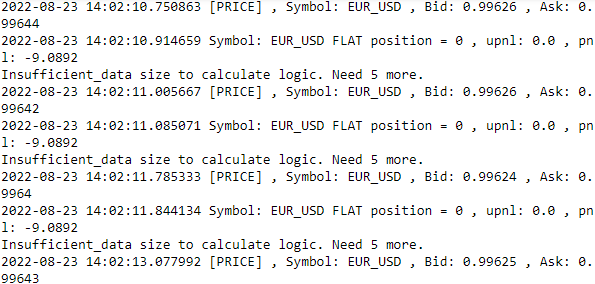
...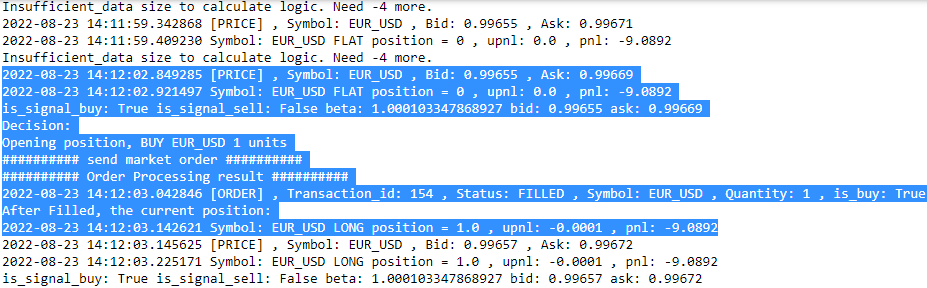
...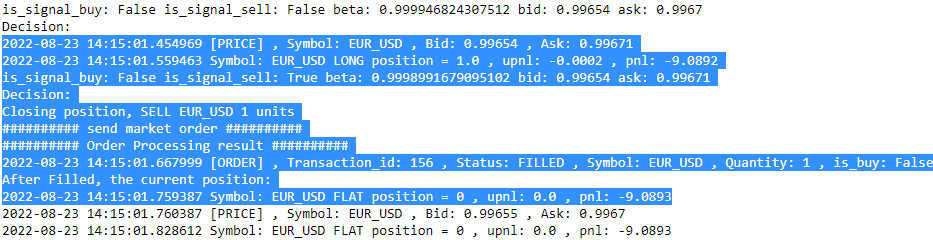
At the start of trading, we obtained the current market prices, staying in a flat position with neither profits nor losses. There is insufficient data available to make any trading decisions, and we will have to wait 10 minutes before we can see the calculated parameters take effect.https://www.oanda.com/demo-account/
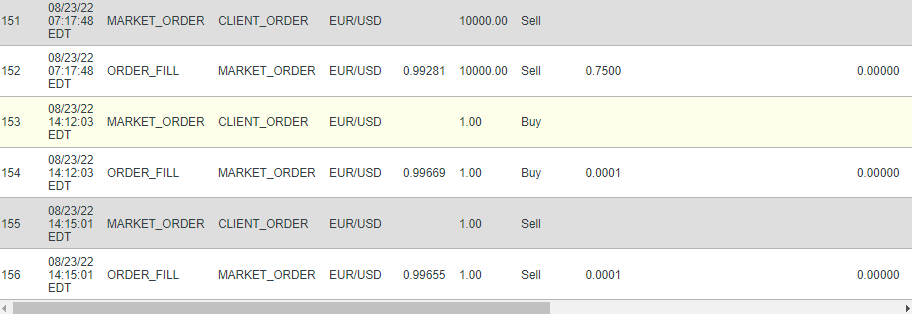
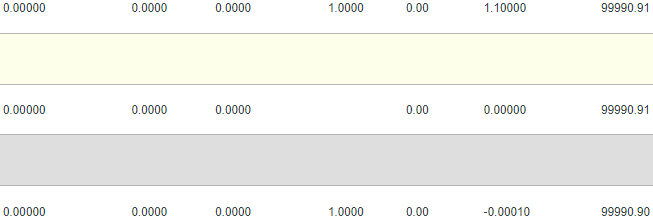
If your trading system depends on a longer period of past data and you do not wish to wait for all this data to be collected, consider bootstrapping your trading system with historical data.
Let the system run on its own for awhile, and it should be able to close out positions on its own. To stop trading, terminate the running process with Ctrl + Z, or something similar. Remember to manually close out any remaining trading positions once the program stops running. Take steps to change your trading parameters and decision logic to make your trading system a profitable one!
Note that the author is not responsible for any outcomes of your trading system! In a live trading environment, it takes more control parameters, order management, and position tracking to manage your risk effectively.
In the next section, we will discuss a risk management strategy that we can apply to our trading plans.
pa8_Contract for Difference CFD Trading_Oanda_git_log return_Momentum Strategy_Leverage_margin_tpqoa:
t5_Sophisticated Algorithmic Strategies(MeanReversion+APO+StdDev_TrendFollowing+APO)_StatArb统计套利_PnL 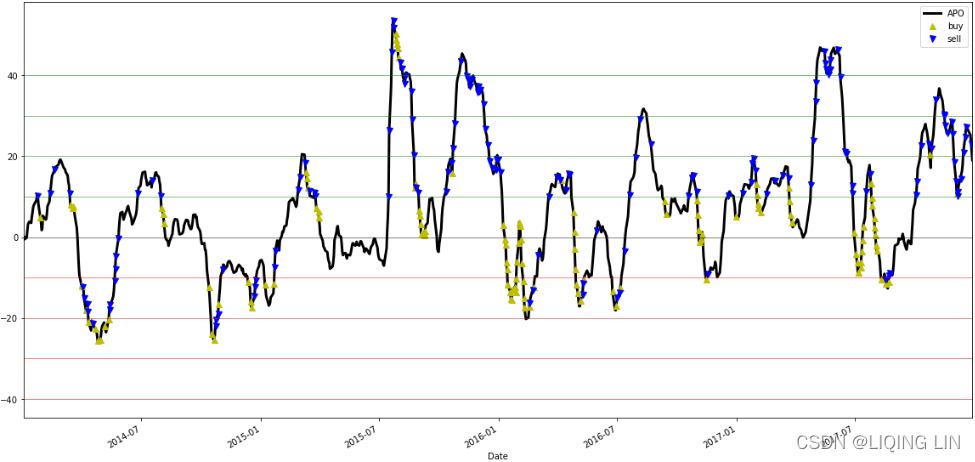
t6_Managing the Risk_limit_metrics of Algorithmic Strategies_Sharpe_adjust_trade side_position_share : https://blog.csdn.net/Linli522362242/article/details/122159869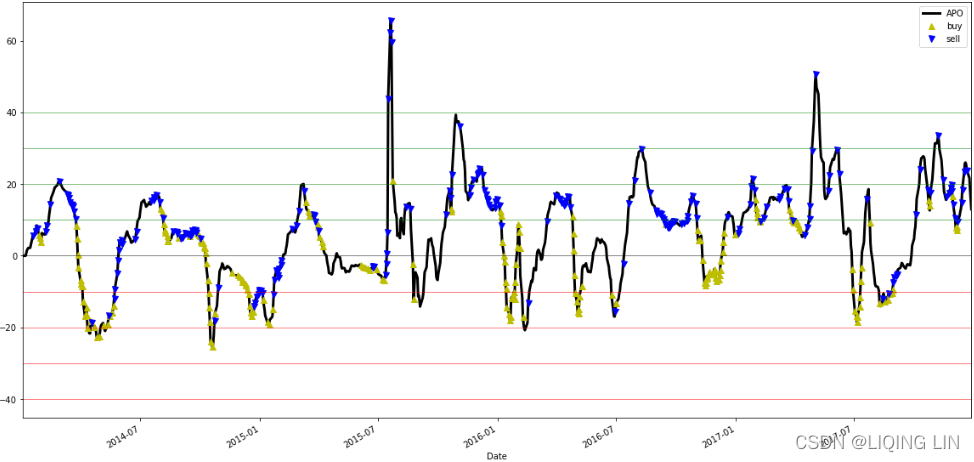
VaR(value-at-risk) for risk management
As soon as we open a position in the market, we are exposed to various types of risks, such as volatility risk and credit risk. To preserve our trading capital as much as possible, it is important to incorporate some form of risk management measures to our trading system.
Perhaps the most common measure of risk used in the financial industry is the VaR technique. It is designed to simply answer the following question: What is the worst expected amount of loss, given a specific probability level, say 95%, over a certain period of time?
(https://blog.csdn.net/Linli522362242/article/details/124977553
VaR is quoted报价 as a currency amount and represents the maximum loss to be expected given both a certain time horizon and a confidence level以货币金额报价,表示在特定时间范围(30天, start='2018-06-01 00:00:00', stop='2018-06-30 00:00:00')和置信水平下 预期的最大损失
)
The beauty of VaR is that it can be applied to multiple levels, from position-specific micro-level to portfolio-based macro-level. For example, a VaR of $1 million with a 95% confidence level for a 1-day time horizon states that, on average, only 1 day out of 20 could you expect to lose more than $1 million due to market movements.1 天时间范围内 95% 的置信水平的 100 万美元的风险价值表明,平均而言,20 天中只有 1 天可以预期由于市场波动而损失超过 100 万美元。
The following diagram illustrates a normally distributed portfolio returns with amean of 0%, where VaR is the loss corresponding to the 95th percentile of the distribution of portfolio returns: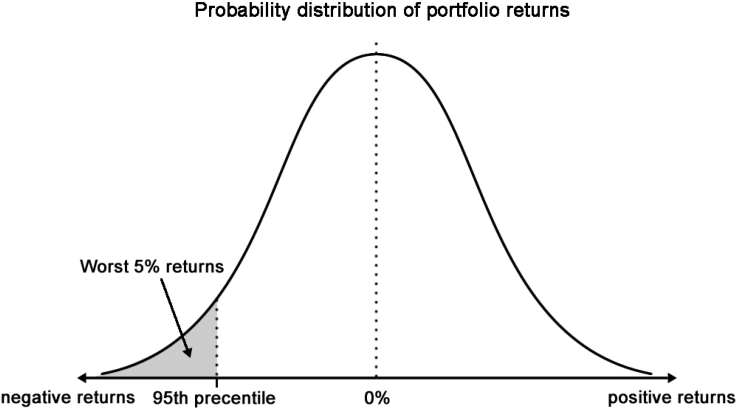
Suppose that we have $100 million under management at afund claiming to have the same risk as an S&P 500 index fund, with an expected return of 9% and a standard deviation of 20%. To calculate the daily VaR at the 5% risk level or 95% confidence level using the variance-covariance method, we will use the following formulas: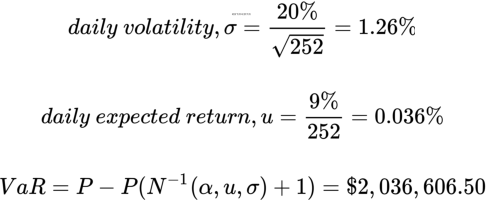
Here, P is the value of the portfolio, andis the inverse normal probability
distribution with a risk level of, a mean of
, a and standard deviation of
. The number
of trading days per year is assumed to be 252. It turns out that the daily VaR at the 5% level
is $2,036,606.50.
import scipy.stats as st
import numpy as np


# the 'inverse' normal cumulative distribution function
# https://blog.csdn.net/Linli522362242/article/details/103646927
# confidence (interval)= 0.95 ==> (1-confidence) = 0.05
# P(z<Z?) = 0.05 ==> Z = -0.020366064952458116
# ppf(q, loc=0, scale=1) or ppf(prob, mean, stddev)


norminv = st.distributions.norm.ppf

portfolio = 100000000.00

prob = 0.95 # or confidence = 0.95
alpha = 1-prob

mean = 0.09 # yearly expected return=0.09
stdev = 0.2 # a standard deviation of 20%
days_per_year = 252

u = mean/days_per_year # daily expected return
sigma = stdev/np.sqrt(days_per_year)

norminv = norminv(alpha, u, sigma)

portfolio - portfolio*(norminv+1) 
cdf: https://blog.csdn.net/Linli522362242/article/details/125863306
However, the use of VaR is not without its flaws缺陷. It does not take into account the probability of the loss for extreme events happening on the far ends of the tails on the normal distribution curve. The magnitude of the loss beyond a certain VaR level is difficult to estimate as well.
The VaR that we investigated uses historical data and an assumed constant volatility level – such measures are not indicative of our future performance.
Let's take a practical approach to calculate the daily VaR of stock prices; we will investigate the AAPL stock prices by downloading from a data source:
import yfinance as yf

start_date='1998-01-01'
end_date = '2018-11-24'
aapl_df = yf.download( 'AAPL', start=start_date, end=end_date)

aapl_df 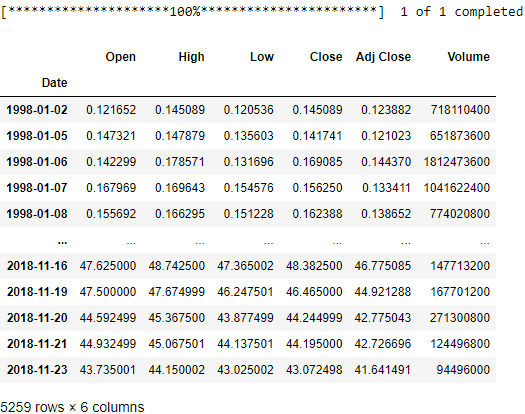
aapl_df.info()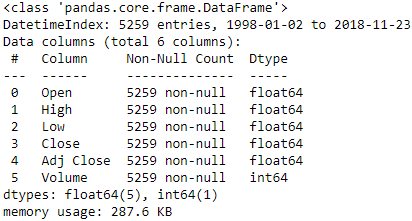
Our DataFrame contains 6 columns, with prices starting from the year 1998 to the present trading day. The column of interest is theadjusted closing prices. Suppose that we are interested in calculating the daily VaR of 2017; let's obtain this dataset using the following code:
The prices variable contains our AAPL dataset for 2017.
Using the formulas discussed earlier, you can implement the calculate_daily_var() function using the following code:
import datetime as dt
import pandas as pd

# Define the date range
start = dt.datetime(2017, 1, 1)
end = dt.datetime(2017, 12, 31)

# Cast indexes as DateTimeIndex objects
# aapl_df.index = pd.to_datetime(df.index)
closing_prices = aapl_df['Adj Close']
prices = closing_prices.loc[start:end]

from scipy.stats import norm

def calculate_daily_var( portfolio, prob, mean,
                         stdev, days_per_year=252.
                       ):
    alpha = 1-prob # left tail

    u = mean/days_per_year
    sigma = stdev/np.sqrt(days_per_year)

    norminv = norm.ppf(alpha, u, sigma)

    return portfolio - portfolio*(norminv+1)
Let's assume that we are holding $100 million of AAPL stock, and we are interested in finding the daily VaR at the 95% confidence level. We can define the VaR parameters using the following code:
The mu and sigma variables represent thedaily mean percentage returns and the daily standard deviation of returns respectively.
We can obtain the VaR (value-at-risk) by calling the calculate_daily_var() function, as follows:
import numpy as np

portfolio = 100000000.00
confidence = 0.95

# https://blog.csdn.net/Linli522362242/article/details/126269188
# pct_change() : prices-prices.shift(1)/prices.shift(1)
daily_returns = prices.pct_change().dropna()

mu = np.mean( daily_returns )
sigma = np.std( daily_returns )

VaR = calculate_daily_var( portfolio, confidence,
                           mu, sigma,
                           days_per_year=252., # trading days in on year
                         )
print('Value-at-Risk: %.2f' % VaR)
Assuming 252 trading days per year, the daily VaR of 2017 for the stock AAPL with 95% confidence is $114,265.86.
Summary
In this chapter, we were introduced to the evolution of trading from the pits to the electronic trading platform, and learned how algorithmic trading came about. We looked at some brokers offering API access to their trading service offering. To help us get started on our journey of developing an algorithmic trading system, we used the Oanda v20 library to implement a mean-reversion trading system.
In designing an event-driven broker interface class, we defined event handlersfor listening to orders, prices, and position updates. Child classes inheriting the Broker class simply extend this interface class with broker-specific functions, while still keeping the underlying trading functions compatible with our trading system. We successfully tested the connection with our broker by getting market prices, sending a market order, and receiving position updates.
We discussed the design of a simple mean-reversion trading system that generates buy or sell signals based the movements of historical average prices, and opening and closing out our positions with market orders. Since this trading system uses only one source of trading logic, more work will be required to build a robust, reliable, and profitable trading system.
We also discussed the design of a trend-following trading system that generates buy or sell signals based on the movements of a short-term average price against a long-term average price. With a well-designed system, we saw how easy it was to make a modification to the existing trading logic by simply extending the mean-reversion parent class and overriding
the decision-making method.
pa8_Contract for Difference CFD Trading_Oanda_git_log return_Momentum Strategy_Leverage_margin_tpqoa:
t5_Sophisticated Algorithmic Strategies(MeanReversion+APO+StdDev_TrendFollowing+APO)_StatArb统计套利_PnL
t6_Managing the Risk_limit_metrics of Algorithmic Strategies_Sharpe_adjust_trade side_position_share : https://blog.csdn.net/Linli522362242/article/details/122159869
One critical aspect of trading is to manage risk effectively. In the financial industry, VaR (value-at-risk)is the most common technique used to measure risk. Using Python, we took a practical approach to calculate the daily VaR of past datasets on AAPL.
Once we have built a working algorithmic trading system, we can explore the other ways to measure the performance of our trading strategy. One of these areas is backtesting; we will discuss this topic in the next chapter.