安卓快捷方式(桌面长按app图标) Ba-Shortcut
简介(下载地址)
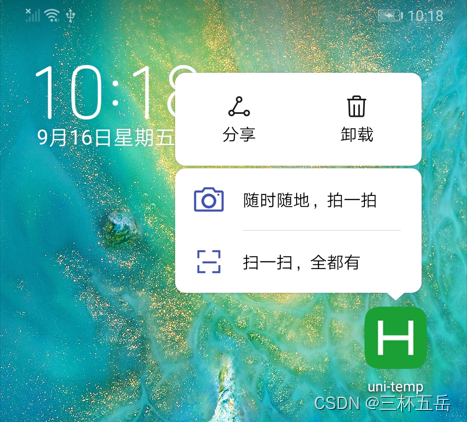
Ba-Shortcut 是一款App Shortcuts(安卓快捷方式)插件。Shortcuts是指在桌面长按app图标而出现的快捷方式, 可以为你的app的关键功能添加更快速的入口而不用先打开app,点击快捷方式可以访问应用功能, 并且这种快捷方式也可以被拖拽到桌面单独放置, 变成单独的桌面快捷方式。
- 支持创建多个快捷方式
- 支持自定义图标
- 支持设置长文本和短文本(优先显示长文本,空间不够时自动显示短文本)
- 支持创建、更新、删除
- 应用添加App Shortcuts是Android 7.1(API 25)的API, 所以只能在Android 7.1的设备上显示, 同时需要launcher支持, 比如Pixel launcher(Pixel设备的默认launcher), Now launcher(Nexus设备上的launcher)现在就支持, 其他launcher也可以提供支持.
效果展示
使用方法
引用
在 script 中引入组件
const shortcut = uni.requireNativePlugin('Ba-Shortcut')
示例1(App.vue)
可在App.vue中快速集成,创建在onLauncher和onShow都可,点击事件在onShow中监听
<script>
	const shortcut = uni.requireNativePlugin('Ba-Shortcut')
	export default {
		onLaunch: function() {
			console.log('App Launch')
			//创建快捷方式
			shortcut.create({
					shortcutId: "MyCamera",//快捷方式id
					shortLabel: "随手拍",//快捷方式显示短文本
					longLabel: "随时随地,拍一拍",//快捷方式显示长文本
					iconName: "ic_camera",//快捷方式图标资源名称,参照‘UI 图标设置’
				},
				(res) => {
					console.log(res);
				});
		},
		onShow: function() {
			console.log('App Show')
			//快捷方式点击事件监听
            var args = plus.runtime.arguments;
            if (args) {
                if(args.shortcutId){
                    //args参数如:{"shortLabel":"随手拍","shortcutId":"MyCamera"}
                    //根据快捷方式的 shortcutId 判断
                    //这里写你的处理逻辑
                }
                console.log(args);
            }
		},
		onHide: function() {
			console.log('App Hide')
		}
	}
</script>
示例2(页面)
可在页面 script 中调用(示例参考,可根据自己业务和调用方法自行修改)
		data() {
			return {
				shortcutId: "MyCamera",
				shortLabel: "随手拍",
				longLabel: "随时随地,拍一拍",
				iconName: "ic_camera",
			}
		},
		methods: {
			create() { //创建
				shortcut.create({
						shortcutId: this.shortcutId,
						shortLabel: this.shortLabel,
						longLabel: this.longLabel,
						iconName: this.iconName,
					},
					(res) => {
						console.log(res);
						uni.showToast({
							title: res.msg,
							icon: "none",
							duration: 3000
						})
					});
			},
			update() { //更新
				shortcut.update({
						shortcutId: this.shortcutId,
						shortLabel: this.shortLabel,
						longLabel: this.longLabel,
					},
					(res) => {
						console.log(res);
						uni.showToast({
							title: res.msg,
							icon: "none",
							duration: 3000
						})
					});
			},
			deleteS() { //删除
				shortcut.delete({
						shortcutId: this.shortcutId,
					},
					(res) => {
						console.log(res);
						uni.showToast({
							title: res.msg,
							icon: "none",
							duration: 3000
						})
					});
			},
		}
UI 图标设置
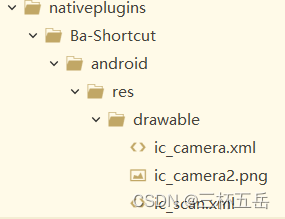
- 快捷方式图标:在项目的 “nativeplugins\Ba-Shortcut\android\res\drawable” 目录下(没有就新建),任意添加图片(支持png、jpg、xml矢量图),名字在 create 方法的 “iconName”字段设置即可。如添加自定义图片"ic_camera.png",那么设置 iconName 为 “ic_camera”。注意:更改后需要重新制作基座才能生效,建议提前配置。
快捷方式点击事件监听
在应用生命周期app.vue的onshow事件中设置监听:
	export default {
		...
		onShow: function() {
			var args = plus.runtime.arguments;
			if (args) {
				if(args.shortcutId){
					//args参数如:{"shortLabel":"随手拍","shortcutId":"MyCamera"}
					//根据快捷方式的 shortcutId 判断
					//这里写你的处理逻辑
				}
				console.log(args);
			}
		},
		...
	}
方法清单
| 名称 | 说明 |
|---|---|
| create | 创建快捷方式 |
| update | 更新快捷方式,也可以用create重建更新 |
| delete | 删除快捷方式 |
create 方法参数
创建快捷方式
| 属性名 | 类型 | 必填 | 默认值 | 说明 |
|---|---|---|---|---|
| shortcutId | String | true | ‘’ | 快捷方式id |
| shortLabel | String | true | ‘’ | 快捷方式显示短文本 |
| longLabel | String | true | ‘’ | 快捷方式显示长文本 |
| iconName | String | true | ‘’ | 快捷方式图标资源名称,参照‘UI 图标设置’ |
update 方法参数
更新快捷方式
| 属性名 | 类型 | 必填 | 默认值 | 说明 |
|---|---|---|---|---|
| shortcutId | String | true | ‘’ | 快捷方式id |
| shortLabel | String | true | ‘’ | 快捷方式显示短文本 |
| longLabel | String | true | ‘’ | 快捷方式显示长文本 |
delete 方法参数
删除快捷方式
| 属性名 | 类型 | 必填 | 默认值 | 说明 |
|---|---|---|---|---|
| shortcutId | String | true | ‘’ | 快捷方式id |
系列插件
应用未读角标插件 Ba-Shortcut-Badge (文档)
版权声明:本文为u013164293原创文章,遵循CC 4.0 BY-SA版权协议,转载请附上原文出处链接和本声明。