刚学android不久,就随便写写上传,做的不好请轻点喷,没多大的技术。这是两个Activity之间实现数据传输并显示。
1.这是登录界面
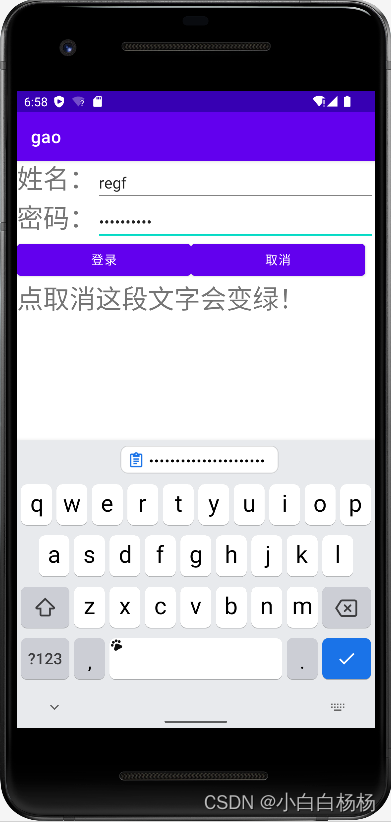
2.这是登录过后的效果
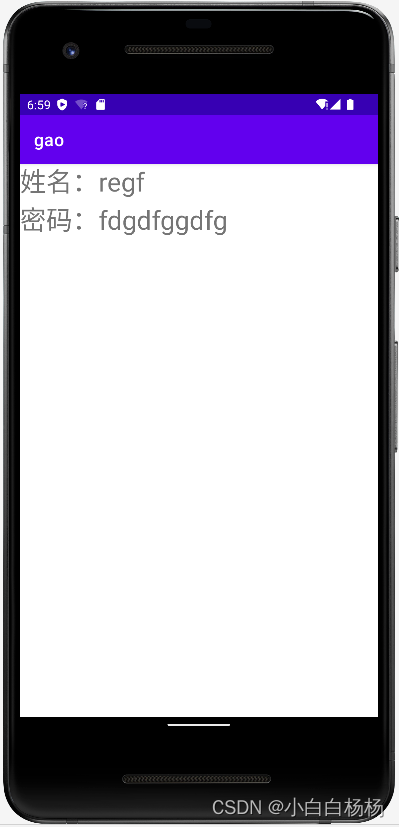
3.MainActivity.java
package com.example.gao;

import androidx.appcompat.app.AppCompatActivity;

import android.content.Intent;
import android.graphics.Color;
import android.os.Bundle;
import android.view.View;
import android.widget.Button;
import android.widget.EditText;
import android.widget.TextView;

public class MainActivity extends AppCompatActivity {
    private EditText username,password;
    private Button login,cancel;
    private TextView bianse;

    @Override
    protected void onCreate(Bundle savedInstanceState) {
        super.onCreate(savedInstanceState);
        setContentView(R.layout.activity_main);
        username=(EditText) findViewById(R.id.name);
        password=(EditText) findViewById(R.id.pswd);
        login=(Button) findViewById(R.id.login);
        cancel=(Button) findViewById(R.id.cancel);
        bianse=(TextView) findViewById(R.id.bianse);
        login.setOnClickListener(new View.OnClickListener() {
            @Override
            public void onClick(View view) {
                String name=username.getText().toString();
                String pswd=password.getText().toString();
                Intent it=new Intent(MainActivity.this,SecondActivity.class);
                it.putExtra("name",name);
                it.putExtra("pswd",pswd);
                startActivity(it);
            }
        });
        cancel.setOnClickListener(new View.OnClickListener() {
            @Override
            public void onClick(View view) {
                bianse.setTextColor(Color.parseColor("green"));
            }
        });
    }
}
4.接受数据的界面SecondActivity.java
package com.example.gao;

import android.content.Intent;
import android.os.Bundle;
import android.widget.TextView;

import androidx.appcompat.app.AppCompatActivity;

public class SecondActivity extends AppCompatActivity {
    private TextView tv_show;
    @Override
    protected void onCreate(Bundle savedInstanceState) {
        super.onCreate(savedInstanceState);
        setContentView(R.layout.activity_second);
        tv_show=(TextView) findViewById(R.id.show);
        Intent intent=getIntent();
        String name=intent.getStringExtra("name");
        String pswd=intent.getStringExtra("pswd");
        tv_show.setText("姓名:"+name+"\n"+"密码:"+pswd);
    }
}
5.前面的界面代码activity_main.xml
<?xml version="1.0" encoding="utf-8"?>
<LinearLayout xmlns:android="http://schemas.android.com/apk/res/android"
    xmlns:app="http://schemas.android.com/apk/res-auto"
    xmlns:tools="http://schemas.android.com/tools"
    android:layout_width="match_parent"
    android:layout_height="match_parent"
    android:orientation="vertical"
    tools:context=".MainActivity">

    <LinearLayout
        android:layout_width="match_parent"
        android:layout_height="wrap_content"
        android:orientation="horizontal">
        <TextView
            android:layout_width="wrap_content"
            android:layout_height="wrap_content"
            android:textSize="30dp"
            android:text="姓名:"/>
        <EditText
            android:layout_width="match_parent"
            android:layout_height="wrap_content"
            android:id="@+id/name"/>
    </LinearLayout>
    <LinearLayout
        android:layout_width="match_parent"
        android:layout_height="wrap_content"
        android:orientation="horizontal">
        <TextView
            android:layout_width="wrap_content"
            android:layout_height="wrap_content"
            android:textSize="30dp"
            android:text="密码:"/>
        <EditText
            android:layout_width="match_parent"
            android:layout_height="wrap_content"
            android:inputType="textPassword"
            android:id="@+id/pswd"/>
    </LinearLayout>
    <LinearLayout
        android:layout_width="match_parent"
        android:layout_height="wrap_content">
        <Button
            android:layout_width="200dp"
            android:layout_height="wrap_content"
            android:text="登录"
            android:id="@+id/login"/>
        <Button
            android:layout_width="200dp"
            android:layout_height="wrap_content"
            android:text="取消"
            android:id="@+id/cancel"/>
    </LinearLayout>
    <TextView
        android:layout_width="wrap_content"
        android:layout_height="wrap_content"
        android:text="点取消这段文字会变绿!"
        android:id="@+id/bianse"
        android:textSize="30dp"/>
</LinearLayout>
6.显示界面activity_second.xml
<?xml version="1.0" encoding="utf-8"?>
<LinearLayout
    xmlns:android="http://schemas.android.com/apk/res/android"
    android:layout_width="match_parent"
    android:layout_height="match_parent">

    <TextView
        android:layout_width="match_parent"
        android:layout_height="wrap_content"
        android:textSize="30dp"
        android:id="@+id/show"/>

</LinearLayout>
7.最后别忘了在ActivityManifest.xml上添加SecondActivity
       <activity
            android:name=".SecondActivity"
            android:exported="true">
            <intent-filter>
                <action android:name="android.intent.action.MAIN" />

                <category android:name="android.intent.category.LAUNCHER" />
            </intent-filter>
        </activity>
好了就这样。
版权声明:本文为m0_62986001原创文章,遵循CC 4.0 BY-SA版权协议,转载请附上原文出处链接和本声明。