文章目录
Ajax:(Asynchronous JavaScript and XML,异步的 JavaScript 和 XML) 一种用于创建快速动态网页的技术。
特点:
在不重新加载整个页面的情况下,可以与服务器交换数据并更新部分网页内容。
Ajax的应用场景
- 搜索框的提示信息
- 在线地图的浏览
一、jQuery 简介
Query是JavaScript的一个库,把常用的一些功能进行了封装,方便用户调用,极大地简化了JavaScript编程。jQuery设计的宗旨是“Write Less, Do more”。
1、下载配置jQuery
JQuery有两种格式的脚本可供下载:压缩版(文件小适合发布使用)、非压缩版(适合调试使用)。
Minified: http://code.jquery.com/jquery-3.2.1.min.js
Uncompressed: http://code.jquery.com/jquery-3.2.1.js
- 配置jQuery
- 在 head 标签内通过script标签引入jQuery库
<script type="text/javascript" src="http://code.jquery.com/jquery-3.2.1.js"></script>
<!-- 填写本地资源路径即使用本地的jQuery -->
- 测试jQuery是否配置成功,在 body 标签内写入如下代码,然后浏览器运行查看是否有输出:
<script>
    $(document).ready(function(){
		alert("Hello jQuery!");
	});
</script>
2、jQuery
$ ----> 定义JQuery
(document) ----> 选择符,查找和查询 HTML 元素
ready ----> 抽象为action(),执行对元素的操作
<script type="text/javascript">
    $(document).ready(function(){
        // 获取id为fruit的jQuery对象
		var $p = $('#fruit');
        // html()方法对标签内容进行更改
        // css()方法对标签样式进行更改
        $p.html('Apple is a fruit.').css('color', 'red');
	});
</script>
3、jQuery选择器
与css类似。
- $("#element") ----> id选择器
- $(“div”) ----> 元素选择器
- $(’’.class’’) ----> 类选择器
- $("*") ----> 全选
- $("#element, div, .class") ----> 联合选择器
二、Ajax语法
- url: 请求的地址
- type: 请求时数据的传递方式(常用的有get/post)
- data: 用来传递的数据(建议使用json来传递)
- success: 交互成功后要执行的方法
- dataType: ajax接收后台数据的类型(建议使用json)
- 注意事项: ajax和后台交互时,后台是不能够直接跳转到其他页面
三、jQuery实现Ajax局部刷新
1、引入jQuery包、json.jar
将jQuery的包放入工程目录下,在 head 标签内通过 script 标签引入JSP页面。
添加 json.jar 到工程。
2、事件函数
通过jQuery语法编写含有Ajax的事件函数。
<script type="text/javascript">
    // 点击id为login的标签触发该事件
	$("#login").click(function(){
        // 函数内使用Ajax实现局部刷新
		$.ajax({
			url:"/MyServlet",  // 请求路径为MyServlet的Servlet

			type:"post",  // 采用post方式请求

			data:{
                // 传给Servlet的数据,形式》 键:值
				username:$("input[name=username]").val(),
				password:$("input[name=password]").val()
			},
            // dataType指明Servlet给Ajax返回数据的数据格式
            // 采用json作为数据的返回格式
			dataType:"json",

            // Ajax通过函数接受处理数据
            // result里封装了Servlet返回给Ajax的结果
			success:function(result){
                // 获取result结果里键为flag的值
				var flag = result.flag;
				if(flag==true){
					// 跳转到指定jsp页面
					window.location.href="success.jsp";
				}else{
					//跳回本页面并刷新部分内容
					$(".tip").text("更新内容");
				}
			}
		});
	});
</script>
3、Ajax请求的Servlet类
@WebServlet("/MyServlet")
public class LoginServlet extends HttpServlet {
    protected void doGet(HttpServletRequest request, HttpServletResponse response) throws ServletException, IOException {
        //1、首先获取jsp页面里Ajax传递过来的参数信息
        String username = request.getParameter("username");
        String password = request.getParameter("password");

        //2、根据数据做相应的处理
        // json数据对象,封装了json数据
        JSONObject jsonObject = null;
        if("101".equals(username) && "123456".equals(password)){
            jsonObject = new JSONObject("{flag:true}");
        }
        else{
            jsonObject = new JSONObject("{flag:false}");
        }
        // 数据传递给response,返回给Ajax的result
       	response.getOutputStream().write(jsonObject.toString().getBytes("utf-8"));
    }

    protected void doPost(HttpServletRequest request, HttpServletResponse response) throws ServletException, IOException {
        doGet(request,response);
    }
}
四、JavaScript实现Ajax局部刷新
1、为标签添加鼠标点击事件onclick
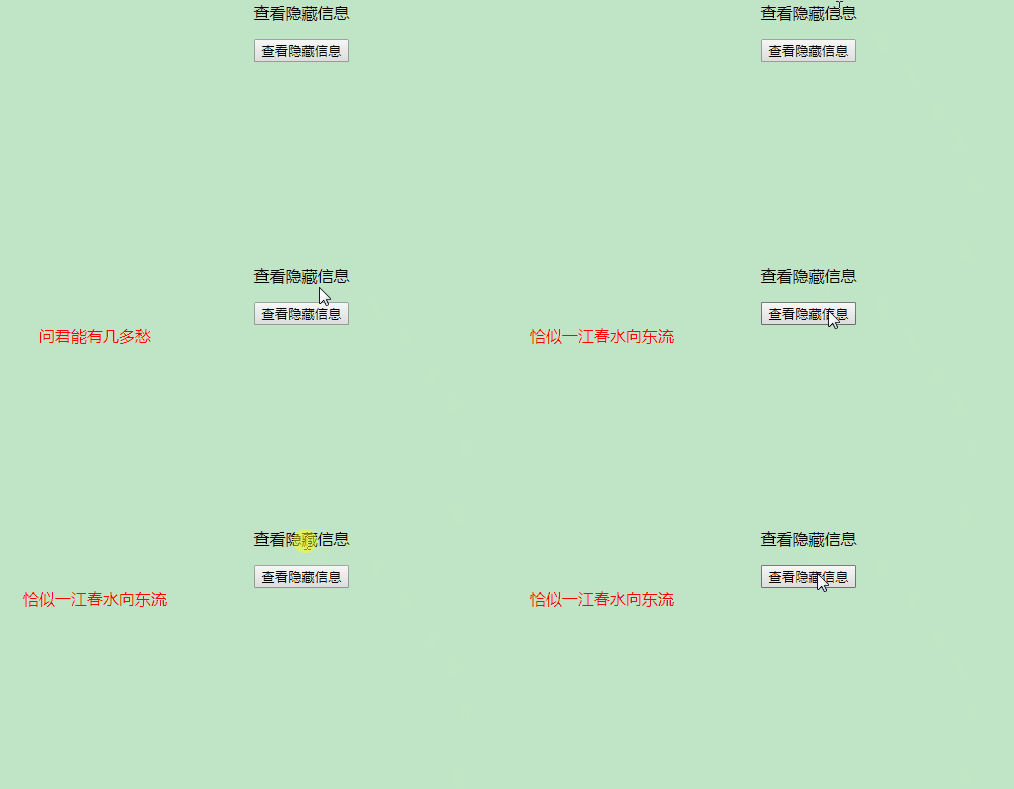
<p onclick="showA()">查看隐藏信息</p>
<input type="button" value="查看隐藏信息" flag="2" onclick="showB()">
<div style="width:400px; height:300px; color:red" id="div" ></div>
2、事件函数
<script type="text/javascript">
	function showA(){
		//1、创建一个 xmlhttpRequest对象
		var xmlhttp = new XMLHttpRequest();
		//2、规定请求的类型、URL(可携带数据) 以及是否异步处理请求。
		xmlhttp.open("GET","/MyServlet?flag=1",true);
		//3、将请求发送到服务器。
		xmlhttp.send();
		//4、接收服务器端的响应(readyState=4:请求已完成且响应已就绪 status=200:请求响应一切正常)
		xmlhttp.onreadystatechange=function(){
			if (xmlhttp.readyState==4 && xmlhttp.status==200){
				//responseText:表示的是服务器返回给ajax的数据
		    	document.getElementById("div").innerHTML=xmlhttp.responseText;
		    	//alert(xmlhttp.responseText);
		    }
		}
	}

	function showB(){
		var xmlhttp = new XMLHttpRequest();
		xmlhttp.open("GET","/MyServlet?flag=2",true);
		xmlhttp.send();
		xmlhttp.onreadystatechange=function(){
			if (xmlhttp.readyState==4 && xmlhttp.status==200){
		    	document.getElementById("div").innerHTML=xmlhttp.responseText;
		    }
		}
	}
</script>
3、Ajax请求的Servlet类
@WebServlet("/MyServlet")
public class ListCouseServlet extends HttpServlet {
	protected void doGet(HttpServletRequest request, HttpServletResponse response) throws ServletException, IOException {
		//1、获取ajax传递过来的参数信息
		String flag = request.getParameter("flag");
		//2、需要返回的数据信息
		String data = "";
		if("1".equals(flag)){  // <p>标签
			data = "问君能有几多愁?";
		}else if("2".equals(flag)){  // <input>标签
			data = "恰似一江春水向东流";
		}
		//3、将数据信息回写给ajax
		response.getOutputStream().write(data.getBytes("utf-8"));
	}
	protected void doPost(HttpServletRequest request, HttpServletResponse response) throws ServletException, IOException {
		doGet(request,response);
	}
}
版权声明:本文为qq_35976650原创文章,遵循CC 4.0 BY-SA版权协议,转载请附上原文出处链接和本声明。