http://blog.csdn.net/wirelessqa/article/details/8997168
http://code.google.com/p/android-apktool/downloads/list
1.下载apktool.jar — 解压
2.下载Mac上的辅助工具apktool-install-macosx.. – 解压
3. 将apktool.jar放到apktool-install-macosx..目录下,也就是跟apktool命令放到一起
4.运行sh apktool
01
bixiaopeng@bixiaopengtekiMacBook-Pro
~$ /Users/bixiaopeng/Downloads/apktool-install-macosx-r05-ibot/apktool ; exit;
02
Apktool
v1.5.2 -
a toolfor reengineering
Android apk files
03
Copyright2010 Ryszard
Wi?niewski
04
with
smali v1.4.1,
and baksmali v1.4.1
05
Updated
by@iBotPeaches
06
Apache
License2.0 (http://www.apache.org/licenses/LICENSE-2.0)
07
08
09
Usage:
apktool [-q|--quiet OR -v|--verbose] COMMAND […]
10
11
12
COMMANDs
are:
13
14
15
d[ecode]
[OPTS] [
16
Decode
to
17
18
19
OPTS:
20
21
22
-s,
--no-src
23
Do
not decode sources.
24
-r,
--no-res
25
Do
not decode resources.
26
-d,
--debug
27
Decode
in debug mode. Check project pagefor more
info.
28
-b,
--no-debug-info
29
Baksmali
-- don't write out debug info (.local, .param, .line, etc.)
30
-f,
--force
31
Force
delete destination directory.
32
-t
, --frame-tag
33
Try
to use framework files tagged by .
34
--frame-path
35
Use
the specified directoryfor framework
files
36
--keep-broken-res
37
Useif there
was an error and some resources were dropped, e.g.:
38
"Invalid
config flags detected. Dropping resources",
but you
39
want
to decode them anyway, even with errors. You will have to
40
fix
them manually before building.
41
42
43
b[uild]
[OPTS] [] [] ----从你给出的本地路径构建一个apk
44
Build
an apk from already decoded application located in .
45
46
47
It
will automatically detect, whether files was changed and perform
48
needed
steps only.
49
50
51
If
you omit then current directory will be used.
52
If
you omit then /dist/
53
will
be used.
54
55
56
OPTS:
57
58
59
-f,
--force-all
60
Skip
changes detection and build all files.
61
-d,
--debug
62
Build
in debug mode. Check project pagefor more
info.
63
-a,
--aapt
64
Loads
aapt from specified location.
65
66
67
if|install-framework
[] --frame-path []
68
Install
framework file to your system.
69
70
71
For
additional info, see: http://code.google.com/p/android-apktool/
72
For
smali/baksmali info, see: http://code.google.com/p/smali/
(1)先查看$PATH的配置

(3) 接下来你就可以直接使用apktool了
三.APKTOOL的命令解释
1.反编译APK命令
apktool d
代表了要反编译的apk文件的路径,最好写绝对路径,比如C:\MusicPlayer.apk
-f指令
apktool d –f
apktool b
这里的
发现C:\MusicPlayer内多了2个文件夹build和dist,其中分别存储着编译过程中逐个编译的文件以及最终打包的apk文件。
该命令用于为APKTool安装特定的framework-res.apk文件,以方便进行反编译一些与ROM相互依赖的APK文件。具体情况请看常见问题
四.APKTOOL使用实例
4.1 反编译新浪微博的APK
01
bixiaopeng@bixiaopengtekiMacBook-Pro
~$ apktool d /Users/bixiaopeng/Downloads/com.sina.weibo.apk /Users/bixiaopeng/work-folder/OWL-APKTOOL
02
I:
Baksmaling…
03
I:
Loading resource table…
04
I:
Loaded.
05
I:
Decoding AndroidManifest.xml with resources…
06
I:
Loading resource table from file: /Users/bixiaopeng/Library/apktool/framework/1.apk
07
I:
Loaded.
08
I:
Regular manifestpackage…
09
I:
Decoding file-resources…
10
I:
Decoding values */* XMLs…
11
I:
Done.
12
I:
Copying assets and libs…
作者:毕小朋 出处: http://www.wirelessqa.com 欢迎转载或分享,但请务必声明文章出处。如果文章对您有帮助,希望您能推荐或关注。
反编译后的结果:
1
bixiaopeng@bixiaopengtekiMacBook-Pro
~$ apktool b /Users/bixiaopeng/work-folder/OWL-APKTOOL
2
I:
Checking whether sources has changed…
3
I:
Checking whether resources has changed…
4
I:
Building resources…
5
I:
Building apk file…
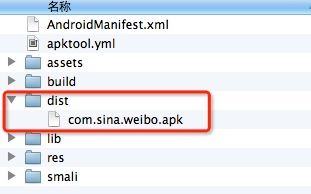
4.3 自动签名
1
bixiaopeng@bixiaopengtekiMacBook-Pro
dist$ jarsigner -verbose -keystore bxp.keystore -signedjarnew.apk
com.sina.weibo.apk bxp.keystore
【keystore】:bxp.keystore
【签名前的apk名字】:com.sina.weibo.apk
1
keytool
-genkey -keystore bxp.keystore -keyalg RSA -validity10000 -alias
bxp.keystore
-genkey 产生证书文件
-keystore 指定密钥库的.keystore文件中
-keyalg 指定密钥的算法
-validity 为证书有效天数,这里我们写的是10000天。
-alias 产生别名
注意:
2. 在用keytool生成数字证书时必须保证:-keystore androidapp.keystore -alias
androidapp.keystore 两者名称必须相同。否则下一步签名时会出现错误:jarsigner: 找不到
androidapp.keystore 的证书链。androidapp.keystore
必须引用包含专用密钥和相应的公共密钥证书链的有效密钥库密钥条目。
2014 非常好用的开源 Android 测试工具
http://www.php100.com/html/it/mobile/2014/1015/7495.html 当前有很大的趋势是转向移动应用平台,Android 是最广泛使用的移动操作系统,201 ...
Android Studio中mac上面的安装
Android Studio中mac上面的安装 学习了:https://blog.csdn.net/xianrenli38/article/details/79347170 http://www.an ...
Infer 在 Mac 上的安装和环境配置
Infer 在 Mac 上的安装和环境配置 Infer 介绍 Infer 是一个静态分析工具.Infer 可以分析 Objective-C, Java 或者 C 代码,报告潜在的问题. 任何人都可以使 ...
Mac上刚安装的WebStorm或PHPStorm遇到SVN版本太旧的问题
Mac上刚安装的WebStorm或PHPStorm遇到SVN版本太旧的问题: URL: svn: E155021: This client is too old to work with the wo ...
Mac上Hive安装配置
Mac上Hive安装配置 1.安装 下载hive,地址:http://mirror.bit.edu.cn/apache/hive/ 之前我配置了集群,tjt01.tjt02.tjt03,这里hive安 ...
一点MongoDB的基础及mongodb在mac上的安装
最近发现维持写博客的习惯还是挺困难的,尤其对我来说,计划好的事过了好长时间才想到要去做. 这段时间一直在熟悉MongoDB,首先我是参考的这一篇:8天学通MongoDB 原博主写得非常好,我这里就 ...
MAC 上编译安装nginx-rtmp-module 流媒体服务器
MAC 上编译安装nginx-rtmp-module 流媒体服务器 记录踩坑过程 下载nginx和nginx-rtmp-module wget http://nginx.org/download/ng ...
常见Android测试工具简介
在进行android设备测试过程中,在进行系统测试时候,往往需要关注到很多方面,导致一个崩溃或者运行一段时间自动重启或者停止的问题很多.最简单来看,影响因素就有:底层硬件设备.OS层.上层app层.另 ...
Android 测试工具集01
Appium是一个支持原生,混合和移动web apps的开源的跨平台测试框架工具. ANDROID依赖 Android SDK API >= 17 (Additional features re ...
随机推荐
【原创】Chrome最新版(53-55)再次爆出BUG!
前言 今年十月份,我曾发布一篇文章,不过那个BUG在最新的 Chrome 54 中已经修正. 而今天即将发布的Chrome弱智BUG: ...
sqlserver索引与查询优化
此文为转载,仅做保存使用,出处:http://www.cr173.com/html/8688_all.html 在数据库存优化设计中往往会提到索引,这编文章就来详细的说明一下在 SQL SERVER ...
JavaScript Patterns 5.4 Module Pattern
MYAPP.namespace('MYAPP.utilities.array'); MYAPP.utilities.array = (function () { // dependencies var ...
HDU1297 Children’s Queue (高精度+递推)
Children’s Queue Time Limit: 2000/1000 MS (Java/Others) Memory Limit: 65536/32768 K (Java/Others) ...
secure CRT 介绍
SecureCRT是一款支持SSH(SSH1和SSH2)的终端仿真程序,简单地说是Windows下登录UNIX或Linux服务器主机的软件. Secure[1] CRT支持SSH,同时 ...
PHP初入,for循环使用
一: 找出100-999之间的所有"水仙花数".所谓水仙花数是指一个三位 数,各位数字的立方和等于该数本身.(如153次方=1的3次方+5的3次方+3的3次方)并输出这些数字 想想 ...
quick-cocos2d-x教程1:在window上创建第一个项目文件夹,并制作helloworld
说明:此教程是针对cocos2dx 2.0系列的,3.0的版本号,如今还没有公布出来. 1)首先从github.com把这个项目下载到本地.然后装到d盘的根文件夹,并设置文件夹路径为d:\quick- ...
Cowboy http服务器 websocket
一.基础介绍 cowboy是一个小巧.快速.模块化的http服务器,采用Erlang开发.其中良好的clean module使得我们可以扩展到多种网络协议之中,cowboy自带的有tcp和ssl,而也 ...
JavaScript Validate a Valid Date formatted as ";mm/dd/yyyy";
// Validates that the input string is a valid date formatted as "mm/dd/yyyy" function isVa ...
python -&;gt; lambda与def的差别
lambda能够定义一个匿名函数.而def定义的函数必须有一个名字. 这应该是lambda与def两者最大的差别. 与Javascript不同的是,python中匿名函数与非匿名函数须要使用不同的语法 ...