没有主清单属性解决:
在pom.xml中添加
    <build>
        <plugins>
            <plugin>
                <executions>
                    <execution>
                        <goals>
                            <goal>repackage</goal><!--可以把依赖的包都打包到生成的Jar包中 -->
                        </goals>
                    </execution>
                </executions>
            </plugin>
        </plugins>
    </build>
如:
    <build>
        <plugins>
            <plugin>
                <groupId>org.springframework.boot</groupId>
                <artifactId>spring-boot-maven-plugin</artifactId>
                <configuration>
                    <fork>true</fork>
                    <includeSystemScope>true</includeSystemScope>
                    <excludes>
                        <exclude>
                            <groupId>org.projectlombok</groupId>
                            <artifactId>lombok</artifactId>
                        </exclude>
                    </excludes>
                </configuration>
                <executions>
                    <execution>
                        <goals>
                            <goal>repackage</goal><!--可以把依赖的包都打包到生成的Jar包中 -->
                        </goals>
                    </execution>
                </executions>
            </plugin>
        </plugins>
        <resources>
            <resource>
                <directory>src/main/java</directory>
                <includes>
                    <include>**/*.xml</include>
                </includes>
            </resource>
        </resources>
    </build>
添加后:Maven-clean,然后直接运行程序,最后Maven-package。
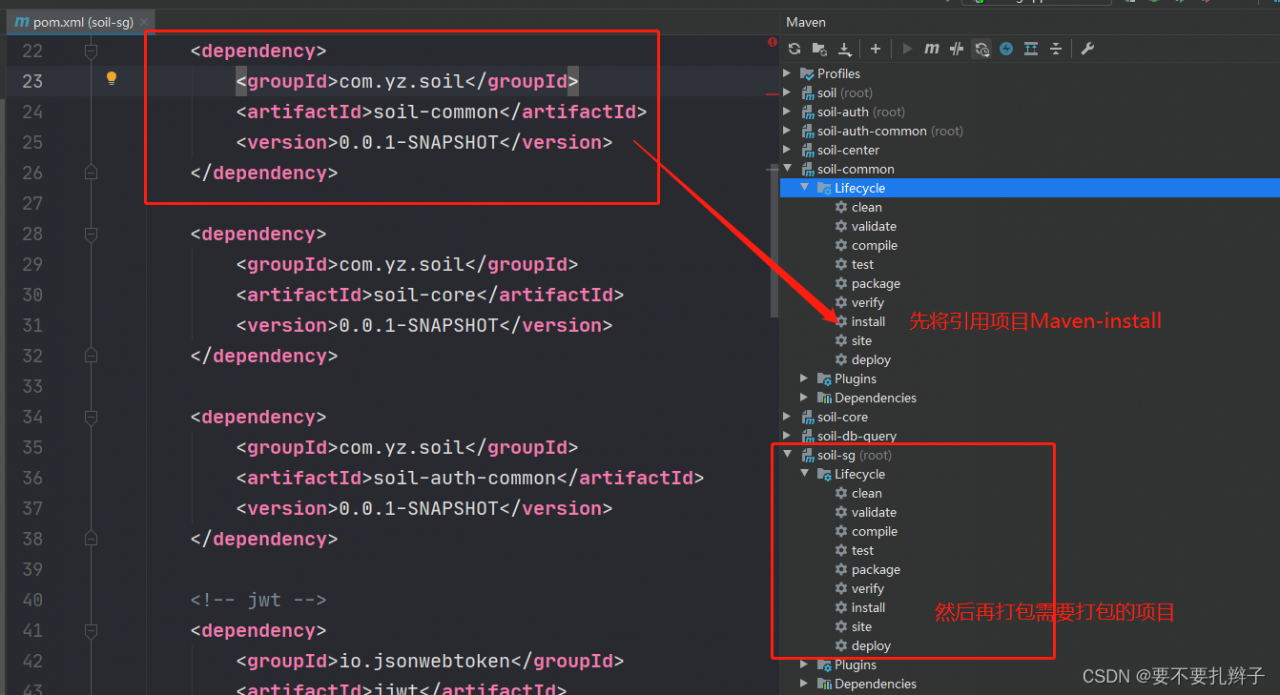
项目引用了项目打包出错:
打包前需要把引用项目先Maven-install,然后再打包需要的项目。
版权声明:本文为qq_40675982原创文章,遵循CC 4.0 BY-SA版权协议,转载请附上原文出处链接和本声明。