Android 自定义圆角TextView控件
在开发中遇到圆角背景大多都是shape资源文件 这样是最简单的方式之一,但是如果很多的圆角,资源文件要不断地创建不同的drawable,最终对打包Apk也不太友好,自定义一个控件来实现View多用
先来看下效果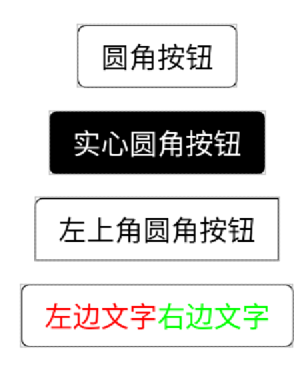
自定义一个RectgleTextView
public class RectgleTextView extends AppCompatTextView {
private static final String EMPTY_SPACE = "\u3000";
private final Context mContext;
private int type = RECTANGLE;
private float mRadius;
private float mTopLeftRadius, mTopRightRadius, mBottomLeftRadius, mBottomRightRadius;
private int mStrokeColor;
private int mStrokeWidth;
private int mSoild;
private float mTextPadding;
private CharSequence mTextLeft;
private CharSequence mTextRight;
private ColorStateList mIconColor = null;
private int mCurIconColor;
private CharSequence iconString;
private ColorStateList mLeftColor = null;
private int mCurLeftColor;
private ColorStateList mRightColor = null;
private int mCurRightColor;
private float mLeftSize;
private float mRightSize;
private List<SpanContainer> leftContainer;
private List<SpanContainer> rightContainer;
private int mTextLeftStyle;
private int mTextRightStyle;
private int mTextCenterStyle;
//icon的index
private int iconIndex = 0;
//是否开启计算文字边界,开启后会以最大文字大小为View高度,并且会增加部分文字高度,防止部分英文类型y,g由于基线的原因无法显示完全
private boolean autoMaxHeight;
//渐变色
private ColorStateList startColor = null;
private ColorStateList centerColor = null;
private ColorStateList endColor = null;
//渐变方向
GradientDrawable.Orientation orientation;
public RectgleTextView(Context context) {
this(context, null);
}
public RectgleTextView(Context context, @Nullable AttributeSet attrs) {
this(context, attrs, 0);
}
public RectgleTextView(Context context, @Nullable AttributeSet attrs, int defStyleAttr) {
super(context, attrs, defStyleAttr);
this.mContext = context;
initAttr(context, attrs);
init();
}
private void init() {
initIconFont();
initShape();
}
private void initIconFont() {
iconString = getText().toString();
int centerSize = iconString.length();
SpannableStringBuilder stringBuilder = new SpannableStringBuilder(getText());
if (!TextUtils.isEmpty(mTextLeft) || !TextUtils.isEmpty(mTextRight)) {
//增加空格
if (!TextUtils.isEmpty(mTextLeft)) {
if (mTextPadding != 0) {
stringBuilder.insert(0, EMPTY_SPACE);
iconIndex++;
}
stringBuilder.insert(0, mTextLeft);
iconIndex += mTextLeft.length();
}
if (!TextUtils.isEmpty(mTextRight)) {
if (mTextPadding != 0) {
stringBuilder.append(EMPTY_SPACE);
}
stringBuilder.append(mTextRight);
}
/*
* ==============
* 设置字和icon间距
* ==============
*/
if (mTextPadding != 0) {
//设置字和icon间距
if (!TextUtils.isEmpty(mTextLeft)) {
AbsoluteSizeSpan sizeSpan = new AbsoluteSizeSpan((int) mTextPadding);
stringBuilder.setSpan(sizeSpan, iconIndex - 1, iconIndex, Spanned
.SPAN_EXCLUSIVE_EXCLUSIVE);
}
if (!TextUtils.isEmpty(mTextRight)) {
AbsoluteSizeSpan sizeSpan = new AbsoluteSizeSpan((int) mTextPadding);
stringBuilder.setSpan(sizeSpan, iconIndex + centerSize, iconIndex +
centerSize + 1, Spanned.SPAN_EXCLUSIVE_EXCLUSIVE);
}
}
/*
* ==============
* 设置左边文字样式
* ==============
*/
setLeftTextAttr(stringBuilder);
/*
* ==============
* 设置右边文字样式
* ==============
*/
setRightTextAttr(centerSize, stringBuilder);
}
/*
* ==============
* 设置icon和字的颜色
* ==============
*/
if (mIconColor != null) {
int color = mIconColor.getColorForState(getDrawableState(), 0);
if (color != mCurIconColor) {
mCurIconColor = color;
}
ForegroundColorSpan foregroundColorSpan = new ForegroundColorSpan(mCurIconColor);
stringBuilder.setSpan(foregroundColorSpan, iconIndex, iconIndex + centerSize, Spanned
.SPAN_EXCLUSIVE_EXCLUSIVE);
} else {
mCurIconColor = getCurrentTextColor();
}
/*
* ==============
* 设置icon的字的样式
* ==============
*/
initTextStyle(mTextCenterStyle, stringBuilder, iconIndex, iconIndex + centerSize);
/*
* ==============
* 设置左右Span,记得调用前在**所有方法**前先clearSpan(),不然直接build,上一次的span任然保留着
* ==============
*/
if (leftContainer != null) {
for (SpanContainer container : leftContainer) {
for (Object o : container.spans) {
try {
stringBuilder.setSpan(o, container.start, container.end, container.flag);
} catch (Exception e) {
//please check invoke clearSpan() method first
}
}
}
}
if (rightContainer != null) {
int start = mTextPadding == 0 ? iconIndex + centerSize : iconIndex + centerSize + 1;
for (SpanContainer container : rightContainer) {
for (Object o : container.spans) {
try {
stringBuilder.setSpan(o, start + container.start, start + container.end,
container.flag);
} catch (Exception e) {
//please check invoke clearSpan() method first
}
}
}
}
setText(stringBuilder);
}
private void setRightTextAttr(int centerSize, SpannableStringBuilder stringBuilder) {
if (!TextUtils.isEmpty(mTextRight)) {
int start = mTextPadding == 0 ? iconIndex + centerSize : iconIndex + centerSize + 1;
/*
* ==============
* 设置右边字的粗体和斜体
* ==============
*/
initTextStyle(mTextRightStyle, stringBuilder, start, stringBuilder.length());
/*
* ==============
* 设置右边字的颜色
* ==============
*/
initTextRightColor(stringBuilder, start);
/*
* ==============
* 设置右边字的大小
* ==============
*/
initTextSize(stringBuilder, start, stringBuilder.length(), mRightSize, mCurRightColor);
}
}
private void initTextRightColor(SpannableStringBuilder stringBuilder, int start) {
if (mRightColor != null) {
int color = mRightColor.getColorForState(getDrawableState(), 0);
if (color != mCurRightColor) {
mCurRightColor = color;
}
ForegroundColorSpan foregroundRightColor = new ForegroundColorSpan(mCurRightColor);
stringBuilder.setSpan(foregroundRightColor, start, stringBuilder.length()
, Spanned.SPAN_EXCLUSIVE_EXCLUSIVE);
} else {
mCurRightColor = getCurrentTextColor();
}
}
private void setLeftTextAttr(SpannableStringBuilder stringBuilder) {
if (!TextUtils.isEmpty(mTextLeft)) {
int end = mTextPadding == 0 ? iconIndex : iconIndex - 1;
/*
* ==============
* 设置左边字的粗体和斜体
* ==============
*/
initTextStyle(mTextLeftStyle, stringBuilder, 0, end);
/*
* ==============
* 设置左边字的颜色
* ==============
*/
initTextLeftColor(stringBuilder, end);
/*
* ==============
* 设置左边字的大小
* ==============
*/
initTextSize(stringBuilder, 0, end, mLeftSize, mCurLeftColor);
}
}
private void initTextSize(SpannableStringBuilder stringBuilder, int start, int end, float
textSize, int mCurColor) {
if (textSize != 0) {
CharacterStyle sizeSpan;
final int gravity = getGravity() & Gravity.VERTICAL_GRAVITY_MASK;
if (gravity == Gravity.CENTER_VERTICAL) {
sizeSpan = new EasyVerticalCenterSpan(textSize, mCurColor);
} else {
sizeSpan = new AbsoluteSizeSpan((int) textSize);
}
stringBuilder.setSpan(sizeSpan, start, end, Spanned
.SPAN_EXCLUSIVE_EXCLUSIVE);
}
}
private void initTextLeftColor(SpannableStringBuilder stringBuilder, int end) {
if (mLeftColor != null) {
int color = mLeftColor.getColorForState(getDrawableState(), 0);
if (color != mCurLeftColor) {
mCurLeftColor = color;
}
ForegroundColorSpan foregroundLeftColor = new ForegroundColorSpan(mCurLeftColor);
stringBuilder.setSpan(foregroundLeftColor, 0, end, Spanned
.SPAN_EXCLUSIVE_EXCLUSIVE);
} else {
mCurLeftColor = getCurrentTextColor();
}
}
private void initTextStyle(int textStyle, SpannableStringBuilder stringBuilder, int start,
int end) {
StyleSpan span;
if (textStyle != Typeface.NORMAL) {
span = new StyleSpan(textStyle);
stringBuilder.setSpan(span, start, end, Spanned.SPAN_EXCLUSIVE_EXCLUSIVE);
}
}
private void initShape() {
if (mRadius == -0 && mStrokeColor == -1 && mStrokeWidth == 0 && mSoild ==
-1 && mTopLeftRadius == 0 && mTopRightRadius == 0 && mBottomLeftRadius == 0 &&
mBottomRightRadius == 0 ) {
} else {
setShape();
}
}
private void setShape() {
ShapeBuilder shapeBuilder;
if (mRadius != 0) {
shapeBuilder = ShapeBuilder.create().Type(type).Radius(mRadius).Stroke
(mStrokeWidth, mStrokeColor);
} else {
if (mTopRightRadius != 0 || mTopLeftRadius != 0 || mBottomRightRadius != 0 || mBottomLeftRadius != 0) {
shapeBuilder = ShapeBuilder.create().Type(type).RoundRadius(mTopLeftRadius,
mTopRightRadius, mBottomLeftRadius, mBottomRightRadius).Stroke
(mStrokeWidth, mStrokeColor);
} else {
shapeBuilder = ShapeBuilder.create().Type(type).Radius(mTopLeftRadius,
mTopRightRadius, mBottomLeftRadius, mBottomRightRadius).Stroke
(mStrokeWidth, mStrokeColor);
}
}
if (orientation != null && startColor != null && endColor != null) {
//渐变
if (centerColor != null) {
shapeBuilder.Gradient(orientation, getColor(startColor), getColor(centerColor),
getColor(endColor));
} else {
shapeBuilder.GradientInit(orientation, getColor(startColor), getColor(endColor));
}
} else {
shapeBuilder.Soild(mSoild);
}
shapeBuilder.build(this);
}
private int getColor(ColorStateList color) {
return color.getColorForState(getDrawableState(), 0);
}
private GradientDrawable.Orientation switchEnumToOrientation(int orientation) {
switch (orientation) {
case 0:
return GradientDrawable.Orientation.TOP_BOTTOM;
case 1:
return GradientDrawable.Orientation.TR_BL;
case 2:
return GradientDrawable.Orientation.RIGHT_LEFT;
case 3:
return GradientDrawable.Orientation.BR_TL;
case 4:
return GradientDrawable.Orientation.BOTTOM_TOP;
case 5:
return GradientDrawable.Orientation.BL_TR;
case 6:
return GradientDrawable.Orientation.LEFT_RIGHT;
case 7:
return GradientDrawable.Orientation.TL_BR;
}
return GradientDrawable.Orientation.LEFT_RIGHT;
}
private void clearText() {
setText(iconString);
iconIndex = 0;
}
private void initAttr(Context context, AttributeSet attrs) {
//左右文字支持xml中设置iconFont
TypedValue textValue = new TypedValue();
TypedArray array = context.obtainStyledAttributes(attrs, R.styleable.RectgleTextView);
type = array.getInteger(R.styleable.RectgleTextView_shapeType, 0);
mRadius = array.getDimensionPixelOffset(R.styleable.RectgleTextView_totalRadius, 0);
mTopLeftRadius = array.getDimensionPixelSize(R.styleable.RectgleTextView_topLeft, 0);
mTopRightRadius = array.getDimensionPixelSize(R.styleable.RectgleTextView_topRight, 0);
mBottomLeftRadius = array.getDimensionPixelSize(R.styleable.RectgleTextView_bottomLeft, 0);
mBottomRightRadius = array.getDimensionPixelSize(R.styleable.RectgleTextView_bottomRight, 0);
mStrokeColor = array.getColor(R.styleable.RectgleTextView_strColor, -1);
mStrokeWidth = array.getDimensionPixelOffset(R.styleable.RectgleTextView_strWidth, 0);
mSoild = array.getColor(R.styleable.RectgleTextView_solidBac, -1);
mTextPadding = array.getDimensionPixelOffset(R.styleable.RectgleTextView_textPadding, 0);
boolean has = array.getValue(R.styleable.RectgleTextView_textLeft, textValue);
if (has) {
if (textValue.type == TypedValue.TYPE_REFERENCE) {
//文字引用
mTextLeft = mContext.getResources().getText(textValue.resourceId);
} else {
//纯文字
mTextLeft = textValue.string;
}
}
has = array.getValue(R.styleable.RectgleTextView_textRight, textValue);
if (has) {
if (textValue.type == TypedValue.TYPE_REFERENCE) {
//文字引用
mTextRight = mContext.getResources().getText(textValue.resourceId);
} else {
//纯文字
mTextRight = textValue.string;
}
}
mIconColor = array.getColorStateList(R.styleable.RectgleTextView_iconColor);
mLeftColor = array.getColorStateList(R.styleable.RectgleTextView_textLeftColor);
mRightColor = array.getColorStateList(R.styleable.RectgleTextView_textRightColor);
mLeftSize = array.getDimensionPixelSize(R.styleable.RectgleTextView_textLeftSize, 0);
mRightSize = array.getDimensionPixelSize(R.styleable.RectgleTextView_textRightSize, 0);
mTextLeftStyle = array.getInt(R.styleable.RectgleTextView_textLeftStyle, Typeface.NORMAL);
mTextRightStyle = array.getInt(R.styleable.RectgleTextView_textRightStyle, Typeface.NORMAL);
mTextCenterStyle = array.getInt(R.styleable.RectgleTextView_textCenterStyle, Typeface.NORMAL);
autoMaxHeight = array.getBoolean(R.styleable.RectgleTextView_autoMaxHeight, false);
orientation = switchEnumToOrientation(array.getInt(R.styleable
.RectgleTextView_gradientOrientation, 0));
startColor = array.getColorStateList(R.styleable.RectgleTextView_startSolid);
centerColor = array.getColorStateList(R.styleable.RectgleTextView_centerSolid);
endColor = array.getColorStateList(R.styleable.RectgleTextView_endSolid);
array.recycle();
}
@Override
protected void drawableStateChanged() {
if (mIconColor != null && mIconColor.isStateful()
|| mLeftColor != null && mLeftColor.isStateful()
|| mRightColor != null && mRightColor.isStateful()) {
clearText();
initIconFont();
}
super.drawableStateChanged();
}
/**
* 设置Shape Type
*/
public void setType(int type) {
this.type = type;
setShape();
}
/**
* 设置边线的宽度
*/
public void setStrokeWidth(int value) {
this.mStrokeWidth = value;
setShape();
}
/**
* 设置边线的颜色
*/
public void setStrokeColor(@ColorInt int color) {
this.mStrokeColor = color;
setShape();
}
/**
* 设置shape背景颜色
*/
public void setSolid(int soild) {
this.mSoild = soild;
setShape();
}
/**
* 设置radius
*/
public void setRadius(int radius) {
this.mRadius = radius;
setShape();
}
/**
* 设置icon颜色
*/
public void setIconColor(int color) {
this.mIconColor = ColorStateList.valueOf(color);
build();
}
/**
* 设置左文案
*/
public void setTextLeft(CharSequence textLeft) {
this.mTextLeft = textLeft;
build();
}
/**
* 设置左文案
*/
public void setTextLeft(@StringRes int textLeft) {
this.mTextLeft = mContext.getString(textLeft);
build();
}
/**
* 设置右文案
*/
public void setTextRight(CharSequence textRight) {
this.mTextRight = textRight;
build();
}
/**
* 设置右文案
*/
public void setTextRight(@StringRes int textRight) {
this.mTextRight = mContext.getString(textRight);
build();
}
/**
* 设置左文案颜色
*/
public void setTextLeftColor(int color) {
this.mLeftColor = ColorStateList.valueOf(color);
build();
}
/**
* 设置右文案颜色
*/
public void setTextRightColor(int color) {
this.mRightColor = ColorStateList.valueOf(color);
build();
}
/**
* 设置左文案字号大小
*/
public void setTextLeftSize(float leftSize) {
this.mLeftSize = leftSize;
build();
}
/**
* 设置右文案字号大小
*/
public void setTextRightSize(float rightSize) {
this.mRightSize = rightSize;
build();
}
/**
* 设置Icon
*/
public void setIcon(String iconText) {
this.iconString = iconText;
build();
}
/**
* 设置Icon
*/
public void setIcon(CharSequence iconText) {
this.iconString = iconText;
build();
}
/**
* 设置Icon
*/
public void setIcon(@StringRes int iconText) {
this.iconString = mContext.getString(iconText);
build();
}
/**
* 设置左文案样式
*/
public void setTextLeftStyle(int textLeftStyle) {
this.mTextLeftStyle = textLeftStyle;
build();
}
/**
* 设置右文案样式
*/
public void setTextRightStyle(int textRightStyle) {
this.mTextRightStyle = textRightStyle;
build();
}
/**
* 设置中间文案样式
*/
public void setTextCenterStyle(int textCenterStyle) {
this.mTextCenterStyle = textCenterStyle;
build();
}
/**
* span之前需要首先clear
*/
public void clearSpan() {
if (leftContainer != null) {
leftContainer.clear();
}
if (rightContainer != null) {
rightContainer.clear();
}
}
/**
* 设置左边文字为多个span
*/
public void addSpanLeft(List<Object> objects, int start, int end, int flags) {
spanLeft(objects, start, end, flags);
build();
}
/**
* 设置左边文字为span
*/
public void addSpanLeft(Object object, int start, int end, int flags) {
spanLeft(object, start, end, flags);
build();
}
/**
* 设置右边文字为多个span
*/
public void addSpanRight(List<Object> objects, int start, int end, int flags) {
spanRight(objects, start, end, flags);
build();
}
/**
* 设置右边文字为span
*/
public void addSpanRight(Object object, int start, int end, int flags) {
spanRight(object, start, end, flags);
build();
}
/**
* 设置文字padding
*/
public void setTextPadding(float textPadding) {
this.mTextPadding = textPadding;
build();
}
/**
* 设置三段文字颜色
*/
public void setAllTextColor(@ColorInt int color) {
allTextColor(color);
build();
}
//=================================链式调用##需要最后调用build()==================================
/**
* 设置Shape type
*/
public RectgleTextView type(int type) {
this.type = type;
return this;
}
/**
* 设置边线的宽度
*/
public RectgleTextView strokeWidth(int width) {
this.mStrokeWidth = width;
return this;
}
/**
* 设置边线的宽度
*/
public RectgleTextView strokeColor(@ColorInt int color) {
this.mStrokeColor = color;
return this;
}
/**
* 设置填充的颜色
*/
public RectgleTextView solid(@ColorInt int color) {
this.mSoild = color;
return this;
}
/**
* 设置radius
*/
public RectgleTextView radius(int radius) {
this.mRadius = radius;
return this;
}
/**
* 设置icon颜色
*/
public RectgleTextView iconColor(int color) {
this.mIconColor = ColorStateList.valueOf(color);
return this;
}
/**
* 设置左文案
*/
public RectgleTextView textLeft(String textLeft) {
this.mTextLeft = textLeft;
return this;
}
/**
* 设置左文案
*/
public RectgleTextView textLeft(@StringRes int textLeft) {
this.mTextLeft = mContext.getString(textLeft);
return this;
}
/**
* 设置右文案
*/
public RectgleTextView textRight(String textRight) {
this.mTextRight = textRight;
return this;
}
/**
* 设置右文案
*/
public RectgleTextView textRight(@StringRes int textRight) {
this.mTextRight = mContext.getString(textRight);
return this;
}
/**
* 设置左文案颜色
*/
public RectgleTextView textLeftColor(int color) {
this.mLeftColor = ColorStateList.valueOf(color);
return this;
}
/**
* 设置右文案颜色
*/
public RectgleTextView textRightColor(int color) {
this.mRightColor = ColorStateList.valueOf(color);
return this;
}
/**
* 设置左文案字号大小
*/
public RectgleTextView textLeftSize(float leftSize) {
this.mLeftSize = leftSize;
return this;
}
/**
* 设置右文案字号大小
*/
public RectgleTextView textRightSize(float rightSize) {
this.mRightSize = rightSize;
return this;
}
/**
* 设置Icon
*/
public RectgleTextView icon(String iconText) {
this.iconString = iconText;
return this;
}
/**
* 设置Icon
*/
public RectgleTextView icon(@StringRes int iconText) {
this.iconString = mContext.getString(iconText);
return this;
}
/**
* 设置左文案样式
*/
public RectgleTextView textLeftStyle(int textLeftStyle) {
this.mTextLeftStyle = textLeftStyle;
return this;
}
/**
* 设置右文案样式
*/
public RectgleTextView textRightStyle(int textRightStyle) {
this.mTextRightStyle = textRightStyle;
return this;
}
/**
* 设置中间文案样式
*/
public RectgleTextView textCenterStyle(int textCenterStyle) {
this.mTextCenterStyle = textCenterStyle;
return this;
}
/**
* 设置右边文字为多个span
*/
public RectgleTextView spanRight(List<Object> objects, int start, int end, int flags) {
if (rightContainer == null) {
rightContainer = new ArrayList<>();
}
this.rightContainer.add(new SpanContainer(objects, start, end, flags));
return this;
}
/**
* 设置右边文字为span
*/
public RectgleTextView spanRight(Object object, int start, int end, int flags) {
if (rightContainer == null) {
rightContainer = new ArrayList<>();
}
this.rightContainer.add(new SpanContainer(object, start, end, flags));
return this;
}
/**
* 设置左边文字为多个span
*/
public RectgleTextView spanLeft(List<Object> objects, int start, int end, int flags) {
if (leftContainer == null) {
leftContainer = new ArrayList<>();
}
this.leftContainer.add(new SpanContainer(objects, start, end, flags));
return this;
}
/**
* 设置左边文字为span
*/
public RectgleTextView spanLeft(Object object, int start, int end, int flags) {
if (leftContainer == null) {
leftContainer = new ArrayList<>();
}
this.leftContainer.add(new SpanContainer(object, start, end, flags));
return this;
}
/**
* 设置文字padding
*/
public RectgleTextView textPadding(float textPadding) {
this.mTextPadding = textPadding;
return this;
}
/**
* 设置三段文字颜色
*/
public RectgleTextView allTextColor(@ColorInt int color) {
ColorStateList temp = ColorStateList.valueOf(color);
this.mIconColor = temp;
this.mLeftColor = temp;
this.mRightColor = temp;
return this;
}
/**
* 获取中间的文案
*/
public CharSequence getIconStr() {
return iconString;
}
/**
* 防止重复初始化,最后调用build
*/
public RectgleTextView build() {
clearText();
//initIconFont();
init();
return this;
}
protected void onMeasure(int widthMeasureSpec, int heightMeasureSpec) {
try {
super.onMeasure(widthMeasureSpec, heightMeasureSpec);
} catch (Exception e) {
}
if (this.autoMaxHeight) {
int lead = 0;
if (this.getPaint() != null) {
lead = this.getPaint().getFontMetricsInt().leading * 3;
}
this.setMeasuredDimension(this.getMeasuredWidth(), (int) (Math.max((float) this
.getMeasuredHeight(), Math.max(this.mLeftSize, this.mRightSize)) + (float)
lead));
}
}
}
这个就是自定义的一个TextView
最终实现的一个是圆角 利用Xml布局
attrs实现其中的属性
Attrs.xml
 <declare-styleable name="RectgleTextView">
        <attr name="shapeType" format="integer|enum">
            <enum name="rectangle" value="0" />
            <enum name="oval" value="1" />
            <enum name="LINE" value="2" />
        </attr>
        <attr name="totalRadius" format="dimension" />
        <attr name="radiusTopLeft" format="dimension" />
        <attr name="radiusBottomLeft" format="dimension" />
        <attr name="radiusTopRight" format="dimension" />
        <attr name="radiusBottomRight" format="dimension" />
        <attr name="topLeft" format="dimension" />
        <attr name="topRight" format="dimension" />
        <attr name="bottomLeft" format="dimension" />
        <attr name="bottomRight" format="dimension" />
        <attr name="strColor" format="color" />
        <attr name="strWidth" format="dimension" />
        <attr name="solidBac" format="color" />
        <attr name="textPadding" format="dimension" />
        <attr name="textLeft" format="string" />
        <attr name="textRight" format="string" />
        <attr name="iconColor" format="reference|color" />
        <attr name="textLeftColor" format="reference|color" />
        <attr name="textRightColor" format="reference|color" />
        <attr name="textLeftSize" format="dimension" />
        <attr name="textRightSize" format="dimension" />
        <attr name="textLeftStyle">
            <enum name="bold" value="1" />
            <enum name="italic" value="2" />
        </attr>
        <attr name="textRightStyle">
            <enum name="bold" value="1" />
            <enum name="italic" value="2" />
        </attr>
        <attr name="textCenterStyle">
            <enum name="bold" value="1" />
            <enum name="italic" value="2" />
        </attr>
        <attr name="autoMaxHeight" format="boolean" />
        <attr name="gradientOrientation">
            <enum name="top_bottom" value="0" />
            <enum name="tp_bl" value="1" />
            <enum name="right_left" value="2" />
            <enum name="br_tl" value="3" />
            <enum name="bottom_top" value="4" />
            <enum name="bl_tr" value="5" />
            <enum name="left_right" value="6" />
            <enum name="tl_br" value="7" />
        </attr>
        <attr name="startSolid" format="reference|color" />
        <attr name="centerSolid" format="reference|color" />
        <attr name="endSolid" format="reference|color" />
        <!--        <attr name="fang_zheng_regular_font" format="boolean" />-->
        <!--        <attr name="fang_zheng_bold_font" format="boolean" />-->
    </declare-styleable>
里面的具体工具类SpanContainer.ShapeBuilder/EasyVerticalCenterSpan
EasyVerticalCenterSpan
public class EasyVerticalCenterSpan extends ReplacementSpan {
    private final float fontSizeSp;    //字体大小sp
    private final float paintColor;

    public EasyVerticalCenterSpan(float fontSizeSp, float paintColor) {
        this.fontSizeSp = fontSizeSp;
        this.paintColor = paintColor;
    }

    @Override
    public int getSize(Paint paint, CharSequence text, int start, int end, Paint.FontMetricsInt
            fm) {
        paint.setTextSize(fontSizeSp);
        text = text.subSequence(start, end);
        return (int) paint.measureText(text.toString());
    }

    @Override
    public void draw(Canvas canvas, CharSequence text, int start, int end, float x, int top, int
            y, int bottom, Paint paint) {
        text = text.subSequence(start, end);
        paint.setTextSize(fontSizeSp);
        paint.setColor((int) paintColor);
        Paint.FontMetricsInt fm = paint.getFontMetricsInt();
        canvas.drawText(text.toString(), x, y - (((y + fm.descent + y + fm.ascent) >> 1) - ((bottom + top) >> 1)), paint);    //此处重新计算y坐标,使字体居中
    }
}
ShapeBuilder
public class ShapeBuilder {
    private GradientDrawable drawable;
    private AttrContainer container;
    private boolean isOperate;

    private ShapeBuilder() {
        drawable = new GradientDrawable();
    }

    public static ShapeBuilder create() {
        return new ShapeBuilder();
    }

    /**
     * 设置shape的type类型
     *
     * @param type RECTANGLE,OVAL,LINE,RING
     */
    public ShapeBuilder Type(int type) {
        drawable.setShape(type);
        if (container != null) {
            container.type = type;
        }
        return this;
    }

    /**
     * 设置Stroke
     *
     * @param px    -width,需要px值
     * @param color -color值
     */
    public ShapeBuilder Stroke(int px, int color) {
        drawable.setStroke(px, color);
        if (container != null) {
            container.stokewidth = px;
            container.stokeColor = color;
        }
        return this;
    }

    /**
     * 边线
     *
     * @param px        -width,需要px值
     * @param color     -color值
     * @param dashWidth -dashWidth 横线的宽度
     * @param dashGap   -dashGap 点与点间的距离
     */
    public ShapeBuilder Stroke(int px, int color, int dashWidth, int dashGap) {
        drawable.setStroke(px, color, dashWidth, dashGap);
        if (container != null) {
            container.stokewidth = px;
            container.stokeColor = color;
            container.dashWidth = dashWidth;
            container.dashGap = dashGap;
        }
        return this;
    }

    /**
     * @param color -背景颜色
     */
    public ShapeBuilder Soild(int color) {
        drawable.setColor(color);
        if (container != null) {
            container.soild = color;
        }
        return this;
    }

    /**
     * @param px -圆角,四个角保持一致
     */
    public ShapeBuilder Radius(float px) {
        drawable.setCornerRadius(px);
        if (container != null) {
            container.setRadius(px, px, px, px);
        }
        return this;
    }

    /**
     * 圆角
     *
     * @param topleft  左上
     * @param topright 右上
     * @param botleft  左下
     * @param botright 右下
     * @Deprecated 左下和右下颠倒了,换用RoundRadius()方法
     */
    @Deprecated
    public ShapeBuilder Radius(float topleft, float topright, float botleft, float botright) {
        drawable.setCornerRadii(new float[]{topleft, topleft, topright, topright, botleft,
                botleft, botright, botright});
        if (container != null) {
            container.setRadius(topleft, topright, botleft, botright);
        }
        return this;
    }

    /**
     * 圆角
     *
     * @param topleft  左上
     * @param topright 右上
     * @param botleft  左下
     * @param botright 右下
     */
    public ShapeBuilder RoundRadius(float topleft, float topright, float botleft, float botright) {
        drawable.setCornerRadii(new float[]{topleft, topleft, topright, topright, botright,
                botright, botleft, botleft});
        if (container != null) {
            container.setRadius(topleft, topright, botleft, botright);
        }
        return this;
    }

    /**
     * 渐变,默认的Linear渐变
     *
     * @param startColor  开始颜色
     * @param centerColor 中心颜色
     * @param endColor    结束颜色
     */
    public ShapeBuilder Gradient(int startColor, int centerColor, int endColor) {
        return GradientInit(GradientDrawable.Orientation.TOP_BOTTOM, startColor, centerColor,
                endColor);
    }

    /**
     * 渐变,设置角度(实质调用的Gradient(GradientDrawable.Orientation orientation, int startColor, int
     * centerColor, int endColor)方法)
     *
     * @param angle       角度,需要是45的整数倍
     * @param startColor  开始颜色
     * @param centerColor 中心颜色
     * @param endColor    结束颜色
     */
    public ShapeBuilder Gradient(int angle, int startColor, int centerColor, int endColor) {
        angle = angle % 360;
        GradientDrawable.Orientation orientation = null;
        switch (angle) {
            case 0:
                orientation = GradientDrawable.Orientation.LEFT_RIGHT;
                break;
            case 45:
                orientation = GradientDrawable.Orientation.BL_TR;
                break;
            case 90:
                orientation = GradientDrawable.Orientation.BOTTOM_TOP;
                break;
            case 135:
                orientation = GradientDrawable.Orientation.BR_TL;
                break;
            case 180:
                orientation = GradientDrawable.Orientation.RIGHT_LEFT;
                break;
            case 225:
                orientation = GradientDrawable.Orientation.TR_BL;
                break;
            case 270:
                orientation = GradientDrawable.Orientation.TOP_BOTTOM;
                break;
            case 315:
                orientation = GradientDrawable.Orientation.TL_BR;
                break;
        }
        return Gradient(orientation, startColor, centerColor, endColor);
    }

    /**
     * 渐变,设置渐变方向
     *
     * @param orientation 方向支持类型
     *                    0-LEFT_RIGHT
     *                    45-BL_TR
     *                    90-BOTTOM_TOP
     *                    135-BR_TL
     *                    180-RIGHT_LEFT
     *                    225-TR_BL
     *                    270-TOP_BOTTOM
     *                    315-TL_BR
     * @param startColor  开始颜色
     * @param centerColor 中心颜色
     * @param endColor    结束颜色
     */
    public ShapeBuilder Gradient(GradientDrawable.Orientation orientation, int startColor, int
            centerColor, int endColor) {
        return GradientInit(orientation, startColor, centerColor, endColor);
    }

    /**
     * 兼容低版本,重新构造drawable,对应调用operateMethod方法重新build,
     * 保证新的drawable与原始drawabel相同
     */
    private ShapeBuilder GradientInit(GradientDrawable.Orientation orientation, int startColor, int
            centerColor, int endColor) {
        if (Build.VERSION.SDK_INT >= Build.VERSION_CODES.JELLY_BEAN) {
            drawable.setOrientation(orientation);
            drawable.setColors(new int[]{startColor, centerColor, endColor});
        } else {
            isOperate = true;
            drawable = new GradientDrawable(orientation, new int[]{startColor, centerColor,
                    endColor});
        }
        return this;
    }

    /**
     * 兼容低版本,重新构造drawable,对应调用operateMethod方法重新build,
     * 保证新的drawable与原始drawabel相同
     */
    public ShapeBuilder GradientInit(GradientDrawable.Orientation orientation, int... colors) {
        if (Build.VERSION.SDK_INT >= Build.VERSION_CODES.JELLY_BEAN) {
            drawable.setOrientation(orientation);
            drawable.setColors(colors);
        } else {
            isOperate = true;
            drawable = new GradientDrawable(orientation, colors);
        }
        return this;
    }


    /**
     * 渐变type
     *
     * @param type linear (default.)-LINEAR_GRADIENT
     *             circular-RADIAL_GRADIENT
     *             sweep-SWEEP_GRADIENT
     * @return
     */
    public ShapeBuilder GradientType(int type) {
        drawable.setGradientType(type);
        if (container != null) {
            container.gradientType = type;
        }
        return this;
    }

    /**
     * 这两个属性只有在type不为linear情况下起作用。
     *
     * @param x 相对X的渐变位置
     * @param y 相对Y的渐变位置
     * @return
     */
    public ShapeBuilder GradientCenter(float x, float y) {
        drawable.setGradientCenter(x, y);
        if (container != null) {
            container.gradientCenterX = x;
            container.gradientCenterY = y;
        }
        return this;
    }

    /**
     * 该属性只有在type="radial"有效
     *
     * @param radius 渐变颜色的半径
     * @return
     */
    public ShapeBuilder GradientRadius(float radius) {
        drawable.setGradientRadius(radius);
        if (container != null) {
            container.gradinetRadius = radius;
        }
        return this;
    }

    /**
     * 设置size
     *
     * @param width  宽
     * @param height 高
     * @return
     */
    public ShapeBuilder setSize(int width, int height) {
        drawable.setSize(width, height);
        if (container != null) {
            container.width = width;
            container.height = height;
        }
        return this;
    }

    /**
     * 传入View,设置Bac
     */
    public void build(View v) {
        build();
        if (Build.VERSION.SDK_INT >= Build.VERSION_CODES.JELLY_BEAN) {
            v.setBackground(drawable);
        } else {
            v.setBackgroundDrawable(drawable);
        }
    }

    public static void clearBg(View v) {
        v.setBackgroundResource(0);
    }

    /**
     * 返回构建的drawable
     */
    public GradientDrawable build() {
        if (Build.VERSION.SDK_INT >= Build.VERSION_CODES.JELLY_BEAN) {
            return drawable;
        } else {
            if (isOperate) {
                operateMethod();
            }
        }
        return drawable;
    }

    /**
     * Build.VERSION_CODES.JELLY_BEAN(4.1)以下渐变需要重新构造drawable,所以需要重新build
     */
    private void operateMethod() {
        if (container != null) {
            this.Type(container.type)
                    .Stroke(container.stokewidth, container.stokeColor, container.dashWidth,
                            container.dashGap)
                    .Radius(container.topLeft, container.topRight, container.botLeft, container.botRight)
                    .setSize(container.width, container.height)
                    .GradientType(container.gradientType)
                    .GradientCenter(container.gradientCenterX, container.gradientCenterY)
                    .GradientRadius(container.gradinetRadius);
            if (container.soild != 0) {
                Soild(container.soild);
            }
        }
    }

    private class AttrContainer {
        public int type;
        public int stokewidth;
        public int stokeColor;
        public int dashWidth;
        public int dashGap;
        public int soild;
        public float topLeft, topRight, botLeft, botRight;
        public int width, height;
        public int gradientType;
        public float gradinetRadius;

        public float gradientCenterX, gradientCenterY;

        private void setRadius(float topleft, float topright, float botleft, float botright) {
            this.topLeft = topleft;
            this.topRight = topright;
            this.botLeft = botleft;
            this.botRight = botright;
        }
    }
}
SpanContainer
public class SpanContainer {
    public List<Object> spans;
    public int start;
    public int end;
    public int flag;

    public SpanContainer(List<Object> spans, int start, int end, int flag) {
        this.spans = spans;
        this.start = start;
        this.end = end;
        this.flag = flag;
    }

    public SpanContainer(Object spans, int start, int end, int flag) {
        this.spans = new ArrayList<>();
        this.spans.add(spans);
        this.start = start;
        this.end = end;
        this.flag = flag;
    }
}
版权声明:本文为qq_46041134原创文章,遵循CC 4.0 BY-SA版权协议,转载请附上原文出处链接和本声明。