网上搜索了很多文章,一直显示找不到自定义的头文件,今天总算捣鼓出来了。
参考文章:https://www.cnblogs.com/icmzn/p/16244665.html
https://blog.csdn.net/qq_39048131/article/details/122446093?spm=1001.2014.3001.5506
文件目录结构如下: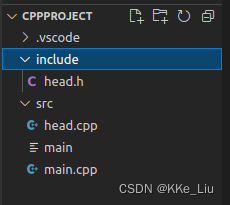
1、launch.json
{
    // Use IntelliSense to learn about possible attributes.
    // Hover to view descriptions of existing attributes.
    // For more information, visit: https://go.microsoft.com/fwlink/?linkid=830387
    "version": "0.2.0",
    "configurations": [
        {
            "name": "g++ build and debug active file",
            "type": "cppdbg",
            "request": "launch",
            "program": "${fileDirname}/${fileBasenameNoExtension}",
            "args": [],
            "stopAtEntry": false,
            "cwd": "${workspaceFolder}",
            "environment": [],
            "externalConsole": true,
            "MIMode": "gdb",
            "setupCommands": [
              {
                "description": "Enable pretty-printing for gdb",
                "text": "-enable-pretty-printing",
                "ignoreFailures": true
              }
            ],
            "preLaunchTask": "C/C++: g++ 生成活动文件",
            "miDebuggerPath": "/usr/bin/gdb"
        }
    ]
}
2、tasks.json
{
    "tasks": [
        {
            "type": "cppbuild",
            "label": "C/C++: g++ 生成活动文件",
            "command": "/usr/bin/g++",
            "args": [
                "-fdiagnostics-color=always",
                "-g",
                // "${file}",
                "/home/liuke/Code/cppproject/src/*.cpp",//源文件路径
                "-I",
                "/home/liuke/Code/cppproject/include",//自定义头文件路径
                "-o",
                "${fileDirname}/${fileBasenameNoExtension}"
            ],
            "options": {
                "cwd": "${fileDirname}"
            },
            "problemMatcher": [
                "$gcc"
            ],
            "group": {
                "kind": "build",
                "isDefault": true
            },
            "detail": "调试器生成的任务。"
        }
    ],
    "version": "2.0.0"
}
3、c_cpp_properties.json
{
    "configurations": [
        {
            "name": "Linux",
            "includePath": [
                "${workspaceFolder}/**"
                //有部分文章说这里添加头文件路径,但是我加了没效果,不知为何。
            ],
            "defines": [],
            "compilerPath": "/usr/bin/gcc",
            "cStandard": "gnu17",
            "cppStandard": "gnu++14",
            "intelliSenseMode": "linux-gcc-x64",
            "configurationProvider": "ms-vscode.makefile-tools"
        }
    ],
    "version": 4
}
版权声明:本文为weixin_45707509原创文章,遵循CC 4.0 BY-SA版权协议,转载请附上原文出处链接和本声明。