环境说明:
操作系统:Windows 10
JDK版本:JDK 11
zip4j版本:2.9.1
问题描述:
使用 zip4j 解压文件,当指定的路径为根目录时,如:
new ZipFile("D:\\my.zip").extractAll("D:");
出现异常:
net.lingala.zip4j.exception.ZipException: illegal file name that breaks out of the target directory: ...
原因分析:
Debug 追踪代码执行流程,在net.lingala.zip4j.tasks.AbstractExtractFileTask.extractFile(AbstractExtractFileTask.java:51-56)处,源代码如下:
    // make sure no file is extracted outside of the target directory (a.k.a zip slip)
    String outputCanonicalPath = (new File(outputPath).getCanonicalPath()) + File.separator;
    if (!outputFile.getCanonicalPath().startsWith(outputCanonicalPath)) {
      throw new ZipException("illegal file name that breaks out of the target directory: "
          + fileHeader.getFileName());
    }
可以看到抛出异常的条件是!outputFile.getCanonicalPath().startsWith(outputCanonicalPath),其中,outputFile.getCanonicalPath()表示获取待解压文件的唯一绝对路径(如:D:\text.txt,此处有误,严谨点应该使用zip文件测试,下同),即输出位置,而outputCanonicalPath变量表示解压指定的路径,(如:D:\)。因此,条件判断逻辑就是简单地判断文件的输出路径名是否以指定的路径名开头,如果不是则抛出异常。
按照上面的例子及表述,似乎没有问题,回顾outputCanonicalPath值的获取:
String outputCanonicalPath = (new File(outputPath).getCanonicalPath()) + File.separator;
通过创建文件对象获取其唯一绝对路径后,再拼接路径分隔符,而问题正出现在这里。当File表示根路径(如D盘)时,new File(outputPath).getCanonicalPath()得到的结果为 D:\ ,再拼接分隔符(Windows下为 \),则为 D:\\ 。而待解压文件的唯一绝对路径中(如 D:\text.txt),只包含一个 \,因此抛出异常。
解决方案:
解决思路为覆盖jar包中的源码。在项目的 src/main/java 路径下,创建 AbstractExtractFileTask.java 所在的包,并复制该类: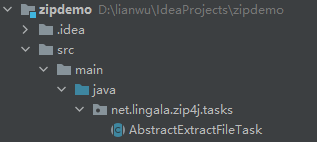
接下来,修改该类的extractFile()的部分代码逻辑,主要为上述分析中outputCanonicalPath值的获取:
        // make sure no file is extracted outside of the target directory (a.k.a zip slip)
        String outputCanonicalPath = new File(outputPath).getCanonicalPath();
        if (!outputCanonicalPath.endsWith(File.separator))
            outputCanonicalPath += File.separator;
        if (!outputFile.getCanonicalPath().startsWith(outputCanonicalPath)) {
            throw new ZipException("illegal file name that breaks out of the target directory: "
                    + fileHeader.getFileName());
        }
最后,即可正常通过单元测试了。
    @Test
    public void test() throws ZipException {
        new ZipFile("D:\\my.zip").extractAll("D:");
    }