3.3 添加到环境变量
[root@134test /opt]# echo 'export PATH="$PATH:/opt/mssql-tools/bin"' >> ~/.bash_profile
[root@134test /opt]# source ~/.bash_profile
[root@134test /opt]# echo 'export PATH="$PATH:/opt/mssql-tools/bin"' >> ~/.bashrc
[root@134test /opt]# source ~/.bashrc
3.4 本地连接
[root@134test /opt/mssql/bin]# sqlcmd -S localhost -U sa
Password:
1> select name from sys.databases;
2> go
name
--------------------------------------------------------------------------------------------------------------------------------
master
tempdb
model
msdb
(5 rows affected)
1>
1>create database TestDB;
2>go
1>
1> use TestDB;
2> go
Changed database context to 'TestDB'.
1> create table t1 (id int, cname nvarchar(50))
2> go
1>
1> insert into t1 (id, cname) values (1,'abc');
2> go
(1 rows affected)
1> select * from t1;
2> go
id cname
----------- --------------------------------------------------
1 abc
(1 rows affected)
1>
3.5 退出
1> quit
4. 安装SQL Server Agent
4.1 下载
4.2 安装
[root@134test /opt/sqlserver2017]# yum localinstall mssql-server-agent-14.0.900.75-1.x86_64.rpm
Loaded plugins: fastestmirror, langpacks
Repository base is listed more than once in the configuration
Repository updates is listed more than once in the configuration
Repository extras is listed more than once in the configuration
Repository centosplus is listed more than once in the configuration
Examining mssql-server-agent-14.0.900.75-1.x86_64.rpm: mssql-server-agent-14.0.900.75-1.x86_64
Marking mssql-server-agent-14.0.900.75-1.x86_64.rpm to be installed
Resolving Dependencies
--> Running transaction check
---> Package mssql-server-agent.x86_64 0:14.0.900.75-1 will be installed
--> Finished Dependency Resolution
Dependencies Resolved
===========================================================================================================================================================================
Package Arch Version Repository Size
===========================================================================================================================================================================
Installing:
mssql-server-agent x86_64 14.0.900.75-1 /mssql-server-agent-14.0.900.75-1.x86_64 8.9 M
Transaction Summary
===========================================================================================================================================================================
Install 1 Package
Total size: 8.9 M
Installed size: 8.9 M
Is this ok [y/d/N]: y
Downloading packages:
Running transaction check
Running transaction test
Transaction test succeeded
Running transaction
Installing : mssql-server-agent-14.0.900.75-1.x86_64 1/1
+--------------------------------------------------------------------------------+
Please restart mssql-server to enable Microsoft SQL Server Agent.
+--------------------------------------------------------------------------------+
Verifying : mssql-server-agent-14.0.900.75-1.x86_64 1/1
Installed:
mssql-server-agent.x86_64 0:14.0.900.75-1
Complete!
5. 在Windows上使用SSMS连接数据库
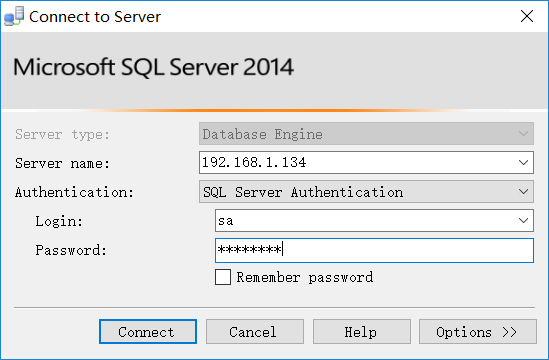
Figure-1:SSMS连接Linux下的数据库
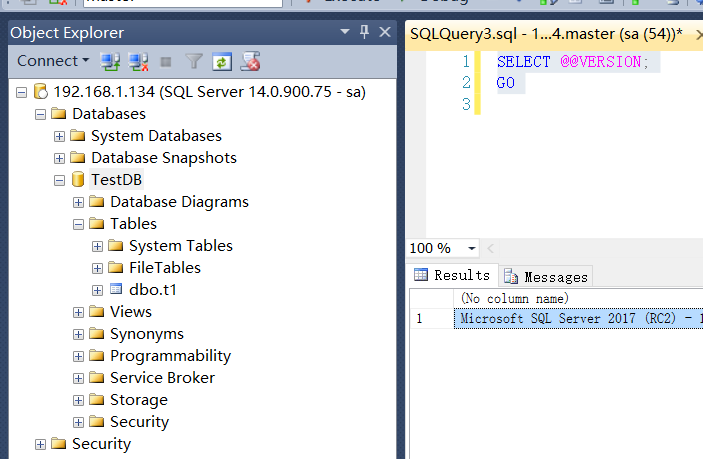
Figure-2:查询版本信息
SELECT @@VERSION;
GO
Microsoft SQL Server 2017 (RC2) - 14.0.900.75 (X64)
Jul 27 2017 08:53:49
Copyright (C) 2017 Microsoft Corporation
Developer Edition (64-bit) on Linux (CentOS Linux 7 (Core))
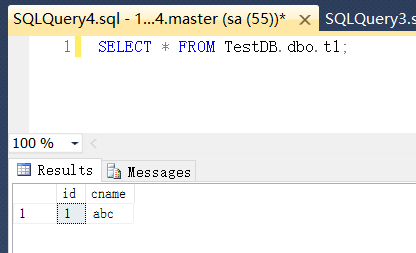
Figure-3:查询数据
发现Red Gate部分功能不能使用。rpm包安装无法指定安装目录。