SpringCloud全家桶:SpringCloud01 – 初识
SpringCloud全家桶:SpringCloud02 – 服务注册 Eureka Zookeeper Consul Nacos
SpringCloud全家桶:SpringCloud03 – 服务调用 Ribbon OpenFeign
SpringCloud全家桶:SpringCloud04 – 服务降级熔断 Hystrix Sentinel
SpringCloud全家桶:SpringCloud05 – 服务网关 Gateway
SpringCloud全家桶:SpringCloud06 – 服务配置 Config Nacos
SpringCloud全家桶:SpringCloud07 – 消息总线 Bus
SpringCloud全家桶:SpringCloud08 – 消息驱动 Stream
SpringCloud全家桶:SpringCloud09 – 分布式请求链路追踪 Sleuth
SpringCloud全家桶:SpringCloud10 – Alibaba Nacos
SpringCloud全家桶:SpringCloud11 – Alibaba Sentinel
SpringCloud全家桶:SpringCloud12 – Alibaba 分布式事务 Seata
服务调用
Ribbon
简介
Spring Cloud Ribbon是基于Netflix Ribbon实现的一套客户端负载均衡的工具。
简单的说,Ribbon是Netflix发布的开源项目,主要功能是提供客户端的软件负载均衡算法和服务调用。Ribbon客户端组件提供一系列完善的配置项如连接超时,重试等。简单的说,就是在配置文件中列出Load Balancer(简称LB)后面所有的机器,Ribbon会自动的帮助你基于某种规则(如简单轮询,随机连接等)去连接这些机器。我们很容易使用Ribbon实现自定义的负载均衡算法。
官网:https://github.com/Netflix/ribbon/wiki/Getting-Started
注意: ribbon现在进入了维护阶段,未来会被loadBalancer代替
LB负载均衡(Load Balance)是什么?
简单的说就是将用户的请求平摊的分配到多个服务上,从而达到系统的HA(高可用)。常见的负载均衡有软件Nginx,LVS,硬件F5等。
Ribbon本地负载均衡客户端 VS Nginx服务端负载均衡区别
Nginx是服务器负载均衡,客户端所有请求都会交给nginx,然后由nginx实现转发请求。即负载均衡是由服务端实现的。Ribbon本地负载均衡,在调用微服务接口时候,会在注册中心上获取注册信息服务列表之后缓存到JVM本地,从而在本地实现RPC远程服务调用技术。
使用:
负载调用+RestTemplate
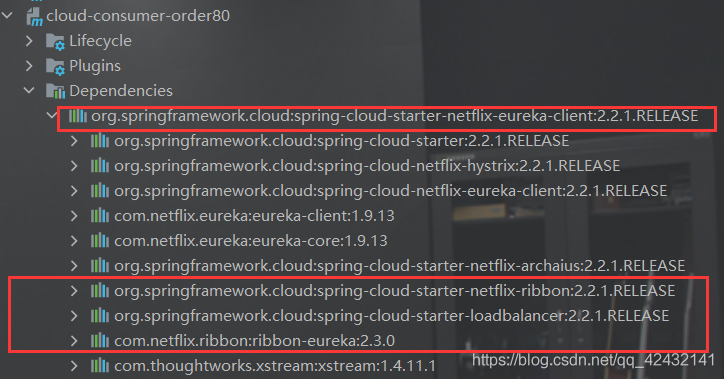
spring-cloud-starter-netflix-eureka-client 包里含有ribbon 所以直接使用即可
核心组件IRule
IRule:根据特定的算法从服务列表中选取一个要访问的服务.
分类:
- com.netflix.loadbalancer.RoundRobinRule:轮询
- com.netflix.loadbalancer.RandomRule:随机
- com.netflix.loadbalancer.RoundRobinRuleRetryRule:先按照轮询策略获取服务,失败后指定时间内重试
- com.netflix.loadbalancer.RoundRobinRuleWeightdResponseTimeRule:对RoundRobinRule的扩展,响应速度越快的实例选择权重越大,越容易被选泽
- com.netflix.loadbalancer.RoundRobinRuleBestAvailableRule:会先过滤掉由于多次访问故障处于断路器跳闸状态的服务,然后选择一个并发量最小的服务
- com.netflix.loadbalancer.RoundRobinRuleAvailabilityFilteringRule:先过滤故障实例,在选择并发较小的实例
- com.netflix.loadbalancer.RoundRobinRuleZoneAvoidanceRule:默认规则,符合判断server所在区域的性能和server的可用性选择服务器。
项目更改
修改cloud-comsumer-order
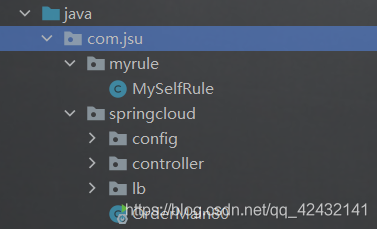
新建package
注意:官方文档明确给出警告 自定义配置类不能放在@ComponentScan所扫描的包以及子包下。
逻辑代码
@Configuration
public class MySelfRule {
    @Bean
    public IRule myRule(){
        // 定义为随机的rule
        return new RandomRule();
    }
}
@EnableEurekaClient
@SpringBootApplication
// name 服务名
 @RibbonClient(name = "CLOUD-PAYMENT-SERVICE",configuration = MySelfRule.class)
public class OrderMain80 {
    public static void main(String[] args) {
        SpringApplication.run(OrderMain80.class);
    }
}
    /**
     * restTemplate.getForEntity 远程调用的使用
     * restTemplate.postForObject 的区别:
     * 如果只要返回值结果  选择Object 如果要详细的信息  使用Entity 建议使用object
     * @param id
     * @return
     */
    @RequestMapping(value = "/consumer/payment/getForEntity/{id}", method = RequestMethod.GET)
    public CommonResult<Payment> getPaymentEntity(@PathVariable("id") Long id) {
        ResponseEntity<CommonResult> entity = restTemplate.getForEntity(PAYMENT_URL + "/payment/get/" + id, CommonResult.class);
        if (entity.getStatusCode().is2xxSuccessful()) {
            return entity.getBody();
        }
        return new CommonResult<>(444, "操作失败");
    }

    @RequestMapping(value = "/consumer/payment/createEntity", method = RequestMethod.GET)
    public CommonResult<Payment> createPaymentEntity(Payment payment) {
        log.info(payment.toString());
        ResponseEntity<CommonResult> entity = restTemplate.postForEntity(PAYMENT_URL + "/payment/create", payment, CommonResult.class);
        if (entity.getStatusCode().is2xxSuccessful()) {
            return entity.getBody();
        }
        return new CommonResult<>(444, "操作失败");
    }
手写轮询代码
启动类
@EnableEurekaClient
@SpringBootApplication
public class OrderMain80 {
    public static void main(String[] args) {
        SpringApplication.run(OrderMain80.class);
    }
}
配置文件
@Configuration
public class ApplicationContextConfig{
    @Bean
    // @LoadBalanced
    public RestTemplate getRestTemplate() {
        return new RestTemplate();
    }
}
核心代码
public interface LoadBalancer {
    /**
     * 收集eureka上所有活着的服务
     * @param serviceInstances
     * @return
     */
    ServiceInstance instance(List<ServiceInstance> serviceInstances);
}
@Component
public class MyLb implements LoadBalancer {
    private AtomicInteger atomicInteger = new AtomicInteger(0);

    public final int getAndIncrement() {
        int current;
        int next;
        do {
            current = this.atomicInteger.get();
            System.out.println("current" + current);
            next = current >= 2147483647 ? 0 : current + 1;
        } while (!this.atomicInteger.compareAndSet(current, next));
        System.out.println("******" + next);

        return next;
    }
    /**
     * 负载均衡算法核心:
     *      rest接口第几次请求数 % 服务器集群总数量 = 实际调用服务器位置下标
     *      每次服务重新启动的时候 rest接口从1开始计数
     * @param serviceInstances
     * @return
     */
    @Override
    public ServiceInstance instance(List<ServiceInstance> serviceInstances) {
        int index = getAndIncrement() % serviceInstances.size();
        return serviceInstances.get(index);
    }
}
8002/8002的controller
// 添加上
@RequestMapping(value = "/payment/lb", method = RequestMethod.GET)
    public String getPaymentLB() {
        return serverPort;
    }
80 controller
@Resource
private LoadBalancer loadBalancer;
@Autowired
private RestTemplate restTemplate;
@Autowired
private DiscoveryClient discoveryClient;

@RequestMapping(value = "/consumer/payment/lb", method = RequestMethod.GET)
public String getPaymentLb() {
    // 获取CLOUD-PAYMENT-SERVICE的所有服务
    List<ServiceInstance> instances = discoveryClient.getInstances("CLOUD-PAYMENT-SERVICE");
    // 判断是否为空
    if (instances == null || instances.size() <= 0) {
        return null;
    }
    // 获取当前提供服务的地址
    ServiceInstance instance = loadBalancer.instance(instances);
    URI uri = instance.getUri();
    return restTemplate.getForObject(uri + "/payment/lb", String.class);
}
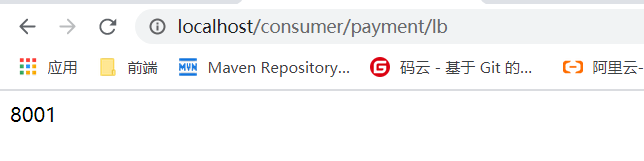
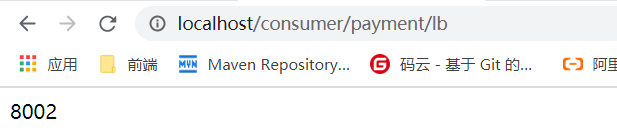
测试:回车刷新 8001/8002轮流显示
Feign
简介
是什么?
Feign是一个声明式的web服务客户端,让编写web服务客户端变得非常容易,只需创建一个接口并在接口上添加注解即可
能干嘛?
Feign旨在使编写Java Http客户端变得更容易。
前面在使用Ribbon+RestTemplate时,利用RestTemplate对http请求的封装处理,形成了一套模版化的调用方法。但是在实际开发中,由于对服务依赖的调用可能不止一处,往往一个接口会被多处调用,所以通常都会针对每个微服务自行封装一些客户端类来包装这些依赖服务的调用。所以,Feign在此基础上做了进一步封装,由他来帮助我们定义和实现依赖服务接口的定义。在Feign的实现下,我们只需创建一个接口并使用注解的方式来配置它(以前是Dao接口上面标注Mapper注解,现在是一个微服务接口上面标注一个Feign注解即可),即可完成对服务提供方的接口绑定,简化了使用Spring cloud Ribbon时,自动封装服务调用客户端的开发量。
Feign集成了Ribbon
利用Ribon维护了Payment的服务列表信息,并且通过轮询实现了客户端的负载均衡。而与Ribbon不同的是,通过feign只需要定义服务绑定接口且以声明式的方法,优雅而简单的实现了服务调用
Feign
Feign是Spring Cloud组件中的一个轻量级RESTful的HTTP服务客户端
Feign内置了Ribbon,用来做客户端负载均衡,去调用服务注册中心的服务。Feign的使用方式是:使用Feign的注解定义接口,feign不支持springmvc的注解,有自己的一套注释,调用这个接口,就可以调用服务注册中心的服务
<dependency>
    <groupId>org.springframework.cloud</groupId>
    <artifactId>spring-cloud-starter-feign</artifactId>
</dependency>
OpenFeign
OpenFeign是Spring Cloud在Feign的基础上支持了SpringMVC的注解,如@RequesMapping等等。OpenFeign的@Feignclient可以解析SpringMVC的@RequestMapping注解下的接口,并通过动态代理的方式产生实现类,实现类中做负载均衡并调用其他服务。
<dependency>
    <groupId>org.springframework.cloud</groupId>
    <artifactId>spring-cloud-starter-openfeign</artifactId>
</dependency>
使用
核心:微服务调用接口+@feignClient
搭建项目
搭建cloud-consumer-oder80feign项目
pom
    <dependencies>
        <dependency><!-- 引用自己定义的api通用包,可以使用Payment支付Entity -->
            <groupId>com.jsu.springcloud</groupId>
            <artifactId>cloud-api-commons</artifactId>
            <version>${project.version}</version>
        </dependency>
        <dependency>
            <groupId>org.springframework.boot</groupId>
            <artifactId>spring-boot-starter-web</artifactId>
        </dependency>
        <!-- openfeign -->
        <dependency>
            <groupId>org.springframework.cloud</groupId>
            <artifactId>spring-cloud-starter-openfeign</artifactId>
        </dependency>
        <!--监控-->
        <dependency>
            <groupId>org.springframework.boot</groupId>
            <artifactId>spring-boot-starter-actuator</artifactId>
        </dependency>
        <!--eureka client-->
        <dependency>
            <groupId>org.springframework.cloud</groupId>
            <artifactId>spring-cloud-starter-netflix-eureka-client</artifactId>
        </dependency>
        <!--热部署-->
        <dependency>
            <groupId>org.springframework.boot</groupId>
            <artifactId>spring-boot-devtools</artifactId>
            <scope>runtime</scope>
            <optional>true</optional>
        </dependency>
        <dependency>
            <groupId>org.projectlombok</groupId>
            <artifactId>lombok</artifactId>
            <optional>true</optional>
        </dependency>
        <dependency>
            <groupId>org.springframework.boot</groupId>
            <artifactId>spring-boot-starter-test</artifactId>
            <scope>test</scope>
        </dependency>
    </dependencies>
yml
server:
  port: 80
spring:
  application:
    name: cloud-order-service
eureka:
  client:
    register-with-eureka: true
    fetch-registry: true
    service-url:
      # 入住地址
      #      defaultZone: http://localhost:7001/eureka 单机版
      defaultZone: http://eureka7001.com:7001/eureka,http://eureka7002.com:7002/eureka # 集群版
启动类
@SpringBootApplication
@EnableFeignClients
public class OrderFeignMain80 {
    public static void main(String[] args) {
        SpringApplication.run(OrderFeignMain80.class);
    }
}
设计接口
@Component
@FeignClient(value = "CLOUD-PAYMENT-SERVICE")
public interface PaymentFeignService {
    /**
     * 通过id获取对应的payment
     * @param id
     * @return
     */
    @RequestMapping(value = "/payment/get/{id}", method = RequestMethod.GET)
    public CommonResult<Payment> getPayment(@PathVariable("id") Long id) ;
}
controller调用
@RestController
@Slf4j
public class OrderFeignController {

    @Autowired
    private PaymentFeignService paymentFeignService;

    @RequestMapping(value = "/consumer/payment/get/{id}", method = RequestMethod.GET)
    public CommonResult<Payment> createPayment(@PathVariable("id") Long id) {
        return paymentFeignService.getPayment(id);
    }
}
测试:轮流


OpenFeign超时控制
超时设置,故意设置超时演示出错情况。
服务提供方8001故意写暂停程序
    @RequestMapping(value = "/payment/timeout", method = RequestMethod.GET)
    public String letTimeOut(){
        try {
            TimeUnit.SECONDS.sleep(3);
        }catch (Exception e){
            e.printStackTrace();
        }
        return serverPort;
    }
服务消费方80添加超时方法
@Component
@FeignClient(value = "CLOUD-PAYMENT-SERVICE")
public interface PaymentFeignService {
    /**
     * feign的超时控制 默认1s 使休息3s 看状态
     * @return
     */
    @RequestMapping(value = "/payment/timeout", method = RequestMethod.GET)
    public String letTimeOut() ;
}
@RestController
@Slf4j
public class OrderFeignController {
  @RequestMapping(value = "/consumer/timeout", method = RequestMethod.GET)
    public String letTimeOut(){
        return paymentFeignService.letTimeOut();
    }
}
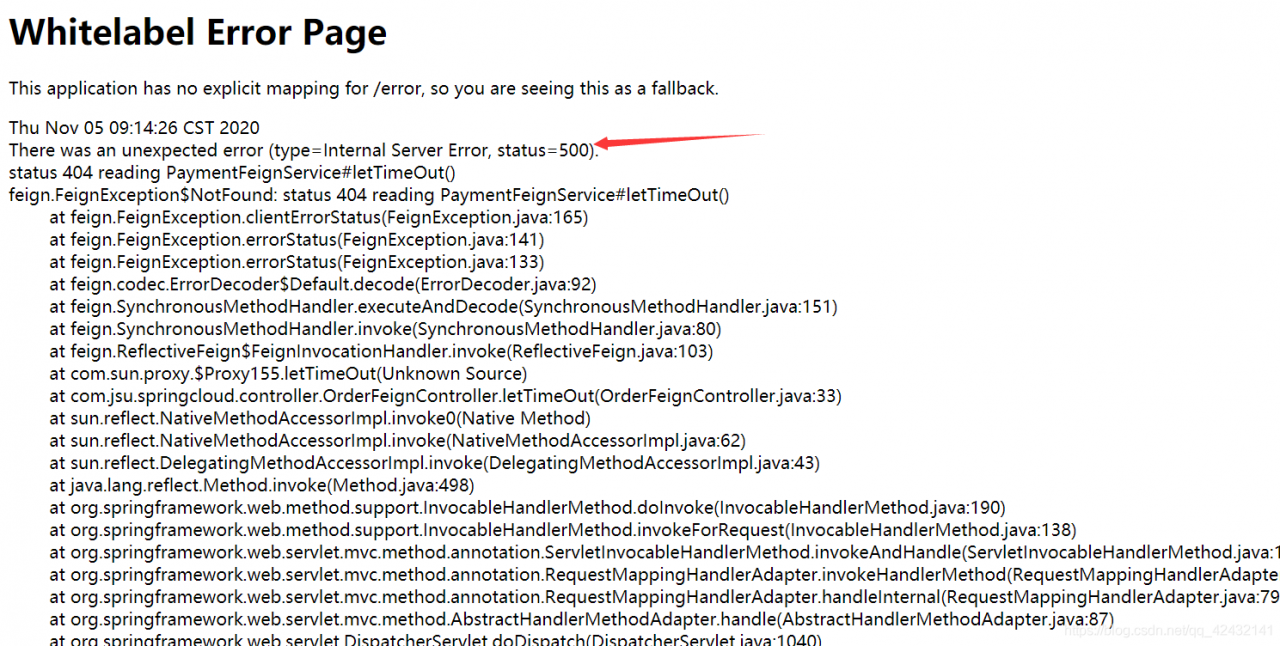
测试后:显示错误
如何修改时间?
feign:
  client:
    config:
      default:
        #建立连接所用的时间,适用于网络状况正常的情况下,两端连接所需要的时间
        ConnectTimeOut: 5000
        #指建立连接后从服务端读取到可用资源所用的时间
        ReadTimeOut: 10000
重新运行 就好了
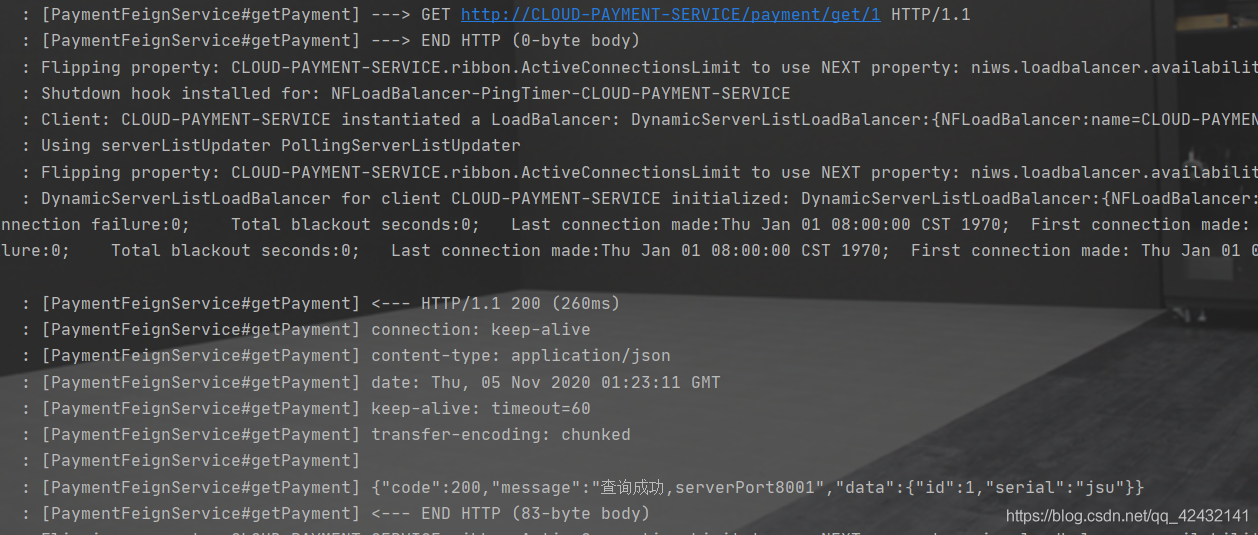
openFeign日志打印功能
Feign 提供了日志打印功能,我们可以通过配置来调整日志级别,从而了解Feign中 Http请求的细节。说白了就是对Feign接口的调用情况进行监控和输出
日志级别
- NONE:默认的,不显示任何日志;
- BASIC:仅记录请求方法、URL、响应状态码及执行时间;
- HEADERS:除了BASIC中定义的信息之外,还有请求和响应的头信息;
- FULL:除了HEADERS中定义的信息之外,还有请求和响应的正文及元数据。
使用
配置文件
@Configuration
public class FeignConfiguration {
    @Bean
    Logger.Level feignLoggerLevel() {
        return Logger.Level.FULL;
    }
}
logging:
  level:
    # feign日志监控的是以什么级别监控那个接口
    com.jsu.springcloud.service.PaymentFeignService: debug
测试:
日志级别
- NONE:默认的,不显示任何日志;
- BASIC:仅记录请求方法、URL、响应状态码及执行时间;
- HEADERS:除了BASIC中定义的信息之外,还有请求和响应的头信息;
- FULL:除了HEADERS中定义的信息之外,还有请求和响应的正文及元数据。
使用
配置文件
@Configuration
public class FeignConfiguration {
    @Bean
    Logger.Level feignLoggerLevel() {
        return Logger.Level.FULL;
    }
}
logging:
  level:
    # feign日志监控的是以什么级别监控那个接口
    com.jsu.springcloud.service.PaymentFeignService: debug
测试: