一、引言
Vertex and Fragment Shader:最强大的Shader类型,下文中简称V&F Shader,属于可编程渲染管线. 使用的是CG/HLSL语法。分为2个部分vertex顶点部分和Fragment像素部分。
二、语法
1、例子如下
Shader "Custom/Exam1"
{
	Properties {
	_MainTex ("Texture", 2D) = "white" { }
	}
	SubShader
	{
		pass
		{
			CGPROGRAM
			#pragma vertex vert
			#pragma fragment frag
			#include "UnityCG.cginc"

			sampler2D _MainTex;
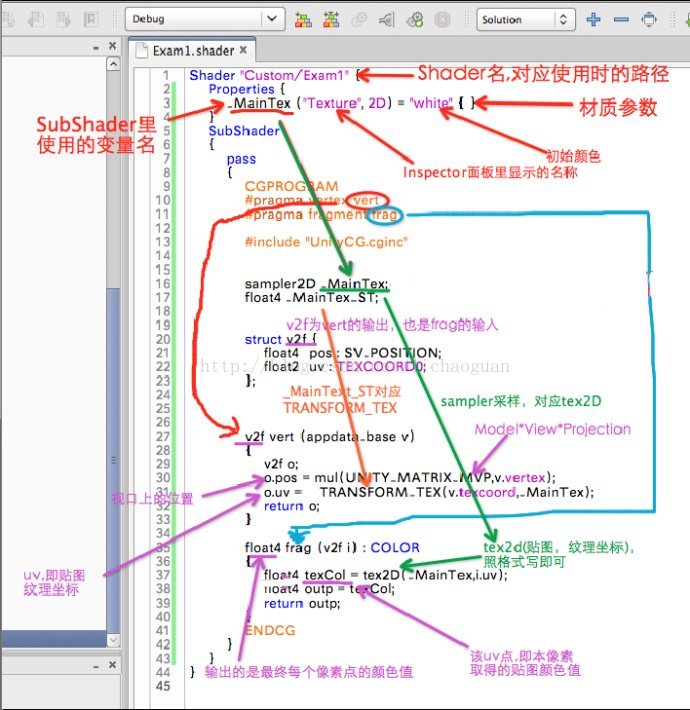
			///_MainTex_ST的ST是应该是SamplerTexture的意思 ,就是声明_MainTex是一张采样图,也就是会进行UV运算。如果没有这句话,是不能进行TRANSFORM_TEX的运算的。_MainTex_ST.xy为Tiling,zw为offset.
			float4 _MainTex_ST;
			struct v2f {
			    float4  pos : SV_POSITION;
			    float2  uv : TEXCOORD0;
			} ;

			v2f vert (appdata_base v)
			{
			    v2f o;
			    //UNITY_MATRIX_MVP 物体空间-视空间-窗口空间的变换矩阵
			   	o.pos = mul(UNITY_MATRIX_MVP,v.vertex);
			   	//TRANSFORM_TEX依据Tiling和offset的设置计算缩放和偏移
				o.uv = TRANSFORM_TEX(v.texcoord,_MainTex);
			    return o;
			}

			float4 frag (v2f i) : COLOR
			{
				float4 texCol = tex2D(_MainTex,i.uv);
			    float4 outp = texCol;
			    return outp;
			}
			ENDCG
		}
	}
}
2、Shader中的数据类型
有3种基本数值类型:float、half和fixed。
这3种基本数值类型可以再组成vector和matrix,比如half3是由3个half组成、float4x4是由16个float组成。
float:32位高精度浮点数。
half:16位中精度浮点数。范围是[-6万, +6万],能精确到十进制的小数点后3.3位。
fixed:11位低精度浮点数。范围是[-2,2],精度是1/256。
数据类型影响性能,精度够用就好。
颜色和单位向量,使用fixed
其他情况,尽量使用half(即范围在[-6万, +6万]内、精确到小数点后3.3位);否则才使用float。
不要将低精度fixed类型转换为更高的精度,否则会产生性能问题。
低精度fixed不要使用“swizzle”(即形如myFixed4.xyzw、myFixed2.xyxy,中文不知咋译,否则会产生性能问题。
3、Pass渲染管线中的Tag
和SubShader有自己专属的Tag类似,Pass也有Pass专属的Tag,且Pass中默认包括SubShader中的Tag。
其中最重要Tag是 "LightMode",指定Pass和Unity的哪一种渲染路径(“Rendering Path”)搭配使用。这里需要描述的Tag取值可包括:
Always,永远都渲染,但不处理光照
ShadowCaster,用于渲染产生阴影的物体
ShadowCollector,用于收集物体阴影到屏幕坐标Buff里。
其他渲染路径相关的Tag详见下面章节“Unity渲染路径种类”。
具体所有Tag取值,可参考ShaderLabsyntax: Pass Tags。
Shader "ShaderLab Tutorials/TestShader" {
    SubShader {
        Pass
        {
            Tags{ "LightMode"="ForwardBase" }
            //...
        }
    }
}
4、编译指令
编译指令#pragma。详见官网Cgsnippets。其中重要的包括:
编译指令 | 示例/含义 |
#pragma vertex name #pragma fragment name | 替换name,来指定Vertex Shader函数、Fragment Shader函数。 |
#pragma target name | 替换name(为2.0、3.0等)。设置编译目标shader model的版本。 |
#pragma only_renderers name name ... #pragma exclude_renderers name name... | #pragma only_renderers gles gles3, #pragma exclude_renderers d3d9 d3d11 opengl, 只为指定渲染平台(render platform)编译 |
(1)引用库。通过形如#include"UnityCG.cginc"引入指定的库。常用的就是UnityCG.cginc了。其他库详见官网Built-inshader include files。
(2)ShaderLab内置值。Unity给Shader程序提供了便捷的、常用的值,比如下面例子中的UNITY_MATRIX_MVP就代表了这个时刻的MVP矩阵。详见官网ShaderLabbuilt-in values。
Unity为你在编写shader是提供了少量的内置变量:类似当前物体的变换矩阵,时间等。
你只能在ShaderLab中使用它们,就像你使用其他属性一样,唯一不同的是你不能声明内置的变量。
要用到这些内置变量你必须在你的shader程序中包含UnityCG.cgincfile文件。
Transformations变换
float4x4UNITY_MATRIX_MVP当前物体*视*投影矩阵。(注:物体矩阵为本地->世界)
float4x4UNITY_MATRIX_MV当前物体*视矩阵
float4x4UNITY_MATRIX_P当前物体*投影矩阵
float4x4UNITY_MATRIX_T_MV转置物体*视矩阵
float4x4UNITY_MATRIX_IT_MV 逆转置物体*视矩阵
float4x4UNITY_MATRIX_TEXTURE0 to UNITY_MATRIX_TEXTURE3贴图变换矩阵
float4x4_Object2World当前物体矩阵
float4x4_World2Object物体矩阵的逆矩阵
float3_WorldSpaceCameraPos世界坐标空间中的摄像机位置
float4unity_Scale不适用xyz分量,而是通过w分量包含的缩放值等比缩放物体。
Lighting光照
在纯粹的ShaderLab中,你可以利用下面这些属性,只要在末尾增加一个零数:例如 灯光的物体*灯光颜色是_ModelLightColor0.在Cgshader中这些变量更像是一个包含单一元素的数组。所以在Cg中他们是这样的_ModelLightColor[0];
Name | Type | Value |
_ModelLightColor | float4 | Material's Main * Light color 材质的主颜色*灯光颜色 |
_SpecularLightColor | float4 | Material's Specular * Light color 材质的镜面反射(高光)*灯光颜色。 |
_ObjectSpaceLightPos | float4 | Light's position in object space. w component is 0 for directional lights, 1 for other lights |
_Light2World | float4x4 | Light to World space matrix 灯光转世界空间矩阵 |
_World2Light | float4x4 | World to Light space matrix 世界转灯光空间矩阵 |
_Object2Light | float4x4 | Object to Light space matrix 物体转灯光空间矩阵 |
Various变量
float4 _Time :时间:用于Shasder中可动画的地方。
float4 _SinTime :时间的正弦值。
float4 _CosTime :时间的余弦值
float4 _ProjectionParams :投影参数
x为1.0或者-1.0如果当前渲染使用的是一个反转的投影矩阵那么为负。
y是摄像机的近剪裁平面
z z是摄像机远剪裁平面
w是1/远剪裁平面
float4 _ScreenParams :屏幕参数
x是当前渲染目标在像素值中宽度
y是当前渲染目标在像素值中的高度
z是1.0+1.0/宽度
w是1.0+1.0/高度
(3)Shader输入输出参数语义(Semantics)。在管线流程中每个阶段之间(比如Vertex Shader阶段和FragmentShader阶段之间)的输入输出参数,通过语义字符串,来指定参数的含义。常用的语义包括:COLOR、SV_Position、TEXCOORD[n]。完整的参数语义可见HLSL Semantic(由于是HLSL的连接,所以可能不完全在Unity里可以使用)。
(4)特别地,因为Vertex Shader的的输入往往是管线的最开始,Unity为此内置了常用的数据结构:
数据结构 | 含义 |
appdata_base | vertex shader input with position, normal, one texture coordinate. |
appdata_tan | vertex shader input with position, normal, tangent, one texture coordinate. |
appdata_full | vertex shader input with position, normal, tangent, vertex color and two texture coordinates. |
appdata_img | vertex shader input with position and one texture coordinate. |
附件:
1、制作地球转动,表面浮有云层的shader
Shader "Custom/2lsy_earth" {
		Properties {
		    _Color ("Main Color", Color) = (1,1,1,0.5)
		    _MainTex ("Texture", 2D) = "white" { }
		    _Cloud ("_Cloud", 2D) = "white" { }
		}
		SubShader {
		Tags{"Queue" = "Transparent" "RenderType"="Transparent"}
		    Pass {

		CGPROGRAM
		#pragma vertex vert
		#pragma fragment frag

		#include "UnityCG.cginc"

		float4 _Color;
		sampler2D _MainTex;
		sampler2D	_Cloud;

		struct v2f {
		    float4  pos : SV_POSITION;
		    float2  uv : TEXCOORD0;
		};

		float4 _MainTex_ST;

		v2f vert (appdata_base v)
		{
		    v2f o;
		    o.pos = mul (UNITY_MATRIX_MVP, v.vertex);
		    o.uv = TRANSFORM_TEX (v.texcoord, _MainTex);
		    return o;
		}

		half4 frag (v2f i) : COLOR
		{
			float u = i.uv.x + -0.1*_Time;
			float2 x=float2( u , i.uv.y);
		    half4 texcol = tex2D (_MainTex, x);

		    u = i.uv.x + -0.2*_Time;
			x=float2( u , i.uv.y);
			half4 texcol3 = tex2D (_Cloud, x);

			half4 texcol0 = float4(1,1,1,0.5) * (texcol3.r);

		    return lerp(texcol,texcol0,0.5f);

		}
		ENDCG

		 }
	}
}
2、制作类似Logo层上闪光效果shader
Shader "Custom/Logo" {
Properties {
        _MainTex ("Texture", 2D) = "white" { }
    }
    SubShader
    {
    	Tags {"Queue"="Transparent" "IgnoreProjector"="True" "RenderType"="Transparent"}
    	Blend SrcAlpha OneMinusSrcAlpha
        AlphaTest Greater 0.1
        pass
        {
            CGPROGRAM
            #pragma vertex vert
            #pragma fragment frag
            #include "UnityCG.cginc"

            sampler2D _MainTex;
            float4 _MainTex_ST;

            struct v2f {
                float4  pos : SV_POSITION;
                float2  uv : TEXCOORD0;
            };

            //顶点函数没什么特别的,和常规一样
            v2f vert (appdata_base v)
            {
                v2f o;
                o.pos = mul(UNITY_MATRIX_MVP,v.vertex);
                o.uv =  TRANSFORM_TEX(v.texcoord,_MainTex);
                return o;
            }

            //必须放在使用其的 frag函数之前,否则无法识别。
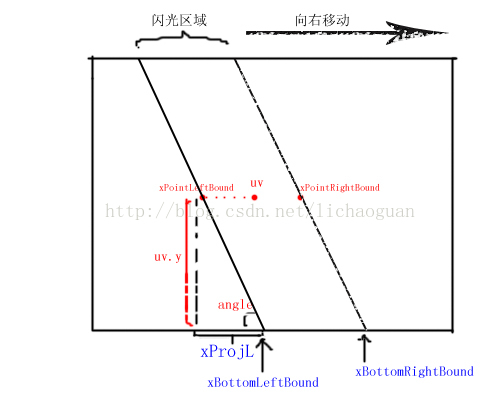
            //核心:计算函数,    角度,      uv, 光带的x长度0.24,     间隔 4,     开始时间2,   偏移0.15, 单次循环时间0.7
            float inFlash(float angle,float2 uv,float xLength,int interval,int beginTime, float offX, float loopTime )
            {
                //亮度值
                float brightness =0;
                //倾斜角
                float angleInRad = 0.0174444 * angle;
                //当前时间
                float currentTime = _Time.y;
                //获取本次光照的起始时间
                int currentTimeInt = _Time.y/interval;
                currentTimeInt *=interval;
                //获取本次光照的流逝时间 = 当前时间 - 起始时间
                float currentTimePassed = currentTime -currentTimeInt;
                if(currentTimePassed >beginTime)
                {
                    //底部左边界和右边界
                    float xBottomLeftBound;
                    float xBottomRightBound;

                    //此点边界
                    float xPointLeftBound;
                    float xPointRightBound;

                    float x0 = currentTimePassed-beginTime;
                    x0 /= loopTime;

                    //设置右边界
                    xBottomRightBound = x0;

                    //设置左边界
                    xBottomLeftBound = x0 - xLength;

                    //投影至x的长度 = y/ tan(angle)
                    float xProjL;
                    xProjL= (uv.y)/tan(angleInRad);

                    //此点的左边界 = 底部左边界 - 投影至x的长度
                    xPointLeftBound = xBottomLeftBound - xProjL;
                    //此点的右边界 = 底部右边界 - 投影至x的长度
                    xPointRightBound = xBottomRightBound - xProjL;

                    //边界加上一个偏移
                    xPointLeftBound += offX;
                    xPointRightBound += offX;

                    //如果该点在区域内
                    if(uv.x > xPointLeftBound && uv.x < xPointRightBound)
                    {
                        //得到发光区域的中心点
                        float midness = (xPointLeftBound + xPointRightBound)/2;

                        //趋近中心点的程度,0表示位于边缘,1表示位于中心点
                        float rate= (xLength -2*abs(uv.x - midness))/ (xLength);
                        brightness = rate;
                    }
                }
                brightness= max(brightness,0);

                //返回颜色 = 纯白色 * 亮度
                //float4 col = float4(1,1,1,1) *brightness;
                return brightness;
            }

            float4 frag (v2f i) : COLOR
            {
                 float4 outp;

                 //根据uv取得纹理颜色,和常规一样
                float4 texCol = tex2D(_MainTex,i.uv);

                //传进i.uv等参数,得到亮度值
                float tmpBrightness;
                tmpBrightness =inFlash(75,i.uv,0.25f,4f,2f,0.15,0.7f);

                //图像区域,判定设置为 颜色的A > 0.5,输出为材质颜色+光亮值
                if(texCol.w >0.5)
                    outp  =texCol+float4(1,1,1,1)*tmpBrightness;
                //空白区域,判定设置为 颜色的A <=0.5,输出空白
                else
                    outp =texCol;

                return outp;
            }
            ENDCG
        }
    }
}