效果示例
1. 原来效果
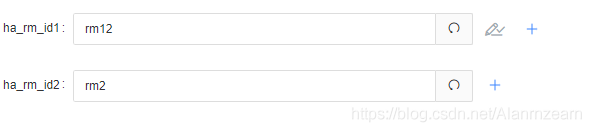
2. 点击+之后
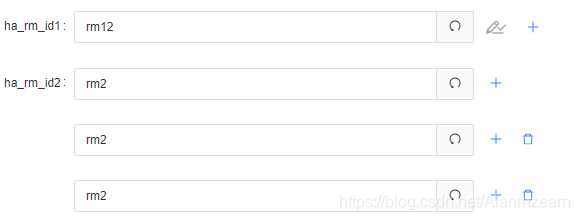
实现说明
- 此次开发需要用到动态生成多行表单,因为新老数据要兼顾,老数据是对象存储走的一个接口,新数据走的多行配置,对象数组存储,走的另一个接口,所以在展示上就需要区分下。
- 注意这里默认了第一行不能删除,当然你也可以在变成多行的时候,给每一行都加上删除,但是为了避免数据被删成一行都不剩了,你需要处理下,要么在删成一行的时候禁止删除或者隐掉删除按钮,要么就在删除后要调接口的时候判断处理下,具体的得看需求来开发。
- 因为这块的按钮有设置,如果配置的参数含有password字段(不区分大小写),这块也是不能做多行的。
代码附上
- 表格渲染数据部分代码
//这块是将拿到的数据遍历后,拿到最底层的展示表单数据,进行判断,如果获取到对应的value是字符串,那就是单行数据,走老接口,如果是是对象数组,就那么就走新接口
if (typeof data[keyName][keyName2] === 'string') {
  <FormItem
    {...formItemLayout}
    label={<React.Fragment>
      {/* 这里是你渲染在表单上的标签名 ,根据实际情况处理*/}
      {key}
    </React.Fragment>}
    key={key}
  >
    <Input
      type={!data[keyName].iconType ? /password/.test(key.toLowerCase()) ? 'password' : 'text' : 'text'}
      defaultValue={data[keyName][keyName2]}
      value={data[keyName][keyName2]}
      onChange={ctx.handleInputChange.bind(ctx, key2)}
    />
    {
      !/password/.test(key.toLowerCase()) && (
        <span className="operate-icon">
          <Icon className="plus-icon" type="plus" onClick={ctx.addItem.bind(ctx, key2)} />
        </span>
      )
    }
  </FormItem>
} else {
  if (Array.isArray(data[keyName][keyName2])) {
    <FormItem
      {...formItemLayout}
      label={<React.Fragment>
        {/* 这里是你渲染在表单上的标签名 */}
        {key}
      </React.Fragment>}
      key={key}
    >
      {data[keyName].keyName2.map((item, index) => {
        return <FormItem key={index}>
          {data[keyName].keyName2.length > 1 ? (
            <Input
              type={!data[keyName].iconType ? /password/.test(key.toLowerCase()) ? 'password' : 'text' : 'text'}
              defaultValue={data[keyName][keyName2]}
              value={typeof item === 'string' ? item : item.field}
              onChange={ctx.handleInputArrayChange.bind(ctx, key2, index)}
            />) : (
            <Input
              type={!data[keyName].iconType ? /password/.test(key.toLowerCase()) ? 'password' : 'text' : 'text'}
              defaultValue={data[keyName][keyName2]}
              value={typeof item === 'string' ? item : item.field}
              onChange={ctx.handleInputChange.bind(ctx, key2)}
            />
          )}
          {
            !/password/.test(key.toLowerCase()) && (
              <span className="operate-icon">
                <Icon className="plus-icon" type="plus" onClick={ctx.addItem.bind(ctx, key2)} />
                {index > 0 ? (
                  <Icon
                    className="dynamic-delete-button"
                    type="delete"
                    onClick={ctx.removeItem.bind(ctx, key2, index)}
                  />
                ) : null}
              </span>
            )
          }
          {repeatParams && index === 0 && repeatParams.some(x => x === keyName) && <p className="repeatparams-span">参数值重复,请重新输入</p>}
        </FormItem>
      })
      }
    </FormItem >
  } else {
    return ''
  }
}
- 执行操作后,调用方法增删数据或者保存数据
//数组部分
// 减少一行
removeItem = (key: any, index: any, e: any) => {
  // 减少一行通过给方法传对应的key与index,找出对应的那组数据,删除掉那一个就行,但是注意删除成一行的时候会变成单行数据,即一个对象,原数据格式需要处理修改。
  const { cur_service } = this.props.ServiceStore;
  const { setServiceConfigModify } = this.props.actions;
  const config = Object.assign({}, cur_service.configModify);
  const spliceIndex = key.split('.')[0];

  if (cur_service.Config[spliceIndex].current.length > 2) {
    cur_service.Config[spliceIndex].current.splice(index, 1)
    config['Config.' + key] = cur_service.Config[spliceIndex].current
  } else {
    cur_service.Config[spliceIndex].current = cur_service.Config[spliceIndex].current[0].field
    config['Config.' + key] = cur_service.Config[spliceIndex].current
  }
  cur_service.configModify = config;
  setServiceConfigModify(cur_service);
};

// 增加一行
addItem = (key: any, e: any) => {
  //增加一行的主要思路是,如果原参数配置是数组,那么你就直接往里面push进去你需要给他加进去一组空数据或者默认新增一行数据。这块根据需求来做。
  const { cur_service } = this.props.ServiceStore;
  const { setServiceConfigModify } = this.props.actions;
  const config = Object.assign({}, cur_service.configModify);
  const arr = [];
  const splitIndex = key.split('.')[0]
  const pushItem = {
    hosts: '',
    field: Array.isArray(cur_service.Config[splitIndex].current) ? cur_service.Config[splitIndex].current[0].field : cur_service.Config[splitIndex].current
  };
  if (Array.isArray(cur_service.Config[splitIndex].current)) {
    cur_service.Config[splitIndex].current.push(pushItem)
  } else {
    const addItem = {
      hosts: '',
      field: cur_service.Config[splitIndex].current
    }
    arr.push(addItem, pushItem)
    cur_service.Config[splitIndex].current = arr
  }
  cur_service.configModify = config;
  setServiceConfigModify(cur_service);
};

// 输入数据变化
// 单行数据时输入框值处理
handleInputChange(key: any, e: any) {
  const { password_key } = this.state
  const securityKey16 = CryptoJS.MD5(password_key)
  const iv = '1234567890123456'
  const closeConfig = {
      securityKey: securityKey16,
      iv: iv
  }
	// 这一块做了输入密码加密处理相关,用不上的不需要注意,可以直接设置对应的那个数据的value为e.target.value就行了

  const { cur_service } = this.props.ServiceStore;
  const { setServiceConfigModify } = this.props.actions;
  const config = Object.assign({}, cur_service.configModify);

  if (/password/.test(key.toLowerCase())) {
      config['Config.' + key] = this.encrypt(e.target.value, closeConfig);
  } else {
      config['Config.' + key] = e.target.value;
  }

  if (key.indexOf('.') > -1) {
      cur_service.Config[key.split('.')[0]][key.split('.')[1]] = e.target.value;
  } else {
      cur_service.Config[key] = e.target.value;
  }

  cur_service.configModify = config;
  setServiceConfigModify(cur_service);
}

// 数组情况下输入框的值改变
handleInputArrayChange(key: any, index: any, e: any) {
// 是数组的输入框需要多传一下index,数组的下标,进行指定位置的修改
  const { cur_service } = this.props.ServiceStore;
  const { setServiceConfigModify } = this.props.actions;
  const config = Object.assign({}, cur_service.configModify);

  const spliceIndex = key.split('.')[0];

  const spliceItem = {
      hosts: cur_service.Config[spliceIndex].current[index].hosts ? cur_service.Config[spliceIndex].current[index].hosts : '',
      field: e.target.value
  }

  cur_service.Config[spliceIndex].current.splice(index, 1, spliceItem)
  config['Config.' + key] = cur_service.Config[spliceIndex].current
  cur_service.configModify = config;

  setServiceConfigModify(cur_service);
}
- 最后一步调用保存接口的方法时
// 点击保存配置信息
handleSaveServiceConfig = () => {
  const { ServiceStore } = this.props;
  const { cur_service } = this.state;
  const { cur_product: { product_name } } = ServiceStore;
  this.changeStatus() // 清掉可能搞好了不需要的参数提示
  Object.keys(ServiceStore.cur_service.configModify).map((config) => {
    const saveParams = {
      [config]: ServiceStore.cur_service.configModify[config]
    }
    // 判断是数组吗,是的就走多行参数数组的接口。
    if (Array.isArray(ServiceStore.cur_service.configModify[config])) {
      servicePageService.modifyMultiConfig(
        {
          product_name: product_name,
          service_name: cur_service.service_name
        },
        saveParams
      ).then((res: any) => {
        res = res.data;
        if (res.code === 0) {
          delete ServiceStore.cur_service.configModify[config]
          this.changeStatus()
          message.success('保存成功!');
        } else if (res.code === 100 && res.msg.includes('输入值重复')) {
          const repeatArr = res.msg.substring(1, res.msg.indexOf(')')).split(',')
          this.setState({
            repeatParams: repeatArr
          })
        } else {
          message.error(res.msg)
        }
      })
    } else { // 不是数组那条走老接口
      servicePageService.modifyConfig(
        {
          product_name: product_name,
          service_name: cur_service.service_name
        },
        saveParams
      ).then((res: any) => {
        res = res.data;
        if (res.code === 0) {
          delete ServiceStore.cur_service.configModify[config]
          message.success('保存完成!');
        } else {
          message.error(res.msg)
        }
      });
    }
    // 在这里处理如果保存接口都调用成功了,那么才会给他切换内容,刷新状态,修改按钮保存置灰,否则当前页面还是修改那个状态
    if (JSON.stringify(ServiceStore.cur_service.configModify) === '{}') {
      this.setCurrentStatus(
        ServiceStore.cur_service,
        cur_service.service_name
      )
    }
  })
};
注意:
这块的开发数据存储以及接口调用都是用的redux相关,如果对redux不是很熟的可能在接口调用以及数据存储这块看的不是很明白,但是每块方法我都写了相关操作说明的注释,相信应该也能根据思路写出来,另外在使用数组方法的时候注意区分下,使用方法改不改变原数组以及返回值相关,避免操作失误。
版权声明:本文为Alanrnzearn原创文章,遵循CC 4.0 BY-SA版权协议,转载请附上原文出处链接和本声明。