使用uni-app时,往往有增加动画效果的需求,这里提供一个在h5以及app端可以良好运行的组件浮动动画。
		/**
		 * 设置一个浮动效果,需要给元素绑定:animation="upgradeAnimation" 这类动画效果
		 * @param {Object} field 在this中定义的动画变量
		 * @param {Object} scope 波动范围
		 * @param {Object} time 一轮动画的时间
		 */
		setFloatAnimation(field, scope = 9, time = 2000) {
			let singleTime = time / 2  //单个方向的运动时间
			let animation = uni.createAnimation()
			const interval = ()=> {
			   animation.translateY(-scope).step({
			   	duration: singleTime
			   })
			   this[field] = animation.export()
			   setTimeout(() => {
			   	animation.translateY(0).step({
			   		duration: singleTime
			   	})
			   	this[field] = animation.export()
			   }, singleTime + 100)
			   return interval // 自我调用一次
			 }
			 //额外增加200秒的周期时间,以避免app动画卡顿的问题
			setInterval(interval(), time + 200)
		},
使用示例:
<template>
	<view :animation="animation" style="margin-top: 100rpx;">
		坚韧白金
	</view>
</template>

<script>
	export default {
		data() {
			return {
				animation:null
			};
		},
		onLoad() {
			this.setFloatAnimation("animation")
		},
		methods: {
			/**
			 * 设置一个浮动效果,需要给元素绑定:animation="animation" 这类动画效果
			 * @param {Object} field 在this中定义的动画变量
			 * @param {Object} scope 波动范围
			 * @param {Object} time 一轮动画的时间
			 */
			setFloatAnimation(field, scope = 9, time = 2000) {
				let singleTime = time / 2  //单个方向的运动时间
				let animation = uni.createAnimation()
				const interval = ()=> {
				   animation.translateY(-scope).step({
				   	duration: singleTime
				   })
				   this[field] = animation.export()
				   setTimeout(() => {
				   	animation.translateY(0).step({
				   		duration: singleTime
				   	})
				   	this[field] = animation.export()
				   }, singleTime + 100)
				   return interval // 自我调用一次
				 }
				setInterval(interval(), time + 200)
			}
		}
	}
</script>
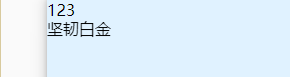
效果图: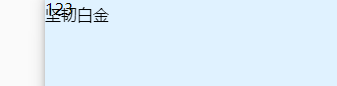
版权声明:本文为hailong29原创文章,遵循CC 4.0 BY-SA版权协议,转载请附上原文出处链接和本声明。