iptables
定义:iptables并不是只防火墙,而是一种客户端工具。用户通过这个客户端(iptables)将用户的安全设定执行到对应的“安全框架”中。这个安全框架才是真正的防火墙。框架名字叫netfilter。
就是通过iptables来操作netfilter。
规则(Rules)
- 规则就是网络管理员预定义的条件。规则一般的定义为“如果数据报头符合这样的条件,就这样处理这个数据包“”。
- 规则存储在内核空间的信息包过滤表中。
- 规则分别指定了源地址,目的地址,传输协议(TCP,UDP,ICMP),和服务类型(HTTP,FTP,SMTP)。
- 当数据包与规则匹配时,Iptables就根据规则所以定义的方法来处理这些数据包,如,放行(accept),拒绝(reject),丢弃(drop) 等。
- 配置防火墙的主要工作就是添加,修改和删除这些规则。
关键:
- Rules包括一个条件和一个目标(target)
- 如果满足条件,就执行目标(target)中的规则或者特定值。
- 如果不满足条件,就判断下一条Rules。
目标值(Target Values),动作
下面是你可以在target里指定的特殊值:
- ACCEPT – 允许防火墙接收数据包
- DROP – 防火墙丢弃包
- QUEUE – 防火墙将数据包移交到用户空间
- RETURN – 防火墙停止执行当前链中的后续Rules,并返回到调用链(the calling chain)中。
四表五链
五链
链(chain)
- 当客户端访问服务器的Web服务时,客户端发送报文到网卡。信息会通过内核的TCP协议传输到用户空间的Web服务中。
- 当Web服务需要响应客户端请求时,Web服务发出的响应报文的目标终点则为客户端。Web服务所监听的ip与端口变成了原点。
- 防火墙要达到目的就需要在内核中设置关卡。所有进出的报文都需要通过这个关卡,符合条件放行不符合则被阻止。就出现了input关卡和output关卡,这些关卡又被称为“链”。
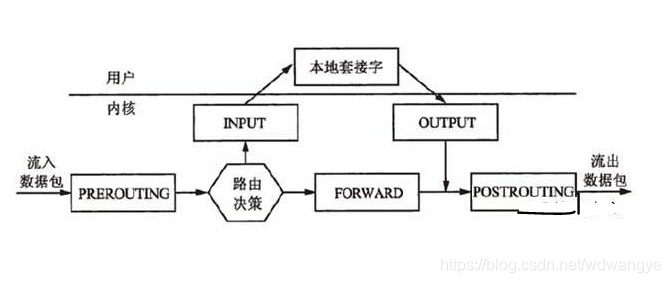
五链分别是
- PREOUTING:路由前
- INPUT
- POSTROUTING :路由后
- OUTPU
- FORWARD:转发
- 数据包经过一个链时,会将链上的所有规则匹配一边,匹配时按照顺序,一条一条匹配。
四表
四表
- 把具有相同功能的规则集合叫做“表”
iptables具有Filter, NAT, Mangle, Raw四种内建表:
| Filter表 | 过滤功能 |
|---|---|
| NAT表 | 网络地址转换功能 |
| Mangle表 | 拆解报文,做出修改,并重新封装的功能 |
| Raw表 | 关闭net表上启用的链接追踪机制,不再让iptables对数据包进行跟踪,提高性能 |
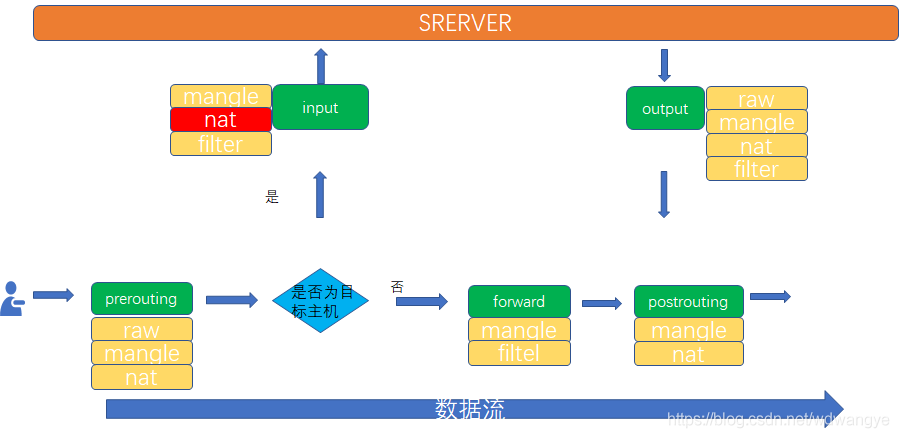
表与链的关系
| 链 | 表 |
|---|---|
| PREOUTING | raw,mangle,nat |
| INPUT | mangle,filter |
| POSTROUTING | mangle,nat |
| OUTPU | raw,mangle,nat,filter |
| FORWARD | mangle,filter |
- 四张表处于同一条链时,执行优先级
- raw–>mangle–>nat–>filter
| 表 | 链 |
|---|---|
| filter | INPUT链 ,OUTPUT链,FORWARD链 |
| NAT | PREROUTING链,POSTROUTING链,OUTPUT链\ |
| Mangle | PREROUTING,OUTPUT,FORWARD,INPUT,POSTROUTING |
| Raw | PREROUTING ,OUTPUT , |
iptables基本用法
iptables的规则:根据指定的匹配条件来尝试匹配每个流经此处的报文。一旦匹配成功,则由规则后面指定的处理动作进行处理。
匹配条件
| 基本匹配条件 | 扩展匹配条件 |
|---|---|
| 源地址Source IP | 源端口Source Port |
| 目标地址Destintion ip | 目标端口Destination Port |
处理动作
| 动作 | 含义 |
|---|---|
| ACCEPT | 接收数据包,允许数据包通过 |
| DROP | 丢弃数据包,不给出任何信息。 |
| REJECT | 拒绝数据通过,必要时发出拒接信息 |
| SNAT | 源地址转换, 解决内网用户用同一个公网上网的问题。 |
| DNAT | 目标地址转换。 |
| REDIRECT | 重定向、本机端口映射、透明代理。 |
| MASQUERADE | IP伪装(NAT),用于动态,临时会变的ip |
| LOG | 日志记录,在/var/log/messages文件中记录。 |
常见选项
| 常用操作命令 | 说明 |
|---|---|
| -A | 在指定链尾部添加规则 |
| -D | 删除匹配的规则 |
| -R | 替换匹配的规则 |
| -I | 在指定位置插入规则(例:iptables -I INPUT 1 --dport 80 -j ACCEPT(将规则插入到filter表INPUT链中的第一位上) |
| -L/S | 列出指定链或者所有链的规则 |
| -F | 删除指定链或所有链的规则 |
| -N | 创建用户自定义链[例:iptables -N allowed] |
| -X | 删除指定的用户自定义链 |
| -P | 为指定链设置默认规则策略,对自定义链不起作用 |
| -Z | 将指定链或所有链的计数器清零 |
| -E | 更改自定义链的名称[例:iptables -E allowed disallowed] |
| -n | ip地址和端口号以数字方式显示[例:iptables -nL] |
| -v | 列出详细信息 |
| –line-number | 最左侧显示规则序号 |
| -t | 指定要操作的表,不指定默认filter |
| 常用规则匹配 | 说明 |
|---|---|
| -p tcp/udp/icmp/all | 匹配协议,all会匹配所有协议 |
| -s addr[/mask] | 匹配源地址 |
| -d addr[/mask] | 匹配目标地址 |
| –sport port1[:port2] | 匹配源端口(可指定连续的端口) |
| –dport port1[:port2] | 匹配目的端口(可指定连续的端口) |
| -o interface | 匹配出口网卡,只适用FORWARD、POSTROUTING、OUTPUT(例:iptables -A FORWARD -o eth0) |
| -i interface | 匹配入口网卡,只使用PREROUTING、INPUT、FORWARD。 |
| –icmp-type | 匹配icmp类型(使用iptables -p icmp -h可查看可用的ICMP类型) |
| –tcp-flags mask comp | 匹配TCP标记,mask表示检查范围,comp表示匹配mask中的哪些标记。(例:iptables -A FORWARD -p tcp --tcp-flags |
| ALL SYN,ACK -j ACCEPT | 表示匹配SYN和ACK标记的数据包) |
iptables下各项名词解释
[root@xiaoagiao ~]# iptables -t filter -L -v             #-t指定要操作的表,不加默认filter
                                                         #-L列出指定链或所有链的规则
                                                         #-v显示详情
Chain INPUT (policy ACCEPT 90 packets, 5544 bytes)
 pkts bytes target     prot opt in     out     source               destination

Chain FORWARD (policy ACCEPT 0 packets, 0 bytes)
 pkts bytes target     prot opt in     out     source               destination

Chain OUTPUT (policy ACCEPT 52 packets, 4224 bytes)
 pkts bytes target     prot opt in     out     source               destination
获得信息解释:
- pkts:对应规则匹配到的报文个数。
- bytes:对应规则匹配到的报文大小总和。
- target :前面提到的target的特殊值,动作,规则匹配成功后要采取的措施。
- prot – 协议:tcp, udp, icmp等
- opt:规则对应的选项。
- in:数据包由哪个接口流入,(可以设置通过哪块网卡流入的报文,需要匹配当前规则)
- out:数据包由哪个接口流出,(可以设置通过哪块网卡流出的报文,需要匹配当前规则)
- source – 数据包的源IP地址,或网段
- destination – 数据包的目标IP地址,或网段
iptables规则配置
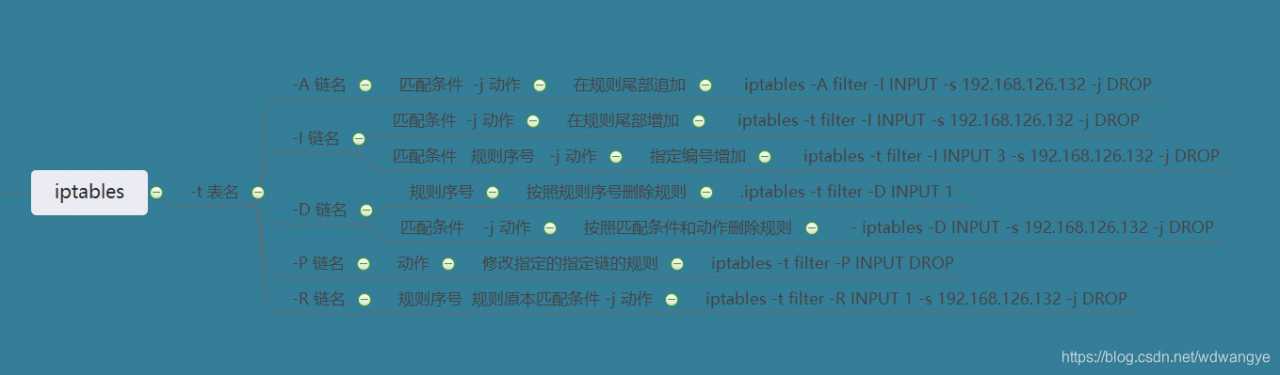
增加规则
- 拒绝所有来自192.168.126.132 的报文
[root@fei ~]# ping 192.168.126.128                            #从另一台机器(192.168.126.132)ping192.168.126.128,可以通
PING 192.168.126.128 (192.168.126.128) 56(84) bytes of data.
64 bytes from 192.168.126.128: icmp_seq=1 ttl=64 time=7.36 ms
64 bytes from 192.168.126.128: icmp_seq=2 ttl=64 time=0.172 ms
64 bytes from 192.168.126.128: icmp_seq=3 ttl=64 time=0.364 ms
64 bytes from 192.168.126.128: icmp_seq=4 ttl=64 time=0.407 ms

[root@xiaoagiao ~]# iptables -t filter -I INPUT -s 192.168.126.132 -j DROP
#-t filter :指定表filter
#-I INPUT:指定链INPUT
#-s:指定匹配的源地址
#-j:指定匹配动作 DROP


[root@xiaoagiao ~]# iptables -nL
Chain INPUT (policy ACCEPT)
target     prot opt source               destination
DROP       all  --  192.168.126.132      0.0.0.0/0            #才INPYT链上增加规则

Chain FORWARD (policy ACCEPT)
target     prot opt source               destination

Chain OUTPUT (policy ACCEPT)
target     prot opt source               destination

[root@fei ~]# ping 192.168.126.128
PING 192.168.126.128 (192.168.126.128) 56(84) bytes of data.
^C
#现在ping就不通了
- 允许所有来自192.168.126.132 的报文
[root@xiaoagiao ~]# iptables -t filter -I INPUT -s 192.168.126.132 -j ACCEPT
[root@xiaoagiao ~]# iptables -nL
Chain INPUT (policy ACCEPT)
target     prot opt source               destination
ACCEPT     all  --  192.168.126.132      0.0.0.0/0
DROP       all  --  192.168.126.132      0.0.0.0/0
# 现在用另一台机器ping 也是可以ping 通的。
删除规则
- 方法1.iptables -t filter -D INPUT 1
- 方法2.iptables -D INPUT -s 192.168.126.132 -j DROP
[root@xiaoagiao ~]# iptables -nL
Chain INPUT (policy ACCEPT)
target     prot opt source               destination
ACCEPT     all  --  192.168.126.132      0.0.0.0/0
DROP       all  --  192.168.126.132      0.0.0.0/0

[root@xiaoagiao ~]# iptables -t filter -D INPUT 1        #删除第一条
[root@xiaoagiao ~]# iptables -nL
Chain INPUT (policy ACCEPT)
target     prot opt source               destination
DROP       all  --  192.168.126.132      0.0.0.0/0

[root@xiaoagiao ~]# iptables -D INPUT -s 192.168.126.132 -j DROP      #指定一个删除
[root@xiaoagiao ~]# iptables -nL
Chain INPUT (policy ACCEPT)
target     prot opt source               destination
修改规则
[root@xiaoagiao ~]# iptables -t filter -I INPUT -s 192.168.126.132 -j ACCEPT
[root@xiaoagiao ~]# iptables -nL
Chain INPUT (policy ACCEPT)
target     prot opt source               destination
ACCEPT     all  --  192.168.126.132      0.0.0.0/0

[root@xiaoagiao ~]# iptables -t filter -R INPUT 1 -s 192.168.126.132 -j DROP   # -R替换匹配的规则,需要在规则链名后加上规则编号。
[root@xiaoagiao ~]# iptables -nL
Chain INPUT (policy ACCEPT)
target     prot opt source               destination
DROP       all  --  192.168.126.132      0.0.0.0/0
- 修改默认动作
iptables -t filter -P INPUT DROP
# -P :为指定链设置默认规则策略,对自定义链不起作用
保存规则
- service iptables save
- 在centos7上需要安装iptables-services,因为centos7上默认使用firewall
[root@xiaoagiao ~]# service iptables save
iptables: Saving firewall rules to /etc/sysconfig/iptables:[  OK  ]

[root@xiaoagiao ~]# cat /etc/sysconfig/iptables       #保存后文件存在此处
# Generated by iptables-save v1.4.21 on Sun Apr 26 21:05:20 2020
*filter
:INPUT ACCEPT [74:4760]
:FORWARD ACCEPT [0:0]
:OUTPUT ACCEPT [49:3500]
-A INPUT -s 192.168.126.132/32 -j DROP                    #已经保存的规则
COMMIT
# Completed on Sun Apr 26 21:05:20 2020
- 或者使用iptables-save > /etc/sysconfig/iptables
使用iptables-save 并不能保存规则,但可以将已经写好的规则输出来,用重定向输出到指定文件。
基本配置语法总结
匹配条件
| -s | 匹配报文的源地址可以同时指定多个原地址。每个ip之间用逗号隔开,也可以指定为一个网段。 |
|---|---|
| -d | 匹配报文的目标地址可以同时匹配多个目标地址。每个ip之间用逗号隔开,也可以指定为一个网段。 |
| -p | 匹配报文的协议类型,可以匹配的协议类型有(tcp,udp,udplite,icmp,esp,ah,sctp) |
| -i | 匹配报文流入本机的网卡接口。由于匹配条件是网卡。所以在Output链和postrouting链中不能使用此选项。 |
| -o | 匹配流出网卡。INPUT,PREROUTING中不可用 |
举例:
- -s
- iptables -A INPUT -s 127.0.0.1 -d 127.0.0.1 -j ACCEPT :允许本地回环接口(即运行本机访问本机)
- -d
- iptables -A INPUT -d 192.168.12.11,192.168.2.23 -d 192.168.1.1 -j ACCEPT
- -p
- iptables -A INPUT -p tcp --dport 22 -j ACCEPT :允许访问22端口
- iptables -A INPUT -p tcp --dport 21 -j ACCEPT :允许ftp服务的21端口
- -i
- iptables -A INPUT -p icmp -i ens32 -j DROP
- iptables -A INPUT -p icmp ! -i ens32 -j DROP
- -o
- iptables -A INPUT -p icmp -o ens32 -j DROP
扩展匹配条件
- 隐式扩展:在使用选项-p指明了特定的协议时,无需再同时使用选项-m指明扩展模块的扩展机制。
- 显式扩展:必须使用-m选项指明要调用的扩展模块的扩展机制。
1. tcp扩展模块:
- -p tcp -m tcp --sport:用于匹配协议报文的源端口,可以使用冒号指定一个连续的端口范围。
- -p tcp -m tcp --dport:用于匹配协议报文的目标端口,可以使用冒号指定一个连续的端口范围
iptables -t filter -I INPUT -d 192.168.1.1 -p tcp -m tcp --sport 22 -j REJECT

iptables -t filter -I INPUT -d 192.168.1.1 -p tcp -m tcp --sport 22:24 -j REJECT

iptables -t filter -I INPUT -d 192.168.1.1 -p tcp -m tcp ! --dport 22:24 -j ACCEPT
2. multiport扩展模块
- -p tcp -m multiport --sports:用于匹配报文的源端口,可以指定离散的多个端口号,端口之间用逗号隔开。
- -p tcp -m multiport --dports:用于匹配报文的目标端口,可以指定离散的多个端口号,端口之间用逗号隔开。
iptables -t filter -I INPUT -d 192.168.1.1 -p tcp -m multiport --sports 122,124 -j REJECT

iptables -t filter -I INPUT -d 192.168.1.1 -p tcp -m multiport --dports 12,45 -j REJECT

iptables -t filter -I INPUT -d 192.168.1.1 -p tcp -m multiport ! --dports 12,45:46 -j REJECT
#!:取反
iptables扩展模块
iprange扩展模块
- 可以指定一段连续的ip地址范围,用于匹配报文的源地址和目标地址。
- -src-range:源地址范围
- -dst-range:目标地址范围
[root@xiaoagiao ~]# iptables -t filter -I INPUT -m iprange --src-rang192.168.1.12-192.168.1.30 -j DROP

[root@xiaoagiao ~]# iptables -nvL
Chain INPUT (policy ACCEPT 68 packets, 3980 bytes)
 pkts bytes target     prot opt in     out     source               destination
  0     0    DROP      all   --  *      *       0.0.0.0/0            0.0.0.0/0            source IP range 192.168.1.12-192.168.1.30
string扩展模块
- 可以指定要匹配的字符串,如果报文中包含对应的字符串,则符合匹配条件。
-m string:表示string扩展模块
--algo:用于指定匹配数算法,可选的算法有bm和kmp,此选项为必需选项。
-string:用于指定匹配的字符串。
[root@xiaoagiao ~]# iptables -t filter -I INPUT -m string --algo kmp --string "bit" -j ACCEPT
[root@xiaoagiao ~]# iptables -nL
Chain INPUT (policy ACCEPT)
target     prot opt source               destination
ACCEPT     all  --  0.0.0.0/0            0.0.0.0/0            STRING match  "bit" ALGO name kmp TO 65535
DROP       all  --  0.0.0.0/0            0.0.0.0/0            source IP range 192.168.1.12-192.168.1.30
time扩展模块
- 根据时间段匹配报文,报文到达的时间在指定时间范围内,则符合匹配条件。
-m time:使用time模块。
-timestart:选项用于指定起始时间。00:00:00格式。
-timestop:选项用于指定结束时间。
-weekdays:用于指定星期几,可以用数字还能用缩写表示。Mon,Tue,Wed,Thu,Fri,Sat,Sun
-monthday,-datestart:用于指定日期范围
[root@xiaoagiao ~]# iptables -t filter -I OUTPUT -p TCP --dport 80 -m time --timestart 08:55:00 --timestop 17:00:00 -j REJECT

[root@xiaoagiao ~]# iptables -nL
Chain INPUT (policy ACCEPT)
target     prot opt source               destination

Chain FORWARD (policy ACCEPT)
target     prot opt source               destination

Chain OUTPUT (policy ACCEPT)
target     prot opt source               destination
REJECT     tcp  --  0.0.0.0/0            0.0.0.0/0            tcp dpt:80 TIME from 08:55:00 to 17:00:00 UTC reject-with icmp-port-unreachable
connlimit 扩展模块
- 限制每个ip地址同时连接到的server端的链接数量。
- 不用指定ip,默认就是针对每个客户端ip。即对单ip的并发连接数限制,一般和协议端口配合使用。
--connlimit-above:限制连接上限
--connlimit-mask:限制连接下限
[root@xiao ~]# iptables -t filter -I OUTPUT -p TCP --dport 22 -m connlimit --connlimit-above 2 --connlimit-mask 24 -j REJECT

[root@xiao ~]# iptables -nL
Chain INPUT (policy ACCEPT)
target     prot opt source               destination

Chain FORWARD (policy ACCEPT)
target     prot opt source               destination

Chain OUTPUT (policy ACCEPT)
target     prot opt source               destination
REJECT     tcp  --  0.0.0.0/0            0.0.0.0/0            tcp dpt:80 TIME from 08:55:00 to 17:00:00 UTC reject-with icmp-port-unrea                chable
REJECT     tcp  --  0.0.0.0/0            0.0.0.0/0            tcp dpt:80 TIME from 08:55:00 to 17:00:00 UTC reject-with icmp-port-unrea                chable
limit扩展模块
- 对报文到达速率进行限制,可以以秒,分钟,小时,天为单位进行限制,(就是单位时间内流入的数据包的数量)。
[root@xiaoagiao ~]# iptables -t filter -I INPUT -m limit --limit 10/min  -j REJECT
#每六秒钟。有一个包不能流入,并且默认开始可以容纳五个包不能流入。

[root@xiaoagiao ~]# iptables -nvL
Chain INPUT (policy ACCEPT 32 packets, 1857 bytes)
 pkts bytes target     prot opt in     out     source               destination
   17  1160 ACCEPT     all  --  *      *       0.0.0.0/0            0.0.0.0/0            limit: avg 10/min burst 5
  335 32564 REJECT     icmp --  *      *       0.0.0.0/0            0.0.0.0/0            reject-with icmp-port-unreachable

[root@xiaoagiao ~]# ping 192.168.126.128          #用另一台机器ping
PING 192.168.126.128 (192.168.126.128) 56(84) bytes of data.
From 192.168.126.128 icmp_seq=1 Destination Port Unreachable
From 192.168.126.128 icmp_seq=2 Destination Port Unreachable
From 192.168.126.128 icmp_seq=3 Destination Port Unreachable
From 192.168.126.128 icmp_seq=4 Destination Port Unreachable
From 192.168.126.128 icmp_seq=5 Destination Port Unreachable
64 bytes from 192.168.126.128: icmp_seq=6 ttl=64 time=0.378 ms
From 192.168.126.128 icmp_seq=7 Destination Port Unreachable
64 bytes from 192.168.126.128: icmp_seq=8 ttl=64 time=0.390 ms
64 bytes from 192.168.126.128: icmp_seq=9 ttl=64 time=0.373 ms
64 bytes from 192.168.126.128: icmp_seq=10 ttl=64 time=0.311 ms
64 bytes from 192.168.126.128: icmp_seq=11 ttl=64 time=0.326 ms
64 bytes from 192.168.126.128: icmp_seq=12 ttl=64 time=0.446 ms
From 192.168.126.128 icmp_seq=13 Destination Port Unreachable
64 bytes from 192.168.126.128: icmp_seq=14 ttl=64 time=0.380 ms
64 bytes from 192.168.126.128: icmp_seq=15 ttl=64 time=0.356 ms
64 bytes from 192.168.126.128: icmp_seq=16 ttl=64 time=0.416 ms
64 bytes from 192.168.126.128: icmp_seq=17 ttl=64 time=0.591 ms
64 bytes from 192.168.126.128: icmp_seq=18 ttl=64 time=0.472 ms
From 192.168.126.128 icmp_seq=19 Destination Port Unreachable
64 bytes from 192.168.126.128: icmp_seq=20 ttl=64 time=0.418 ms
64 bytes from 192.168.126.128: icmp_seq=21 ttl=64 time=0.430 ms
^C
--- 192.168.126.128 ping statistics ---
21 packets transmitted, 13 received, +8 errors, 38% packet loss, time 20252ms
rtt min/avg/max/mdev = 0.311/0.406/0.591/0.072 ms
tcp-flags模块
state扩展
- 可以基于连接追踪功能去查看每一个报文当前所处的状态。
无论什么协议,客户端第一次访问时服务器会去内核内存中的追踪表查看他之前是否来过,查不到就证明是第一次来,记录入追踪表,如果查到以前来过就不检测规则直接允许访问。这称为连接追踪机制。比如负载均衡服务器,不建议开启,追踪表最大只能记录6万多的条目。访问数超过就会无法记录出错,导致所有的连接失败。 - 报文状态
- NEW:第一次连接
- ESTABLISHED:已建立连接
- INVALID:无法识别的连接
- RELATED:相关联连接,当前连接是一个新请求,但附属于已存在的连接
- UNTRACKED:row表上关闭连接追踪功能
[root@xiaoagiao ~]# iptables -t filter -I INPUT -m state --state RELATED,ESTABLISHED -j ACCEPT
[root@xiaoagiao ~]# iptables -t filter -A INPUT -j REJECT
[root@xiaoagiao ~]# iptables -nvL
Chain INPUT (policy ACCEPT 0 packets, 0 bytes)
 pkts bytes target     prot opt in     out     source               destination
  110  6452 ACCEPT     all  --  *      *       0.0.0.0/0            0.0.0.0/0            state RELATED,ESTABLISHED
    0     0 REJECT     all  --  *      *       0.0.0.0/0            0.0.0.0/0            reject-with icmp-port-unreachable
#原有连接不受影响
#新建连接被拒绝
网络防火墙
实例:iptables之forward转发
- 实现外部网络主机与内部网络主机通讯
当外部网络中的主机与网络内部主机通讯时,不管是由外部主机向内部主机,还是由内向外发送报文。都需要经过防火墙所在的主机,其作用是进行过滤转发。
实验环境:
| 分类 | 外网主机 | 防火墙主机 | 内网主机 |
|---|---|---|---|
| ip | ens32 192.168.126.131 | ens33,192.168.126.128 ens32,192.168.248.128 | eth0,192.168.248.129 |
| GATEWAY | 192.168.126.2 | 192.168.126.2,192.168.248.2 | 192.168.244.128 |
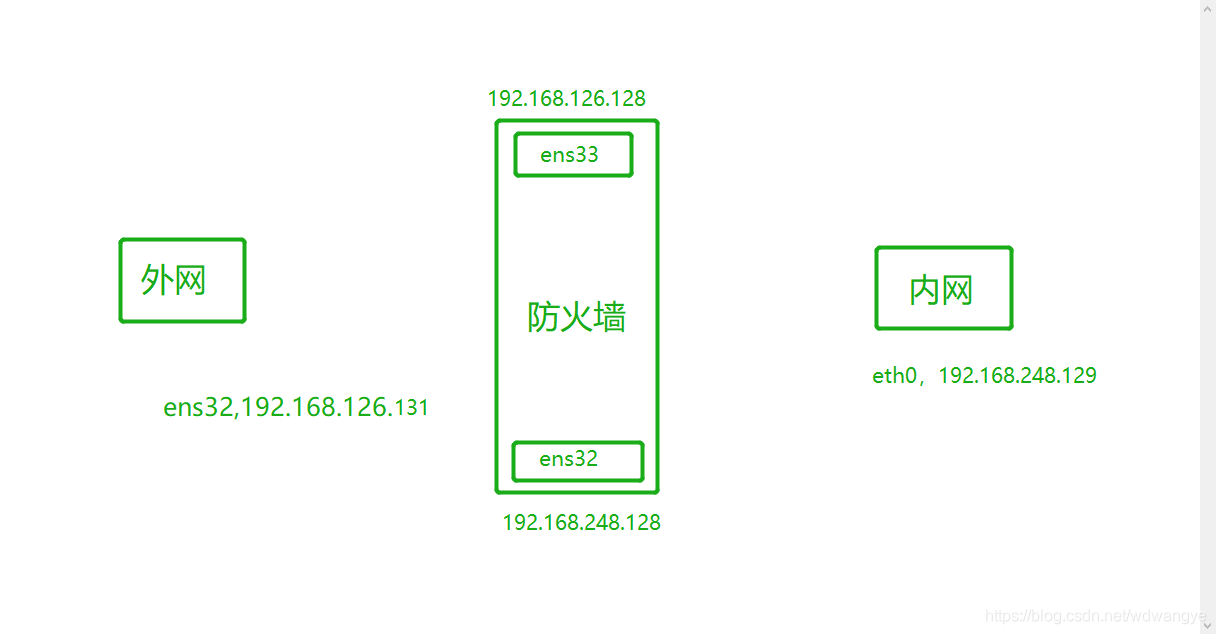
实验环境:
三台机器分别充当外网,防火墙,内网。
外网和内网由于不在同一网段,所以相互不能通讯。
设置:
- 外网和防火墙的ens33网卡设置为nat模式,ens32和内网设置为仅主机模式,用于区分网段。
实验开始
- 测试内网和外网是否相同。
[root@xiaoagiao ~]# ping 192.168.248.129       #外网ping内网并不能ping通。
PING 192.168.248.129 (192.168.248.129) 56(84) bytes of data.
^C
--- 192.168.248.129 ping statistics ---
4 packets transmitted, 0 received, 100% packet loss, time 3008ms

#不光内网,防火墙的ens32也ping不通
[root@xiaoagiao ~]# ping 192.168.248.128
PING 192.168.248.128 (192.168.248.128) 56(84) bytes of data.
^C
--- 192.168.248.128 ping statistics ---
5 packets transmitted, 0 received, 100% packet loss, time 4040ms

# 只能ping通防火墙ens33
[root@xiaoagiao ~]# ping 192.168.126.128
PING 192.168.126.128 (192.168.126.128) 56(84) bytes of data.
64 bytes from 192.168.126.128: icmp_seq=1 ttl=64 time=0.168 ms
64 bytes from 192.168.126.128: icmp_seq=2 ttl=64 time=0.429 ms
用内网ping外网不同,ping防火墙的ens32可以ping通(因为在同一网段)
实验中,在设置内网时,要将虚拟机中,虚拟网卡编辑器中的仅主机模式下的‘将主机虚拟适配器连接到此网络去掉勾选’
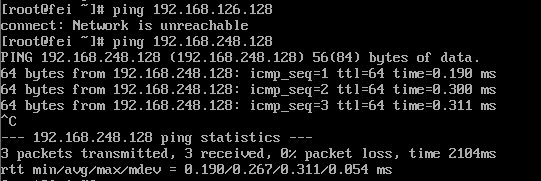
- 在外网中新增一条路由,让访问内网(192.168.248.0/24)都发送给ens33上
[root@xiaoagiao ~]# route add -net 192.168.248.0/24 gw 192.168.126.128
[root@xiaoagiao ~]# route -n
Kernel IP routing table
Destination     Gateway         Genmask         Flags Metric Ref    Use Iface
0.0.0.0         192.168.126.2   0.0.0.0         UG    100    0        0 ens32
192.168.126.0   0.0.0.0         255.255.255.0   U     100    0        0 ens32
192.168.248.0   192.168.126.128 255.255.255.0   UG    0      0        0 ens32
- 此时发现外网可以ping通防火墙的两块网卡了,但是还是ping不通内网
[root@xiaoagiao ~]# ping 192.168.126.128                      #ping防火墙ens33,通
PING 192.168.126.128 (192.168.126.128) 56(84) bytes of data.
64 bytes from 192.168.126.128: icmp_seq=1 ttl=64 time=0.251 ms
64 bytes from 192.168.126.128: icmp_seq=2 ttl=64 time=0.499 ms
64 bytes from 192.168.126.128: icmp_seq=3 ttl=64 time=0.403 ms
^C
--- 192.168.126.128 ping statistics ---
3 packets transmitted, 3 received, 0% packet loss, time 2012ms
rtt min/avg/max/mdev = 0.251/0.384/0.499/0.103 ms

[root@xiaoagiao ~]# ping 192.168.248.128                      #ping防火墙ens32,通
PING 192.168.248.128 (192.168.248.128) 56(84) bytes of data.
64 bytes from 192.168.248.128: icmp_seq=1 ttl=64 time=0.290 ms
64 bytes from 192.168.248.128: icmp_seq=2 ttl=64 time=0.431 ms
^C
--- 192.168.248.128 ping statistics ---
2 packets transmitted, 2 received, 0% packet loss, time 1009ms
rtt min/avg/max/mdev = 0.290/0.360/0.431/0.073 ms

[root@xiaoagiao ~]# ping 192.168.248.129                       #ping防火墙ens33,不通
PING 192.168.248.129 (192.168.248.129) 56(84) bytes of data.
^C
--- 192.168.248.129 ping statistics ---
2 packets transmitted, 0 received, 100% packet loss, time 1013ms
为什么会这样:
当用外网ping 192.168.248.128时,防火墙收到这个报文,发现这个地址是自己的,所以给了外网回应。(这就是新增路由的作用,192.168.248.128把报文给了192.168.126.128)
当用外网ping192.168.248.129时,防火墙收到这个报文,发现这个地址不是自己的,所以不给外网回应。
- 此时:就应该将防火墙的转发功能打开,让防火墙的ens32将报文转发给内网。
- 打开防火墙转发功能。
- 临时修改
[root@xiaoagiao ~]# cat /proc/sys/net/ipv4/ip_forward
0            #0表示关闭
[root@xiaoagiao ~]# echo 1 > /proc/sys/net/ipv4/ip_forward
[root@xiaoagiao ~]# cat /proc/sys/net/ipv4/ip_forward
1            #将0改为1
- 永久次改
#centos7中
/usr/lib/sysctl.d/00-system.conf 中加入 net.ipv4.ip_forward=1
#centos6中
/etc/sysctl.conf  中修改   net.ipv4.ip_forward=1
- 将内网的网关设置为防火墙ens32的网址,实现相互通讯
- 完成之后重启网卡
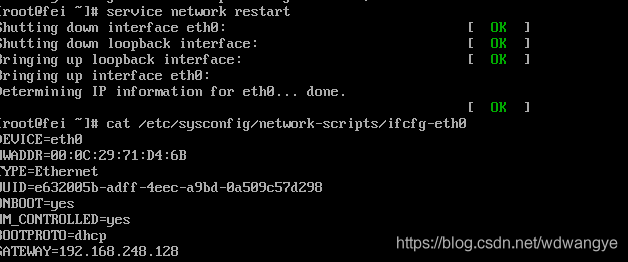 - 现在使用外网来ping内网
[root@xiaoagiao ~]# ping 192.168.248.129
PING 192.168.248.129 (192.168.248.129) 56(84) bytes of data.
64 bytes from 192.168.248.129: icmp_seq=1 ttl=63 time=0.541 ms
64 bytes from 192.168.248.129: icmp_seq=2 ttl=63 time=262 ms
64 bytes from 192.168.248.129: icmp_seq=3 ttl=63 time=0.429 ms
^C
--- 192.168.248.129 ping statistics ---
3 packets transmitted, 3 received, 0% packet loss, time 2024ms
rtt min/avg/max/mdev = 0.429/87.757/262.303/123.422 ms
可以ping通 ,实现了防火墙网络的转发。
整个报文流向:
- 外网将报文发给内网,防火墙对该网段进行拦截
- 通过路由转发,防火墙发现对方请求的是自己的ip,实行放行,但此时数据不能到达内网。
- 防火墙开启转发功能,将报文转发给内网。